
You just got the call. The fiber installation technician is coming to your home next week, and you are staring at the router sitting on your shelf right now wondering one simple thing: can I just use this router for a fiber optic cable, or do I need something completely different?
It is one of the most common questions in home networking, and the confusion is completely understandable. Fiber internet sounds like an entirely different technology from the cable or DSL connections most people grew up with — and in some ways, it is. But the relationship between your router and the fiber line coming into your home is more straightforward than most people expect, once you understand what each piece of equipment actually does.
This guide walks through exactly how fiber connects to your home network, whether your existing router can be part of that setup, and what the installation process actually looks like.
The Short Answer: Yes, But Not Directly
Here is the topic’s answer before we get into the details: yes, you can absolutely use a normal router with a fiber optic internet connection. In fact, the overwhelming majority of fiber internet customers around the world do exactly that — they keep using a standard Wi-Fi router they already own, or they buy a new consumer router of their choice, and it works perfectly well with their fiber service.
What you cannot do is plug the fiber optic cable directly into a normal router. This is the part that trips people up. A standard home router has Ethernet ports — those familiar rectangular RJ45 jacks — and a fiber optic cable physically cannot plug into an Ethernet port. The connectors are completely different, the cables are made of entirely different materials, and the signal each one carries is fundamentally different in nature. Ethernet ports receive electrical signals over copper wiring. Fiber optic cables carry data as pulses of light through hair-thin strands of glass or plastic. There is no physical or electrical compatibility between the two.
| The Key Insight: Your normal router is not connected directly to the fiber line. It is connected to a device called an ONT — an Optical Network Terminal — which does the job of converting the light-based fiber signal into a standard Ethernet signal that your router can understand. The router then takes over from there, exactly as it would with a cable or DSL connection. |
How Fiber Internet Actually Connects to Your Router?
Understanding the full chain of equipment between the internet provider’s network and your devices at home clarifies exactly where your router fits in — and why it does not need to be anything special.
The fiber optic cable itself runs from your internet service provider’s network, through underground or aerial cabling infrastructure in your neighbourhood, and terminates at a small box mounted on an interior or exterior wall of your home. This box is the Optical Network Terminal, almost universally abbreviated as the ONT. Some providers also use the term ONU, for Optical Network Unit, which performs the same essential function.
The ONT is the device that actually receives the fiber optic cable. Inside the ONT is specialised optical equipment that converts the light pulses travelling through the fiber strand into standard electrical Ethernet signals. Once that conversion happens, the ONT outputs a regular Ethernet cable from one of its ports — and that Ethernet cable is what plugs into your normal router.
From the router’s perspective, nothing about this setup is unusual. The router receives an internet connection over an Ethernet cable from the ONT in exactly the same way it would receive an internet connection over an Ethernet cable from a cable modem or DSL modem. The router does not know or care that the signal originated as light pulses traveling through glass fiber a few feet away — by the time the signal reaches the router, it is a completely standard Ethernet connection, and the router processes it using the same protocols it always has.
This is precisely why your existing router works fine with fiber internet. Routers handle local network traffic, Wi-Fi broadcasting, firewall functions, and device management — none of which depends on what kind of physical medium delivered the original internet signal to your home. As long as your router has an Ethernet WAN port to connect to the ONT, and reasonably modern specifications to handle your subscribed internet speed, it will work.
Can the Router Be Connected Directly to the Fiber Line?
In nearly all residential installations, no — a standard consumer router cannot connect directly to a fiber optic cable, because it lacks the optical receiver hardware needed to interpret light-based signals. The router’s WAN port is built to receive electrical signals over copper Ethernet wiring, not optical signals over glass fiber. Connecting a fiber cable directly to a router’s Ethernet port is not just ineffective, it is physically impossible, since the connector types themselves are entirely different — fiber cables typically use SC, LC, or ST connectors, while Ethernet ports accept RJ45 connectors.
There is an important exception worth knowing about. A small but growing category of advanced consumer and prosumer routers includes a built-in SFP or SFP+ port — a slot that accepts a small optical transceiver module, which can then accept certain types of fiber connectors directly. Some high-end routers marketed to networking enthusiasts and small businesses include this capability, effectively combining the ONT and router functions into a single device. However, this is uncommon in typical residential fiber installations, and most internet service providers still deploy a dedicated, provider-supplied ONT regardless of what router the customer ultimately uses, both for technical consistency and for remote diagnostic purposes.
For the overwhelming majority of home fiber customers, the practical reality remains the same: the fiber cable connects to the ONT, and the router connects to the ONT’s Ethernet output. This two-box arrangement is the standard architecture for fiber internet delivery worldwide, regardless of provider or country.
How Is Fiber Internet Installed?
Understanding the installation process helps demystify what the technician will actually do during a fiber installation appointment, and what role your own equipment plays in that process.
The installation begins outside your home, where the technician confirms that fiber infrastructure already reaches your property — typically through a junction box, a utility pole, or an underground conduit, depending on how your neighbourhood’s network was built out. From this external access point, the technician runs a dedicated fiber drop cable to your home, either by burying a small cable run, attaching it along existing utility lines, or in some cases threading it through existing conduit if your home was pre-wired for fiber during construction.
Once the fiber cable reaches the interior or exterior wall of your home, the technician installs the ONT at a location you typically choose together — often near where your existing internet equipment was previously located, or near an electrical outlet, since the ONT requires its own power supply to operate. The technician connects the incoming fiber strand to the ONT, tests the optical signal strength to confirm it falls within acceptable parameters, and activates the connection with the network on the provider’s end.
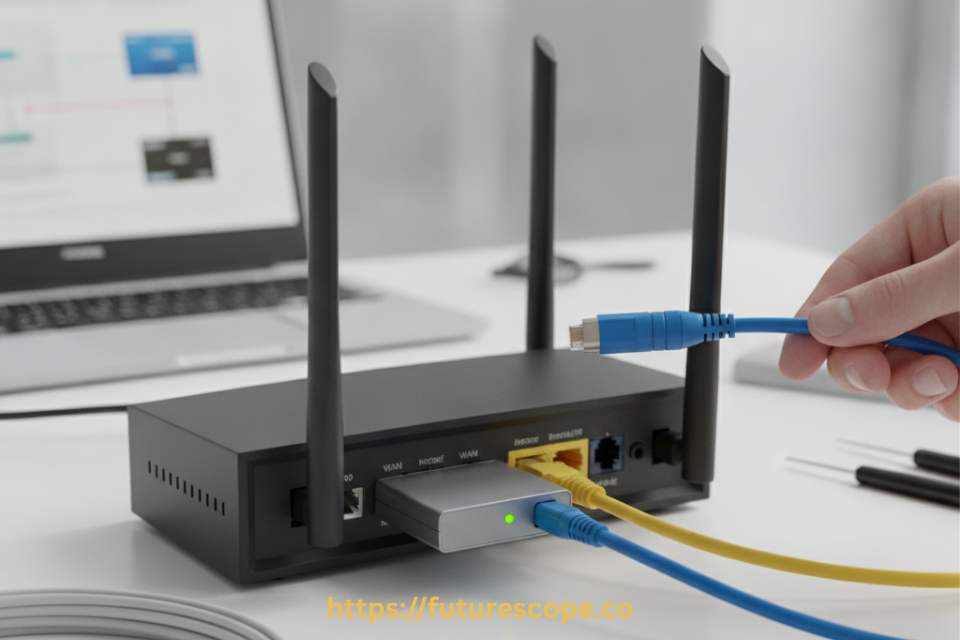
With the ONT active and confirmed working, the technician connects an Ethernet cable from the ONT’s data port to your router’s WAN or internet port. At this point, your router behaves exactly as it would with any other internet connection type. The technician typically confirms that your Wi-Fi network is broadcasting correctly and that devices in your home can access the internet before considering the installation complete.
Many fiber providers offer their own combined ONT-router gateway devices as part of the service package, which simplifies the installation into a single piece of equipment. If you prefer to use your own separate router rather than the provider’s all-in-one gateway, most providers can configure their gateway into a pure bridge mode, in which the gateway passes the internet connection through to your own router without interfering, or in some cases the provider will install a separate ONT specifically so you can connect your own router directly without dealing with a combined gateway device at all.

What Type of Fiber Optic Cable Connects to the Router?
To be precise about the terminology: no fiber optic cable connects directly to a normal router in a typical residential setup. The fiber optic cable connects to the ONT, and a standard copper Ethernet cable connects the ONT to the router.
The fiber cable itself, for those curious about the physical infrastructure, is almost always single-mode fiber for residential and business internet service, as opposed to multi-mode fiber, which is more commonly used for shorter-distance data centre and enterprise networking applications. Single-mode fiber uses a much narrower core, allowing light signals to travel longer distances with less signal degradation, which makes it the appropriate choice for the kilometres of cabling that typically separate a provider’s network infrastructure from individual homes.
The fiber cable terminates at the ONT using one of several standard connector types, most commonly SC connectors, which use a simple push-pull mechanism, or in some installations LC connectors, which are smaller and increasingly common in newer deployments. Inside the ONT, the optical receiver interprets the light signal and the device’s internal circuitry handles the conversion to electrical Ethernet signals.
The cable that actually plugs into your router’s WAN port is a standard Category 5e or Category 6 Ethernet cable, terminated with the familiar RJ45 connector that every network engineer and home user recognises. This is the cable doing the real connecting work between your fiber infrastructure and your router, and it is identical to the Ethernet cables used in any other type of home network setup.
What to Check Before Using Your Existing Router with Fiber?
While almost any router with an Ethernet WAN port will technically work with a fiber connection through an ONT, getting the most out of your fiber subscription requires checking a few specifications on your existing equipment.
- Gigabit Ethernet ports: if your fiber plan delivers speeds above 100 Mbps, ensure your router has Gigabit Ethernet ports rather than older Fast Ethernet (100 Mbps) ports, which would bottleneck your connection regardless of fiber speed
- Wi-Fi standard: routers supporting Wi-Fi 6 or Wi-Fi 6E deliver substantially better wireless throughput than older Wi-Fi 5 routers, which matters significantly if your fiber plan delivers several hundred Mbps or more
- Processing power: very high-speed fiber plans, particularly multi-gigabit tiers, require routers with sufficiently powerful processors to handle that throughput without becoming the bottleneck in your network
- Router age: routers older than five to seven years may lack the hardware capability to fully utilise modern fiber speeds, even if their Ethernet ports are nominally Gigabit-rated
Frequently Asked Questions
Q: Do I need to buy a special router for fiber internet?
A: No, you do not need a special fiber-specific router. Any standard consumer router with a Gigabit Ethernet WAN port will work fine with fiber internet, because the ONT handles the conversion from the optical fiber signal to a standard Ethernet signal before it ever reaches your router. The only consideration is ensuring your router’s specifications — Ethernet port speed, Wi-Fi standard, and processing capability — are sufficient to handle the internet speed tier you are subscribed to, particularly for higher-speed fiber plans of 500 Mbps or above.
Q: What is the difference between an ONT and a router?
A: An ONT, or Optical Network Terminal, is the device that physically receives the fiber optic cable and converts the light-based signal into a standard electrical Ethernet signal. A router is a separate device that takes that Ethernet signal and manages your home network — distributing internet access to your devices via Wi-Fi and Ethernet, handling network security through its firewall, and managing local network traffic between connected devices. The ONT handles the conversion from fiber to Ethernet; the router handles everything that happens with that Ethernet signal once it is inside your home network.
Q: Can I use my own router instead of the one provided by my fiber internet provider?
A: In most cases, yes. Many fiber providers supply a combined ONT-router gateway device, but most will allow you to use your own router instead, either by configuring their provided gateway into bridge mode — which simply passes the internet connection through without performing router functions itself — or by connecting your own router to the Ethernet port on a separate, dedicated ONT. Using your own router can offer better Wi-Fi performance, more configuration control, and compatibility with mesh networking systems, though the specific process for enabling this varies by provider, and some providers may charge an equipment fee regardless of whether you use their hardware.
Q: Why can’t a fiber optic cable plug directly into a router’s Ethernet port?
A: Fiber optic cables and Ethernet ports use fundamentally incompatible physical connectors and signal types. A fiber optic cable carries data as pulses of light through a thin strand of glass or plastic, terminated with connectors like SC or LC that are shaped completely differently from the RJ45 connector used by Ethernet cables. A router’s Ethernet port is built to receive electrical signals over copper wiring through an RJ45 jack, and it has no optical receiver hardware capable of interpreting light signals. The ONT exists specifically to bridge this gap, converting optical signals into the electrical Ethernet signals that routers are designed to process.
Q: Will my internet speed be limited if I use an older router with a new fiber connection?
A: Yes, potentially significantly. If your router has Fast Ethernet ports rated for a maximum of 100 Mbps rather than Gigabit Ethernet ports, your internet speed will be capped at 100 Mbps regardless of how fast your fiber subscription is rated, because the router’s hardware becomes the bottleneck. Similarly, older routers with outdated Wi-Fi standards or weaker processors may struggle to deliver your full subscribed speed wirelessly, even if the wired connection performs at full speed. If you have subscribed to a fiber plan above 100 Mbps, it is worth checking your router’s port specifications and, if necessary, upgrading to a router with Gigabit Ethernet ports and a modern Wi-Fi standard to fully benefit from your fiber speed.
The Bottom Line: Your Router Is Ready for Fiber
The relationship between fiber optic internet and your home router is simpler than it first appears. The fiber optic cable itself never touches your router directly — it terminates at the ONT, which handles the technical work of converting light signals into the standard Ethernet format your router already understands. From that point forward, your normal router does exactly what it has always done: manages your Wi-Fi network, routes traffic between your devices, and keeps your home network secure.
The one thing worth checking before your fiber installation is whether your existing router’s hardware specifications match the speed tier you are subscribing to. A router with outdated Ethernet ports or an older Wi-Fi standard can genuinely bottleneck a fast fiber connection, even though the router itself works perfectly well with fiber service in every other respect.
Beyond that single consideration, you can feel confident heading into your fiber installation appointment. Your router is ready. It always was.
Get Your Home Network Fiber-Ready Today
- Check your router’s specs, prepare your space for the ONT, and walk into installation day with total confidence.
- Check router speed compatibility before your provider visits
- Choose a clear, powered wall space near your entry point for the ONT
- Ask your provider about bridge mode if you want to use your own router
- Upgrade to a Gigabit, Wi-Fi 6 router if your plan is 300 Mbps or faster
Fiber-fast internet starts with the right setup. You’ve got this.