
From auto-captioning to intelligent scene detection, the AI video editor is changing who can make great video — and how fast they can do it.
Video editing used to be a gatekeeper. To produce polished, professional content, you needed years of training, expensive software, and hours of painstaking manual work. Filler words, colour grading, subtitles, multi-format exports — each one a time-consuming task that separated the professionals from everyone else.
That equation is shifting fast. AI for video editing has moved from a novelty to a genuinely practical tool that saves real time on real tasks — and the best part is that it’s no longer reserved for big studios. Independent creators, small businesses, marketers, and educators are all finding that a well-chosen AI video editor can compress hours of work into minutes.
But not every AI feature lives up to the hype, and not every creator needs the same tools. In this guide, I’ll break down exactly how AI is changing video editing, which features genuinely move the needle, the best AI video editors available today, and where this technology is headed next.
How AI Is Revolutionizing Video Editing?
The biggest shift isn’t any single feature. It’s a change in where human effort is actually required. Traditional video editing demanded that a human make every decision manually: which take to keep, where to cut, how to time a transition, when to add a caption. AI for video editing doesn’t eliminate those decisions — it handles the mechanical labor around them, so editors can focus on the choices that actually shape meaning.
The fundamental principle that makes AI useful here is straightforward: AI works best when it handles repetitive technical tasks that follow predictable patterns. It works worst when it’s asked to make creative judgments that require understanding context, tone, and audience. The technologies driving this change include computer vision (allowing AI to analyze frames), natural language processing (enabling transcript generation and voice commands), and machine learning models trained on millions of videos to identify what makes content engaging.
The Scale of Change: According to OpusClip research, AI-powered editing workflows are reducing production time by up to 90% for certain repeatable tasks like short-form clip creation, captioning, and multi-format resizing — without sacrificing professional quality output.
How Does AI Improve the Video Editing Process?
Let’s get specific. Here are the AI capabilities that are delivering genuine, measurable value in real editing workflows in 2025 and 2026:
Automated Transcription and Captioning
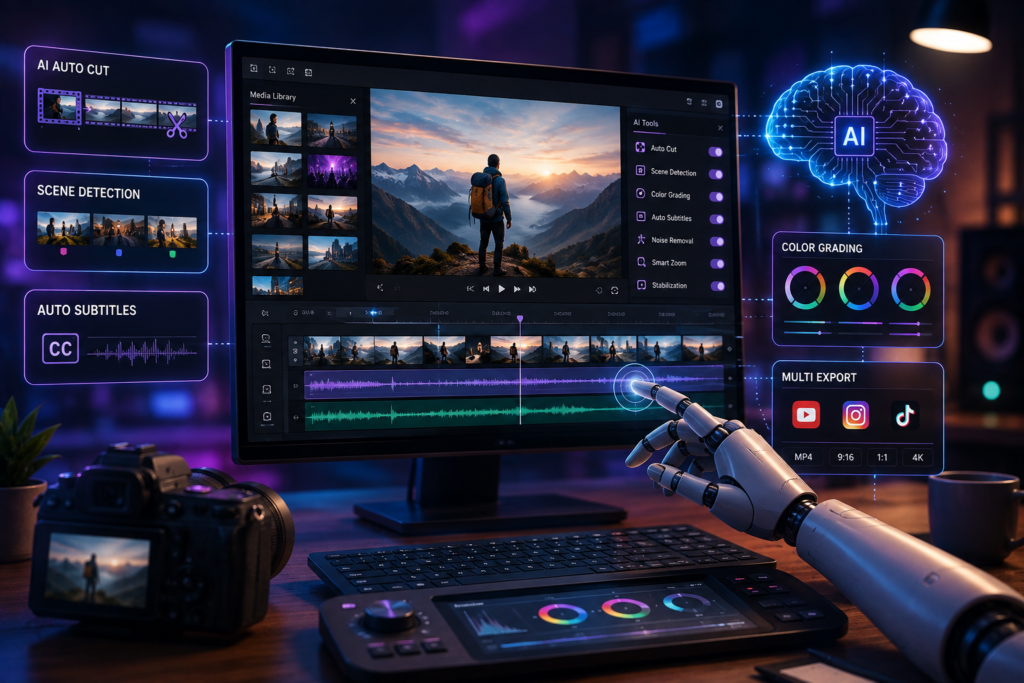
Auto-captioning is probably the clearest example of AI doing a real job rather than pretending to be a co-editor. Modern AI transcription tools deliver 85–95% word accuracy out of the box, producing a working draft that editors can review and correct in a fraction of the time it would take to type from scratch. Beyond accuracy, next-generation systems are moving toward context-aware captioning — understanding speaker intent, emotional tone, and industry terminology to automatically adjust caption style for TikTok, LinkedIn, or YouTube.
Intelligent Scene Detection and Auto-Editing
Machine learning algorithms can now analyze video frame-by-frame to identify optimal cutting points, emotional peaks, speaker changes, and filler words. Tools like OpusClip apply this to long-form content — a 60-minute podcast or webinar — to automatically surface the most engaging 60-second clips. This is transformative for content repurposing: what once took hours of manual scrubbing takes minutes of AI-assisted review.
AI Audio Cleanup and Enhancement
Background hum, room noise, and inconsistent audio levels are among the most tedious problems in video editing. AI noise reduction tools can identify and remove these artifacts as a first pass, getting raw recordings to a professionally acceptable baseline far faster than manual EQ adjustments. As one experienced editor noted, this kind of audio automation ‘earns its place’ precisely because it handles labor, not judgment — the editor still reviews and adjusts, but the starting point is dramatically better.
Auto Reframe and Multi-Platform Resizing
The same piece of content now needs to exist simultaneously in 16:9 for YouTube, 9:16 for Instagram Reels and TikTok, and 1:1 for feed posts. AI auto-reframe tools use computer vision to track the primary subject and intelligently crop for each aspect ratio, reducing manual reformatting time by up to 75%. The best implementations don’t just mechanically crop — they maintain visual coherence and narrative integrity across formats.
AI-Generated B-Roll and Visual Enhancement
AI can now analyze spoken content in a video and automatically suggest or generate contextually relevant B-roll footage, graphics overlays, and visual elements. For creators producing tutorials, explainers, or educational content, this removes one of the most time-consuming research tasks: finding and licensing relevant supplementary footage. The technology works best as a complement to human creative direction — AI surfaces options, the editor selects and refines.
Where AI Shouldn’t Replace Human Judgment
Honesty about limitations is what separates useful guidance from marketing copy. The most significant pitfall in AI video editing is over-automation — letting AI make editorial decisions that should stay with a human.
The areas where AI consistently falls short include narrative structure (which clips tell the story in the right order), emotional pacing (where pauses matter, what rhythm serves the message), and creative identity (whether a video feels authentic to the creator’s voice). AI that auto-generates visual styles, auto-selects music for emotional impact, or reorganises content based on “engagement prediction” is often doing things that look impressive in demos and create fixing work in practice.
The practical rule is simple: if a feature changes what the video means, the rhythm it moves at, or how it feels to watch — a human should be making that decision. If it removes repetitive technical labour without affecting those things — that’s where AI genuinely helps.
Best AI Video Editors to Know
The AI video editor market has expanded rapidly. Here are the tools with the strongest practical track records across different use cases:
Mootion — Transform anything into pro-level videos
AI-powered tools are making video editing faster and more accessible than ever. Mootion is a great example, allowing users to turn text, images, or scripts into polished videos with AI-generated animations, voiceovers, and transitions. By automating much of the editing process, Mootion helps creators, marketers, and businesses produce professional-quality videos in minutes instead of hours. Learn more about Mootion on AppSumo.
OpusClip — Best for: long-form to short-form repurposing
Specialises in extracting the most engaging clips from long-form content (podcasts, webinars, interviews). Auto-reframe, animated captions, AI B-roll, and social scheduling are all integrated. Well-suited for podcasters, marketers, and agencies working at volume.
Kapwing — Best for: browser-based editing with AI assistance
A web-based editor with practical AI features including auto-subtitles, background removal, and smart cut. Works directly in the browser with no download required. Popular with educators, small teams, and creators who want a versatile all-in-one tool without the complexity of desktop software.
Canva AI Video — Best for: design-forward creators and non-editors
Canva’s video editor integrates AI-powered features including Magic Media (text-to-video), AI background remover, and auto-generated captions within a familiar drag-and-drop interface. Best for marketers and small businesses who want good-looking output without a steep learning curve.
Simplified — Best for: AI-driven script-to-video workflows
Simplified offers a complete workflow from script generation through video production to social scheduling. Its AI video generation tools allow users to create and edit videos through text prompts. Suited for content teams who need to produce high volumes of social content with minimal editing expertise.
CapCut — Best for: social media creators and quick repurposing
Widely used by social media creators for its fast AI captioning, auto-reframe, and AI upscaling features. Free tier is generous. Best for creators who need quick turnaround on multiple versions of the same content for TikTok, Instagram, and YouTube Shorts.
The Future of AI Video Editing
The trajectory is clear: AI for video editing is moving from assisting individual tasks to understanding complete creative intent. Here’s what the next few years look like based on current development trends:
2025–2026: Real-time AI editing assistants become standard in major platforms. Voice-activated editing commands reach mainstream adoption — telling your editor to “remove all pauses over two seconds in the last five minutes” becomes a normal workflow. Auto-captioning accuracy reaches 95–99% with context-aware cultural adaptation.
2026–2027: AI-generated B-roll achieves professional broadcast quality. Predictive content optimisation — where AI analyses platform trends and your past performance data to recommend edit length, thumbnail design, and release timing — becomes standard in creator tools. Autonomous multi-platform repurposing workflows handle end-to-end production.
2027 and beyond: The barrier between “has video editing skills” and “doesn’t” effectively dissolves for common use cases. AI editing assistants understand complex creative briefs and can execute them under human direction. Anyone with a clear message and a camera can produce professional-quality video content.
What remains consistent throughout this timeline is the relationship between AI and human creativity. AI excels at scale, speed, and pattern recognition. Humans excel at meaning, narrative judgment, and authentic voice. The best future is a collaboration — not a replacement.
Frequently Asked Questions
1. Will AI replace human video editors?
Not for the kinds of work that actually matter most in video. AI is rapidly taking over repetitive, technical tasks — captioning, noise cleanup, reformatting, clip trimming — that don’t require creative judgment. What AI cannot replace is the ability to understand what a video is trying to communicate, decide what’s worth keeping versus cutting based on narrative context, and maintain a distinctive creative voice across a body of work. The editors who will thrive are those who use AI to eliminate low-value labor and redirect that time toward the higher-level creative and strategic decisions that genuinely require human expertise.
2. What’s the difference between a standard video editor and an AI video editor?
A standard video editor is a software tool that provides manual controls for cutting, trimming, colour grading, and audio mixing — the editor makes every decision by hand. An AI video editor adds a layer of machine intelligence that automates specific tasks: transcribing speech to generate captions, detecting scene changes to suggest cuts, tracking subjects to enable auto-reframe, or identifying filler words for removal. The best AI video editors combine automation for repetitive tasks with full manual control for everything else, so you get time savings without giving up creative precision.
3. Is AI good for video editing beginners?
Genuinely yes, in specific ways. For a beginner, the most valuable AI features are automatic captioning (eliminating a tedious manual process), noise reduction (fixing common audio problems without requiring EQ expertise), and auto-reframe (enabling multi-platform publishing without knowing how to crop). Where beginners should be more cautious is with AI features that automate editorial decisions — like auto-cut or AI pacing — because these can produce technically competent but creatively flat results. Learning to make good cuts manually, even occasionally, develops instincts that make everything else better.
4. How accurate is AI transcription for auto-captions?
Current AI transcription tools deliver 85–95% word accuracy on clean recordings with a single speaker in standard English. Accuracy drops meaningfully with strong accents, multiple simultaneous speakers, heavy background noise, or technical jargon. Most tools produce a working draft that requires review and correction rather than a finished transcript that can go live unchanged. The value is in the time saved on the first pass — correcting a 90% accurate draft is far faster than typing from scratch. For high-stakes content like courses, legal material, or professional presentations, always review AI captions before publishing.
5. What should I look for when choosing an AI video editor?
Start with your primary use case rather than feature lists. If you need to repurpose long-form content into short clips, look for tools with smart scene detection and auto-reframe (OpusClip, CapCut). If you need design-forward output with minimal editing skill, Canva or Simplified may suit you better. If you need professional-grade audio and colour tools with AI assistance layered in, check how well AI features integrate with manual controls in tools like DaVinci Resolve or Adobe Premiere Pro, both of which have been adding AI capabilities. The key questions are: does it support my specific workflow? Can I still override the AI when I need to? And does the output actually match my quality standard?
Stop Editing the Hard Way. Start Using AI Where It Actually Counts.
The AI video editing revolution isn’t coming — it’s already here. The creators and businesses who adopt it early aren’t just saving time. They’re producing more content, reaching more platforms, and spending their energy on the creative decisions that actually differentiate their work.
You don’t need to overhaul your entire workflow overnight. Start with one AI tool, applied to one repetitive task that costs you the most time right now.
Your action plan:
- Identify the most time-consuming repetitive task in your current video workflow — captions, repurposing, noise cleanup, reformatting.
- Test one AI video editor from this guide specifically for that task. Most offer free tiers.
- Keep manual control for decisions that affect what your video means — only automate the mechanical labor around them.
- Invest the time you save in better storytelling, clearer messaging, and higher-quality raw footage.
- Revisit your AI toolset every six months — this space is moving fast and the tools available in six months will be meaningfully better than today’s.
The best AI video editor is the one that makes your actual work faster and better — without making creative decisions that belong to you.
Written by an AI and video technology specialist. AI handles the labor. You handle the meaning.