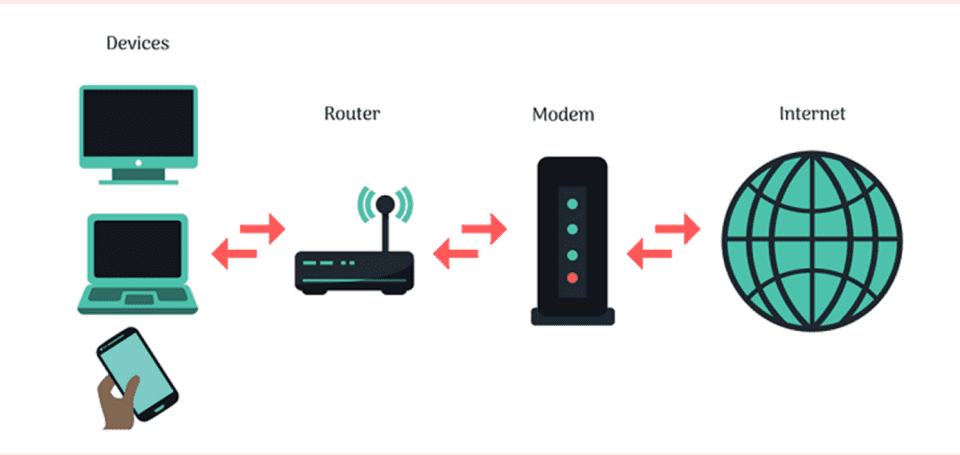

Yes, a router can work with fiber optic internet. It requires a compatible fiber optic modem or ONT.
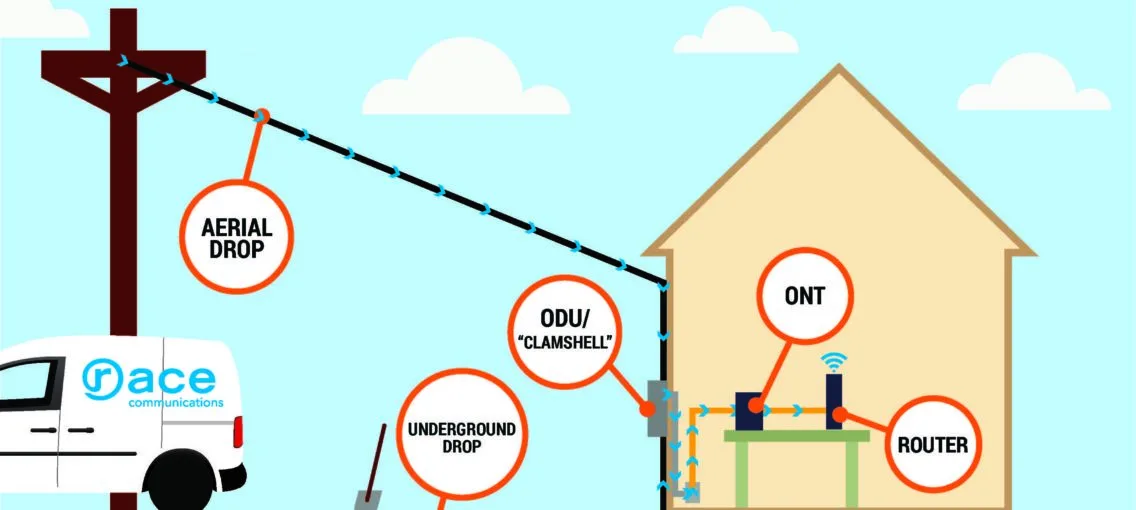
Fiber optic internet offers high-speed connectivity. To use it, you’ll need a router that supports high-speed data transfer. The router connects to a fiber optic modem or Optical Network Terminal (ONT). This setup ensures you receive the fast internet speeds fiber optic promises.
Not all routers are compatible, so choose one designed for fiber optic use. This router will distribute the high-speed internet throughout your home. A fiber optic router can handle heavy internet usage, multiple devices, and streaming services. Investing in the right router maximizes your fiber optic internet benefits, providing a seamless online experience.
Introduction To Fiber Optic Internet
Fiber optic internet is a new way to enjoy fast internet. It uses light to send data, making it much quicker than regular internet.
What Is Fiber Optic Internet?
Fiber optic internet uses thin strands of glass or plastic. These strands are called fibers. They carry data as light signals. This method allows for faster and more reliable internet connections.
Fiber optic cables can carry large amounts of data. They are less affected by weather or electrical interference.
Benefits Of Fiber Optic Internet
- Speed: Fiber optic internet is much faster than traditional internet.
- Reliability: It offers a stable connection without frequent interruptions.
- Bandwidth: It can handle more data at the same time.
- Future-Proof: Fiber is ready for future internet needs.
- Low Latency: It has lower delays, making it perfect for gaming and video calls.
Role Of A Router
A router is a crucial device in any internet setup. It connects your devices to the internet. It also manages data traffic to ensure smooth connectivity. But can a router work with fiber optic internet? The answer is yes, but not all routers are created equal.
Functions Of A Router
Routers perform several key functions:
- Data Routing: It directs data between your devices and the internet.
- Network Management: It manages and prioritizes network traffic.
- Security: It provides a firewall to protect your network from threats.
- Wireless Connectivity: It offers Wi-Fi to connect wireless devices.
These functions are essential for smooth internet usage. A router ensures that your devices get the data they need quickly and securely.
Types Of Routers
There are different types of routers available:
- Wired Routers: These connect devices using Ethernet cables. They offer stable and fast connections.
- Wireless Routers: These provide Wi-Fi for wireless devices. They are common in homes and offices.
- Core Routers: These are used by ISPs to manage large networks. They handle heavy data traffic.
- Edge Routers: These route data between local networks and the internet. They are often used in businesses.
Each type of router has its unique features and use cases. For fiber optic internet, you need a router that supports high-speed connections. Many modern routers are compatible with fiber optic internet.
Compatibility With Fiber Optic
Can a router work with fiber optic internet? Yes, it can. But not all routers are compatible with fiber optic connections. It’s important to choose a router that supports fiber optic. This ensures you get the best internet speeds and performance.
Fiber-compatible Routers
Not all routers can handle fiber optic speeds. Fiber-compatible routers are designed for high-speed internet. These routers support the fast data transfer rates of fiber optic.
Here are some features to look for in a fiber-compatible router:
- Gigabit Ethernet Ports: These ports support fast wired connections.
- Dual-Band or Tri-Band: These bands reduce interference and improve performance.
- Advanced Wi-Fi Standards: Look for Wi-Fi 5 or Wi-Fi 6 standards.
Necessary Specifications
Your router needs certain specifications to work with fiber optic. These specs ensure you get the full benefit of fiber optic speeds.
Here’s a table of necessary specifications:
| Specification | Details |
|---|---|
| WAN Port | Should support at least 1 Gbps speed |
| Wi-Fi Standards | Should support 802.11ac or 802.11ax (Wi-Fi 6) |
| Processor | Dual-core or better for handling multiple devices |
| RAM | At least 256MB for better performance |
Ensure your router meets these specifications. This guarantees optimal performance with fiber optic internet.
Setting Up Fiber Optic Internet
Setting up fiber optic internet can seem complex. However, it’s straightforward with the right steps. This section will guide you through connecting the router and the necessary configuration steps.
Connecting The Router
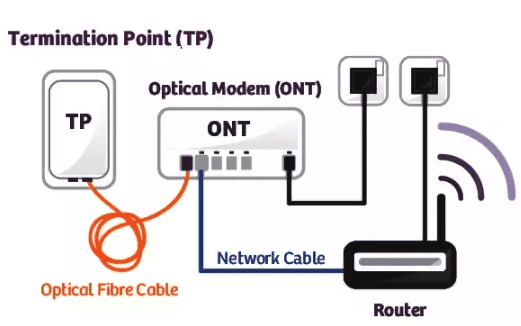
First, unpack your router and the fiber optic modem. Locate the fiber optic cable. This cable is usually yellow or white. Connect the fiber optic cable to the modem. Then, take an ethernet cable. Plug one end into the modem. Connect the other end to your router’s WAN port. Ensure all connections are secure.
Configuration Steps
- Access the Router’s Interface: Open a web browser. Type the router’s IP address into the address bar. Common IPs are 192.168.1.1 or 192.168.0.1. Press Enter.
- Login: Enter the default username and password. This information is usually on the router’s label.
- Network Settings: Go to the network settings section. Select ‘Internet’ or ‘WAN’ settings.
- Enter ISP Details: Input your ISP’s provided details. This includes IP address, subnet mask, and DNS server.
- Save and Reboot: Save the settings. Reboot the router to apply changes.
After completing these steps, your router should be connected to the fiber optic internet. Enjoy faster and more reliable internet service.
Troubleshooting Common Issues
Using a router with fiber optic internet can sometimes cause issues. Understanding common problems can help you fix them quickly. This section provides solutions for connectivity and speed optimization.
Connectivity Problems
Sometimes, your router may not connect to your fiber optic internet. These are common reasons:
- Incorrect Settings: Double-check your router’s settings. Ensure they match your internet provider’s requirements.
- Loose Connections: Ensure all cables are securely connected.
- Firmware Issues: Update your router’s firmware to the latest version.
If these steps do not help, try these additional tips:
- Restart your router and modem.
- Reset your router to factory settings and reconfigure.
- Contact your internet service provider for support.
Speed Optimization
Is your internet slow? Here are tips to optimize speed:
- Position Your Router: Place your router in a central location.
- Reduce Interference: Keep your router away from electronic devices.
- Use Wired Connections: For best speeds, connect devices directly to the router using Ethernet cables.
Additional steps to boost speed:
- Update your router’s firmware.
- Use a Wi-Fi extender to cover larger areas.
- Check for background applications using bandwidth.
Frequently Asked Questions
Can Any Router Handle Fiber Optic Internet?
Not all routers can handle fiber optic internet. Ensure your router supports high speeds for optimal performance.
Do I Need A Special Router For Fiber?
Yes, fiber optic internet often requires a router with specific capabilities to manage high-speed data transmission effectively.
How Do I Connect My Router To Fiber?
Connect your router to the Optical Network Terminal (ONT) using an Ethernet cable. Ensure the router is configured correctly.
Can I Use My Old Router With Fiber?
Old routers may not support the high speeds of fiber optic internet. Check compatibility before using an old router.
Conclusion
A router can indeed work with fiber optic internet. Ensure compatibility for optimal performance. Choose a modern router designed for fiber connections. Enjoy faster speeds and reliable connectivity. Fiber optic internet and the right router enhance your online experience. Upgrade your network setup today for a seamless internet experience.