
You need an HDMI cable, so you grab whichever one’s cheapest, or maybe whichever one promises the fanciest picture quality on the package. Either way, it plugs in and something shows up on screen, so it must be fine, right?
Mostly, yes, but not always. HDMI cables look identical on the outside, yet they can vary quite a bit in what they’re actually capable of carrying. Here’s what really matters, and what’s mostly just marketing.
HDMI Is a Standard, Not a Guarantee
HDMI describes the type of connector and the way devices talk to each other, but it doesn’t automatically mean every cable performs the same. Think of it like how all garden hoses screw onto the same size faucet, but a thin, cheap hose still can’t handle the same water flow as a thick, heavy-duty one.
- Any HDMI cable will physically plug into any HDMI port.
- Not every cable can carry the same amount of data, which is what actually determines resolution, refresh rate, and features like HDR.
- A cable that’s technically “HDMI” can still fall short of what your TV, console, or monitor is capable of.
The Main HDMI Cable Categories
Instead of labeling cables by version number, HDMI cables are officially categorized by capability:
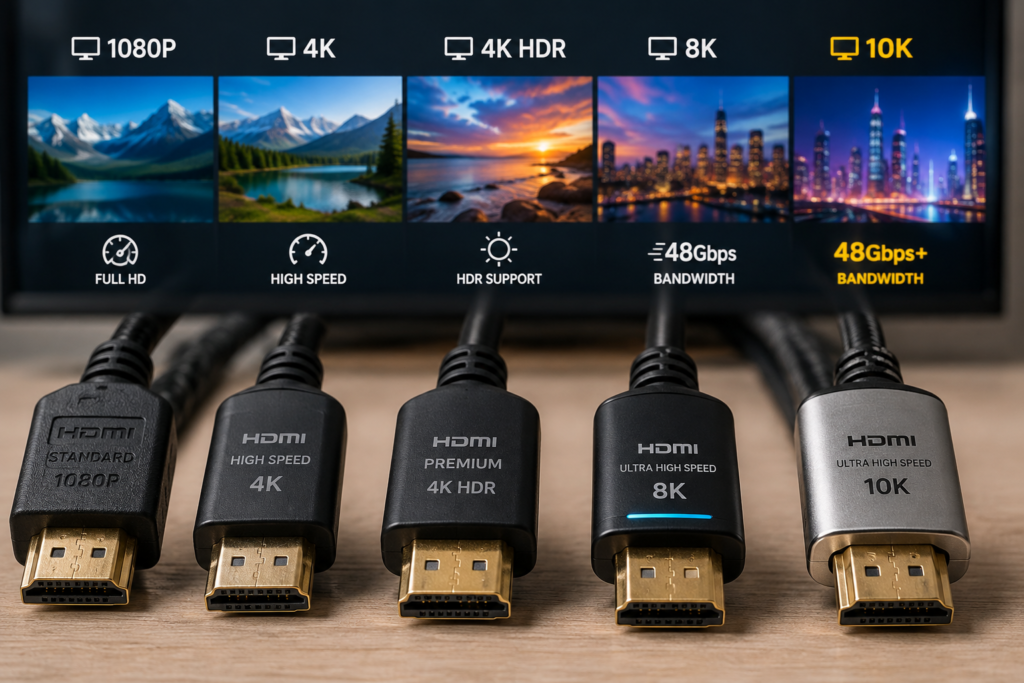
- Standard HDMI. Built for older, lower-resolution content like 720p or 1080i. You’ll rarely see these sold new anymore.
- High Speed HDMI. Supports 1080p and basic 4K at 30 frames per second. This covers a lot of everyday use, but not more demanding setups.
- Premium High Speed HDMI. Built for 4K at 60 frames per second, along with HDR. This is a solid, common choice for most modern TVs and streaming devices.
- Ultra High Speed HDMI. The current top tier, supporting much higher bandwidth for things like 4K at 120 frames per second, 8K, and advanced gaming features.
Each step up isn’t about better picture quality in a subjective sense. It’s about how much data the cable can reliably carry.
How Cable Category Relates to Resolution, Refresh Rate, and HDR
The more bandwidth a cable supports, the more demanding a signal it can carry without issues.
- Basic 4K at 30Hz doesn’t require much bandwidth, so even a High Speed cable usually handles it fine.
- 4K at 60Hz with HDR needs more headroom, which is where Premium High Speed cables come in.
- 4K at 120Hz, 8K resolution, and advanced HDR formats require significantly more bandwidth, which only Ultra High Speed cables are built to handle.
If a cable doesn’t have enough bandwidth for what you’re trying to send, you won’t get a slightly worse picture. You’ll typically get no picture at all, flickering, dropouts, or your device automatically falling back to a lower resolution.
Does an Expensive HDMI Cable Mean Better Picture or Sound?
This is where a lot of marketing gets misleading. HDMI carries a digital signal, not an analog one, so it doesn’t work the way old audio or video cables used to.
- A digital signal either arrives correctly or it doesn’t. There’s no in-between where a pricier cable makes colors “richer” or sound “warmer,” the way some product descriptions imply.
- Once a cable has enough bandwidth and meets proper certification, a $10 cable and a $60 cable will produce an identical picture and sound.
- Extra cost in premium cables usually goes toward things like sturdier connectors, better shielding, or longer warranties, not picture quality itself.
In short, paying more can buy durability or peace of mind, but it doesn’t buy a better-looking picture once you’re already using a properly rated cable.
HDMI 2.0 vs. HDMI 2.1: What Actually Changed
HDMI version numbers refer to what a device, like a TV, graphics card, or gaming console, is capable of, not strictly the cable itself. That said, cable bandwidth still has to keep up with whatever version your devices are using.
- HDMI 2.0 devices max out around 18 gigabits per second of bandwidth, enough for 4K at 60Hz with HDR.
- HDMI 2.1 devices can use up to 48 gigabits per second, unlocking 4K at 120Hz, 8K, and gaming features like variable refresh rate.
- You’ll often see cables marketed as “HDMI 2.1 cables,” but that’s really shorthand. The official designation for a cable built to handle that full bandwidth is Ultra High Speed HDMI.
- Simply put, matching an HDMI 2.1 device with a cable that’s only rated for 18 gigabits per second means you won’t get the full benefit of that device’s capabilities.
Active vs. Passive HDMI Cables
Most HDMI cables are passive, meaning they’re just wiring with no extra components inside. That works fine for shorter distances, but longer cables run into physical limits.
- Passive cables are typically reliable up to around 15 to 25 feet, depending on the bandwidth being carried.
- Active cables include a small chip that boosts and cleans up the signal, allowing for longer runs, especially at higher bandwidths like Ultra High Speed.
- For very long distances, fiber optic HDMI cables are another option, since they can maintain full bandwidth over much greater lengths than copper cables.
- If you’re running a cable behind a wall, across a room, or any unusually long distance, checking whether it needs to be active is worth the extra minute.
Why Length, Build Quality, and Certification Matter!
A cable’s rated category only means something if it’s actually built to deliver on that rating.
- Longer cables are more prone to signal loss, especially at higher bandwidths, which is why length and category are closely connected.
- Better shielding and connector quality help maintain a stable signal, particularly for high-bandwidth, high-resolution setups.
- Official HDMI certification (often shown with a scannable QR code on the packaging) verifies that a cable has actually been tested to meet its claimed category, rather than just printing a label.
Choosing the Right Cable for Your Setup
Matching the cable to the device is really the whole exercise, and it’s simpler than it sounds.
- Basic TV or streaming device viewing at 4K30 or standard 4K60: a High Speed or Premium High Speed cable is typically enough.
- Modern 4K TV with HDR: Premium High Speed HDMI covers this comfortably.
- Gaming console like a PS5 or Xbox Series X, especially if you want 4K at 120Hz or variable refresh rate: Ultra High Speed HDMI is the right choice.
- PC monitor for high refresh rate gaming beyond standard 4K60: Ultra High Speed HDMI, to avoid bottlenecking your graphics card.
- Soundbar or AV receiver: match the cable to whatever resolution and audio format is passing through it, which is often Premium High Speed for most home setups.
Marketing Claims Worth Being Skeptical Of
- “Gold-plated connectors improve picture quality.” Gold plating helps resist corrosion over time, but it doesn’t change how the digital signal looks or sounds.
- “Audiophile-grade” or “cinema-grade” HDMI cables. These are marketing terms, not official HDMI categories, and don’t indicate better real-world performance.
- Extremely high prices implying better color or clarity. As covered above, this isn’t how digital signals work once a cable meets its bandwidth requirement.
- Vague claims of being “future-proof” without listing an actual certified category or bandwidth rating.
How to Check Specifications Before You Buy?
- Look for the official category name, like Premium High Speed or Ultra High Speed, rather than relying on version numbers alone.
- Check the bandwidth rating in gigabits per second if it’s listed, and compare it to what your device supports.
- Look for HDMI certification, ideally with a verifiable QR code, especially for higher-bandwidth Ultra High Speed cables.
- Check your TV, monitor, console, or graphics card’s actual specifications first, so you’re buying a cable that matches what your devices can really do, rather than guessing.
Frequently Asked Questions
Are all HDMI cables compatible with every HDMI device?
Physically, yes, since HDMI connectors are standardized and backward compatible. However, a lower-category cable may still limit which resolutions, refresh rates, or features actually work, even though it plugs in without issue.
Do expensive HDMI cables provide better picture quality?
No, not once a cable already meets the bandwidth and certification your setup needs. HDMI carries a digital signal, so picture and sound quality stay the same across properly rated cables regardless of price.
Do I need an HDMI 2.1 cable for 4K?
Not necessarily. Standard 4K at 30Hz or 60Hz works fine over High Speed or Premium High Speed cables. An Ultra High Speed cable (often marketed as “HDMI 2.1”) is only needed for higher-bandwidth features like 4K at 120Hz or 8K.
What HDMI cable do I need for PS5 or Xbox Series X?
If you want 4K at 120Hz or variable refresh rate, use an Ultra High Speed HDMI cable. For standard 4K60 HDR gaming without those extras, a Premium High Speed cable will work fine.
Can an old HDMI cable support 4K?
Many older High Speed cables can handle basic 4K at 30Hz, and some may manage 4K60 without HDR. They typically won’t have enough bandwidth for 4K60 with HDR or higher frame rates, though.
Does HDMI cable length affect performance?
Yes. Longer cables are more prone to signal degradation, especially at higher bandwidths. Passive cables work well up to a certain length, beyond which active or fiber optic HDMI cables are a more reliable choice.
What is an Ultra High Speed HDMI cable?
It’s the officially certified cable category built to support up to 48 gigabits per second of bandwidth, enabling features like 4K at 120Hz, 8K, and advanced gaming capabilities such as variable refresh rate.
How can I tell which HDMI cable I need?
Check the maximum resolution, refresh rate, and HDR capabilities of your source device and display, then choose a cable category (Premium High Speed or Ultra High Speed) that comfortably covers those specs.
Match the Cable to the Device, Not the Price Tag
Not all HDMI cables are the same, but the differences that matter come down to bandwidth and certification, not price. A budget cable that’s properly rated for your setup will perform exactly as well as an expensive one making bold marketing claims. Before your next purchase, check what your TV, monitor, console, or soundbar actually supports, and match your cable to that. It’s a small step that saves you money and guesswork, without sacrificing any picture or sound quality.