
Not all VPNs are built for torrenting — and using the wrong one is worse than using none at all.
Legal Note: Torrenting is a file transfer technology and is entirely legal. Using it to download copyrighted content without authorisation is not legal in many countries. This guide covers the technical and privacy aspects of using a VPN for torrenting. We don’t endorse or encourage copyright infringement.
You’ve heard the advice: always use a VPN for torrenting. But here’s the part that often gets left out — not every VPN is actually suitable for torrenting. Some block P2P traffic outright. Others technically allow it but leak your IP address in ways that expose you entirely. And a surprising number keep logs that can be handed over to third parties the moment a lawsuit arrives.
So the real question isn’t just whether to use a VPN for torrenting. It’s whether the VPN you’re using actually does what it claims to do. This guide answers that fully: why you need a VPN, how necessary it really is, what to look for, which providers stand up to scrutiny, and the best practices that make every torrenting session genuinely private.
How Necessary Is a VPN for Torrenting?
Strongly necessary if you torrent regularly — and here’s the technical reason why. The BitTorrent protocol is peer-to-peer, which means every device sharing or downloading a file can see every other device’s IP address. Your IP is not hidden behind the website you’re visiting or a server somewhere. It’s directly visible to every stranger in that swarm, and those strangers include both regular users and anti-piracy monitoring organisations that actively scan swarms and log IP addresses for legal action.
Beyond the swarm itself, your internet service provider can see your P2P traffic. Many ISPs throttle BitTorrent connections specifically — even for entirely legal downloads — simply because the traffic pattern matches a torrent signature. A VPN encrypts your connection so your ISP cannot identify the traffic type, and it replaces your real IP address with the VPN server’s address, removing you from visibility in the swarm entirely.
In countries where torrenting copyrighted content triggers legal consequences, this protection is particularly important. But even for legal torrenting, the combination of IP exposure to strangers and ISP monitoring creates a compelling case for using a reputable VPN every time.
Why Using a VPN for Torrenting Actually Matters!
The protection a VPN provides for torrenting goes beyond just hiding your activity. Here’s what a properly configured VPN for torrenting actually does:
- Replaces your IP address: Every peer in the swarm sees the VPN server’s IP, not yours. Anti-piracy trackers logging IP addresses get a dead end.
- Encrypts your connection: Your ISP sees encrypted traffic going to a VPN server — nothing readable, nothing identifiable as P2P. This stops selective throttling.
- Creates a VPN tunnel: Data travels through an encrypted tunnel between your device and the VPN server. Even on a compromised or monitored network, your activity is unreadable.
- Prevents targeted attacks: Knowing your IP address opens the door to targeted harassment or DDoS attacks, particularly in competitive gaming or activist communities. A VPN closes that door.
- Bypasses geographic restrictions: Some torrent sites are blocked by ISPs in specific countries. A VPN lets you connect through a server in a different region where those blocks don’t apply.
The Risk Without One: Anti-piracy firms actively monitor torrent swarms in real time. They log IP addresses, cross-reference them with ISP subscriber databases, and use that information to generate infringement notices or pursue legal claims. In the United States, statutory damages for copyright infringement can reach $150,000 per infringed work. Using a VPN for torrenting is your primary protection against this traceability chain.
Can You Actually Use Any VPN for Torrenting? The Real Answer
No. And this is the specific thing most guides fail to explain clearly enough. There are three distinct categories of VPNs that will fail you for torrenting, in different ways:
VPNs That Block P2P Traffic
Some VPN providers don’t allow BitTorrent at all. Not-for-profit services like VPN Gate (run by a Japanese university) explicitly block torrenting because of the heavy network load it creates — a single movie torrent can be several gigabytes, and the simultaneous uploading compounds that strain further. Some commercial providers restrict torrenting to specific servers for the same reason. NordVPN, for example, routes P2P traffic through dedicated torrenting servers rather than its entire server network. Before you subscribe to any VPN, confirm its P2P policy explicitly.
VPNs With Legal Restrictions on Servers
Some VPNs have been legally compelled to block torrenting on specific servers. TorGuard, for example, had to block BitTorrent traffic on its US servers following a lawsuit. In cases like this, you’re not just blocked from torrenting — you’re potentially torrent-ing in a legally scrutinised environment even if you do find a workaround. Avoiding US servers when torrenting is a general recommendation from security researchers specifically because the US is one of the most active jurisdictions for copyright enforcement action.
VPNs That Simply Don’t Work Properly
This is the most dangerous category. Some VPNs — particularly free services with millions of installs in app stores — claim to protect you while doing the opposite. Their security is poor enough that the VPN tunnel can be penetrated, exposing your real IP despite appearing connected. Some keep detailed logs despite claiming otherwise. These logs can be subpoenaed, seized in a raid, or sold to data brokers.
Free VPNs are the most common offender in this category. Because they have no subscription revenue, they monetise through data collection and resale. Using a free VPN for torrenting can leave you less protected than not using one at all — you’re paying with your data for the false comfort of thinking you’re hidden.
Factors to Consider When Choosing a VPN for Torrenting
No-Logs Policy — Independently Audited
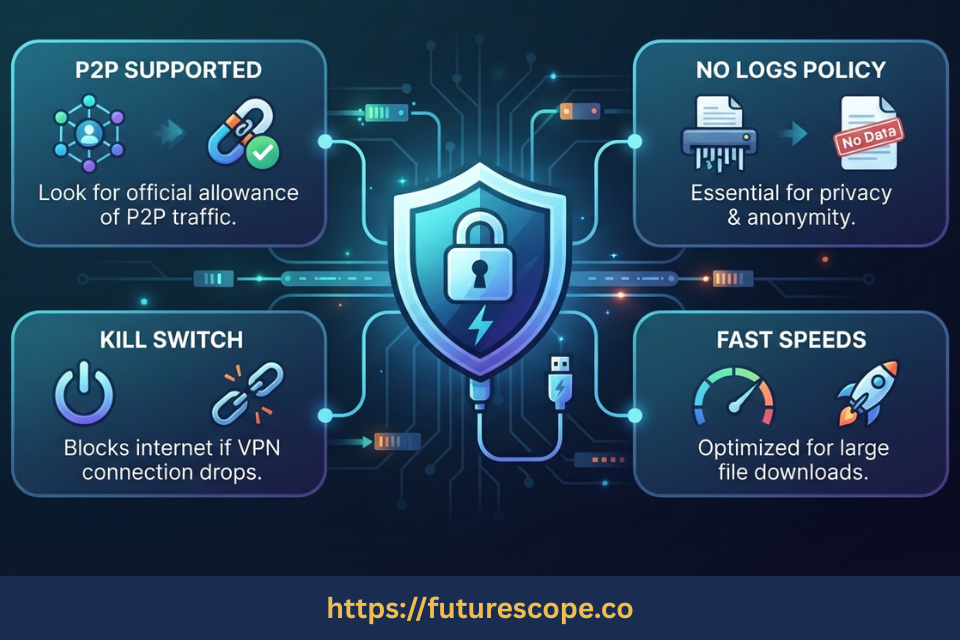
A no-logs policy means the provider keeps no records of your connection timestamps, IP addresses, bandwidth usage, or activity. The key word is “audit” — not every provider that claims a no-logs policy has had that claim independently verified. Look for providers whose no-logs policy has been confirmed by third-party security audits from reputable firms. A policy on a marketing page is not the same as a verified operational commitment.
Kill Switch — Non-Negotiable for Torrenting
If your VPN connection drops mid-download, your real IP becomes visible to the entire swarm instantly. A kill switch prevents this by cutting your internet connection the moment the VPN tunnel drops, stopping any traffic from leaving through your unprotected real IP. For torrenting specifically — where downloads often run unattended for hours — this is the most critical single feature to verify and enable.
Confirmed P2P Support
Before subscribing, confirm the VPN explicitly supports P2P traffic on the server locations you plan to use. Some providers support P2P across their full network; others restrict it to specific servers. Both can work, but knowing which applies to your provider — and which servers to use — is essential before your first download session.
Speed and Protocol
VPN encryption adds overhead that reduces download speeds. Modern protocols like WireGuard minimise this overhead significantly compared to older protocols like OpenVPN. Look for providers that offer WireGuard support. A strong VPN should reduce your speeds by no more than 10–20% on nearby servers — if you’re seeing larger drops, switch to a closer server or a faster protocol.
Leak Protection and Verified Security
DNS leaks and WebRTC leaks can expose your real IP even when you appear connected to a VPN. After connecting to any VPN you plan to use for torrenting, run a leak test at ipleak.net or dnsleaktest.com before opening your torrent client. This takes two minutes and confirms your protection is actually working — not just appearing to work.
Recommended Top VPNs for Torrenting
Based on track record, independent audit results, P2P support, and verified security, these providers consistently appear in security community recommendations for torrenting:
ProtonVPN — Swiss-based, independently audited no-logs, open-source, full P2P support
ProtonVPN’s open-source code has been independently audited, it operates under Swiss privacy law, and it explicitly supports P2P on its servers. Its free tier does not support P2P — a paid plan is required for torrenting.
Mullvad — No-account model, accepts cash and crypto, RAM-only servers, audited
Mullvad doesn’t require an email address to sign up — you receive an account number only. It accepts anonymous payment methods and has undergone multiple independent audits. P2P is fully supported.
IVPN — Minimal data model, transparent infrastructure, audited, P2P supported
IVPN collects minimal data at signup and has been independently audited. Security researchers consistently rate it highly for privacy-first users who need reliable P2P support.
ExpressVPN — Large server network, TrustedServer RAM-only tech, audited no-logs
ExpressVPN runs all servers on RAM-only infrastructure (meaning data cannot persist across reboots), supports P2P across its full network, and has had its no-logs policy verified through independent audits.
Best Practices for Secure Torrenting
A good VPN does most of the heavy lifting for your privacy. But there are additional habits that complete the picture:
- Always connect to the VPN before opening your torrent client: Your client should never see your real IP. Connect first, verify the connection, then open the client.
- Run a leak test before every session: Two minutes at ipleak.net before starting any download confirms your VPN protection is active and functional.
- Enable the kill switch: Find it in your VPN settings and turn it on. Then confirm it works by deliberately disconnecting your VPN while the client is open and checking whether your internet cuts out entirely.
- Avoid US servers when torrenting: The United States is one of the most active jurisdictions for copyright enforcement. Connecting through servers in countries with stronger privacy laws — Switzerland, Iceland, Romania — reduces legal exposure for your VPN provider and by extension for you.
- Use an open-source torrent client: qBittorrent and Transmission are the standard security community recommendations — no bundled software, no ads, no data collection.
- Scan every file before opening it: Your VPN protects your IP address. It cannot protect you from malicious files. Run antivirus on every downloaded file before executing or opening it.
- Download from well-seeded, reputable sources: High seed counts and positive community comments are the strongest practical signals of file legitimacy and safety.
Frequently Asked Questions
1. Is a VPN completely enough protection for torrenting?
A properly configured VPN — with a verified no-logs policy, kill switch, and confirmed P2P support — provides very strong protection for network-level privacy. It hides your IP address from the swarm and your ISP, encrypts your traffic in transit, and prevents your identity from being traced through your IP. What it does not do is protect you from malicious files inside a torrent, ensure the legality of what you’re downloading, or guarantee safety if you log into personal accounts while torrenting. Think of it as strong protection for one specific attack surface, not a comprehensive safety net for all risks.
2. Why shouldn’t I use a free VPN for torrenting?
Most free VPNs fail at the basic task of protecting your privacy. Many collect and sell browsing data to fund operations — which directly undermines the purpose of using one. Security is frequently inadequate, leaving the VPN tunnel penetrable. Many free services either block P2P traffic entirely or have no reliable kill switch. And without subscription revenue, there’s no business incentive to invest in the server infrastructure and security auditing that makes a VPN trustworthy for high-stakes use. If budget is a concern, Windscribe’s free tier with bandwidth limits is one of the few exceptions recommended by security researchers.
3. What happens if my VPN drops during a torrent download?
If you don’t have a kill switch enabled, your torrent client continues downloading with your real IP address visible to every peer in the swarm immediately. Depending on how long the VPN is down, your real IP can be logged by anti-piracy monitoring organisations. This is why enabling your kill switch before any download session is non-negotiable — a momentary VPN drop you don’t notice at 3 AM can expose your real IP for hours if the download continues running.
4. Should I avoid torrenting on US-based VPN servers?
Security researchers broadly recommend this. The United States is one of the most legally active jurisdictions for copyright enforcement, and some VPN providers have faced legal action that forced them to restrict or expose usage on US servers. TorGuard, for example, was required to block BitTorrent traffic on its US servers following a lawsuit. Switzerland, Iceland, and Romania are commonly mentioned as privacy-law-friendly alternatives. Beyond legal jurisdiction, US servers sometimes come with additional restrictions imposed by the provider itself as a precautionary measure.
5. How do I test whether my VPN is actually protecting me while torrenting?
Connect to your VPN and then visit ipleak.net before opening your torrent client. This page shows your current IP address, your DNS server addresses, and any WebRTC IP leaks. If you see only your VPN server’s IP and no references to your real IP or your ISP’s DNS servers, your VPN is protecting you correctly. If your real IP appears anywhere on that page, your VPN has a leak. At that point, cancel your subscription, request a refund using the money-back guarantee most reputable providers offer, and find a provider whose security is actually functional.
Torrent Safely — Verify Your VPN Before Your Next Download
The answer to “can you use any VPN for torrenting?” is clear: no. Some block P2P. Some keep logs. Some leak your IP despite appearing connected. The wrong VPN doesn’t just fail to protect you — it gives you false confidence while leaving every door open.
The right VPN — audited, kill-switch-equipped, and confirmed for P2P — closes that exposure completely. It takes ten minutes to set up correctly, and those ten minutes protect every session that follows.
Do this before your next download:
- Confirm your VPN provider explicitly supports P2P on the servers you use.
- Enable the kill switch in your VPN settings — then test it.
- Run a leak test at ipleak.net before opening your torrent client.
- Avoid US servers — connect through Switzerland, Iceland, or Romania instead.
- Use qBittorrent or Transmission, not closed-source or ad-supported clients.
- Scan every downloaded file with antivirus before opening it.
Your IP address and your download history are yours. A properly configured VPN for torrenting keeps them that way.
Written by a cybersecurity professional. Privacy while torrenting is a technical problem with a technical solution — use the right one.