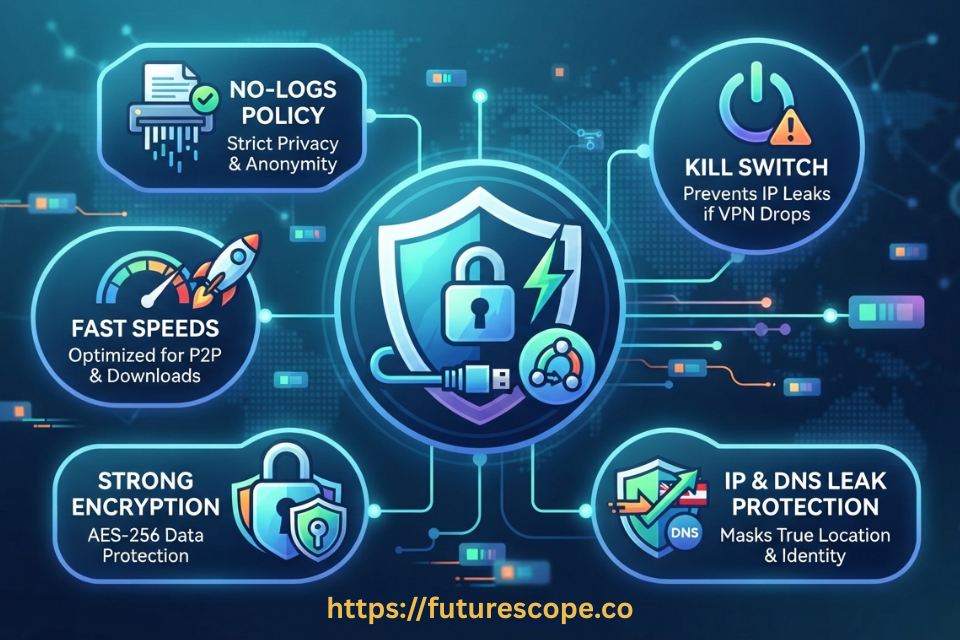

Not every VPN handles torrenting well. Here’s exactly what separates a great torrenting VPN from one that will expose your IP address mid-download.
You’ve probably heard the advice a hundred times: use a VPN when torrenting. But once you start shopping, you quickly realise the advice is incomplete. There are hundreds of VPN services, and not all of them are built for the demands that torrenting places on a connection. Some block P2P traffic outright. Others have kill switches that don’t actually work. A few keep logs that defeat the entire purpose of using a VPN in the first place.
Choosing among the best VPNs for torrenting means knowing which features are essential, which are nice to have, and which red flags tell you to walk away. This guide covers all of it — from the core features to look for, to a step-by-step guide to torrenting safely, to a practical checklist you can use before hitting that first download button.
Legal Note: Torrenting is a file transfer protocol and is completely legal. Using it to download copyrighted material without permission is not. This guide covers safe, legal torrenting practices. Fines for copyright infringement under the Digital Millennium Copyright Act can range from $200 to $150,000 per work infringed. We don’t recommend torrenting copyrighted material.
A Quick Guide to Torrenting: How It Works!
Torrenting uses peer-to-peer (P2P) file sharing to distribute large files across a network of users. Instead of downloading a file from a single central server, your torrent client pulls small pieces — called packets — from multiple peers who already have parts of the file, while simultaneously uploading pieces to others.
The result is a decentralised, highly efficient transfer system. BitTorrent, the underlying protocol, has over 100 million active users and remains one of the most common methods for transferring large files on the internet. Popular torrent clients include qBittorrent, Transmission, and Vuze — with many security experts now recommending open-source, ad-free alternatives over uTorrent, which has included bundled software in some versions.
The major practical consequence of how P2P works is that your real IP address is visible to every other peer in the swarm — meaning strangers sharing the same file can see where you’re connecting from. That’s the privacy exposure that makes a VPN essential for regular torrenters.
Why You Need a VPN While Torrenting?
Your internet service provider (ISP) can see your P2P traffic. Many ISPs have actively throttled torrent traffic, even for completely legal files like Linux distributions or public domain content, simply because the traffic pattern matches a torrent signature. In fact, ISPs including Comcast have faced legal action over undisclosed P2P throttling practices.
Beyond throttling, your IP address being visible in a public torrent swarm creates several risks:
- IP exposure to thousands of strangers: Anyone sharing the same torrent can log your IP address. This is how anti-piracy monitoring firms build their databases of alleged infringers.
- Targeted cyberattacks: Malicious actors in a swarm can use your IP for further targeting, particularly in competitive gaming or activist communities.
- ISP monitoring and data collection: ISPs can collect and sell browsing data in many jurisdictions, and P2P activity contributes to that profile.
- Copyright notices and legal risk: If you torrent copyrighted material, your IP in the swarm is exactly how rights holders identify and pursue infringement claims.
A VPN solves the IP exposure problem by routing your traffic through an encrypted tunnel and presenting the VPN server’s IP address to the swarm instead of yours. Your ISP sees encrypted traffic going to a VPN server — nothing more.
The Essential Features of a VPN for Torrenting
Not every VPN makes a good torrenting companion. Here are the eight features that separate the best VPNs for torrenting from the rest:
01 Verified No-Logs Policy
A no-logs policy means the VPN provider does not store records of your online activity, connection times, bandwidth usage, or IP addresses. This is the single most critical security feature for torrenting. If a VPN keeps logs, those records can be subpoenaed by courts or handed to third parties.
The gold standard is an independently audited no-logs policy — not just a marketing claim on a website. Look for providers who have undergone third-party audits by reputable security firms confirming their stated policy. Several leading providers now conduct these audits annually.
02 Kill Switch
A kill switch automatically cuts your internet connection if the VPN drops, preventing your real IP from being temporarily exposed during a reconnection gap. This is non-negotiable for torrenting because downloads often run for hours unattended.
If your VPN fails at 2 AM while you’re asleep and your kill switch isn’t enabled, your torrent client may continue downloading with your real IP visible to every peer in that swarm for the rest of the night. Always enable the kill switch before starting any download session.
03 Explicit P2P Support
Some VPN services block P2P traffic entirely or restrict it to specific servers. Before committing to any provider, confirm that torrenting and P2P file sharing is explicitly supported on the servers you plan to use. Some providers — for example, certain free tiers — only allow torrenting on a handful of specific servers, which may not be near your location.
The best VPNs for torrenting support P2P across their full server network or designate high-performance P2P-optimised servers specifically built for the demands of sustained, large-file downloads.
04 Strong Encryption and Modern Protocols
Look for AES-256 or ChaCha20 encryption — the same standards used by governments and financial institutions. For protocols, WireGuard is currently the leading option for speed and security combined, with OpenVPN remaining the well-established, extensively audited alternative. Avoid older or proprietary protocols that haven’t been independently scrutinised.
Protocol choice also matters for performance. WireGuard in particular delivers significantly better speeds than OpenVPN in most real-world testing, which matters when you’re trying to maintain fast download speeds through an encrypted tunnel.
05 DNS and WebRTC Leak Protection
DNS leaks and WebRTC leaks are two common technical vulnerabilities that can expose your real IP address even when you’re technically connected to a VPN. A DNS leak means your DNS queries are going to your ISP’s servers instead of the VPN’s, revealing which domains you’re connecting to. A WebRTC leak can expose your true IP through your browser’s real-time communication functionality.
After connecting to any VPN, run a leak test using a tool like dnsleaktest.com or ipleak.net before opening your torrent client. A properly configured VPN should show only the VPN server’s IP address and no references to your real IP or ISP’s DNS servers.
06 Speed and Server Network Size
VPNs reduce your speed due to encryption overhead and the additional server hop. Testing by security researchers has consistently shown that quality VPNs reduce download speeds by approximately 10 to 20 percent — barely noticeable for most torrenting activities. However, an underperforming VPN can cut speeds dramatically more.
A large, well-distributed server network matters for two reasons: more servers reduce congestion per server, and a server physically close to you reduces the latency added by the extra routing hop. Always choose the nearest server when raw speed is your priority.
07 Split Tunneling
Split tunneling lets you route only your torrent traffic through the VPN while keeping other applications on your regular connection. This reduces the load on the VPN tunnel, improving speed for your downloads without affecting other services. Some users configure their torrent client to route through the VPN while their browser or streaming apps bypass it entirely.
08 Reliable Customer Support
VPN configuration issues can expose your privacy without any obvious indication that something is wrong. A provider with responsive live chat support — not just an email ticket queue — means you can quickly resolve leak issues, kill switch problems, or protocol settings that aren’t behaving as expected.
How to Use a VPN for Torrenting: Step by Step
Once you’ve chosen a VPN that meets the criteria above, the setup process is straightforward. Here’s the complete flow:
1. Choose your VPN: Confirm it has explicit P2P support, a verified no-logs policy, a kill switch, and leak protection. Check its server locations and speed test results for P2P use.
2. Download and install the VPN app: On whichever device you plan to torrent from — desktop is generally preferable over mobile for large downloads.
3. Test for leaks before anything else: Connect to a nearby server and run a DNS leak test and WebRTC leak test. Confirm only the VPN server’s IP appears.
4. Enable the kill switch: Find the kill switch setting in your VPN app and turn it on before opening your torrent client. This is not optional.
5. Use a reputable torrent client: Open-source clients like qBittorrent or Transmission are generally recommended over ad-supported or closed-source alternatives.
6. Choose your torrent carefully: Download from well-established sources with high seed counts and positive community feedback. Watch for .exe or .bat files bundled inside what should be media files — these are common malware delivery vectors.
7. Scan before you open: Run a reputable antivirus scan on every downloaded file before executing or opening it. A VPN protects your network privacy; it doesn’t protect you from malicious file contents.
Speed Tip: If your ISP throttles P2P traffic, connecting through a VPN may actually improve your torrent speeds rather than reducing them, because your ISP can no longer identify the traffic pattern as P2P and has nothing to selectively throttle. Several ISPs including Comcast have been documented throttling BitTorrent traffic specifically.
How to Choose the Best VPN for Torrenting: A Quick Checklist
Use this checklist when evaluating any VPN for torrenting:
- Verified no-logs policy: Independently audited by a third-party security firm, not just stated in a privacy policy.
- Kill switch: Available, functional, and enabled by default or easy to enable.
- Explicit P2P support: Confirmed on the server locations you plan to use, not just on a handful of geographically inconvenient servers.
- Strong encryption: AES-256 or ChaCha20 with WireGuard or OpenVPN protocol.
- Leak protection: Verified with a real leak test after connecting, not just claimed in feature lists.
- Decent speed reduction: No more than 10–25% reduction on nearby servers under typical testing conditions.
- Large server network: Enough servers and locations that you can always find a nearby P2P-optimised option.
- Responsive support: Live chat or direct support available when configuration issues arise.
Frequently Asked Questions
1. Can I use any VPN for torrenting?
No. Some VPN providers explicitly block or restrict P2P traffic. Services like Encrypt.me do not allow torrenting at all, while others limit P2P to specific servers that may not be in convenient locations. Always confirm that a VPN supports torrenting on the servers you plan to use before subscribing. The best VPNs for torrenting either support P2P across their full server network or offer dedicated P2P-optimised servers.
2. Will a VPN slow down my torrent downloads?
Somewhat, but less than most people expect when using a quality provider. Testing consistently shows that well-performing VPNs reduce download speeds by approximately 10 to 20 percent due to encryption overhead and the extra server hop. The impact is often barely noticeable for typical torrenting. Interestingly, if your ISP throttles P2P traffic — which many do — using a VPN can actually improve your speeds by hiding the traffic type from your ISP. The best way to minimise speed loss is to choose a server geographically close to you and use a modern protocol like WireGuard.
3. Is it safe to use a free VPN for torrenting?
Generally, no. Free VPN services typically operate smaller, more congested server networks, impose data caps that are unsuitable for large torrent files, and in some cases monetise user data in ways that directly undermine the privacy purpose of using a VPN. Some free VPNs also block P2P traffic entirely. A reputable paid provider with a verified no-logs policy, a functional kill switch, and confirmed P2P support is the safer and more reliable choice for regular torrenting.
4. Do I need antivirus software as well as a VPN when torrenting?
Yes, and this is a distinction worth being clear about. A VPN protects your network-level privacy — it hides your IP address from the swarm and your ISP, and encrypts your traffic in transit. It does not inspect or scan files you download. Malware-laden torrent files are a real risk, particularly executable files disguised as media content. Running a reputable antivirus scanner on every downloaded file before opening it is a separate, essential layer of protection that a VPN cannot provide.
5. What is the kill switch and why is it specifically important for torrenting?
A kill switch is a VPN feature that automatically cuts your internet connection if the VPN tunnel drops unexpectedly. For regular browsing, a momentary VPN disconnection might be a minor inconvenience. For torrenting, it can be a serious privacy failure, because your torrent client will continue downloading with your real IP address visible to every peer in the swarm for however long the VPN is down. Since torrent downloads often run for hours — sometimes overnight or while you’re away from the keyboard — a VPN disconnection you don’t immediately notice can expose your IP for an extended period. Always enable the kill switch before starting any download session.
Torrent Smarter — Protect Your IP Before Your Next Download
Every torrent session without a properly configured VPN is a session where your real IP address is visible to hundreds of strangers and your ISP is watching your traffic patterns. The eight features in this guide are the difference between a VPN that protects you and one that just costs money.
Don’t just install any VPN and assume you’re covered. Verify it. Test it. Configure it correctly every time.
Your action plan before your next download:
- Check that your VPN explicitly supports P2P on the servers you plan to use.
- Run a DNS and WebRTC leak test immediately after connecting to confirm your real IP is hidden.
- Enable the kill switch in your VPN settings before opening your torrent client.
- Choose a torrent client without bundled software: qBittorrent and Transmission are the standard recommendations.
- Run antivirus on every downloaded file before opening it — your VPN cannot protect you from malicious file contents.
- Use a wired Ethernet connection for large downloads to maximise speed and connection stability.
Your IP address, your privacy, and your device security are all worth the five minutes it takes to set this up correctly.
Written by a cybersecurity professional. Torrenting legally is your right. Doing it without exposing your IP doesn’t have to be complicated.