
Let’s settle this question once and for all: do you really need a VPN for torrenting? Short answer — yes, almost certainly. Long answer — it depends on what you’re downloading, who your ISP is, and how much you value not having your IP address broadcast to every stranger in a torrent swarm.
Torrenting itself isn’t illegal. It’s just a file-transfer protocol, the same technology used to share Linux distributions, open-source software, and large legitimate files. But the way torrenting works technically exposes information about you that a VPN is specifically designed to hide.
In this guide, I’ll walk through exactly why a VPN matters for torrenting, how necessary it really is in practice, whether you need one for popular clients like uTorrent, and — importantly — whether a VPN alone is actually enough to keep you fully safe. Spoiler: it’s not quite the whole story.
How Torrenting Actually Exposes Your IP Address?
To understand why a VPN matters here, you need to understand what torrenting actually does on a technical level. Torrenting uses peer-to-peer (P2P) file sharing, which means you’re not downloading a file from one central server like you would from a website. Instead, you’re pulling small pieces of that file from dozens or hundreds of other users — your peers — who already have parts of it, while simultaneously uploading pieces back to others.
Here’s the part that matters for your privacy: in order for that peer-to-peer exchange to work, every single person in that swarm can see your IP address, and you can see theirs. There’s no way around this — it’s baked into how the BitTorrent protocol functions. Your IP address is public information to everyone downloading or seeding that same file, for as long as you’re connected to that swarm.
Your ISP can see this activity too. While they typically can’t see the exact file contents, P2P traffic has a recognizable signature, and many ISPs actively monitor for it — sometimes to throttle your connection speed, and in some jurisdictions, to log activity that copyright holders later request access to.
The Core Privacy Problem: When you torrent without protection, your real IP address is visible to every peer in the swarm and detectable by your ISP. A VPN replaces that visible IP with the VPN server’s IP, meaning peers and your ISP see the VPN’s address instead of yours.
Why You Need a VPN for Torrenting?
Beyond the basic IP exposure problem, there are several concrete reasons a VPN has become close to standard practice for anyone who torrents regularly:
- Hiding your IP from the swarm: This is the headline reason. With a VPN active, peers in the torrent swarm see the VPN server’s IP address instead of yours, making it far harder for anyone to trace activity back to your actual internet connection.
- Preventing ISP throttling: Many ISPs actively detect P2P traffic patterns and slow down connections that show heavy torrenting activity — even for completely legal downloads like open-source software. Since a VPN encrypts your traffic, your ISP can’t identify it as torrent traffic and has nothing specific to throttle.
- Avoiding copyright infringement notices: If you torrent copyrighted material without permission, copyright holders and anti-piracy monitoring firms actively scan torrent swarms, logging the IP addresses of everyone participating. Those IPs get matched to ISP subscribers, who then receive infringement notices or, in serious or repeated cases, face legal action. A VPN breaks that traceability chain.
- Protecting against malicious peers: Torrent swarms are public, and you don’t know who else is in them. Some bad actors specifically monitor torrent swarms for additional reconnaissance or targeting opportunities. Hiding your IP reduces your visibility as a target.
- Bypassing network-level torrent blocks: Some networks — university Wi-Fi, corporate networks, even some countries’ national networks — block torrenting outright at the network level. A VPN can route around these restrictions in many cases.
None of this requires you to be doing anything illegal. Even completely legitimate uses — downloading a Linux ISO, grabbing a public-domain film, or receiving a large file your team shared via torrent instead of a slow cloud upload — still expose your IP address to the swarm and your ISP. The privacy risk exists regardless of what’s inside the file.
How Necessary Is a VPN for Torrenting, Really?
This is where opinions genuinely diverge, and it’s worth being honest about the nuance instead of just saying “always use one” without context.
If you torrent legal, public-domain, or open-source content occasionally, the practical risk of skipping a VPN is lower — nobody’s coming after you for downloading a Linux distribution. However, your IP is still exposed to the swarm regardless of content legality, and many ISPs throttle P2P traffic indiscriminately, regardless of what’s being shared. So even low-risk torrenting benefits from a VPN, just with lower urgency.
If you torrent copyrighted movies, TV shows, music, or software without authorization, a VPN moves from “nice to have” to “strongly necessary.” Anti-piracy monitoring firms are professionally good at this — they routinely join popular torrent swarms specifically to log participant IP addresses, then forward that data to ISPs or rights holders. Depending on your country, the consequences range from a scary email to your ISP, to account suspension, to actual lawsuits with statutory damages that can run into the tens of thousands of dollars per infringed work.
If your ISP has a history of throttling P2P traffic — and many do, regardless of content legality — a VPN becomes necessary just to maintain reasonable download speeds. Several major ISPs have faced legal action over undisclosed throttling practices specifically targeting peer-to-peer traffic.
If you’re on a public, university, or workplace network where torrenting is blocked outright, a VPN may be the only way to torrent at all, assuming the network policy and your local laws permit it.
A Necessary Caveat: We don’t recommend using a VPN to torrent or download copyrighted materials without permission — doing so remains illegal in most jurisdictions regardless of whether a VPN is involved. This guide focuses on the privacy and security mechanics of torrenting, not on encouraging copyright infringement.
Should I Use a VPN When Using uTorrent?
Yes — and the reasoning is identical regardless of which BitTorrent client you use, whether that’s uTorrent, qBittorrent, Transmission, Vuze, or any other. The VPN protects your connection at the network level, before your torrent client even gets involved, so the specific client software doesn’t change whether you need one.
That said, uTorrent deserves a specific mention because of its particular history. uTorrent itself, when downloaded from its official source, doesn’t install malware on its own. However, the free version has bundled additional software and displayed ads in past versions, and plenty of fake or modified uTorrent installers circulating online do carry malware. Many security-conscious users have shifted toward open-source alternatives like qBittorrent or Transmission, which don’t include bundled software or ads.
Whichever client you choose, the VPN setup process looks essentially the same:
- Choose a reputable VPN provider that explicitly allows P2P or torrenting traffic — not all of them do.
- Connect to the VPN first, before opening your torrent client.
- Verify the VPN connection is active and check for IP or DNS leaks using a leak-testing tool.
- Enable the VPN’s kill switch, which cuts your internet entirely if the VPN connection drops — this is critical for torrenting since downloads can run for hours unattended.
- Open your torrent client and begin downloading as usual; your traffic now routes through the encrypted VPN tunnel.
The kill switch step deserves special emphasis. Because torrents often run unattended for long stretches, a VPN disconnection you don’t notice immediately could expose your real IP address for the rest of that session without any obvious warning. A kill switch closes that gap automatically.
Is a VPN Really All I Need to Be Safe While Torrenting?
This is the question that trips up a lot of people, and the honest answer is: not quite, but it gets you most of the way there.
A VPN handles the network-level privacy problem extremely well — hiding your IP from peers, preventing ISP monitoring of your traffic content, and stopping throttling. What it does not do is protect you from the file itself being malicious. A VPN’s encryption tunnel has no idea whether the file you’re downloading contains a virus, ransomware, or a trojan disguised as the movie or software you wanted.
Torrent swarms are public and unmoderated, which means malware-laden files are a real and persistent risk — particularly executable files (.exe) or batch files (.bat) disguised as media files, and pirated software cracks that frequently come bundled with hidden malicious payloads.
Here’s what a complete safety approach actually requires, beyond just the VPN:
- Antivirus or anti-malware software: Scan every downloaded file before opening it. This catches malicious payloads a VPN has no visibility into whatsoever.
- Source verification: Stick to well-established, reputable torrent sites and prioritize files with high seed counts and positive community comments — these are strong (though not foolproof) signals of legitimacy.
- Healthy file-type suspicion: Be especially wary of unexpected executable or batch files bundled inside what should be a media download — this is one of the most common malware delivery patterns in torrenting.
- A no-logs, audited VPN provider: Not all VPNs are equal. Some keep connection logs that defeat the purpose, and a few have been caught misrepresenting their no-logs claims. Look for providers with independent, third-party audits confirming their policies.
- Legal awareness: Understand your jurisdiction’s stance on copyrighted content. A VPN reduces traceability risk but doesn’t make copyright infringement legal — it changes your risk exposure, not the law itself.
Put simply: a VPN protects your identity and connection. Antivirus protects your device. Source vetting protects you from obviously bad files. You genuinely need all three working together for a complete picture — a VPN is necessary, but it was never designed to be sufficient on its own.
What to Look for in a VPN for Torrenting!
Not every VPN is built equally for this use case. If you’re subscribing specifically for torrenting, prioritize these features:
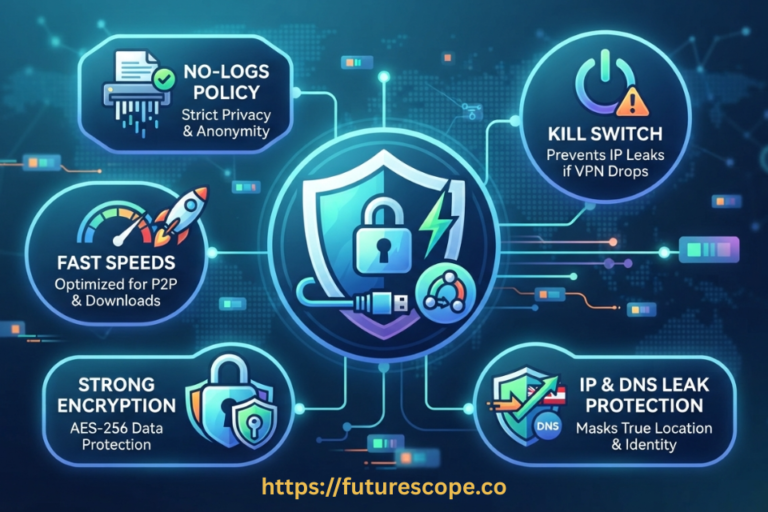
- Explicit P2P support: Some VPN providers block or restrict torrent traffic entirely. Confirm P2P support before subscribing, ideally with dedicated P2P-optimized servers.
- A verified kill switch: Non-negotiable for torrenting, given how long downloads can run unattended.
- Strong, modern encryption: Look for AES-256 or ChaCha20 encryption paired with current protocols like WireGuard or OpenVPN.
- An independently audited no-logs policy: This has become the industry gold standard — don’t settle for an unverified claim on a marketing page.
- Solid download speeds: A good VPN typically only reduces speeds by around 10–20%, which is barely noticeable for most torrenting. Choosing a server geographically close to you helps minimize this further.
- DNS and WebRTC leak protection: These leaks can expose your real IP address even while connected to a VPN, completely undermining the protection you’re paying for. Test for leaks after setup.
Frequently Asked Questions
1. Can I get in trouble for torrenting even with a VPN on?
Using a VPN significantly reduces the chance of your real IP address being traced back to specific torrenting activity, but it doesn’t make illegal downloading legal, and it isn’t a guaranteed shield. If a VPN provider keeps logs and is legally compelled to hand them over, or if you make a configuration mistake that leaks your real IP, you could still be identified. The safest approach is to use torrenting for legal content and treat a VPN as a strong privacy layer rather than a legal loophole.
2. Will a VPN actually make my torrent downloads faster?
Sometimes, yes — though it depends entirely on your specific situation. If your ISP throttles P2P traffic, which many do, a VPN can prevent that throttling since your ISP can no longer identify the traffic as torrenting, which may result in noticeably faster speeds than you’d get unprotected. However, a VPN does add some overhead from encryption and the extra routing hop, typically reducing raw speed by around 10 to 20 percent with a quality provider. In practice, these two effects can roughly offset each other, and many users report similar or even improved speeds once ISP throttling is removed from the equation.
3. Do free VPNs work fine for torrenting, or do I need a paid one?
Free VPNs are generally not recommended for torrenting. Many either explicitly block P2P traffic, throttle speeds heavily, log and monetize user data in ways that defeat the entire privacy purpose, or simply lack the security auditing that reputable paid providers undergo. There are a small number of legitimate free VPN options with good reputations, but they typically come with strict data caps unsuitable for torrenting large files. For anything beyond occasional, low-stakes downloads, a reputable paid VPN with verified no-logs policies and explicit P2P support is the safer choice.
4. What’s the difference between hiding my IP and actually being anonymous while torrenting?
This is an important distinction people often miss. Hiding your IP address means peers in the swarm and your ISP see the VPN server’s address instead of yours — that’s what a standard VPN achieves. True anonymity is a much higher bar that also requires no metadata trail connecting you to the VPN account itself, no payment information tying back to your identity, and careful operational habits beyond just the technical setup. For the overwhelming majority of torrent users, IP-hiding through a reputable VPN is sufficient privacy protection; full anonymity is a separate, more demanding goal mostly relevant to high-risk use cases.
5. If I only torrent legal content, do I still need a VPN?
Yes, and this surprises a lot of people. The BitTorrent protocol exposes your IP address to the swarm and reveals P2P traffic patterns to your ISP regardless of whether the content is legal. Your ISP doesn’t inspect file contents before deciding whether to throttle — they often throttle based on traffic pattern alone. And while legal content carries far less risk of copyright notices, your IP address being visible to an entire public swarm of strangers is itself a privacy exposure worth caring about, independent of legality.
Stop Broadcasting Your IP to Strangers
Every torrent swarm you join is a room full of strangers who can see exactly where your connection is coming from. A VPN for torrenting closes that exposure — quickly, affordably, and without requiring any technical expertise to set up.
But remember: a VPN is your privacy layer, not your entire safety net. Pair it with real antivirus protection and a bit of common sense about where your files come from, and you’ve covered all the angles that actually matter.
Here’s your action checklist before your next download:
- Confirm your VPN provider explicitly supports P2P traffic — don’t assume.
- Enable the kill switch before you start any torrent download, every single time.
- Run a quick DNS and IP leak test once connected to confirm your real IP isn’t slipping through.
- Install or update a reputable antivirus program and scan every file before opening it.
- Stick to reputable torrent sources with high seed counts and active community feedback.
- Choose torrenting content responsibly — a VPN protects your privacy, not your legal standing.
Your IP address is yours. Don’t hand it to an entire swarm of strangers when protecting it takes less effort than choosing what to download next.