
It’s a tempting shortcut: snap a photo of your seed phrase, save it to a Google Doc, and let it sit safely in the cloud where you’ll never lose it. Except that convenience comes with a real trade-off. Let’s go through what a seed phrase actually protects, why Google Drive isn’t the safe bet it seems, and what to do if it’s already there.
What a Seed Phrase Is and Why It Must Be Protected?
A seed phrase is a set of 12 or 24 words generated when you create a crypto wallet. It’s essentially the master key — anyone who has it can access and move whatever funds are tied to that wallet, no password reset or customer support involved.
Unlike a typical online account, there’s no way to lock someone out once they have your seed phrase. That’s what makes where you store it such a serious decision, not just an afterthought.

Is Google Drive a Safe Place for a Seed Phrase?
In short, no — not as your primary or only storage method. Google Drive is built for convenience and accessibility, which is exactly the opposite of what a seed phrase needs. A seed phrase is safest when it’s hard to access remotely, and cloud storage is designed to be easy to access from anywhere.
That doesn’t mean Google Drive is insecure in general — it has solid protections for everyday files. The issue is that a seed phrase isn’t an everyday file. It’s the kind of information where a single point of remote access, however unlikely, is one too many.
Risks of Storing a Seed Phrase as a Document, Photo, or File
However you save it, the underlying risk is the same: it becomes a digital copy someone could potentially access without ever touching your physical space.
- Text files or documents: Easily searchable, and could be found by anyone who gains access to your account or device.
- Photos or screenshots: Often get swept into automatic photo backups, meaning copies may exist in more places than you realize.
- PDFs: Just as accessible as text files once someone is inside your Drive, with no extra protection by default.
None of these formats add meaningful protection on their own. The risk isn’t really the file type — it’s that the file exists somewhere reachable over the internet at all.

How Your Google Account Could Be Compromised?
The seed phrase itself might be sitting untouched in your Drive, but the real risk is anything that could give someone access to your Google account:
- Phishing: A convincing fake login page or email could trick you into handing over your Google credentials without realizing it.
- Malware: Software running on a compromised device could quietly access your logged-in accounts, including Drive.
- Stolen or unlocked devices: If your phone or laptop is lost, stolen, or accessed while unlocked, anyone using it may reach your Drive files directly.
- Weak or reused passwords: If your Google password has been reused elsewhere and leaked in a data breach, your account could be accessed without you knowing right away.
- Unauthorized access: Even shared devices, family accounts, or old logged-in sessions can create unexpected access points.
Any one of these could expose a seed phrase saved in Drive — and you might not find out until funds are already gone.
The Risks of Syncing and Cloud Backups

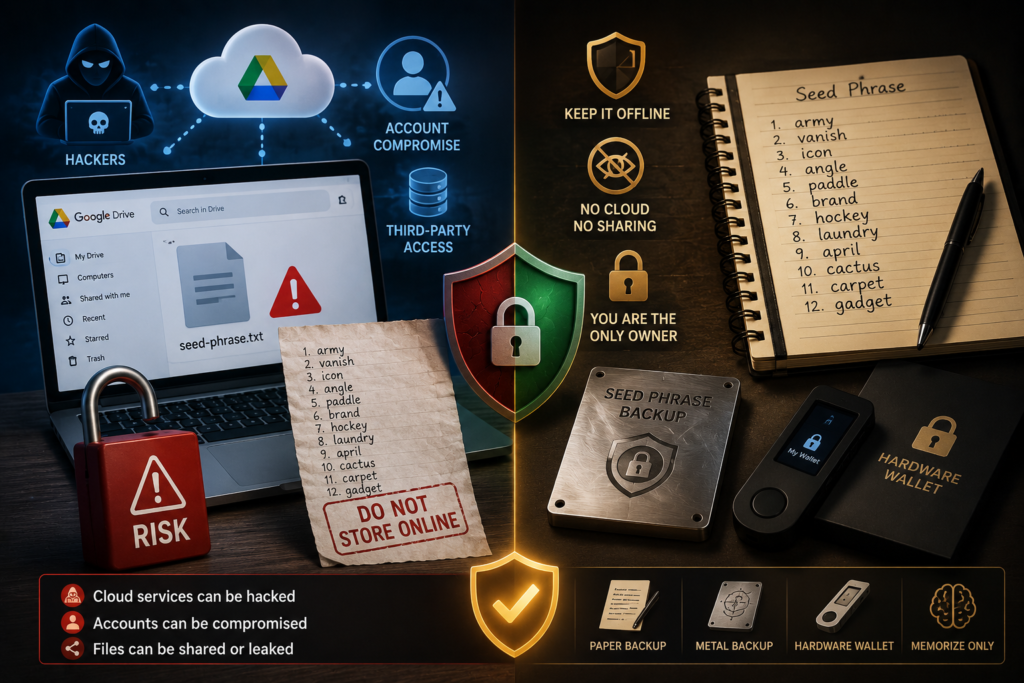
Cloud storage doesn’t just sit in one place — it syncs. That’s the whole point of it, but it also means a seed phrase saved in Drive can quietly multiply:
- Syncing across devices: A file in Drive may automatically appear on every phone, tablet, or computer linked to that account.
- Version history: Google Drive keeps previous versions of edited files, so even deleting the current version doesn’t necessarily erase all traces.
- Shared folders: If the file was ever in a shared folder, other people may have had access at some point, even briefly.
- Third-party app access: Apps you’ve granted Drive permissions to in the past could technically have had access to files stored there.
This is part of what makes cloud storage risky for something like a seed phrase — it’s genuinely hard to know every place a copy might exist.
Does Encrypting the File Before Uploading Help?
Encrypting a file before uploading it does add a real layer of protection, and it’s meaningfully better than uploading a plain photo or document. But it’s still not the ideal solution.
- A strong, unique encryption password can make the file unreadable without that password, even if someone gains access to your Drive.
- However, this shifts the risk rather than removing it — now everything depends on that encryption password being strong and never lost or exposed.
- It also adds complexity: if you forget the encryption method or password years later, you could lock yourself out of your own backup.
If you’re only choosing between an unencrypted file in Drive and an encrypted one, encryption is clearly the safer option. But compared to a proper offline backup, it’s still a workaround rather than a solution.
Why Offline Backups Are Generally Safer?
Paper and metal backups solve the core problem: they can’t be accessed remotely. No phishing email, malware infection, or leaked password can reach a physical object sitting in a safe.
- Paper: A low-cost starting option, though vulnerable to fire, water, and general wear over time.
- Metal: Built to withstand fire, flooding, and physical damage, making it a better choice for long-term storage of anything significant.
The tradeoff with offline storage is convenience — you can’t access it instantly from anywhere. But for something that should never be accessed by anyone but you, that inconvenience is actually the point.
What to Do If You’ve Already Stored a Seed Phrase in Google Drive?
If this already describes your situation, don’t panic — but do take it seriously and act soon.
- Locate every copy: check Drive itself, photo backups, shared folders, and version history for the file.
- Delete all copies you can find, including from Google’s Trash/Bin, which should also be emptied.
- Create a proper offline backup — paper or metal — for your existing seed phrase, stored securely.
- Consider whether the exposure risk is high enough to move funds to a brand-new wallet with a freshly generated seed phrase, especially if the file was ever shared, viewed on another device, or your account security has ever been in question.
Deleting the file is a good first step, but it doesn’t undo any access that may have already happened. That’s the part worth thinking through carefully.
Is Deleting the File Enough?
It depends on what you know about your account’s history. A few questions worth asking yourself:
- Has your Google account ever shown signs of unauthorized login activity, even briefly?
- Was the file ever in a shared folder, or synced to a device you no longer control or trust?
- Have you reused your Google password anywhere that’s been part of a known data breach?
If the answer to any of these is yes, or even uncertain, moving your funds to a new wallet is the safer choice. If you’re confident your account has never been compromised and the file was never shared or exposed, deleting it and switching to offline storage going forward is a reasonable step — though moving to a new wallet remains the more cautious option.
Practical Tips for Securely Backing Up a Seed Phrase
- Write your seed phrase on paper or, ideally, a metal backup plate for long-term durability.
- Store at least two copies in separate, secure, offline locations.
- Never save it as a photo, document, or note on any device connected to the internet.
- Avoid cloud storage entirely for this specific purpose, even with encryption, as a primary storage method.
- Use strong, unique passwords and enable two-factor authentication on accounts like Google, even though they shouldn’t hold your seed phrase in the first place.
- Periodically check that your backups are still legible and intact, especially paper copies.
- use hardrawe wallet that does not required Seed Phrases, Here is our post, Check here -> ->
Frequently Asked Questions
Is Google Drive safe for a crypto seed phrase?
No, it’s not recommended as a storage location, even though Drive itself has decent general security. The risk comes from account compromise, syncing, and the fact that a remote copy exists at all.
Can I encrypt my seed phrase before storing it in Google Drive?
Encryption adds a real layer of protection and is safer than an unencrypted file, but it’s still not as secure as a proper offline backup. It shifts risk to the encryption password rather than eliminating it.
Is a password-protected Google Drive file secure?
Password protection on a file is weaker than full encryption and can sometimes be bypassed depending on the method used. It shouldn’t be relied on as sufficient protection for something as sensitive as a seed phrase.
Can Google employees see my seed phrase?
Google has strict internal policies and doesn’t routinely access user files, but the theoretical possibility, combined with account compromise risks, is part of why sensitive information like a seed phrase shouldn’t be stored there at all.
What should I do if I already stored my seed phrase in Google Drive?
Delete all copies, including from Trash and version history, then create a proper offline backup. If there’s any chance your account was ever compromised or the file was shared, move your funds to a new wallet with a freshly generated seed phrase.
Is Google Drive safer than keeping a seed phrase on my phone?
Not really — they carry similar risks. A phone can be lost, hacked, or accessed directly, while Drive can be reached remotely through account compromise. Neither is a safe long-term storage method.
What is the safest way to back up a seed phrase?
A durable offline backup, ideally on metal for long-term resilience, stored in a secure location like a safe. Keeping two or three copies in separate secure locations adds further protection against loss or damage.
Check Where Your Seed Phrase Actually Lives
If your seed phrase is sitting in Google Drive right now — as a photo, document, or note — it’s worth pausing to fix that today rather than assuming it’ll be fine. Delete what’s there, create a secure offline backup, and think honestly about whether your account’s history means it’s time to move your funds to a new wallet. A seed phrase only needs to be exposed once to cause real damage. Taking twenty minutes now to move it offline is a small effort compared to what’s actua