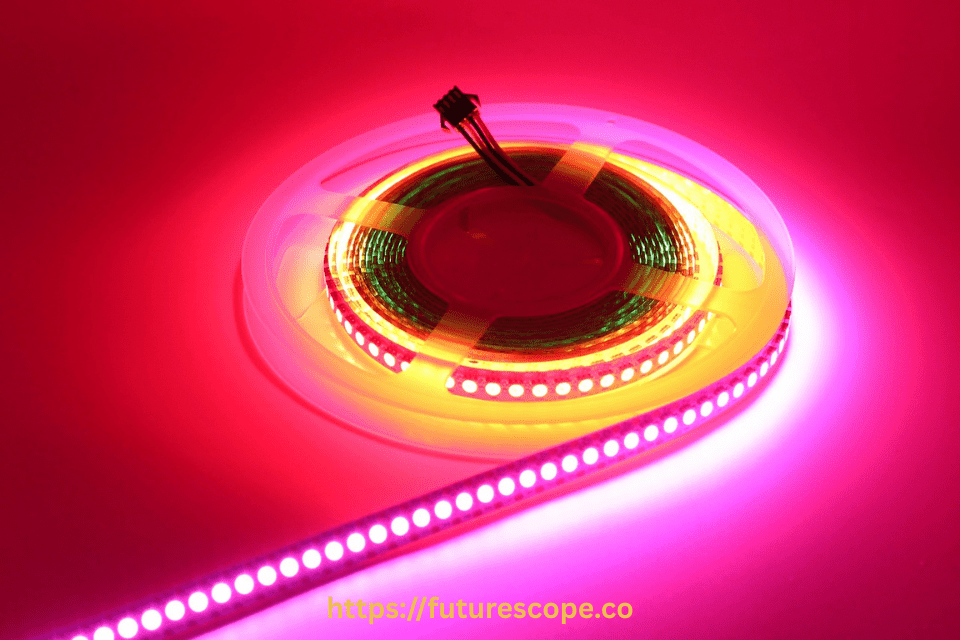

Smart LED strip lights that sync with music are a game-changer for home ambience, gaming setups, and party vibes. Whether you want your lights to pulse with bass drops or flow with mellow tunes, setting up music-synced LED lights is easier than ever—especially with the rise of voice assistants and mobile apps. Here’s a step-by-step guide on how to install, configure, and fully enjoy your music-reactive LED light strips in 2026.
Why Sync LED Strip Lights with Music?
Smart LED strip lights with music sync capabilities offer a unique way to elevate your environment. Here’s why they’re a must-have:
- Enhanced Atmosphere: Lights that pulse to music create an engaging atmosphere for parties, making guests feel immersed in the experience.
- Gaming Immersion: Syncing lights with in-game sounds heightens excitement, especially for action-packed games.
- Relaxation and Ambiance: Soft music paired with gentle light pulses creates a cozy, intimate setting for home relaxation.
- Versatility: These lights can be used in various settings, from kitchens and bedrooms to vehicles and outdoor spaces.
With prices ranging from $20 to $50, these lights are an affordable way to add dynamic flair to your space. Recent posts on X highlight their popularity, with users praising brands like Lumary for their bright, colorful displays and music sync features.
Choosing the Best Smart LED Strip Lights
Selecting the right LED strip lights is crucial for a successful music-sync setup. Here are key factors to consider:
- Music Sync Capability: Ensure the lights have a built-in microphone or app support for music synchronization. Brands like Govee, Philips Hue, and Tapo are known for reliable music sync features.
- Length and Coverage: Choose a length that fits your space, such as 16ft for small areas or 100ft for larger setups, as seen in products like VOLIVO RGB Strip Lights.
- Color Options: RGB lights offer vibrant color changes, while RGBW includes white light for more versatility. Tunable white lights are ideal for adjustable ambiance.
- Smart Home Compatibility: Check if the lights integrate with Alexa, Google Home, or Apple HomeKit for voice control and automation.
- Durability: For outdoor or kitchen use, opt for an IP65 or higher rating to ensure water and dust resistance.
Budget Tip: Look for deals on platforms like Amazon, where 100ft RGB strip lights with music sync can be found for as low as $6.97, as noted in an X post.
Step-by-Step Guide to Setting Up Music-Sync LED Strip Lights
Step 1: Choose the Right Smart LED Strip Lights
Before setup, selecting the right LED light strip is crucial. Look for models that explicitly support music sync or audio-reactive modes. Popular brands like Govee, Philips Hue, LIFX, and Nanoleaf offer high-quality RGBIC or RGB strips with built-in microphones or app-syncing features. Ensure your choice is Wi-Fi or Bluetooth enabled, and supports integration with smart home ecosystems like Alexa, Google Assistant, or Apple HomeKit.
Pro Tip: RGBIC strips offer individual color zoning—perfect for dynamic effects that match different beats or frequencies.
Step 2: Install the Light Strips
Clean the surface where you plan to attach the LED strip—whether it’s behind your TV, along a wall, under furniture, or around your ceiling. Most strips come with adhesive backing, but for long-term installation, consider using mounting clips or channels.
- Avoid bending at sharp angles to prevent damage.
- Connect the power adapter and plug it into a nearby outlet.
- Ensure the IR or Wi-Fi controller (if external) is placed in an open area for signal access.
Step 3: Connect to the App
Download the companion app that supports your smart LED strip. For instance:
- Govee Home App
- Philips Hue App + Hue Bridge
- LIFX App
- Smart Life or Tuya Smart (for budget models)
Follow the app’s on-screen instructions to pair your device via Bluetooth or Wi-Fi. Make sure your smartphone is on the same Wi-Fi network (2.4GHz in most cases) during setup.
Step 4: Enable Music Sync Mode
Once connected, open the app and look for a “Music Mode” or “Audio Reactive” section. There are typically two ways these work:
- Internal Microphone Mode – The light controller has a built-in mic that listens to ambient sound and syncs lighting accordingly.
- Phone Mic Mode – The app uses your phone’s microphone to analyze audio and send commands to the lights in real time.
Select your preferred source, adjust sensitivity if available, and watch your LEDs dance to your playlist.
Step 5: Customize Light Effects
Most apps allow full customization of light sync effects. You can:
- Choose color palettes or dynamic patterns.
- Set brightness levels and transition speeds.
- Assign zones or sections (for RGBIC models).
- Schedule lighting scenes for events or daily routines.
For advanced setups, some users integrate their LED strips with third-party tools like IFTTT, Razer Synapse, or Spotify Visualizers for real-time beat syncing and automation.
Step 6: Test and Adjust
- Test with Music: Play various tracks (e.g., bass-heavy EDM, mellow jazz) to observe the lights’ response. Bass-heavy music often produces more dramatic effects.
- Customize Settings: Adjust brightness, color patterns, and reactivity in the app. Some models offer preset modes like “Party” or “Relax.”
- Optimize Syncing: If the lights lag or don’t sync well, reposition the microphone closer to the sound source or reduce background noise.
Step 7: Sync with Voice Assistants (Optional)
Integrate your lights with Google Assistant, Alexa, or Siri for voice control. You can say:
- “Alexa, turn on music mode.”
- “Hey Google, sync my lights with music.”
Make sure your LED system supports smart home linking and is registered under the same account as your smart assistant.
Troubleshooting Common Issues
- Lights Not Syncing: Ensure the microphone is near the sound source and free from background noise. If using the phone’s audio, verify the app has access to the media player.
- Connectivity Issues: Confirm that the lights and phone are on the same Wi-Fi or Bluetooth network. Restart the app or reset the controller if needed.
- Flickering or Dim Lights: Check that the power supply matches the strip’s voltage and length requirements. A weak power supply can cause performance issues.
- App Compatibility: Some apps may not sync directly with third-party music apps like Spotify. Play music out loud for the microphone to detect, as suggested by Lepro.
Comparison Table of Popular Smart LED Strip Lights
| Brand/Model | Price Range | Length Options | Music Sync Method | Smart Home Compatibility | Water Resistance |
|---|---|---|---|---|---|
| Govee Strip Light 2 Pro | $40-$60 | 16ft, 32ft | App or Microphone | Alexa, Google Home, Matter | IP67 |
| Philips Hue Lightstrip Plus | $70-$100 | 6ft, extendable | App or Sync Box | Alexa, Google Home, HomeKit | IP20 (indoor only) |
| Tapo Smart LED Strip | $20-$30 | 16ft, 32ft | App or Microphone | Alexa, Google Home | IP65 |
| Lumary Smart Neon Rope Lights | $30-$50 | 16ft, 32ft | App or Microphone | Alexa, Google Home | IP65 |
| VOLIVO RGB Strip Lights | $6.97-$20 | Up to 100ft | Remote or App | Limited | Not specified |
Tips for Maximizing Your Music-Sync Experience
- Experiment with Music Genres: Bass-heavy tracks produce more dramatic light effects, while softer music creates subtle pulses.
- Use Third-Party Apps: Apps like Muviz Edge can enhance visualization for a more customized experience.
- Group Multiple Strips: If using multiple strips, ensure they’re grouped in the app for synchronized effects, as noted in a TP-Link community post.
- Check for Deals: Look for discounts on platforms like Amazon, where 100ft VOLIVO strips were recently listed for $6.97, as per an X post.
Conclusion
Setting up smart LED strip lights that sync with music is a straightforward yet rewarding project that can elevate any space. By choosing the right lights, installing them carefully, and fine-tuning the music sync settings, you can create a dynamic light-and-sound experience tailored to your needs. Brands like Govee, Philips Hue, and Lumary offer reliable options, while budget-friendly choices like VOLIVO make this technology accessible to all. Whether you’re hosting a party, gaming, or relaxing, these lights will add a vibrant touch to your environment. Start your setup today and enjoy the magic of music-synced lighting!
Frequently Asked Questions
How do you sync LED strip lights with music?
You can sync LED strip lights with music using a built-in microphone or a music controller. Many modern LED strips come with sound-responsive modes that react to beats and rhythms. Simply connect the lights to a compatible controller or mobile app, enable “music mode,” and the LEDs will flash, change colors, or pulse in sync with the audio, creating a dynamic lighting effect that matches your music.
Can I sync my LED lights to Spotify?
Yes, you can sync LED lights to Spotify, but it usually requires a compatible smart controller or third-party app. Some LED light brands and apps integrate directly with Spotify to match lighting effects with songs, while others use your device’s microphone to capture the music and sync the lights. With the right setup, your LEDs can change colors and patterns in real-time with Spotify playback.
What is the app that syncs lights with music?
Several apps can sync lights with music, depending on your LED brand and controller. Popular options include Hue Sync for Philips Hue, LIFX App for LIFX lights, and third-party apps like LED Hue, iLightShow, or Synergy. These apps use either built-in integrations or your device’s microphone to detect music and adjust lighting effects in real time, creating a synchronized audio-visual experience.
What are music sync LED lights?
Music sync LED lights are LED strips or bulbs designed to change colors and patterns in response to music or sound. They use built-in microphones or external controllers to detect beats, rhythms, and melodies, creating a synchronized lighting display. Popular for parties, gaming, and home décor, these lights enhance the atmosphere by visually matching the mood of your music, turning any space into a dynamic and immersive experience.
Can Philips Hue sync with Spotify?
Yes, Philips Hue can sync with Spotify through the Philips Hue app. By linking your Spotify account, the system analyzes the song’s beat, tempo, and mood to create real-time lighting effects. Unlike microphone-based syncing, this integration directly reads the music data for more accurate and immersive results, making your lights change colors and brightness perfectly in tune with your Spotify playlist.
Can Philips Hue sync with music?
Yes, Philips Hue can sync with music using the Philips Hue Sync app or third-party apps. The system listens to the audio through your device or directly integrates with platforms like Spotify, allowing the lights to change colors and brightness in rhythm with the music. This creates a dynamic and immersive atmosphere, perfect for parties, gaming, or simply enhancing your favorite songs with matching visual effects.