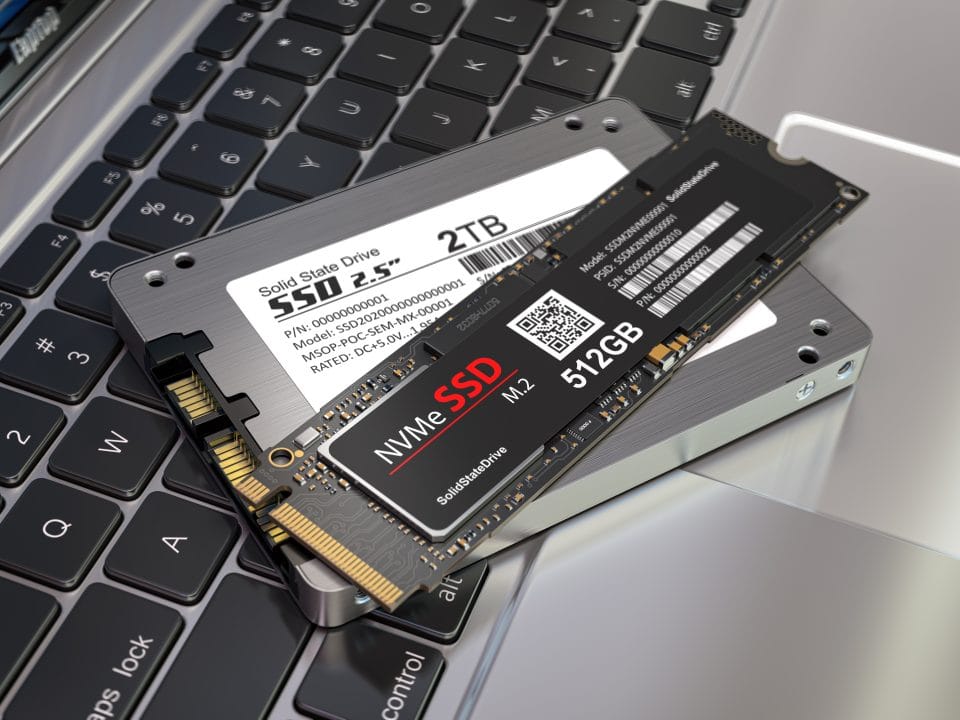

SSDs are reliable for long-term storage but can degrade over time. Regular backups are essential to prevent data loss.
Solid State Drives (SSDs) have become popular for their speed and durability. They are faster than traditional Hard Disk Drives (HDDs) and have no moving parts, reducing the risk of mechanical failure. This makes them an excellent choice for frequent data access and quick boot times.
However, SSDs have a limited number of write cycles, meaning they can wear out over time. Regular data backups are crucial to ensure data integrity. Investing in quality SSDs with good warranties can also help maximize their lifespan. Balancing speed and reliability, SSDs are a solid choice for many users.
The Evolution Of Storage Solutions
Data storage has changed a lot over the years. It started with big, clunky devices. Now, we have tiny, powerful storage solutions. This journey shows amazing progress in technology.
From Magnetic Tapes To Solid State Drives
Magnetic tapes were among the first storage devices. They were big and slow. They used magnetic fields to store data.
Then came hard disk drives (HDDs). These were faster and could store more data. They used spinning disks and read/write heads.
Today, we have solid state drives (SSDs). These are much faster than HDDs. SSDs use flash memory to store data. They have no moving parts.
Key Milestones In Storage Technology
- 1950s: Magnetic tapes became popular.
- 1980s: HDDs took over from magnetic tapes.
- 2000s: SSDs started replacing HDDs.
- 2010s: SSDs became the standard for most users.
Below is a table showing the evolution of storage capacities over the years:
| Year | Storage Device | Average Capacity |
|---|---|---|
| 1950s | Magnetic Tape | 1 MB |
| 1980s | Hard Disk Drive | 100 MB |
| 2000s | Solid State Drive | 1 GB |
| 2010s | Solid State Drive | 1 TB |
SSDs have many benefits over older storage methods. They are faster and more reliable. They also use less power.
This makes SSDs a great choice for long-term storage.
SSD Technology Explained
Solid State Drives (SSDs) have revolutionized data storage. SSDs are fast, durable, and energy-efficient. But are they reliable for long-term storage? To answer this, understanding SSD technology is crucial.
How SSDs Work
SSDs use flash memory to store data. Unlike Hard Disk Drives (HDDs), SSDs have no moving parts. They use NAND-based flash memory. This makes SSDs faster and more durable.
Data in an SSD is stored in cells. These cells are grouped into pages. Pages are then grouped into blocks. SSDs use a controller to manage these cells and ensure data integrity.
Comparing SSDs And HDDs
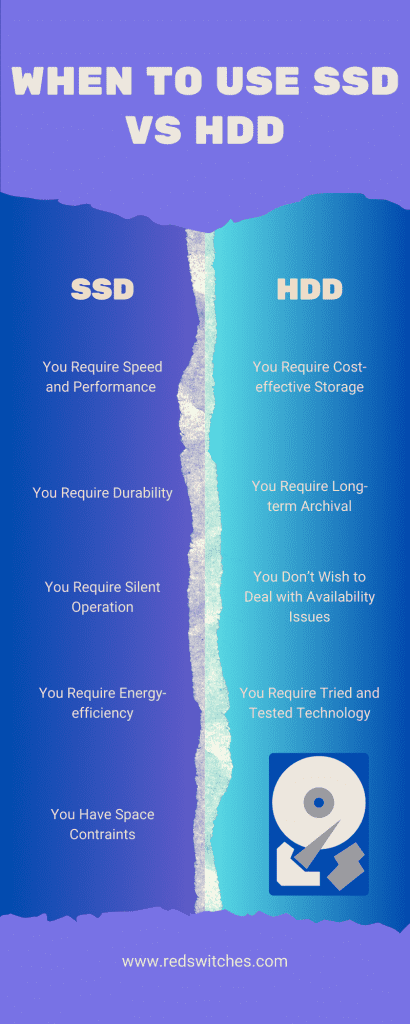
SSDs and HDDs differ in many ways. Below is a comparison table to highlight the key differences:
| Feature | SSD | HDD |
|---|---|---|
| Speed | Faster | Slower |
| Durability | More durable | Less durable |
| Noise | Silent | Noise due to moving parts |
| Energy Consumption | Lower | Higher |
SSDs excel in speed and durability. HDDs are more prone to mechanical failures. SSDs consume less power, making them ideal for laptops.
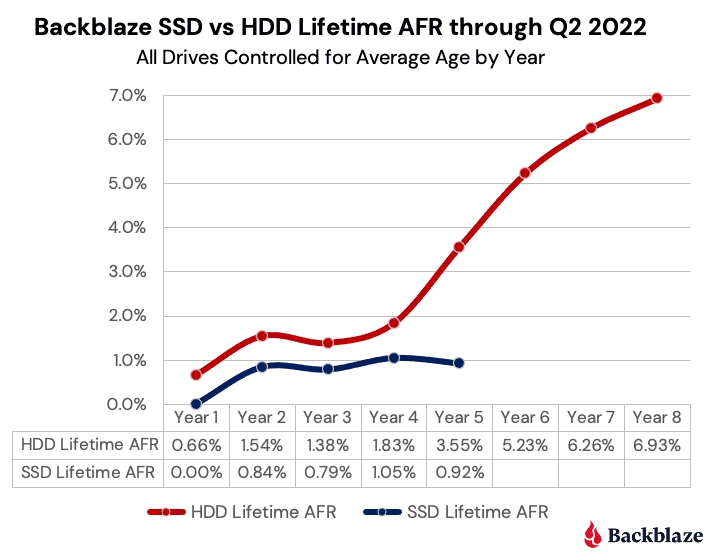
But what about long-term reliability? SSDs do have a finite number of write cycles. This means they can wear out over time. Yet, modern SSDs are built to last for years under normal use.
In summary, SSDs offer many advantages over HDDs. They are faster, more durable, and energy-efficient. For many, these benefits outweigh the concerns of long-term reliability.
Analyzing SSD Longevity
Understanding the longevity of SSDs is crucial for long-term storage. Many factors influence how long your SSD will last. This section dives into these factors, offering insights into real-world performance and durability.
Factors Affecting SSD Lifespan
Several key factors affect an SSD’s lifespan. Let’s explore these elements:
- Write Cycles: SSDs have limited write cycles. Each cell wears out after several writes.
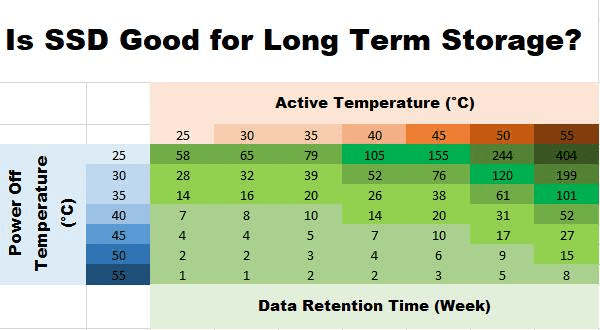
- Temperature: High temperatures can degrade SSD components faster.
- Usage Patterns: Frequent large data transfers shorten SSD life.
- Quality of NAND Flash: Higher quality NAND lasts longer. Choose SSDs with durable NAND flash.
Real-world Performance And Durability
Real-world performance often differs from theoretical lifespan. Here’s why:
Most SSDs last longer than their rated write cycles. Manufacturers include extra cells for this reason. These extra cells replace worn-out ones, extending life. Also, wear leveling algorithms distribute writes evenly. This helps maintain performance over time.
In real-world tests, many SSDs exceed their expected lifespan. Users report SSDs lasting several years with no issues. Regular firmware updates from manufacturers also enhance durability. These updates fix bugs and optimize performance.
| SSD Model | Rated Write Cycles | Actual Lifespan (Years) |
|---|---|---|
| Model A | 300 TBW | 5+ years |
| Model B | 600 TBW | 7+ years |
Data in the table above shows SSDs often outlast their rated write cycles. Proper maintenance and regular updates can further enhance SSD longevity.
The Verdict On SSDs For Long-term Storage
Solid State Drives (SSDs) are changing the way we store data. Many people ask if SSDs are good for long-term storage. The answer is important for keeping your data safe.
Advantages Of Using SSDs
SSDs have many advantages over traditional hard drives. They are faster and more reliable.
- Speed: SSDs read and write data quickly.
- Durability: They have no moving parts, which makes them last longer.
- Energy Efficiency: SSDs use less power than hard drives.
- Quiet Operation: They make no noise.
Considerations And Best Practices
While SSDs have many benefits, there are some important things to consider. Follow best practices to ensure your data stays safe.
- Regular Backups: Always keep a backup of your important data.
- Temperature Control: Keep SSDs in a cool environment.
- Firmware Updates: Update the SSD firmware regularly.
- Usage: Avoid writing data to the SSD continuously.
| Advantages | Considerations |
|---|---|
| Speed | Regular Backups |
| Durability | Temperature Control |
| Energy Efficiency | Firmware Updates |
| Quiet Operation | Usage |
Frequently Asked Questions
Are SSDs Good For Long-term Storage?
SSDs are reliable for long-term storage if used correctly and maintained.
Do SSDs Degrade Over Time?
Yes, SSDs can degrade over time due to limited write cycles.
How Long Do SSDs Typically Last?
SSDs can last between 5 to 10 years, depending on usage and quality.
Can SSDs Fail Suddenly?
Yes, SSDs can fail suddenly, but regular backups minimize data loss risk.
Conclusion
SSDs are generally reliable for long-term storage. They offer fast access times and durability. Regular backups are essential to safeguard data. Choosing a high-quality SSD can enhance longevity. Always monitor SSD health and replace when needed. For most users, SSDs provide a dependable storage solution.