
Every anti-detect browser markets itself a little differently, but they all share the same blind spot: none of them change your IP address on their own. Whether you’re running Incogniton, GoLogin, Dolphin Anty, Multilogin, Kameleo, Octo Browser, or something else entirely, the fingerprint masking only tells half the story. Knowing how to integrate ProxyEmpire with an anti-detect browser is what completes the picture, and once you understand the underlying logic, it transfers to pretty much any tool you pick up next.
This guide covers the universal framework behind every anti-detect browser integration, so you’re not starting from scratch every time you switch tools or add a new one to your stack.
What Anti-Detect Browsers Actually Do (and Where They Fall Short)
Anti-detect browsers create isolated profiles, each with its own spoofed or genuinely device-sourced fingerprint covering canvas rendering, WebGL output, fonts, screen resolution, timezone, and dozens of other signals platforms use to identify a device. Every profile also keeps its cookies, cache, and storage completely separate from every other profile you run.
That handles the fingerprint side of detection. It doesn’t touch your network identity. If ten profiles all connect from the same IP address, platforms can still link them together no matter how convincing each fingerprint looks on its own. That’s the gap ProxyEmpire fills, giving every profile its own real IP to match its own fingerprint.
What You Need Before Integrating ProxyEmpire with Any Anti-Detect Browser
- An active ProxyEmpire plan — You’ll generate proxy credentials from your dashboard for whichever proxy type your project needs, regardless of which browser you’re pairing it with.
- The anti-detect browser of your choice — Any anti-detect browser you choose, installed and set up before you start creating profiles.
- Your proxy credentials ready to copy — The host or IP, port, and, for most connections, a username and password, copied exactly as shown in your ProxyEmpire dashboard.
Start With ProxyEmpire and Scale When You Need To, Explore ProxyEmpire Proxies
Get Reliable Proxies With ProxyEmpire
If ProxyEmpire looks like a good fit, check the current plans and start with the option that suits your traffic needs.
The Universal Integration Framework
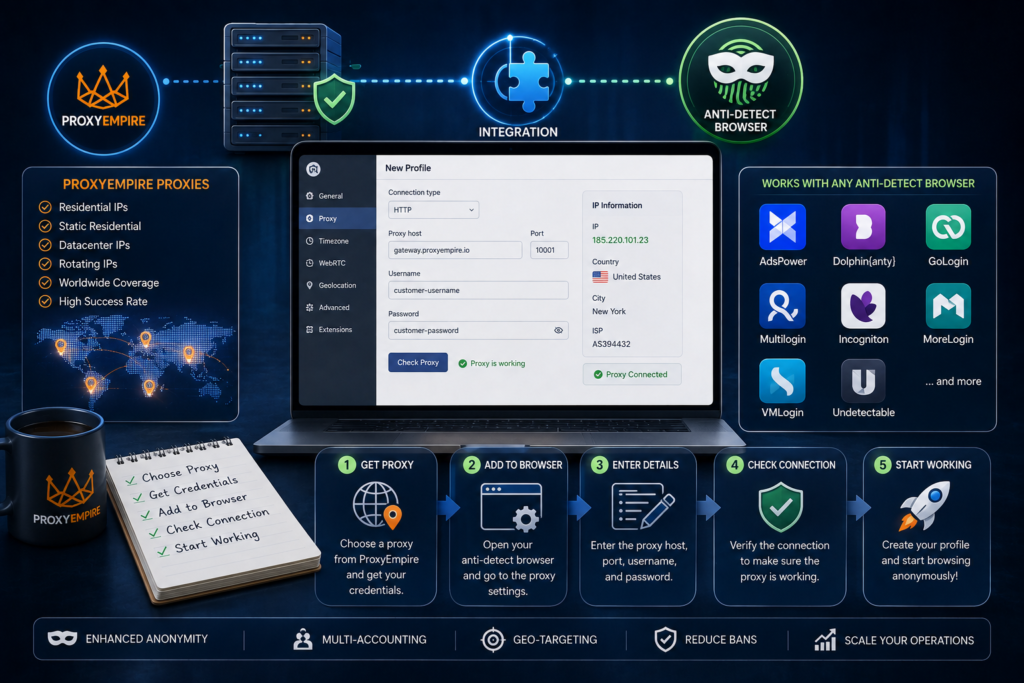
The exact menus and button labels differ from browser to browser, but the underlying steps are nearly identical everywhere. Once you understand this pattern, applying it to a new tool is mostly a matter of finding where each step lives in that browser’s interface.
- Generate your ProxyEmpire proxy. Log into your ProxyEmpire dashboard, choose rotating residential, static residential, mobile, or datacenter, and configure your country, region, city, or ISP targeting based on your project.
- Copy your credentials precisely. Copy the host, port, username, and password exactly as displayed, since even a small typo is the most common reason a connection fails.
- Find the browser’s proxy configuration section. Every anti-detect browser has a proxy section, either inline during profile creation or in a separate Proxy Manager, where you’ll select the protocol, usually HTTP, HTTPS, or SOCKS5, matching what your ProxyEmpire credentials were generated for.
- Enter your ProxyEmpire connection details. Type in or paste your host, port, username, and password. Many tools accept a combined connection string and will detect the format automatically.
- Test the connection before saving. Nearly every anti-detect browser includes a built-in proxy checker. Use it before you save or launch anything, since a passed check is your first confirmation the setup is actually working.
- Assign the proxy to a profile. Attach the tested proxy to a specific profile if it wasn’t created inline, then launch that profile.
- Verify with a live launch, not just the check. Visit an IP-checking site inside the live browser window and confirm the IP, country, and timezone match your ProxyEmpire configuration.
Popular Anti-Detect Browsers ProxyEmpire Works With
ProxyEmpire’s HTTP and SOCKS5 support means it integrates cleanly with essentially any anti-detect browser on the market. A few of the most common pairings include:
- Incogniton — Configure ProxyEmpire directly in Profile Management, or use the Location column’s paste shortcut for faster setup.
- GoLogin — Add ProxyEmpire through the Proxy tab during profile creation, or paste credentials directly on the All Profiles page.
- Dolphin Anty — Enter ProxyEmpire under New Proxy while building a profile, or save it first in the dedicated Proxies section for reuse.
- Multilogin — Select Custom as the proxy type, since ProxyEmpire is a third-party connection rather than Multilogin’s built-in proxy option.
- Kameleo — Switch the Proxy section from Without Proxy to With Proxy, choose your protocol, and enter your ProxyEmpire details.
- Octo Browser — Add ProxyEmpire through the dedicated Proxies tab, individually or in bulk, and take advantage of automatic timezone and language matching.
- NSTBrowser — NSTBrowser works with ProxyEmpire by allowing you to configure ProxyEmpire’s residential or other supported proxies for individual browser profiles, giving each profile a separate IP and browsing identity.
- AdsPower — AdsPower integrates with ProxyEmpire proxies at the browser-profile level, letting you assign different ProxyEmpire IPs to profiles for isolated sessions, location targeting, and more consistent account management.
The specific menus vary, but every one of these follows the same core framework covered above.
Choosing the Right ProxyEmpire Proxy Type for Your Anti-Detect Setup
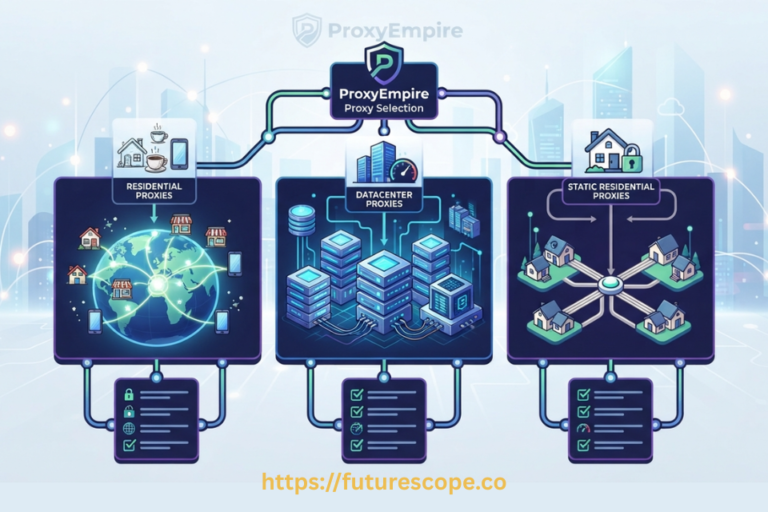
- Rotating residential proxies — A strong default across nearly every anti-detect browser, since a large, constantly rotating pool of real ISP-assigned IPs blends into normal traffic.
- Static residential (ISP) proxies — Generally the more trusted, stable choice for long-term account management, since the same IP staying tied to the same profile mimics how a real, returning user behaves.
- Mobile proxies — A strong fit for mobile-first platforms and apps that scrutinize mobile traffic specifically.
- Datacenter proxies — Best reserved for lower-risk, non-sensitive profiles, since datacenter IP ranges are more easily flagged on platforms with strong bot detection.
Universal Best Practices Across Every Anti-Detect Browser
- One proxy, one profile, always — This holds true no matter which anti-detect browser you’re using, and it’s the single most important rule in this entire guide.
- Verify with a live launch, not just a passed check — A passed proxy check confirms connectivity, but only a live launch and an IP-checking site confirm the setup is actually behaving the way you expect.
- Save proxies for reuse instead of re-entering them — Most anti-detect browsers offer a saved proxy list or template feature specifically to avoid re-entering the same ProxyEmpire credentials from scratch every time.
- Take advantage of bandwidth rollover — Since unused ProxyEmpire bandwidth carries forward instead of expiring, you can size any plan around your average usage without worrying about wasting a quieter month.
Common Mistakes That Apply No Matter Which Browser You Use
- Reusing the same ProxyEmpire proxy across multiple profiles — This is the fastest way to undermine any anti-detect browser’s isolation, regardless of how different the fingerprints look.
- Skipping fingerprint alignment after the proxy connects — A convincing fingerprint paired with a mismatched timezone or language is still an easy pattern for anti-bot systems to catch.
- Using datacenter proxies for sensitive account management — Datacenter proxies are more easily flagged, undermining the realism any anti-detect browser is designed to provide for account-based work.
Need Proxies? Try ProxyEmpire Today!
Try ProxyEmpire for $1.97
Curious whether ProxyEmpire is worth it? Try it yourself and see how it performs for your use case.
Troubleshooting: General Issues You’ll Run Into Almost Anywhere
If a proxy check fails immediately, recheck the host, port, username, and password for typos, and confirm the selected protocol matches what your ProxyEmpire dashboard generated. If a check passes but the resulting location looks wrong, revisit your targeting filters in the ProxyEmpire dashboard, since your credentials are tied to whatever country, region, or city was selected when you generated them. And if a profile seems to work initially but underperforms over time, check the remaining bandwidth on that specific ProxyEmpire package, since a nearly exhausted allowance can cause noticeably degraded performance before the connection fails outright.
Final Thoughts
Once you understand the universal pattern, learning how to integrate ProxyEmpire with an anti-detect browser stops being a browser-specific puzzle and becomes a repeatable process: generate the proxy, find the browser’s proxy section, enter the details, test, assign, and verify. The menus will look different from tool to tool, but the logic underneath stays exactly the same.
Frequently Asked Questions
1. Does ProxyEmpire work with every anti-detect browser?
ProxyEmpire’s HTTP and SOCKS5 support means it integrates with essentially any anti-detect browser that accepts custom or third-party proxies, which covers the vast majority of tools on the market.
2. Which ProxyEmpire proxy type should I use across different anti-detect browsers?
Rotating residential proxies work well as a general default, static residential (ISP) proxies suit long-term account management, and mobile proxies fit mobile-first platforms particularly well, regardless of which browser you’re using.
3. Do I need different ProxyEmpire settings for different anti-detect browsers?
No, the proxy itself works the same way everywhere. What changes is where you enter it and how each browser’s interface is laid out, not the underlying ProxyEmpire configuration.
4. Can I use the same ProxyEmpire proxy across two different anti-detect browsers?
It’s not recommended if both are actively running profiles tied to the same or related accounts, since sharing an IP across identities undermines the isolation any anti-detect browser is designed to provide.
5. What’s the most common mistake people make when integrating ProxyEmpire with an anti-detect browser?
Skipping the live verification step. A passed proxy check confirms connectivity, but only launching the profile and checking an IP-checking site confirms the IP, location, and timezone are all actually correct.
Ready to Integrate Your First Proxy?
You now understand the universal framework for how to integrate ProxyEmpire with any anti-detect browser, whether you’re using one of the popular names above or something else entirely. Grab your ProxyEmpire proxy credentials, find the proxy section in your browser of choice, and follow the same seven steps that work everywhere. Go set up your first ProxyEmpire integration today and get your profiles running securely.