Alienware, Dell’s flagship gaming PC brand, is known for its premium design, high-end performance, and out-of-the-box gaming readiness. For gamers seeking a personalized gaming experience, the question often arises: can you customize Alienware desktops? The answer is a resounding Yes, you can customize Alienware desktops. You can choose the processor, memory, storage, and other options that best meet your needs. You can also select from a variety of pre-configured models, or build your own custom system.
This guide explores the customization capabilities of Alienware desktops, including key features, limitations, and how they compare to other gaming PCs, providing a detailed resource for anyone looking to tailor their gaming rig.
Yes, Alienware Desktops Are Customizable
Unlike many pre-built systems from big brands, Alienware desktops are designed with modularity and expandability in mind. Whether you buy a pre-configured Aurora R16 or build your own variant through Dell’s customization portal, you’ll have the ability to upgrade key components like GPU, RAM, storage, CPU (in some models), cooling systems, and more.
What Can You Customize in Alienware Desktops?
Here are the main components you can upgrade or swap:
| Component | Can You Customize? | Notes |
|---|---|---|
| Graphics Card (GPU) | ✅ Yes | Most Aurora desktops allow easy GPU upgrades. |
| Processor (CPU) | ⚠️ Varies | Soldered in some models; replaceable in others like R16. |
| RAM (Memory) | ✅ Yes | Easily expandable up to 64GB/128GB DDR5. |
| Storage (SSD/HDD) | ✅ Yes | Multiple slots for SSD and 2.5″ HDDs. |
| Power Supply (PSU) | ⚠️ Limited | Proprietary PSUs in some models—check wattage & size. |
| Cooling System | ⚠️ Limited | Aurora R16 supports AIO coolers; older models have airflow constraints. |
5 Must Do Mods/Upgrades For The Alienware Aurora R10/R11/R12
Why Choose Alienware for Customization?
Alienware desktops are an excellent choice for gamers who value both performance and personalization. The combination of high-end hardware options, user-friendly software, and customizable aesthetics makes Alienware a versatile platform for creating a gaming PC that reflects your unique needs and style. While proprietary components may pose some limitations, the overall customization experience is robust, supported by Dell’s reputation for reliability and customer service.
Extensive Hardware Customization Options
Alienware desktops, such as the Area-51 and Aurora models, offer a wide range of hardware customization options to meet diverse gaming needs. When configuring a new system, you can select from high-performance components to ensure your desktop delivers the power required for modern games or creative workloads.
Processor and Graphics
The Area-51 supports processors up to the Intel® Core™ Ultra 9 285K, while the Aurora offers the same high-end CPU option. For graphics, the Area-51 can be equipped with up to an NVIDIA® GeForce RTX™ 5090, and the Aurora supports up to an RTX™ 5080. These choices allow you to prioritize performance for tasks like 4K gaming, streaming, or content creation.
Memory and Storage
Memory customization includes up to 64 GB of RAM for both models, ensuring smooth multitasking and fast load times. Storage options are equally impressive, with the Area-51 supporting up to 4 TB and the Aurora up to 8 TB. These capacities provide ample space for games, media, and other data-intensive applications.
Upgradability
Alienware desktops are designed with upgradability in mind. The Aurora R15, for example, provides easy access to internal components via a safety screw and latches for removing side panels. You can upgrade RAM (with two accessible slots), storage (including SSD and HDD, with a slot for a second M.2 SSD), Wi-Fi cards, and even the GPU and CPU. For instance, the Aurora R15 review unit featured an NVIDIA® GeForce RTX™ 4090 GPU and an Intel® Core™ i9-13900KF CPU, both of which can be swapped out for newer models as needed.
Cooling Solutions
To support high-performance components, Alienware desktops incorporate advanced cooling systems. The Aurora features a 240mm liquid cooling solution, while the Area-51 offers a 360mm version for enhanced thermal capacity. These systems ensure stable performance during intense gaming sessions, with dedicated cable management channels in the Area-51 to maintain optimal airflow.
| Customization Option | Area-51 Details | Aurora Details |
|---|---|---|
| Processor | Up to Intel® Core™ Ultra 9 285K | Up to Intel® Core™ Ultra 9 285K |
| Graphics | Up to NVIDIA® GeForce RTX™ 5090 | Up to NVIDIA® GeForce RTX™ 5080 |
| Memory | Up to 64 GB | Up to 64 GB |
| Storage | Up to 4 TB | Up to 8 TB |
| Cooling | 360mm liquid cooling | 240mm liquid cooling |
| Lighting Zones | Up to 8 | Up to 5 |
Limitations to Consider
- Some Alienware PCs (older Aurora models) use proprietary motherboard layouts, making it harder to replace components like PSU or CPU coolers.
- BIOS compatibility may limit third-party upgrades—especially with newer GPUs or RAM kits.
- Pricing for upgrades through Dell is often higher than aftermarket parts.
- GPU clearance may be restricted in certain cases—always check dimensions.
Alienware vs Custom PC Builds: Which Is Better for Customization?
| Feature | Alienware Aurora | Custom PC Build |
|---|---|---|
| Ease of Setup | ✅ Pre-assembled | ❌ Requires DIY |
| Customization Freedom | ⚠️ Limited by proprietary parts | ✅ Fully customizable |
| Support/Warranty | ✅ Dell warranty | ⚠️ Depends on parts |
| Price/Performance | ❌ Higher cost | ✅ Better value |
Software Customization with Alienware Command Center
The Alienware Command Center is a powerful software suite that enhances the customization experience by allowing you to fine-tune performance and aesthetics. Available on all Alienware desktops, this tool provides a user-friendly interface for managing system settings.
Performance Tuning
Through the Command Center, you can adjust power profiles to optimize your system for performance, efficiency, or a balance of both. Overclocking options are available for supported CPUs, enabling you to push your hardware for maximum gaming performance. The software also allows you to monitor system temperatures and fan speeds, ensuring your desktop remains stable under heavy loads.
Game Management
The Command Center simplifies game management by providing a centralized hub to launch your favorite titles. You can create custom profiles for specific games, adjusting settings like lighting and performance to enhance your gaming experience.
Aesthetic Customization with AlienFX
One of the standout features of Alienware desktops is their customizable RGB lighting, managed through the AlienFX section of the Command Center. The Aurora supports up to five lighting zones, while the Area-51 offers up to eight, allowing you to create a personalized visual setup. You can choose from a variety of colors and effects, such as teal, lilac, magenta, or orange, to match your gaming environment or mood. This level of aesthetic customization makes your desktop a unique centerpiece in your gaming rig.
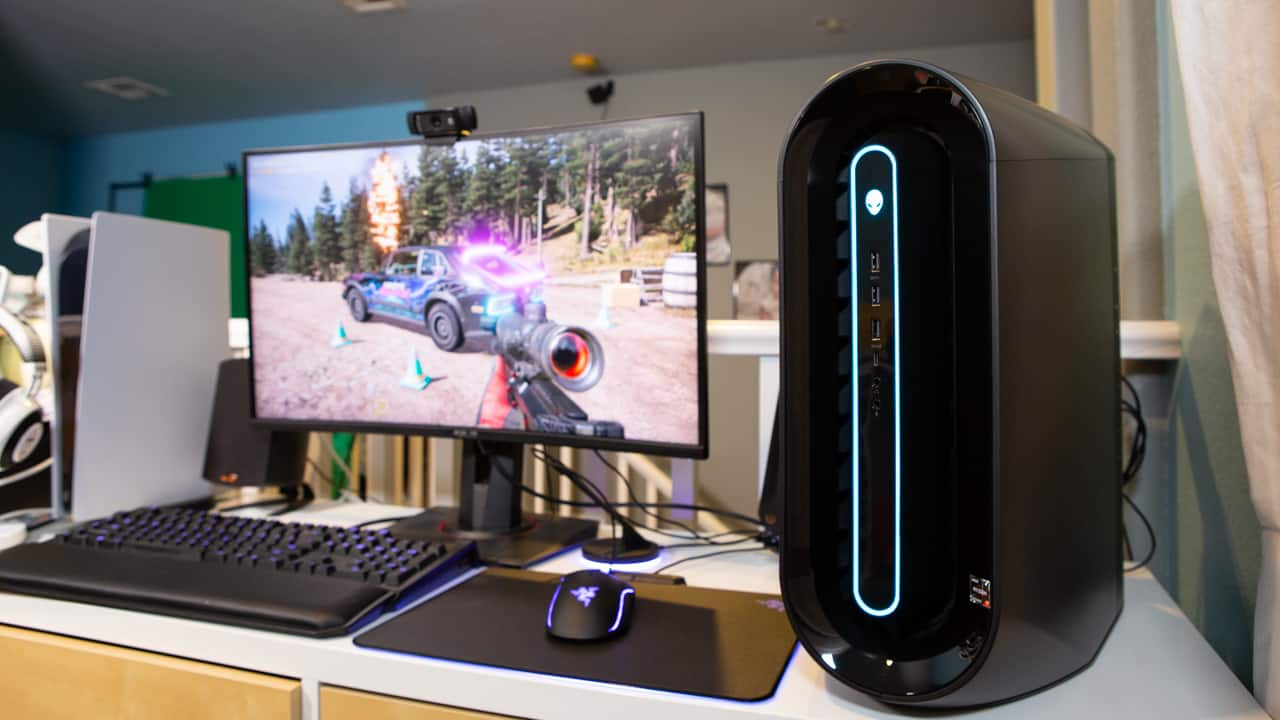
Most Customizable Alienware Desktop Models (2025)
Alienware desktops in 2025 offer solid customization options, especially the Aurora R16, which fixes many of the limitations of earlier models. Whether you’re upgrading your RAM, GPU, SSD, or even CPU (in supported units), Alienware gives you both style and substance. However, be sure to check model-specific limitations, especially if you plan on heavy modifications.
Here are the top Alienware desktop towers you can customize:
Alienware Aurora R16 – Best All-Round Customizable Desktop (2025)
The Alienware Aurora R16 is the latest evolution of the Aurora series, offering a compact, airflow-optimized chassis with standard ATX components, finally moving away from the proprietary layout that limited previous models. It’s built for gamers, streamers, and creators who want power and quiet performance in a sleek case.
Pros
- Standard motherboard and GPU layout
- Tool-less side panel and internal access
- Much quieter than previous Aurora models
- More future-proof with better thermal efficiency
Cons
- CPU cooler clearance may be tight
- Some proprietary parts (e.g., front panel connector)
Key Specs:
- CPU: Up to Intel Core i9-14900KF or AMD Ryzen 9 7950X
- GPU: Up to NVIDIA GeForce RTX 4090
- RAM: Up to 64GB DDR5 (user-upgradable)
- Storage: 2x M.2 PCIe Gen4 SSDs + 1x 3.5” HDD slot
- Cooling: Air or liquid AIO (support for 240mm radiator)
- PSU: Up to 1000W Platinum
Best For:
Gamers and creators seeking high-end performance and modular upgrades in a space-efficient case.
Alienware Aurora Ryzen Edition R14 – AMD-Powered Beast
The Aurora Ryzen Edition R14 caters to AMD fans and packs serious multitasking and gaming power. With support for Ryzen 5000/7000 series CPUs and massive GPU options, it’s ideal for those who love overclocking or productivity-focused workloads.
Pros
- Fantastic multicore CPU performance/li>
- Radeon GPU compatibility/li>
- Supports overclocking with Alienware Command Center/li>
- Ideal for 4K gaming and rendering
Cons
- Still uses some proprietary cabling
- Bulkier than the R16
Key Specs:
- CPU: AMD Ryzen 7 7800X3D / Ryzen 9 7950X
- GPU: Up to NVIDIA RTX 4080 or AMD Radeon RX 7900 XTX
- RAM: Up to 128GB DDR5
- Storage: Dual M.2 + Dual 2.5” SATA support
- PSU: 750W–1000W options
- Cooling: Optional liquid cooling + better thermals than earlier Ryzen models
Best For:
Hardcore gamers, video editors, and streamers who need AMD power and flexibility.
Alienware Aurora R13 – Intel 12th/13th Gen Option (Budget Pick in 2025)
Though a generation older, the Aurora R13 remains a popular budget-to-mid-tier choice in 2025, especially for those entering the gaming world. It supports Intel 12th and 13th Gen CPUs, making it compatible with many current-gen GPUs and DDR5 RAM.
Pros
- Good upgrade path for GPU/RAM
- Slightly more affordable in 2025 market
- Reliable Dell BIOS and warranty
Cons
- Proprietary motherboard layout
- Cable clutter can be an issue
- PSU limitations in certain configurations
Key Specs:
- CPU: Intel Core i5-12600K to i9-13900KF
- GPU: Up to NVIDIA RTX 4070 Ti
- RAM: Up to 64GB DDR5
- Storage: 1TB SSD + secondary 2TB HDD supported
- Cooling: Optional liquid cooling
Best For:
Gamers on a budget or those upgrading from older builds who want modern performance.
Alienware Aurora R10 – Legacy AMD Model Still in Circulation
The R10 was Alienware’s original AMD Ryzen system and is still available as refurbished or discounted new units. While not ideal for long-term upgrades due to non-standard layout, it remains usable for casual gamers or light streamers.
Pros
- Affordable entry-level gaming
- Stable 1080p/1440p performance
- Older parts are cheaper
Cons
- DDR4 memory only
- No DDR5 or PCIe Gen 4.0
- Proprietary PSU, tight internal space
Key Specs:
- CPU: Up to AMD Ryzen 9 5900X
- GPU: Up to NVIDIA RTX 3070
- RAM: 32GB DDR4
- Storage: Up to 1TB SSD + 1TB HDD
Best For:
Entry-level gamers, students, or casual streamers who want performance without high cost.
Conclusion
Alienware desktops are highly customizable, offering extensive options for hardware upgrades, software tuning, and aesthetic personalization. From choosing powerful processors and graphics cards to adjusting RGB lighting and performance profiles, Alienware provides the tools to create a gaming rig tailored to your preferences. Despite some limitations due to proprietary components, the flexibility and ease of use make Alienware a top choice for gamers seeking a personalized, high-performance desktop. Whether you’re a casual gamer or a competitive enthusiast, Alienware’s customization capabilities ensure your system is ready to deliver an out-of-this-world gaming experience.
If you’re a gamer or creator who prefers a plug-and-play experience with room to grow, Alienware desktops like the Aurora R16 are an excellent choice. While they may not offer the full flexibility of custom PC builds, they strike a good balance between premium design, upgrade options, and Dell’s support ecosystem.
For users planning incremental upgrades (RAM, SSD, GPU), Alienware offers a future-proof platform in 2025. Just be mindful of proprietary constraints and always check compatibility charts before installing new parts.
Frequently Asked Questions
Are Alienware Desktops Customizable?
If you’re looking for a gaming desktop that you can customize to your own liking, then an Alienware desktop is a great option. These desktops come with a variety of options and features that can be changed and customized to suit your needs. For example, you can choose the type of processor, graphics card, memory, storage, and other components that you want.
You can also select the case style and color that you prefer. In addition, Alienware desktops come with pre-installed software such as Windows 10 Pro 64-bit Edition and AlienFX lighting control software.
Can You Change Color of Alienware Desktop?
Yes, you can change the color of your Alienware desktop. There are a few different ways to do this, and we’ll walk you through each method so that you can choose the best option for your needs.The first way to change the color of your Alienware desktop is to use the pre-installed MyColors software.
This software allows you to select from a variety of preset colors, or you can create your own custom color scheme. To access MyColors, simply click on the “MyColors” icon on your desktop.If you want more control over the colors on your Alienware desktop, you can use Windows 10’s built-in Color Management tool.
To access this tool, go to Start > Settings > System > Display. Scroll down to the “Advanced display settings” section and click on “Color management”. From here, you can adjust the gamma, brightness, contrast, and other color settings for your display.
Finally, if you want to really customize the look of your Alienware desktop, you can install a third-party theme or skin. There are many different skins available online, so take some time to browse around and find one that suits your taste. Once you’ve downloaded a skin, follow the installation instructions provided by the developer.
After installation is complete, restart your computer and enjoy your new look!
Is Dell Alienware Upgradeable?
Yes, Dell Alienware computers are upgradeable. You can upgrade the processor, memory, hard drive, and video card on most models. Some of the newer models also support SSD upgrades.
Are Alienware Desktops Any Good?
If you’re looking for a powerful gaming desktop, then the Alienware Aurora R7 is a great option. It’s packed with top-of-the-line components like an Intel Core i7 processor and Nvidia GeForce GTX 1080 Ti graphics card, so it can handle even the most demanding games. Plus, it has a stylish design with cool lighting effects that will make your friends jealous.
However, all of this power comes at a price, as the Aurora R7 is one of the more expensive gaming desktops on the market.
Can You Upgrade Alienware Aurora R11?
Yes! Here are some things to keep in mind when upgrading your R11. First, you’ll need to decide what kind of upgrades you want to make.
Keep in mind that each type of upgrade will require a different kind of process and may have different costs associated with it. Once you’ve decided what kind of upgrades you want to make, it’s time to start researching compatible parts.
Depending on the part(s) you’re installing, this process can vary greatly. However, there are plenty of online resources available that can walk you through each step of the process. After installation is complete, don’t forget to run any necessary updates and restart your computer so that the changes can take effect.
Can You Upgrade Alienware Aurora R12?
Yes – you can upgrade your Aurora R12!
Here are some things to keep in mind when doing so:
1. Make sure that you have the correct components. In order to upgrade your Aurora R12, you’ll need to have compatible CPU, GPU, and memory.
Check withAlienware or your local computer store to make sure that you’re getting the right parts.
2. Take care when opening up your computer. Be careful not to damage any of the delicate components inside.
If you’re not comfortable doing this yourself, take it to a professional who can do it for you.
3. Once everything is installed, test it out! Make sure everything is working correctly before putting everything back together again.
With these tips in mind, upgrading your Alienware Aurora R12 should be a breeze!
Can You Upgrade Alienware Aurora R10?
Yes! In fact, we highly recommend that you upgrade your system when possible to ensure peak performance and longevity.
There are a few things to keep in mind when upgrading your Aurora R10, however. First, make sure that you have compatible parts. The easiest way to do this is to check the Dell website or give us a call and we can help you determine compatibility.
Second, be aware of your thermal limits. Overclocking any component will increase heat output, so make sure your cooling solution is up to the task. And finally, take care when handling sensitive components like the CPU and GPU – static electricity can easily damage these parts.