Yes, an inkjet printer can print on vinyl if you use compatible inkjet printable vinyl. Ensure the printer settings are adjusted for vinyl media.
Discover the versatility of inkjet printers with the ability to print on vinyl, a popular material for both professional and DIY projects. Vinyl printing opens a doorway to creative expression, allowing you to produce everything from stickers and decals to signs and banners.
Before starting, it’s crucial to select the right type of vinyl, as only vinyl specifically coated for inkjet printing will produce reliable, long-lasting results. Bear in mind that typical home inkjet printers are designed to handle paper and may require careful handling of vinyl to avoid jams or misprints. Always consult your printer’s manual for material compatibility and proper settings, or consider investing in a specialized printer for optimal results with a wider range of materials. Embrace the creative possibilities that an inkjet printer offers when paired with the right vinyl.
Inkjet Printers And Vinyl Compatibility
Using an inkjet printer to print on vinyl is popular for crafting, stickers, and decals. But will it work flawlessly every time? The answer lies in understanding the compatibility between inkjet printers and vinyl materials.
Factors Affecting Ink Adhesion
Ink adhesion to vinyl depends on several elements:
- Printer Type: Not all inkjet printers can handle vinyl printing.
- Ink Type: Dye-based inks may smear; pigment-based inks adhere better.
- Vinyl Quality: High-quality vinyl maximizes ink adhesion.
- Surface Treatment: Pre-treated vinyl surfaces improve ink grip.
Types Of Vinyl For Inkjet Printers
Vinyl types suitable for inkjet printers include:
| Type | Features |
|---|---|
| Matte Vinyl | Low glare, perfect for wall decals |
| Glossy Vinyl | High shine, ideal for vibrant stickers |
| Clear Vinyl | Transparent, used for window decals |
Choosing the right type of vinyl is crucial for clear, durable prints.
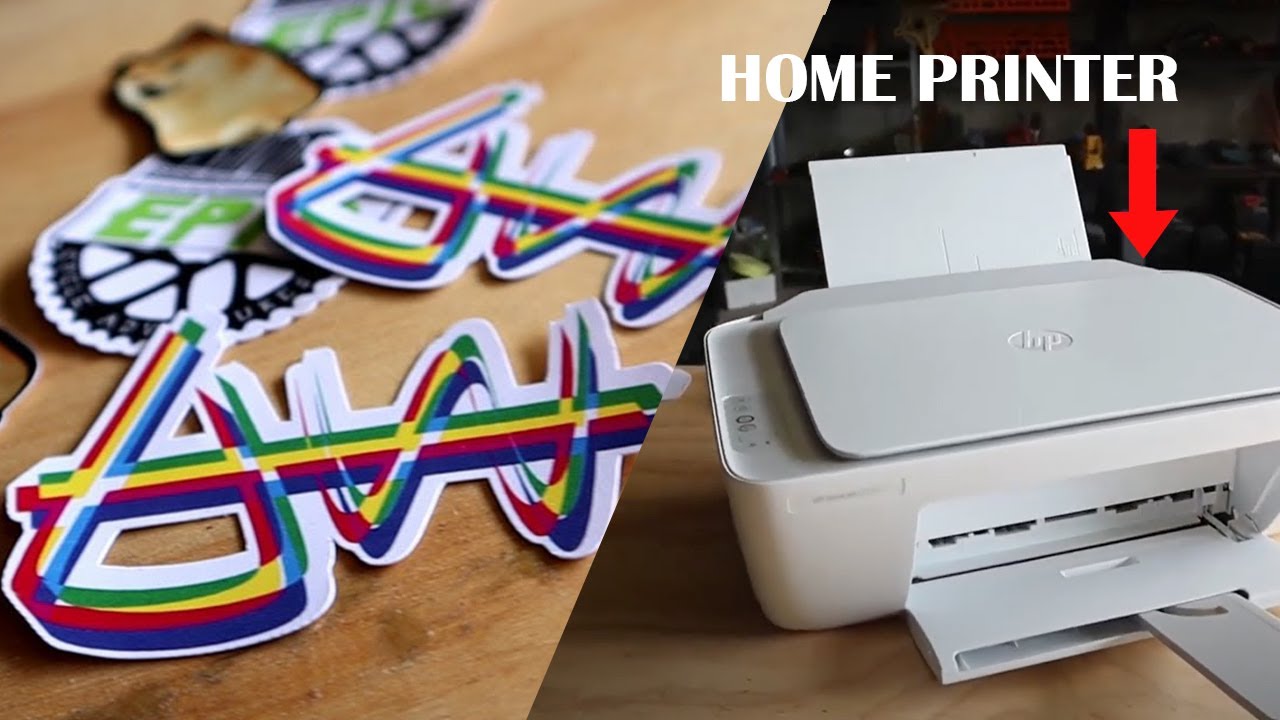
Preparing For Printing On Vinyl
Preparing for Printing on Vinyl unlocks a world of creativity and customization for crafters and businesses alike. To ensure a successful print job, the right steps must be taken before ink meets vinyl. Let’s delve into the best practices to prepare for this task.
Selecting The Right Vinyl
Choosing the appropriate vinyl is crucial. Here are the key points to consider:
- Adhesive or Heat Transfer: Know the end-use. Adhesive sticks on surfaces. Heat transfer applies to fabrics.
- Printer Compatibility: Some vinyl works with inkjet printers only. Check the product specifications before purchasing.
- Indoor or Outdoor: Outdoor vinyl stands up to weather. Indoor vinyl fits for wall decals and crafts.
Pre-treatment Processes
A smooth printing experience requires a few pre-printing tasks. Follow this guide for the best outcomes:
- Clean Your Printer: Remove dust or debris. It prevents ink smudges and streaks.
- Load Vinyl Correctly: Align the vinyl sheet. Ensure it’s flat to avoid printer jams.
- Adjust Printer Settings: Choose ‘high-quality’ or ‘photo quality’. It optimizes the print for vinyl.
- Test Print: Always run a test. It helps avoid mistakes on the actual vinyl.
Inkjet Printing Process On Vinyl
Vinyl printing with an inkjet printer transforms plain surfaces into vibrant displays. This process requires specific types of vinyl designed for inkjet printing, allowing for crisp images and texts.
Step-by-step Printing Guide
Follow this guide for seamless vinyl printing:
- Select the right vinyl. Only use vinyl with an inkjet coating.
- Prepare the image. Ensure it fits the vinyl sheet size.
- Load the printer. Place one sheet at a time.
- Adjust printer settings. Choose ‘photo quality’ for best results.
- Print a test page. Check for color accuracy on paper first.
- Print on vinyl. Feed vinyl face up or down as required.
- Allow ink to dry. Avoid smudging by waiting before use.
- Apply a sealant. Protect the print from water and UV damage.
Troubleshooting Common Issues
Solve frequent printing hiccups with these tips:
- Ink smearing? Allow more drying time or use a fixative spray.
- Prints off-center? Check the vinyl alignment in the tray.
- Color issues? Perform a nozzle check and clean as needed.
- Printer not feeding? It may be a roller or tray grip issue. Clean them.
- Blurry prints? Ensure the print resolution is adequately high.

Post-printing Considerations
After printing on vinyl with an inkjet printer, it’s crucial to focus on how to protect and enhance the print. Proper post-printing practices ensure long-lasting vibrancy and durability for your vinyl projects.
Laminating Printed Vinyl
Lamination adds a protective layer over your print. This extra step can extend the life of your artwork. Here’s why you should consider laminating your printed vinyl:
- Protects against scratches and fading.
- Seals out water and moisture.
- Gives a professional glossy or matte finish.
- Increases sturdiness for handling.
Durability And Weather Resistance
Assess the vinyl’s ability to withstand elements. This ensures your print stays perfect in various conditions.
| Factor | Impact on Durability |
|---|---|
| UV Exposure | Can cause fading without UV protection. |
| Moisture | Water-resistant materials fare better outdoors. |
| Temperature | Extreme heat or cold may affect adhesion. |
Consider the intended use of the printed vinyl. Is it for indoor or outdoor use? Your answer determines the needed weather resistance level. Outdoor applications typically require additional protective measures.
Frequently Asked Questions For Will An Inkjet Printer Print On Vinyl?
Will A Regular Printer Print On Vinyl?
Most regular printers cannot print on vinyl as they are designed for paper-based media. Specialized inkjet printers with compatible inks are required for printing on vinyl sheets effectively.
How Do You Make Vinyl Decals With An Inkjet Printer?
To make vinyl decals with an inkjet printer, start by choosing a design and printing it onto vinyl inkjet paper. Let the ink dry completely, then cut out the design using a pair of scissors or a craft cutter. Peel off the backing and apply the decal to a clean surface.
Can An Hp Printer Print On Vinyl?
Yes, some HP printers can print on vinyl, specifically models that support vinyl printing in their specifications. Always use compatible vinyl sheets designed for inkjet printers to ensure quality results.
Can Inkjet Printer Print Stickers?
Yes, inkjet printers can print stickers. Ensure you use compatible sticker paper and adjust printer settings for best quality.
Conclusion
Exploring the capabilities of inkjet printers with vinyl has been illuminating. We’ve uncovered that specific models can indeed tackle this task, given the right type of vinyl and ink. To ensure success, always check your printer’s specifications and choose materials wisely.
Embrace experimentation to achieve the best results and don’t hesitate to reach out for expert advice if needed. Happy printing!


![How to Fix YouTube Server Connection Error [400] on Android](https://www.futurescope.co/wp-content/uploads/2021/09/How-to-Fix-YouTube-Server-Connection-Error-400-on-Android-150x150.png)