Storing a motherboard without an antistatic bag can be risky, but it’s not impossible if done carefully. Electrostatic discharge (ESD) is a silent killer for sensitive electronics, and motherboards are particularly vulnerable. Typically, manufacturers use antistatic bags to protect components from ESD damage during shipping or storage. However, if you don’t have an antistatic bag available, you can still store a motherboard safely by following certain precautions and using alternative methods.
Motherboards are the backbone of any computer system, orchestrating the interaction of critical components. When you need to store a spare motherboard—whether for future use, testing, or resale—protecting it from damage is essential. Antistatic bags are the standard for shielding motherboards from electrostatic discharge (ESD), moisture, and physical harm.
To safely store a motherboard without an antistatic bag, use non-conductive materials such as a cardboard box or paper towel to cover it. This ensures protection against electrostatic discharge (ESD) and prevents damage to the motherboard.
It is important to avoid using plastic materials, as they can potentially generate static electricity. By following these precautions, you can store your motherboard securely without the need for an antistatic bag.
Why Antistatic Protection Is Important?
Motherboards contain integrated circuits and microchips that can be damaged by even a tiny static shock, often without any visible signs. While the risk may seem small, improper storage can lead to long-term instability, boot failures, or complete hardware malfunction. That’s why using proper ESD precautions is crucial when storing or handling any motherboard.
Alternative Ways to Store a Motherboard Safely
If an antistatic bag is unavailable, the following methods can help you store your motherboard safely. Each method focuses on minimizing ESD risks, preventing physical damage, and protecting against environmental factors.
1. Use Non-Conductive Materials
Non-conductive materials are a simple and accessible way to store a motherboard while reducing the risk of ESD.
- Cardboard Box: A sturdy cardboard box, such as the motherboard’s original packaging or a corrugated box, is an effective storage solution. Cardboard is non-conductive and provides some protection against static discharge. Ensure the box is large enough to prevent the motherboard from touching the sides. Line the box with foam, bubble wrap (preferably pink anti-static bubble wrap), or paper towels to cushion the motherboard and prevent movement during storage. According to discussions on Tom’s Hardware, storing a motherboard in a cardboard box without an antistatic bag is generally safe, as ESD risks are often overstated when proper precautions are taken.
- Paper Towel or Cloth: Wrapping the motherboard in a clean, dry paper towel or cloth offers basic protection against dust and minor impacts. This method is best for short-term storage, as it provides limited ESD protection. Ensure the material is free of static-generating properties, as some plastics can increase static buildup.
- Bubble wrap: while bubble wrap is not inherently non-conductive, it can be safely used to store motherboards by wrapping it around the board and ensuring that there is no contact with conductive surfaces.
- Foam padding: foam padding can be used to cushion the motherboard and provide protection against static electricity. It is important to choose foam that is specifically designed for electronic components to ensure adequate insulation.
- Anti-static foam: similar to regular foam padding, anti-static foam is specially formulated to dissipate static electricity. It provides an extra layer of protection and is commonly used in electronics packaging.
2. Create a DIY Antistatic Bag
You can replicate the protective qualities of an antistatic bag using household items to create a Faraday cage effect.
- Aluminum Foil and Non-Conductive Material: Wrap the motherboard in a non-conductive material, such as a paper bag or a non-static-generating plastic bag, to prevent direct contact with conductive surfaces. Then, wrap it in aluminum foil, which acts as a conductive layer to shield against ESD. This method mimics the Faraday cage effect of an antistatic bag, as noted by WhatsaByte. Ensure the foil is securely wrapped to avoid gaps that could allow static penetration.
- Pink Anti-Static Bubble Wrap: If available, pink anti-static bubble wrap is an excellent alternative, as it is specifically designed to dissipate static electricity. Wrap the motherboard tightly in this material and place it in a sturdy container for added protection. This is particularly useful for shipping or long-term storage, as it combines ESD protection with cushioning.
3. Use a Metal Container with Non-Conductive Lining
A metal container can serve as a Faraday cage, but it must be used correctly to avoid conducting electricity to the motherboard.
- Place the motherboard inside a non-conductive material, such as a paper bag or a clean cloth, to prevent direct contact with the metal. Then, place it inside a metal container, such as a tin box. The metal container shields the motherboard from external static fields, while the non-conductive lining ensures safety. This method is effective for long-term storage, as it provides robust protection against ESD and environmental factors.
4. Store in a Cardboard Box with Padding
Reusing the motherboard’s original box or a similar cardboard box is a practical option, even without the antistatic bag.
- Line the box with foam, bubble wrap, or anti-static foam to secure the motherboard and prevent movement. Center the motherboard in the box and add padding on all sides to cushion it against impacts. Seal the box tightly to protect against dust and moisture. According to FutureScope, this method is effective for both short-term and long-term storage when combined with proper padding and environmental controls.
5. Avoid High Humidity and Heat
Motherboards should be kept in an environment between 20–25°C (68–77°F) and a relative humidity of 40–60%. Excessive moisture can corrode connectors, while high heat may warp PCB materials.
6. Minimize Handling
Only handle the motherboard by the edges, and avoid touching capacitors, chips, or socket areas. Ground yourself by touching a metal object or using an ESD wrist strap if available.
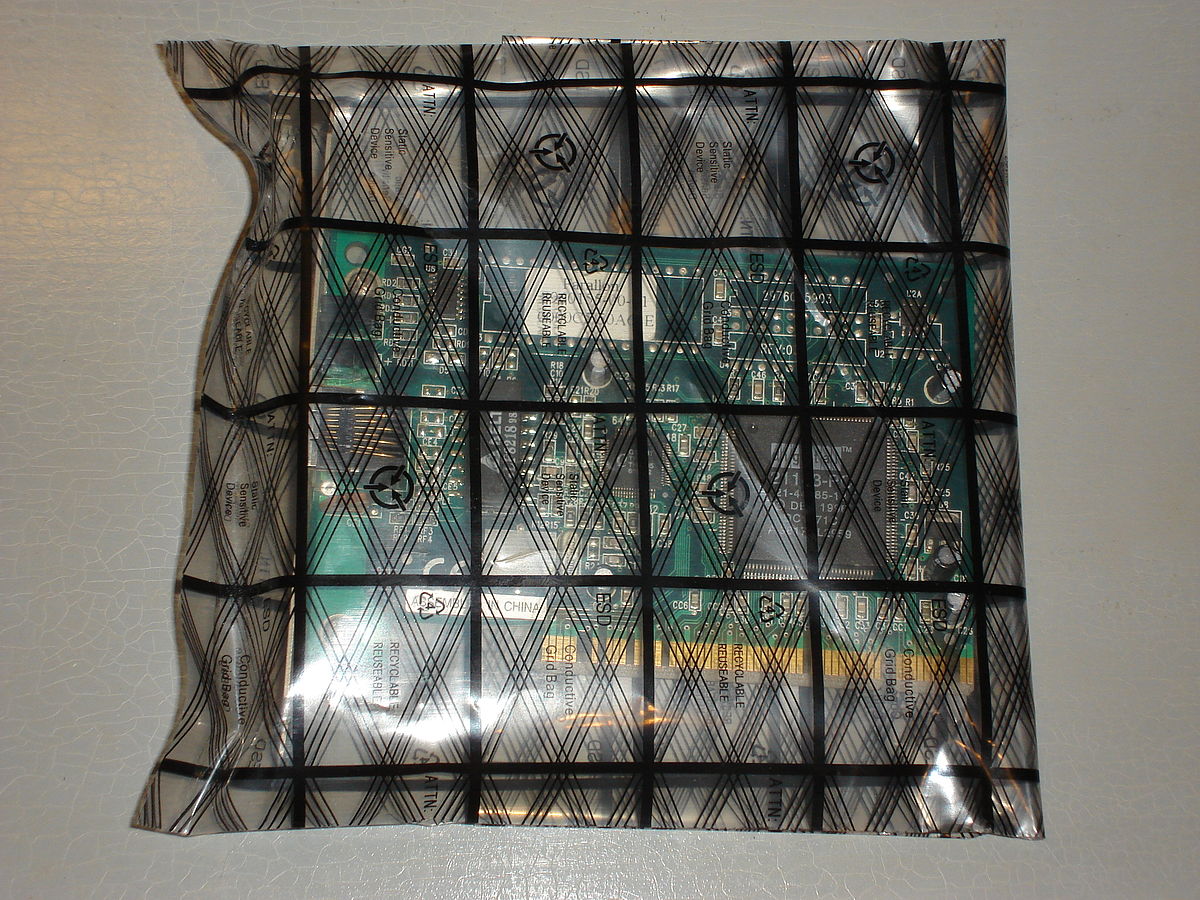
Credit: en.wikipedia.org
Storage Method Comparison
The following table summarizes the alternative storage methods, their materials, and key considerations:
| Method | Materials Needed | Advantages | Considerations |
|---|---|---|---|
| Cardboard Box | Cardboard box, foam, bubble wrap, paper towels | Simple, accessible, provides physical protection | Limited ESD protection; best with padding to prevent movement |
| DIY Antistatic Bag | Paper/plastic bag, aluminum foil, pink anti-static bubble wrap | Mimics Faraday cage, cost-effective, customizable | Requires careful wrapping to ensure no gaps in conductive layer |
| Metal Container with Lining | Metal container, paper bag, cloth | Strong ESD protection via Faraday cage, durable for long-term storage | Must use non-conductive lining to prevent electrical conduction |
| Padded Original Box | Original motherboard box, foam, bubble wrap | Reuses existing packaging, good for short- and long-term storage | Ensure sufficient padding to prevent movement and damage |
Preparing The Motherboard For Storage
Properly preparing your motherboard for storage is essential to ensure its longevity and functionality when you decide to use it again. Even without an antistatic bag, you can take certain steps to protect your motherboard from static electricity and other potential risks. In this section, we will discuss the proper handling and cleaning of the motherboard, removing dust and debris, and ensuring all components are securely attached before storage.
Proper Handling and Cleaning of the Motherboard before Storage
Before storing your motherboard, it is crucial to handle it with utmost care to prevent any damage. Here are some tips to follow:
- Make sure to work on a clean and dry surface to minimize the risk of contamination.
- Wash your hands thoroughly and dry them before handling the motherboard to avoid transferring any oils or moisture.
- Avoid touching the sensitive components, such as the pins and capacitors, as they are susceptible to damage caused by static electricity.
Cleaning the motherboard is also important before storage. Dust and debris can accumulate over time and potentially affect its performance. Here’s how you can clean it:
- Use compressed air or a soft brush to remove loose dust and debris from the motherboard. Be gentle to avoid damaging any components.
- Moisten a lint-free cloth or microfiber cloth with isopropyl alcohol and gently wipe the motherboard to remove stubborn stains or dirt. Make sure the cloth is not dripping wet.
- Allow the motherboard to air dry completely before proceeding with the next step.
Tips on Removing Dust and Debris from the Motherboard
Keeping your motherboard free from dust and debris is crucial for its optimal performance. Here are some tips to effectively remove dust and debris:
- Use compressed air to blow away dust from hard-to-reach areas such as between components and along connectors. Be cautious not to blow the dust further into the motherboard.
- A soft brush can be used to gently sweep away any remaining dust particles. Ensure that the brush doesn’t have stiff bristles that may scratch the motherboard.
- For stubborn debris, use a cotton swab moistened with isopropyl alcohol to carefully clean the affected area. Remember to be gentle to avoid damaging any delicate components.
Ensuring All Components are Securely Attached Before Storage
Before storing your motherboard, it is crucial to ensure that all components are securely attached. This will prevent any potential damage during storage and easy installation when you decide to use it again. Here’s what you can do:
- Check all cables and connectors to make sure they are firmly connected to the motherboard. This includes power cables, data cables, and any expansion cards or RAM modules.
- If you have any loose components, such as unused RAM modules or expansion cards, consider removing them and storing them separately in antistatic bags.
- Inspect the motherboard for any loose screws or mounting brackets. Tighten them if necessary.
By following these steps, you can ensure that your motherboard is properly prepared for storage, even without an antistatic bag. Remember to handle it with care, clean it thoroughly, remove dust and debris, and securely attach all components. By taking these precautions, you can protect your motherboard and ensure its longevity for future use
Securing The Motherboard In A Cardboard Box
When it comes to safely storing a motherboard without an antistatic bag, one effective option is to secure it in a cardboard box. With the right padding and proper precautions, you can ensure that your motherboard remains protected from potential damage during storage.
Step-by-step guide on how to safely store a motherboard in a cardboard box
- Start by finding a sturdy cardboard box that is large enough to fit the motherboard comfortably.
- Clean the box to remove any dust or debris that could potentially harm the components.
- Place a layer of non-conductive material, such as bubble wrap or foam, at the bottom of the box to provide a cushioning effect.
- Gently place the motherboard on top of the padding, ensuring that it is centered and doesn’t protrude over the edges of the box.
- If you have additional components to store along with the motherboard, it is recommended to individually wrap each item in an antistatic bag or non-conductive material before placing them in the box. This will minimize the risk of any accidental damage or static discharge.
- Once all the components are securely placed in the box, add more padding around them to prevent any movement during transportation or storage. This can be done by using foam inserts, crumpled paper, or more bubble wrap.
- Close the box carefully, ensuring that it is sealed tightly to prevent any dust or moisture from entering.
Tips on padding and securing the motherboard to prevent movement
Properly padding and securing the motherboard in a cardboard box is crucial to prevent any movement that can lead to potential damage. Here are some tips:
- Ensure that the motherboard is centered in the box and does not touch the edges to avoid any impact or pressure points.
- Use foam inserts or cut pieces of foam to create a snug fit around the motherboard and other components, minimizing any chances of movement.
- If using bubble wrap, make sure to wrap the motherboard and other components tightly to provide sufficient cushioning and prevent them from shifting.
- Double-check that all the components are securely placed and that there is no empty space in the box.
- If storing multiple motherboards or components, consider placing dividers or separators to keep them separate and prevent any contact or rubbing that might cause damage.
Recommendations for storing additional components along with the motherboard
When storing additional components along with the motherboard, it is essential to handle each item with care. Here are some recommendations:
- Wrap each component individually in antistatic bags or non-conductive materials for added protection against static discharge.
- Label each component or use a clear plastic bag to easily identify and locate specific parts when needed.
- If storing multiple items together, place smaller components in separate compartments or containers to avoid any movement or potential damage.
- Consider using a small parts organizer or plastic containers with adjustable dividers for better organization and to avoid any accidental mixing or shifting of components.
- Ensure that all the components are properly padded and secured within the box to minimize any contact or movement during storage.
Best Practices For Long-Term Storage
Tips on choosing a suitable storage location for the motherboard:
When storing a motherboard without an antistatic bag, it is essential to choose a storage location that minimizes the risk of damage from static electricity. Here are a few tips for selecting a suitable storage location:
1. Avoid carpeted areas: Carpets can generate and retain static electricity, which poses a risk to sensitive electronic components. Instead, opt for hard surfaces such as desks or shelves.
2. Select a dry environment: Moisture can corrode the delicate circuitry of a motherboard, leading to irreversible damage. Therefore, it is crucial to choose a storage location that is dry and free from humidity. Avoid basements, bathrooms, or areas prone to water leaks.
3. Optimize temperature conditions: Extreme temperatures can also harm the motherboard. Avoid storing it in areas with high heat, such as attics or near radiators. Similarly, extremely cold temperatures can cause condensation, which can lead to moisture damage. Find a location with stable and moderate temperatures.
How to protect the motherboard from moisture and extreme temperature?
To protect the motherboard from moisture and temperature extremes, follow these practices:
1. Wrap the motherboard in an antistatic bag alternative: While an antistatic bag is the ideal choice, you can improvise by using non-conductive materials to cover the motherboard. For example, you can carefully wrap it in pink anti-static bubble wrap or place it inside a cardboard box lined with non-static materials.
2. Use moisture-absorbing packets: Moisture-absorbing packets, such as silica gel, can help reduce the moisture levels in the storage area. Place these packets near the motherboard to minimize the risk of condensation and moisture damage.
3. Insulate against extreme temperatures: If storing in an area prone to extreme temperatures, consider insulating the storage container. You can use thermal insulation materials, such as foam, to create a barrier against temperature fluctuations.
Recommendations for periodic maintenance and monitoring during storage:
Even during long-term storage, it is crucial to perform periodic maintenance and monitoring to ensure the motherboard remains in good condition. Here are some recommendations:
1. Perform visual inspections: Regularly inspect the motherboard for any signs of physical damage, such as bent pins or corrosion. If you notice any issues, take necessary actions promptly.
2. Check for pest infestations: Insects and rodents can cause extensive damage to electronic components. Regularly inspect the storage area for any signs of pest infestations and take appropriate measures to eliminate them.
3. Monitor humidity levels: Invest in a humidity monitor or hygrometer to keep track of the moisture levels in the storage area. If the humidity levels rise, consider relocating the motherboard to a drier location or using additional moisture-absorbing packets.
Remember, proper storage practices are essential for maintaining the integrity and functionality of the motherboard. By following these best practices, you can ensure that your motherboard remains protected without the need for an antistatic bag.
Frequently Asked Questions
What Can I Use If I Don’t Have An Anti-Static Bag?
To safely store a motherboard without an anti-static bag, use non-conductive materials like a cardboard box or a plain brown paper bag from the grocery store. Avoid using plastic or leaving the motherboard exposed to your bare skin.
Do You Need Anti-Static Bag For Motherboard?
No, it is not necessary to use an anti-static bag for a motherboard. While the bag is designed to be conductive on the outside, it is unlikely to cause any issues in the real world. Instead, you can safely store a motherboard using non-conductive materials such as a cardboard box or paper towel.
How Do You Store A Motherboard Safely?
To store a motherboard safely without an antistatic bag, you can use non-conductive materials like cardboard or a plain brown paper bag. Avoid plastic and ensure the motherboard is covered completely to protect it from electrostatic discharge (ESD) damage.
How Do I Store My Motherboard?
To store your motherboard without an antistatic bag, you can use non-conductive materials like paper or cardboard to cover it. Simply place the motherboard inside a cardboard box or wrap it in a plain brown paper bag. Avoid using plastic or touching it with bare hands to minimize the risk of static discharge.
Conclusion
While an antistatic bag is the safest method for storing a motherboard, you can still protect it by using non-conductive materials, keeping it in a stable and dry environment, and minimizing exposure to ESD. Whether you’re holding onto a backup board or storing a newly purchased one for future use, taking a few simple precautions can extend its life and ensure it’s ready when you need it.