Yes, thermal paste can go bad. If it’s too old, it can dry out and become crumbly, which won’t work as well at transferring heat. You can test whether your thermal paste is still good by seeing if it spreads easily and evenly when you apply it to a surface.
Thermal paste—also known as thermal compound or thermal grease—is an essential material for maintaining optimal heat transfer between a CPU or GPU and its heatsink. If you’re a PC builder, gamer, or someone performing hardware maintenance. Thermal paste does degrade over time, both in storage and after application. Understanding how and why it deteriorates is crucial for maintaining system performance and preventing overheating.
Bad thermal paste can cause a number of problems. First, it won’t transfer heat as effectively, which can lead to overheating and potential damage to your CPU. Second, it can actually insulate heat instead of dissipating it, making the problem even worse.
Finally, if the paste dries out or cracks, it can cause air pockets to form that further impede heat transfer. If you suspect your thermal paste may be going bad, it’s best to replace it with fresh paste.
What Is Thermal Paste and Why Is It Important?
Thermal paste is a thermally conductive material applied between a processor and its heatsink to fill microscopic air gaps that could hinder heat transfer. Without it, even the best CPU cooler can’t function efficiently. The compound usually consists of silicone, metal oxides, or ceramic particles suspended in a bonding agent. The quality, composition, and application method of thermal paste directly affect CPU temperatures and overall system longevity.
There are several types of thermal paste, each with unique properties:
| Type | Characteristics | Examples |
|---|---|---|
| Silicone-based | Affordable, decent thermal performance, non-conductive | Arctic MX-4, Cooler Master |
| Metal-based | High thermal conductivity, may be electrically conductive, requires careful application | Arctic Silver 5, Thermal Grizzly |
| Ceramic-based | Non-conductive, safer for beginners, slightly less effective than metal-based | Noctua NT-H1, Corsair TM30 |
The type of thermal paste can influence its shelf life and performance over time, with some formulations being more resilient to degradation than others.
What happens if you use the WRONG amount of thermal paste?
Does Thermal Paste Expire?
Yes, thermal paste can expire or go bad, typically within 3 to 5 years, according to most manufacturers. However, this timeline is not absolute and depends on several factors, including storage conditions, whether the tube is opened or unopened, and the specific formulation of the paste. While some users report using thermal paste as old as 20 years with no issues (Tom’s Hardware), others have experienced degradation in as little as two years, particularly with certain brands (Tom’s Hardware Forum).
Thermal paste is a suspension of compounds held together by a liquid medium. Over time, this mixture can break down, especially if exposed to air, heat, or humidity. Even unopened tubes can expire if stored improperly, though they generally last longer than opened ones.
Factors Affecting Thermal Paste Longevity
Several factors influence how long thermal paste remains effective:
| Factor | Impact on Longevity |
|---|---|
| Storage Conditions | Exposure to heat, humidity, or sunlight can accelerate degradation. Store in a cool, dry place. |
| Opened vs. Unopened | Opened tubes are more prone to drying out due to air exposure. Unopened tubes last longer. |
| Type of Paste | Metal-based pastes like Arctic Silver 5 may last longer than some newer formulations. |
| Environmental Exposure | Extreme temperatures or damp environments can cause faster expiration, even in unopened tubes. |
For instance, improper storage, such as leaving a tube in a hot or humid environment, can cause the paste to degrade faster (Motherboard CPU Fan). Similarly, overclocking or running demanding applications like gaming can stress the paste applied to a CPU, reducing its effective lifespan (CPUTemper).
How Can You Tell If Thermal Paste is Bad?
Thermal paste is used to fill the gaps between a CPU and its heatsink, and its main purpose is to conduct heat away from the CPU. Over time, thermal paste can dry out, harden or become crusty, and when this happens, it’s no longer effective at doing its job. If your computer has been running hotter than usual lately, it’s a good idea to check the condition of your thermal paste.
Here are Signs That Thermal Paste Has Gone Bad:
Your CPU temps are higher than usual.
If your computer has been running hotter than normal, there’s a good chance that your thermal paste has dried out and is no longer doing its job properly.
Check your CPU temps with a program like CoreTemp or HWMonitor, and if they’re consistently 10-15°C above their normal range, it’s time to replace the thermal paste.
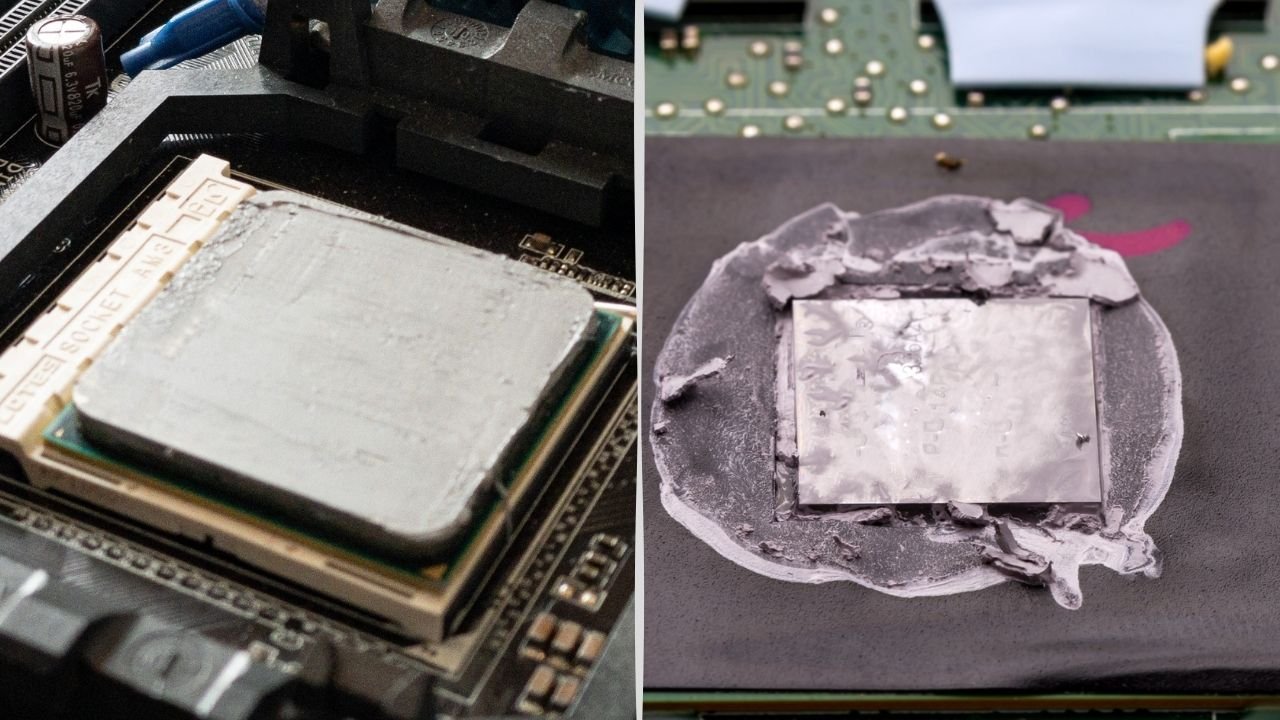
The surface of your CPU looks dry or cracked.
Another visual cue that you may need new thermal paste is if the surface of your CPU looks dry or cracked.
This can happen if the existing paste has completely dried out, causing it to shrink and pull away from the edges of the CPU die. cracks in the middle of your CPU die are especially bad news as they can lead to leaks and shorts– both of which can seriously damage your CPU . If you see any cracks on the surface of your CPU , it’s definitely time for new thermal paste.
You notice strange noises coming from your PC.
Occasionally , these sounds can also be caused by failing hard drives or other moving internals parts– so if you start hearing any unusual noises coming from your machine , be sure to get it checked out by a professional right away just to be safe.
To test your thermal paste, squeeze a small amount onto a clean metal surface and attempt to spread it. If it doesn’t spread smoothly or exhibits any of the above characteristics, it’s time to replace it. For example, Cooler Master FAQ advises discarding any initial clear liquid from an expired tube and checking for a smooth, well-mixed consistency before use.
Can Thermal Paste Expire in the Tube?
Yes, thermal paste can go bad even before it’s used, especially if stored improperly. Most manufacturers include a “best before” date on the packaging, usually ranging from 2 to 5 years. However, exposure to heat, air, or sunlight can accelerate the breakdown of the compound. Signs of expired thermal paste in the tube include:
- Dry or chalky consistency
- Separation of liquid and solids
- Discoloration or unusual odor
- Difficulty in spreading
Using degraded paste can lead to poor thermal conductivity and higher CPU temperatures, potentially damaging components over time.
Best Practices for Storing Thermal Paste
To maximize the shelf life of your thermal paste, follow these best practices:
- Store in a Cool, Dry Place: Keep the tube in a drawer or cabinet, ideally at room temperature (around 20-25°C or 68-77°F).
- Avoid Sunlight and Humidity: Exposure to direct sunlight or damp conditions can degrade the paste, even if unopened.
- Seal Tightly: For opened tubes, ensure the cap is securely fastened to minimize air exposure. Consider storing in an airtight container or bag.
- Check Expiration Dates: Some manufacturers include expiration dates on packaging. Always check before purchasing or using.
- Use Within 1-2 Years for Opened Tubes: Opened tubes are more susceptible to degradation, so aim to use them within this timeframe.
Proper storage can significantly extend the usability of thermal paste, ensuring it remains effective when you need it.
When to Replace Thermal Paste?
Even if your thermal paste hasn’t technically expired, it may need replacement if it’s no longer performing effectively. Signs that the thermal paste on your CPU or GPU needs replacing include:
- High Temperatures: If your CPU or GPU is running hotter than usual (e.g., exceeding 80°C under normal loads), the paste may have degraded.
- System Instability: Overheating can cause crashes, performance throttling, or system instability.
- Age: Thermal paste applied to a processor typically lasts 3-5 years, but heavy use (e.g., overclocking or gaming) can shorten this period (Motherboard CPU Fan).
Using expired or degraded thermal paste can lead to poor heat transfer, resulting in higher temperatures and potential damage to your components. For example, one user reported that a two-year-old tube of IC Diamond 7K caused overheating issues, which were resolved by switching to a fresh tube of Arctic MX-5
Practical Tips for Using Thermal Paste
When applying or replacing thermal paste, keep these tips in mind:
Monitor Temperatures: Use software like HWMonitor or Core Temp to track CPU/GPU temperatures and catch issues early.
Apply the Right Amount: Too much paste can act as an insulator, reducing cooling efficiency, while too little may not fill all gaps.
Clean Old Paste Thoroughly: Use isopropyl alcohol and a lint-free cloth to remove old paste before applying new paste.
Choose a Quality Paste: Modern options like Arctic MX-6 or Noctua NT-H1 offer excellent performance and longevity.
Conclusion
Thermal paste is essential for keeping your computer’s processor cool, but it can go bad or expire, typically within 3-5 years. Factors like storage conditions, whether the tube is opened, and the type of paste all influence its longevity. Signs of expiration include hardness, flakiness, separation, or a watery consistency, all of which can compromise cooling performance.
By storing thermal paste properly and replacing it when needed, you can ensure your system remains efficient and protected from overheating. If you’re unsure about your paste’s condition, test it or replace it with a fresh tube to avoid risking your hardware.
Frequently Asked Questions
What Happens If You Use Old Thermal Paste?
If you use old thermal paste, it will no longer be effective at transferring heat away from your CPU. This could lead to your CPU overheating and sustaining damage. It is therefore important to regularly replace your thermal paste to ensure that it is performing optimally.
How Do I Know If My Thermal Paste Needs Replacing?
Most people don’t realize that thermal paste degrades over time. Even if you never open your computer, the heat and humidity can cause the thermal paste to break down and become less effective. That’s why it’s important to check your thermal paste every few months and replace it if necessary.
There are a few ways to tell if your thermal paste needs replacing. One is to simply look at it. If the paste is dry, cracked, or otherwise damaged, it needs to be replaced.
Another way to tell is by touch. If the paste feels gritty or sandy, it’s time for new paste. Finally, you can check the performance of your CPU cooler.
If it’s not cooling as well as it used to, or if your CPU temperatures are higher than usual, those could be signs that the thermal paste has degraded and needs to be replaced.
Does Thermal Paste Need to Be Replaced?
Yes, thermal paste does need to be replaced periodically, especially if you’re aiming to maintain optimal performance and temperature control in your computer or other electronic devices.
Can unopened thermal paste expire?
Yes, unopened thermal paste can expire, typically after 3-5 years, depending on storage conditions.
How long does thermal paste last on a CPU?
Applied thermal paste typically lasts 3-5 years, but heavy use like overclocking or gaming may necessitate earlier replacement (Motherboard CPU Fan).
What happens if I use expired thermal paste?
Expired paste may lead to poor heat transfer, causing higher temperatures and potential damage to your CPU or GPU.
How can I store thermal paste to make it last longer?
Store it in a cool, dry place, away from sunlight and moisture, and seal opened tubes tightly.