
To recover permanently deleted files from a PC, use data recovery software or consult a professional data recovery service. Immediate action increases chances of success.
Losing important files can be stressful and disruptive. Fortunately, there are effective methods to recover permanently deleted files from your PC. Acting quickly is crucial to prevent data from being overwritten. Data recovery software like Recuva, EaseUS Data Recovery Wizard, and Disk Drill can help retrieve lost files.
These tools scan your hard drive for recoverable data. For severe cases, seeking help from professional data recovery services is advisable. They have advanced techniques to recover files from damaged or corrupted storage devices. Always back up your data regularly to avoid such scenarios in the future.
Primary Steps Before Recovery
Deleting important files by mistake can be stressful. But don’t worry! There are steps you can take before starting the recovery process. Follow these initial steps to increase your chances of getting your files back.
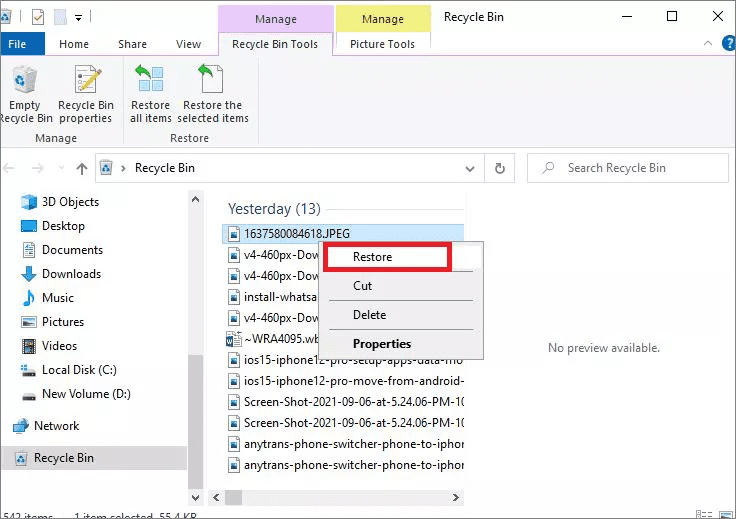
Check The Recycle Bin
Many deleted files end up in the Recycle Bin. It’s a safety net for users. First, open the Recycle Bin icon on your desktop. Look for your deleted files. If you find them, right-click and select “Restore.” Your files will return to their original location.
Use File History Or Previous Versions
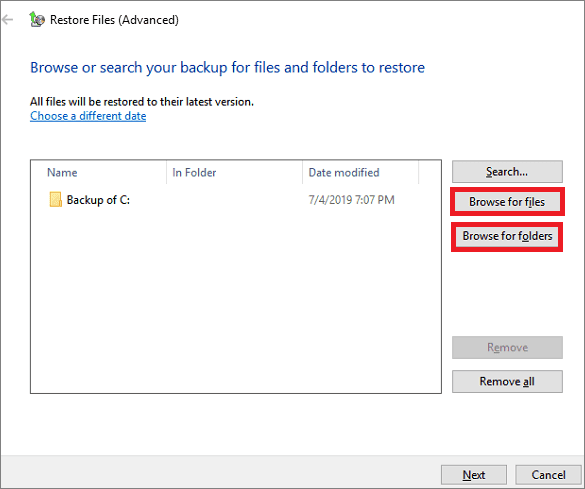
Windows has built-in backup tools. These tools can help retrieve deleted files. Start by opening the folder where your file was. Right-click inside the folder and choose “Properties.” In the Properties window, select the “Previous Versions” tab.
If backups exist, you will see a list of earlier versions. Choose a version that likely contains your file. Click “Restore” to recover the file.
Professional Data Recovery Software
Recovering permanently deleted files from your PC can be a stressful task. Professional Data Recovery Software is designed to rescue lost data with ease. These tools scan your drives and restore lost files efficiently. Let’s explore how to choose the right software and follow a step-by-step recovery process.
Choosing The Right Software
Selecting the right data recovery software is crucial. Here are some factors to consider:
- Compatibility: Ensure the software is compatible with your PC.
- File Types: Check if it supports the file types you need.
- User Reviews: Read reviews to understand its effectiveness.
- Customer Support: Good support can be a lifesaver.
- Price: Compare the cost and features.
Top-rated software options include EaseUS Data Recovery Wizard, Recuva, and Stellar Data Recovery. They are known for their high success rates.
Step-by-step Recovery Process
Follow these steps to recover your files using professional software:
- Download and Install: Get the recovery software from the official website.
- Launch the Program: Open the software once installed.
- Select the Drive: Choose the drive where files were deleted.
- Scan the Drive: Start a scan to locate deleted files.
- Preview Files: Look at the preview to confirm the files you need.
- Recover Files: Select and recover the files to a safe location.
Important Tips: Always save recovered files to a different drive to avoid overwriting data.
Apply System Restore Points
Recovering permanently deleted files from your PC can be a stressful task. One efficient method is using System Restore Points. This approach can help you retrieve lost files without much hassle.
What Is System Restore?
System Restore is a feature in Windows that helps to restore your computer’s system files to an earlier point in time. It does this without affecting your personal files such as documents, photos, and emails. System Restore uses restore points to return your system to a previous state.
Restoring Files From A System Restore Point
Follow these steps to restore files using a System Restore Point:
- Click on the Start menu and type System Restore.
- Select Create a restore point from the search results.
- In the System Properties window, click on System Restore.
- Choose a restore point that was created before the files were deleted.
- Follow the on-screen instructions to complete the restoration process.
After completing these steps, your system will revert to the selected restore point. This can help in recovering your deleted files.
| Step | Description |
|---|---|
| 1 | Open Start menu and type System Restore. |
| 2 | Select Create a restore point. |
| 3 | Click on System Restore in System Properties window. |
| 4 | Pick a restore point before file deletion. |
| 5 | Follow on-screen instructions to restore the system. |
Using System Restore Points is a reliable way to recover deleted files. This method ensures you can get back your data without needing complex software.
When To Seek Expert Help?
Recovering permanently deleted files can be tricky. Sometimes, you need expert help. This ensures your data is safely restored. Learn when to seek professional assistance.
Limits Of DIY Recovery
DIY recovery tools are handy. Yet, they have limits. These tools can’t handle complex data loss scenarios. If your hard drive is damaged, DIY methods won’t work. They also can’t recover data after a severe system crash.
- DIY tools can’t fix physical damage.
- They struggle with overwritten files.
- Complex file systems confuse these tools.
In these cases, you need expert help. Professionals use advanced techniques. They have the right tools and experience.
Finding A Reputable Data Recovery Service
Choosing the right service is crucial. Look for a service with good reviews. Ensure they have experience with your issue. Ask about their success rates.
| Criteria | What to Look For |
|---|---|
| Reputation | Check online reviews and ratings. |
| Experience | Look for specialists in your problem area. |
| Success Rate | Ask about their recovery statistics. |
Ensure the service uses safe methods. Data recovery can be risky. You don’t want to cause more damage.
- Ask about their recovery process.
- Ensure they follow data privacy laws.
- Check if they offer a no-recovery, no-fee policy.
Choosing wisely can save your data. It’s worth the effort to find the best service.
Frequently Asked Questions
Can I Recover Permanently Deleted Files From My Computer?
Recovering permanently deleted files is challenging. Use file recovery software or consult a data recovery specialist. Backup data regularly.
Are Permanently Deleted Files Gone Forever?
Permanently deleted files are usually gone forever. However, specialized data recovery tools might still retrieve them. Always back up important data.
How To Recover Permanently Deleted Files From Pc Without Backup?
Use data recovery software like Recuva or EaseUS. Install, scan your PC, and recover your deleted files. Ensure quick action.
Where Can I Recover Permanently Deleted Files?
Permanently deleted files are often unrecoverable. Use professional data recovery services or specialized software for the best chance.
Conclusion
Recovering permanently deleted files from your PC is possible with the right tools and methods. Always keep backups to prevent future loss. Utilize reliable data recovery software for the best results. Stay informed and proactive about your data management practices.
This ensures your important files remain safe and accessible.