When it comes to maintaining or upgrading your PC, thermal paste plays a critical role in ensuring your CPU or GPU runs cool and efficiently. One of the most common questions among DIY builders and PC enthusiasts is: “Can you reuse thermal paste?” While it might seem economical to reuse what’s already there, the short answer is no—it is not recommended to reuse old thermal paste. Let’s explore why and what the best practices are.
Do You HAVE To Use New CPU Paste? Can You Reuse Thermal Paste?
What Is Thermal Paste and Why It Matters?
Thermal paste is a thermally conductive material designed to bridge the tiny imperfections between a processor’s surface (the Integrated Heat Spreader, or IHS) and the heatsink. Known as thermal compound or thermal grease. These imperfections, though invisible to the naked eye, can trap air, which is a poor conductor of heat. By filling these gaps, thermal paste ensures optimal heat transfer, keeping your CPU or GPU at safe operating temperatures. Without proper thermal paste application, your processor could overheat, leading to performance throttling, system instability, or even permanent damage.
Can You Technically Reuse Thermal Paste?
Technically, yes—you can reuse thermal paste, but only under very limited conditions. If you recently applied high-quality thermal paste and removed the cooler within minutes or hours, and the paste hasn’t dried or contaminated, it might be okay to re-seat the cooler without reapplying. However, this is not a best practice. Most manufacturers and experts advise against reusing old paste because it compromises thermal efficiency.
Why Reusing Thermal Paste Is Not Recommended?
There are several critical reasons why reusing thermal paste is discouraged:
Loss of Thermal Conductivity: Thermal paste, especially those containing organic solvents, can dry out or break down when exposed to heat during normal computer operation. This degradation reduces its thermal conductivity, making it less effective at transferring heat (Kooling Monster).
Contaminants and Debris: Once exposed to air or handled, thermal paste can collect dust, skin oils, or other contaminants that reduce performance and increase risk. As used thermal paste can pick up dust, dirt, or other contaminants during application or removal. These particles can create barriers between the CPU and heatsink, further reducing cooling efficiency (Tom’s Hardware).
Uneven Spread: When you remove a cooler, the old paste is likely to be unevenly distributed, creating air pockets if reused. This leads to hot spots and thermal inefficiency.
Chemical Breakdown: Some thermal pastes degrade chemically with heat cycles, especially silicone-based or budget brands. Reusing them could do more harm than good.
Formation of Air Bubbles: When a heatsink is removed and reinstalled, air bubbles can form in the thermal paste. These bubbles create insulating gaps that hinder heat transfer, potentially causing higher CPU temperatures and reduced performance.
How to Properly Replace Thermal Paste?
If you’re removing your heatsink or performing CPU maintenance, the best approach is to:
- Clean the old thermal paste completely using isopropyl alcohol (90% or higher) and a lint-free cloth or coffee filter.
- Let both surfaces dry.
- Apply a small, fresh pea-sized dot of high-quality thermal paste (e.g., Arctic MX-6, Noctua NT-H2, or Thermal Grizzly Kryonaut).
- Reseat the heatsink evenly to ensure proper contact.
This ensures optimal thermal performance and long-term stability.
When Is It Acceptable to Reuse Thermal Paste?
While reusing thermal paste is not ideal, there are rare situations where it might be considered:
Short-Term Solution:
If you’re waiting for new thermal paste to arrive or need to test a system briefly, reusing existing paste can work temporarily. Intel notes that this is a short-term fix and recommends reapplying fresh paste for long-term use (How to Apply Thermal Paste).
Recently Applied Paste:
If the thermal paste was applied within a few days and the system hasn’t been powered on extensively, it may still be in good condition. For example, if you installed a CPU and immediately needed to remove the cooler due to a bent pin, the paste might still be viable (Tom’s Hardware). However, even in these cases, cleaning and reapplying is preferred.
Non-Organic Solvent Pastes:
Some thermal pastes, particularly those without organic solvents, are less prone to drying out and may be more suitable for reuse, provided they are not contaminated (Kooling Monster).
Even then, this should be seen as a temporary workaround, not a permanent solution.
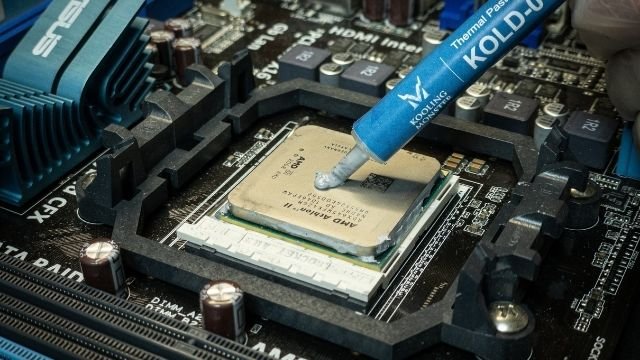
Best Practices for Thermal Paste Application
To ensure optimal cooling performance, follow these expert-recommended steps when applying thermal paste:
Clean the Surfaces Thoroughly:
Before applying new paste, clean both the CPU’s Integrated Heat Spreader (IHS) and the heatsink’s base using isopropyl alcohol (90% or higher) and a lint-free cloth or coffee filter. This removes old paste, oils, and contaminants that could interfere with heat transfer (Super User).
Apply a Small Amount:
Use a pea-sized dot of thermal paste in the center of the CPU. For most modern processors, this is sufficient, as the pressure from the heatsink will spread the paste evenly. Overapplying can lead to excess paste squeezing out, which may attract dust or reduce efficiency.
Let the Heatsink Spread the Paste:
Avoid manually spreading the paste, as this can introduce air bubbles or uneven layers. Instead, carefully install the heatsink, ensuring proper alignment, and let the mounting pressure distribute the paste naturally (How to Apply Thermal Paste).
Monitor Temperatures:
After applying new paste and reassembling your system, use software like HWMonitor or Core Temp to check CPU temperatures under load. If temperatures are unusually high, it may indicate improper paste application or other cooling issues.
Storing Thermal Paste for Future Use
If you have leftover thermal paste in a syringe or tube, proper storage can extend its usability for future applications:
- Seal Tightly: Store the paste in its original syringe or tube, ensuring the cap is tightly secured to prevent air exposure, which can cause drying or oxidation.
- Maintain Room Temperature: Keep the paste at average room temperature (around 20-25°C or 68-77°F), avoiding extreme heat or cold, such as attics or refrigerators (Kooling Monster).
- Avoid Sunlight: Direct sunlight can degrade the paste’s chemical properties, so store it in a dark, dry place like a drawer.
- Check for Expiration: Thermal paste typically has a shelf life of 6 to 24 months under optimal conditions. Before reusing stored paste, check for signs of degradation, such as a clumpy, watery, or overly sticky texture, or difficulty in extraction from the syringe.
| Aspect | Details | Recommendations |
|---|---|---|
| Purpose | Fills microscopic gaps between CPU and heatsink for efficient heat transfer | Always use high-quality thermal paste for optimal performance |
| Reusing Paste | Can lead to air bubbles, contamination, and reduced thermal conductivity | Avoid reusing; apply fresh paste for best results |
| Short-Term Reuse | Possible if paste is recent and uncontaminated | Use as a temporary fix only; replace with new paste ASAP |
| Cleaning Surfaces | Removes old paste, dust, and oils | Use isopropyl alcohol and lint-free cloth |
| Application Method | Pea-sized dot in center, spread by heatsink pressure | Avoid manual spreading to prevent air bubbles |
| Storage | Tightly sealed, room temperature, no sunlight | Check for expiration signs before reuse |
Practical Considerations and Alternatives
If you’re considering reusing thermal paste due to cost concerns, note that thermal paste is relatively inexpensive. High-quality options, such as Arctic MX-4 or Noctua NT-H2, are available for under $10 and can last for multiple applications (Noctua NT-H2). Investing in a fresh tube is a small price to pay compared to the risk of overheating, which could damage a CPU costing hundreds of dollars.
For those who frequently build or upgrade PCs, keeping a tube of thermal paste on hand is a good practice. If you must reuse paste from a syringe (not previously applied paste), ensure it’s stored properly and shows no signs of degradation. Avoid using paste that appears clumpy, separated, or overly viscous, as these are signs it may no longer perform effectively.
Conclusion: Don’t Reuse—Reapply for Best Results
While reusing thermal paste might save a few minutes or dollars, it’s rarely worth the risk. Fresh thermal paste ensures optimal heat transfer, better cooling, and overall system longevity. For such a low-cost component, it’s always safer and smarter to reapply. Whether you’re building a new rig or replacing a CPU cooler, treat thermal paste like a critical part of your system’s performance—and give your components the fresh layer they deserve.
Frequently Asked Questions
Can You Use the Same Thermal Paste Twice?
You can use the same thermal paste multiple times. However, it will need to be reapplied every few months to ensure optimal performance.
How Many Times Can You Use Thermal Paste?
You can use thermal paste as many times as you need to – there is no limit. Just make sure that you apply it evenly and in a thin layer so that it can effectively conduct heat away from the CPU. Also, be sure to clean off any old thermal paste before applying new thermal paste.
Is It Ok to Use Old Thermal Paste?
Yes, it is perfectly fine to use old thermal paste. In fact, many people actually prefer using older thermal paste because it tends to be more effective than newer thermal paste. The reason for this is that older thermal paste usually contains more metal particles, which help to better conduct heat away from the CPU.
How Long Does a Used Thermal Paste Last?
When it comes to thermal paste, the lifespan of a used tube can vary greatly depending on how well it was applied and how often the CPU is used. A good rule of thumb, however, is to replace your thermal paste every 6-12 months to ensure optimal performance.
Do I Need to Replace Thermal Paste After Removing Heatsink?
It’s not uncommon for people to remove and then re-attach their heatsinks. If you do this, you may be wondering if you need to replace the thermal paste. The answer is: it depends.
If the original thermal paste is still in good condition and hasn’t dried out, then you can probably just re-use it. However, if the thermal paste has dried out or seems to be no longer effective, then you’ll want to replace it with fresh thermal paste. Applying fresh thermal paste is pretty simple – just follow the instructions that came with your heatsink or CPU cooler.
In general, you’ll just need to apply a small amount of thermal paste to the top of the CPU (be sure not to use too much!) and then attach the heatsink on top.
How to Remove Thermal Paste?
Removing thermal paste can be a difficult and messy task, but it is necessary if you want to clean your CPU or replace your old thermal paste with new thermal paste. There are a few methods that you can use to remove thermal paste, but the most effective method is to use isopropyl alcohol. Isopropyl alcohol will dissolve the thermal paste and make it easy to wipe away.
You can find isopropyl alcohol at your local drug store or online. Make sure to get pure isopropyl alcohol and not rubbing alcohol, which will not work as well. To remove the thermal paste, simply apply some isopropyl alcohol to a cotton swab or paper towel and wipe it across the surface of the CPU.
You may need to apply pressure to remove all of the thermal paste. Once all of the thermal paste has been removed, you can clean the surface of the CPU with a clean cloth dipped in isopropyl alcohol. If you are having trouble removing all of the thermal paste, you can try using a credit card or other thin object to scrape it off.
Be careful not to scratch the surface of the CPU while doing this.


![How to Fix YouTube Server Connection Error [400] on Android](https://www.futurescope.co/wp-content/uploads/2021/09/How-to-Fix-YouTube-Server-Connection-Error-400-on-Android-150x150.png)