Use & explore the Microsoft Copilot for task automation and data analysis. Enhance productivity with AI-driven insights and recommendations.
Microsoft Copilot offers a powerful suite of AI tools designed to streamline your workflow. This tool integrates seamlessly with Microsoft 365, providing intelligent assistance to help you complete tasks more efficiently. Copilot can automate repetitive tasks, freeing up time for more strategic activities.
It also excels in data analysis, offering real-time insights and recommendations that can drive better decision-making. Whether you’re drafting emails, creating presentations, or analyzing data, Microsoft Copilot enhances your productivity. Its user-friendly interface and robust features make it an invaluable tool for professionals looking to optimize their work processes. By incorporating Copilot into your daily routine, you can achieve more with less effort.
Introducing Microsoft Copilot
Microsoft Copilot is a revolutionary tool designed to enhance productivity. It integrates seamlessly with Microsoft 365 applications, offering intelligent assistance. Copilot helps users write, edit, and optimize content effortlessly. Let’s explore the basics and key features of Microsoft Copilot.
Breaking Down The Basics
Microsoft Copilot works within familiar applications like Word and Excel. It uses AI to provide suggestions, corrections, and enhancements. This tool can significantly improve your workflow.
Copilot operates in real-time, making it a dynamic assistant. You can rely on it for grammar checks, stylistic improvements, and content generation. It adapts to your writing style and preferences.
Key Features And Capabilities
Microsoft Copilot comes packed with powerful features:
- Grammar and Spell Check: Identifies and corrects errors instantly.
- Content Suggestions: Offers ideas to enrich your text.
- Stylistic Enhancements: Improves readability and engagement.
- Real-time Collaboration: Enables seamless teamwork on documents.
- Data Insights: Analyzes and visualizes data in Excel.
These features are designed to save time and increase efficiency. Copilot’s AI algorithms are constantly learning, providing better assistance over time.
| Feature | Description |
|---|---|
| Grammar and Spell Check | Corrects errors as you type. |
| Content Suggestions | Provides ideas to enhance your writing. |
| Stylistic Enhancements | Improves the flow and readability of text. |
| Real-time Collaboration | Allows multiple users to work on a document simultaneously. |
| Data Insights | Helps analyze and interpret data in Excel. |
With these capabilities, Microsoft Copilot transforms the way you work. Embrace this tool to boost your productivity and achieve better results.
How To Boosting Productivity With Copilot?
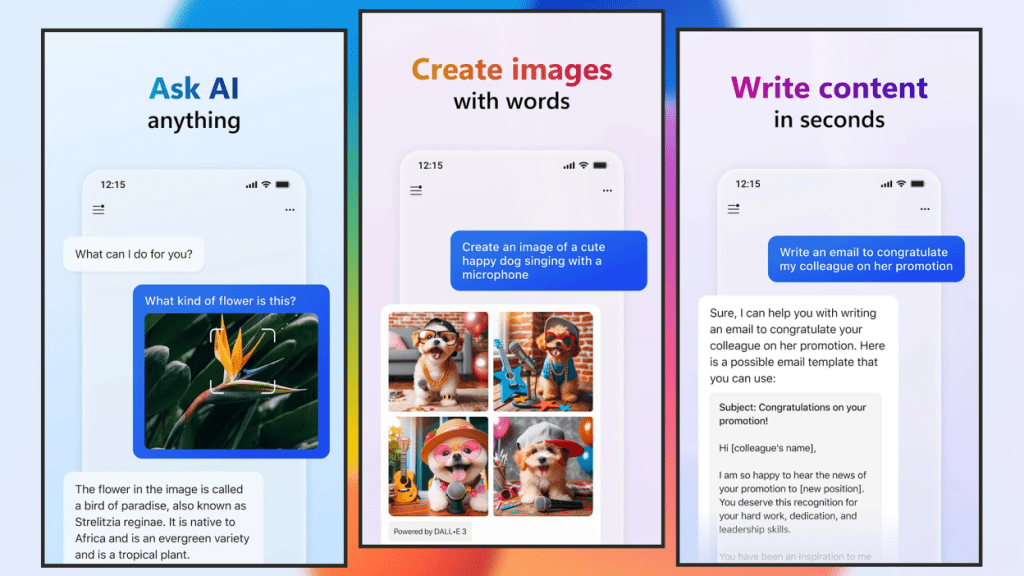
Microsoft Copilot is a powerful tool designed to enhance productivity. It integrates seamlessly with various Microsoft applications, making daily tasks easier and faster. By leveraging AI capabilities, Copilot can significantly streamline workflows and automate repetitive processes.
Streamlining Daily Tasks
Copilot helps in streamlining daily tasks with ease. It can assist in managing emails, scheduling meetings, and organizing files. The AI can suggest responses to emails, saving valuable time.
It also offers smart scheduling options. Copilot can find the best meeting times by checking everyone’s calendar. This ensures no conflicts and optimizes scheduling.
Another great feature is file organization. Copilot can automatically sort and categorize files. This reduces the time spent on manual organization. It makes finding documents faster and easier.
Automating Repetitive Processes
Automating repetitive processes is another strong point of Copilot. It can automate data entry tasks, reducing human error. This makes workflows more efficient and accurate.
Copilot can also handle routine updates. It can automatically update software and applications. This ensures everything is always up-to-date without manual intervention.
Here are some key areas where Copilot excels in automation:
- Data Entry: Automatically inputs data with high accuracy.
- Software Updates: Keeps applications current without manual updates.
- Report Generation: Creates and formats reports based on given data.
Utilizing these features can free up time for more critical tasks. It allows users to focus on strategic work rather than mundane activities.
In summary, Microsoft Copilot is a valuable tool for enhancing productivity. It makes daily tasks simpler and automates repetitive processes efficiently.
Collaboration And Communication
Collaboration and communication are essential for successful teamwork. Microsoft Copilot helps teams work together better. It offers many features that improve team workflows. Real-time editing and sharing make tasks easier. Let’s explore how Microsoft Copilot enhances collaboration and communication.
Enhancing Team Workflows
Microsoft Copilot streamlines team workflows. It integrates with popular tools like Microsoft Teams and Outlook. This makes it easy to manage tasks and projects. Teams can assign tasks quickly and track progress. The shared dashboard keeps everyone updated.
- Task Management: Create, assign, and track tasks efficiently.
- Shared Dashboard: View project status in real-time.
- Integration: Seamlessly works with Microsoft Teams and Outlook.
Using these features, teams can improve productivity. Everyone stays on the same page, avoiding confusion.
Real-time Editing And Sharing
Real-time editing and sharing allow instant collaboration. Team members can edit documents together. This makes it easy to share ideas and feedback. Microsoft Copilot supports real-time editing in Word, Excel, and PowerPoint. Changes appear instantly, making teamwork smoother.
| Feature | Benefit |
|---|---|
| Real-Time Editing | Instantly see changes made by others. |
| Document Sharing | Share files easily within the team. |
| Live Feedback | Provide and receive feedback quickly. |
These features save time and reduce miscommunication. Teams can deliver high-quality work faster.
Customization For Personal Use
Microsoft Copilot can be customized for personal use. This feature allows users to tailor their experience and create personal shortcuts. By doing so, you can make your workflow more efficient and enjoyable.
Tailoring The Experience
With Microsoft Copilot, you can tailor your experience to suit your needs. Adjust settings to match your preferences. Use the customization options to change the interface. This makes it easier to find what you need quickly.
One way to tailor your experience is by changing the theme. Choose a light or dark theme based on your preference. You can also adjust the font size for better readability. These small changes can make a big difference in your daily use.
Another way is by organizing your workspace. Arrange tools and features you use most often. This helps you access them faster. You can also hide features you rarely use. This keeps your workspace clean and clutter-free.
Creating Personal Shortcuts
Creating personal shortcuts can save you a lot of time. Microsoft Copilot allows you to create shortcuts for frequently used actions. This makes your workflow smoother and more efficient.
To create a shortcut, follow these steps:
- Go to the settings menu.
- Select the “Shortcuts” option.
- Choose the action you want to create a shortcut for.
- Assign a key combination to the action.
- Save your changes.
Here are some ideas for shortcuts you can create:
- Opening a new document.
- Saving your work.
- Undoing the last action.
- Copying and pasting text.
These shortcuts can make your work much faster. You won’t have to navigate through menus to perform common tasks. This can save you a lot of time and effort.
| Shortcut | Action |
|---|---|
| Ctrl + N | Open a new document |
| Ctrl + S | Save your work |
| Ctrl + Z | Undo last action |
| Ctrl + C | Copy text |
| Ctrl + V | Paste text |
Advanced Tips And Tricks
Microsoft Copilot is a powerful tool. It helps users streamline tasks and improve productivity. Here, we share advanced tips and tricks for using Microsoft Copilot effectively. These tips help you master the tool and leverage its full potential.
Mastering Keyboard Shortcuts
Keyboard shortcuts save time. They let you perform tasks quickly. Here are some essential shortcuts:
- Ctrl + Alt + C: Opens Copilot instantly.
- Ctrl + Shift + A: Activates AI suggestions.
- Alt + Shift + R: Runs the last command.
Learning these shortcuts boosts your efficiency. Practice regularly to remember them.
Utilize AI For Complex Tasks
Microsoft Copilot uses AI to manage complex tasks. It automates repetitive actions. Here are ways to leverage AI:
- Task Automation: Use AI to automate routine tasks. This frees up your time.
- Data Analysis: AI can analyze large data sets quickly. This helps in making informed decisions.
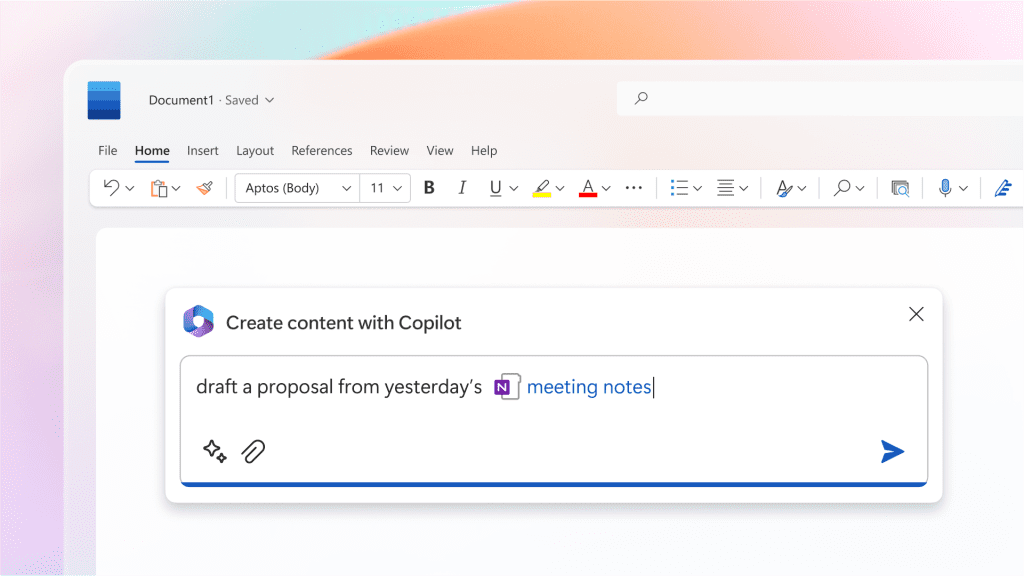
- Content Creation: AI assists in generating content ideas. It also helps in drafting documents.
Utilizing AI for complex tasks enhances productivity. It reduces manual effort and increases accuracy.
| Feature | Description |
|---|---|
| AI Task Automation | Automates routine tasks to save time. |
| Data Analysis | Quickly processes large data sets. |
| Content Creation | Helps in drafting and generating ideas. |
Frequently Asked Questions
What Is The Best Use Of Microsoft Copilot?
Microsoft Copilot is best used for automating tasks, enhancing productivity, and providing intelligent recommendations in Microsoft 365 apps. It streamlines workflows and improves efficiency.
How To Use Copilot Most Effectively?
Use Copilot effectively by starting with clear prompts. Break tasks into smaller parts. Utilize relevant suggestions. Continuously refine inputs.
How Can I Use Microsoft Copilot?
To use Microsoft Copilot, integrate it within your Microsoft 365 apps. Access AI-driven assistance in Word, Excel, and other tools. Explore Copilot’s features via the Microsoft 365 subscription.
What Are The Limitations Of Microsoft Copilot?
Microsoft Copilot has limitations like dependency on internet connectivity, potential privacy concerns, and occasional inaccuracies in content generation. It requires regular updates and may struggle with complex queries or niche topics.
What Is Microsoft Copilot?
Microsoft Copilot is an AI-powered assistant integrated into Microsoft 365, enhancing productivity through smart suggestions and automation.
Conclusion
Mastering Microsoft Copilot can boost productivity and streamline tasks. Experiment with its features to find what suits you best. Embrace this tool to enhance your workflow and achieve better results. Stay updated with new features to maximize its potential. Enjoy the efficiency and creativity Microsoft Copilot offers.