No, computer power cords are not interchangeable. Each type of computer requires a specific type of power cord in order to function properly. For example, a laptop will require a different power cord than a desktop computer.
In today’s tech-driven world, managing computer hardware often raises practical questions, such as whether power cords are interchangeable across devices. Whether you’ve lost a cord, moved to a new region, or are building a custom PC, understanding power cord compatibility is essential to ensure safety and functionality. While some cords may physically fit multiple devices, their interchangeability depends on several factors, including connector types, power requirements, and regional standards. This guide explores these factors in detail, providing clarity on when and how computer power cords can be safely swapped.
How to Safely Mix Power Supply Cables Without Killing Parts
Understanding the Standard PC Power Cable
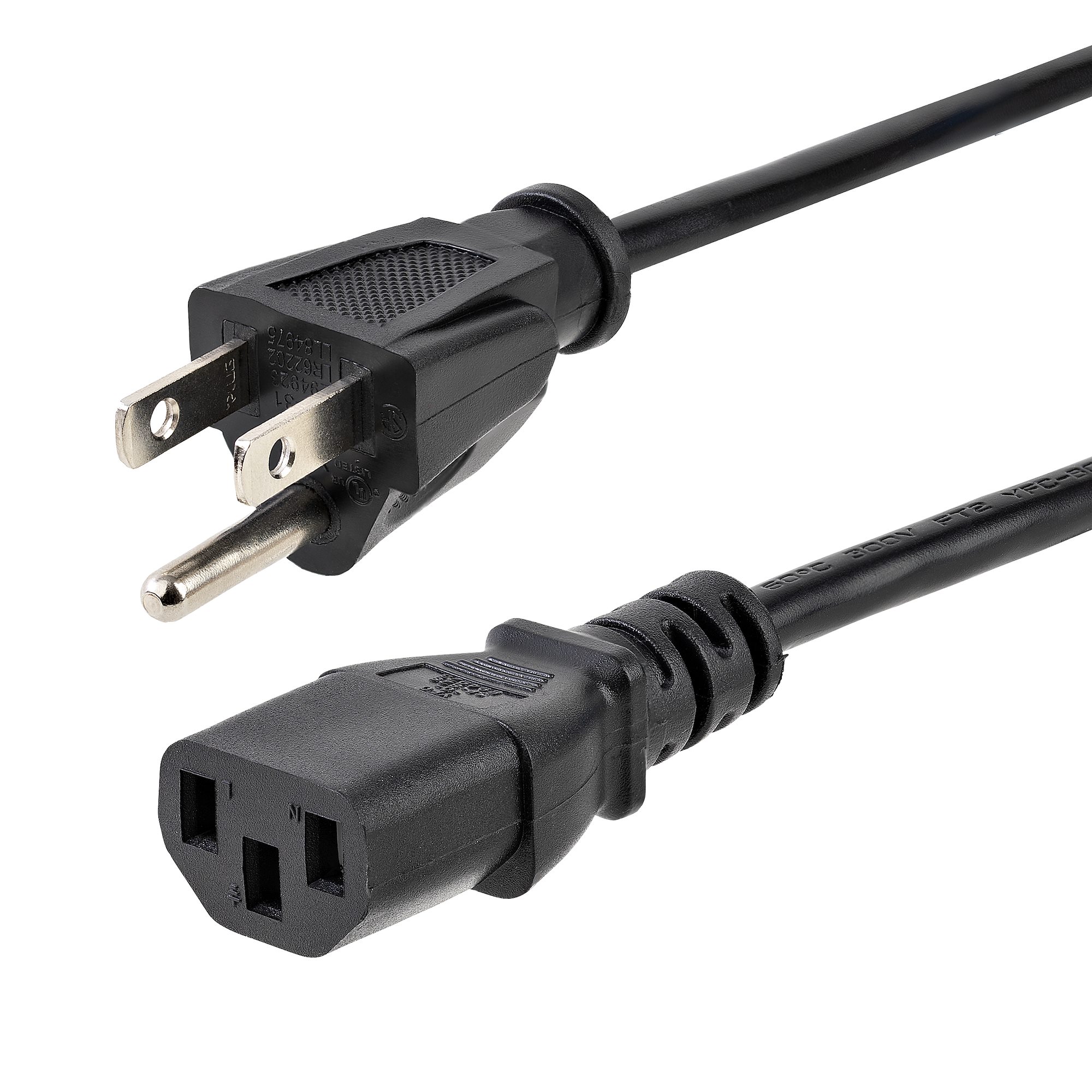
Most desktop computers use an IEC C13 to NEMA 5-15P power cord. This standard cable features:
- IEC Standards: Globally, IEC 60320 standards define appliance couplers like C13/C14 for desktops and C7/C8 for smaller devices. For example, C15/C16 cords, used for high-voltage equipment, have a notch to differentiate them from C13/C14 cords, ensuring proper use..
- NEMA Standards: In North America, NEMA standards define plug shapes and electrical ratings, ranging from 15-60A and 125-600V. These standards prevent mismatched connections, such as plugging a 125V device into a 220V outlet.
- Compatibility with monitors, printers, game consoles, and other electronics.
In many cases, these cords are functionally interchangeable, especially for similar devices operating within the same voltage and wattage ranges. However, it’s not just about the shape of the connector — voltage, amperage, and wire gauge matter, too.
Types of Power Cords Used in Computers
To assess interchangeability, it’s important to understand the types of power cords commonly used in computers:
- Desktop Computers: Most desktops use an IEC C13/C14 cord, which connects the PSU to a wall outlet. These cords are designed for devices requiring up to 10A at 250V, making them common for desktops and some monitors.
- Laptops: Laptops typically require proprietary power adapters with specific connectors and power ratings (e.g., 19V at 3.42A). The cord from the adapter to the wall may vary, often using C5/C6 or C7/C8 connectors.
- Monitors: Many monitors use C13/C14 cords, similar to desktops, but their power requirements may be lower, requiring careful matching.
- Peripherals: Devices like printers or external hard drives may use C7/C8 (figure-8) cords, which are not compatible with C13/C14 sockets due to their different shapes.
Each type is designed for specific power delivery and safety standards, making it critical to match the cord to the device.
Key Safety Factors Before Swapping Power Cords
While many cords look the same, the internal specifications may differ. Here are the most important factors to consider:
- Voltage Rating (V):
Ensure the cord supports the voltage used by your power source — typically 110V–125V in the U.S. and 220V–240V in many other countries. Using a low-rated cord on a higher-voltage system may cause overheating or failure. - Current Rating (Amps):
Most standard PC cords are rated for 10A or 15A. If your device requires more current than the cord supports, it can cause a fire hazard. - Wire Gauge (AWG):
Thicker cables (lower AWG number like 14 or 16) carry more current. Swapping with a thinner cord may be unsafe under heavy load conditions. - Device Power Draw:
A gaming PC or workstation with a powerful PSU draws more power than a basic office computer. Ensure the cord is rated to handle the wattage your system requires. - Country Plug Type and Frequency:
If you’re in a region with a different plug type or power frequency (e.g., 50Hz vs. 60Hz), you’ll need a compatible cable or adapter — but also ensure the power supply supports dual-voltage (e.g., 100–240V).
When It’s Safe to Interchange Power Cords?
- Both power cords are rated for the same or higher voltage and current.
- The plug and connector match (e.g., C13 to NEMA 5-15P).
- The new cable has a certification mark (UL, CE, etc.) indicating it meets safety standards.
- The cord isn’t damaged, frayed, or worn out.
If all these conditions are met, it’s generally safe to interchange power cords between devices like desktops, monitors, and even some network devices.
When You Should NOT Swap Power Cables?
- The voltage/amperage rating is lower than required.
- The wire is too thin (higher AWG) for your device’s power draw.
- The device has a different plug type (e.g., C5 cloverleaf for laptops or figure-8 for compact devices).
- You’re connecting to non-standard or industrial equipment (e.g., servers, lab devices).
Mismatching cords can cause overheating, short-circuits, or damage to your PSU, motherboard, or other sensitive components.
Practical Tips for Safe Power Cord Use
To ensure you’re using the right power cord, follow these best practices:
- Check Device Specifications: Verify the voltage, current, and connector type required by your device, typically found on the device or in its manual.
- Match the Connector: Ensure the cord’s plug matches the device’s socket (e.g., C13 for desktops, C7 for some peripherals).
- Use Certified Cords: Opt for cords with UL or ETL certifications from reputable manufacturers to ensure safety.
- Avoid Mismatching: Don’t use a laptop cord for a desktop or vice versa unless confirmed compatible by the manufacturer.
- Replace Wisely: When replacing a cord, choose one that matches the original specifications. Universal C13/C14 cords are widely available for desktops and monitors at retailers like ShowMeCables.
- Consult the Manual: Device manuals often specify the correct power cord type and ratings. If unsure, contact the manufacturer for guidance.
If you need a replacement cord, avoid using cords from unrelated devices (e.g., a TV cord for a computer) unless you’ve confirmed compatibility. For example, a Quora discussion warns against assuming all cords are interchangeable, as physical fit doesn’t guarantee electrical compatibility.
Conclusion
While many computer power cords are interchangeable in form and function, it’s essential to check electrical ratings and certification standards before swapping them. Compatibility depends on the device type, connector type, power requirements, and adherence to safety standards like NEMA and IEC. While desktop computers and monitors often use standardized C13/C14 cords, laptops and high-power PSUs may require specific cords or adapters. Using the wrong cord can lead to device damage, power issues, or safety hazards.
Always match voltage, amperage, and connector type. When in doubt, buy a new power cord from a reputable manufacturer that matches your system’s requirements.
Bottom line? Don’t rely on appearances alone — your PC’s safety and longevity depend on using the correct power cable.
Frequently Asked Questions
Does It Matter What Power Cord I Use for My PC?
Yes, the power cord you use for your PC can actually make a difference in terms of performance and stability. Here’s a look at why that is: Different power cords are designed to handle different voltages and amperages.
If you’re using a power cord that isn’t rated for the voltage and amperage your PC needs, it could cause problems. For example, if your PC needs 12 volts and 5 amps of power, using a power cord that can only handle 10 volts and 3 amps could cause instability or even damage your components. The gauge of the wires inside the power cord also matters.
Using the wrong kind of cord could cause problems ranging from slight instability to component damage, so it’s important to choose wisely.
Can You Interchange Laptop Power Cords?
Most laptop computers come with a standard power cord that is designed to work with that particular model. The same is true for many other electronics, like cell phone chargers. While it might be tempting to try and use one power cord for all of your devices, it’s generally not a good idea to interchange them.
Are Computer Power Supply Cords Universal?
No, computer power supply cords are not universal. Each type of computer requires a specific type of power cord in order to function properly. For example, a desktop computer requires a different power cord than a laptop computer.
The reason for this is that each type of computer has different power requirements. A desktop computer requires more power than a laptop computer, so the power cord must be able to deliver enough power to the desktop computer.
Can You Mix And Match Power Cords?
No, you cannot mix and match power cords. Each appliance has a specific power cord that is designed to work with that appliance. Mixing and matching power cords can result in damage to the appliance or even cause a fire.
Are Laptop Power Cords Interchangeable?
Laptop power cords are not interchangeable. Each laptop has a specific power cord that is designed to work with that particular model.
Trying to use a different power cord can damage the laptop or cause it to overheat. When shopping for a replacement power cord, be sure to get the correct one for your laptop. The best way to do this is to check the manufacturer’s website or the label on the existing power cord.
Are All PC Power Cables the Same?
No, not all PC power cables are the same. In fact, there are several different types of PC power cables, each with their own specific purpose.
Here’s a quick rundown of the most common types of PC power cables:
ATX Power Cable: This is the most common type of PC power cable. It’s used to connect the PSU (power supply unit) to the motherboard. Most PSUs come with an ATX power cable included.
EPS Power Cable: This type of PC power cable is used to connect the PSU to an EPS (external peripheral controller). EPS controllers are often found on high-end motherboards and allow for better control over external devices.
PCI Express Power Cable: This type of PC power cable is used to connect a PCI Express card to the PSU. PCI Express cards are high-performance expansion cards that require more power than a standard PCI card.
Can You Replace the Power Cord on a TV?
If your TV is unplugged and you can’t find the cord, you may be wondering if it’s possible to replace it. The answer is yes, but it’s important to know which type of cord you need before you buy a new one. There are two types of power cords for TVs: two-pronged and three-pronged.
Two-pronged cords are less common and are typically only used for older TVs. Three-pronged cords are the standard for most modern TVs. To determine which type of cord you need, look at the back of your TV where the cord plugs in.
If there are two slots, you need a two-pronged cord. If there are three slots, you need a three-pronged cord. Once you know which type of cord you need, simply purchase one from an electronics store or online retailer.
Be sure to match the voltage and amperage rating on the new cord with that of your TV. Once you have the new cord, simply plug it into your TV and plug the other end into an outlet.