Roblox is one of the most popular online gaming platforms in the world, offering millions of user-created games across countless genres. However, many players experience one common problem: they keep joining high ping servers. High ping often leads to lag, delayed responses, and frustrating gameplay. If you’ve ever wondered, “Why do I keep joining high ping servers in Roblox?”, you’re not alone.
In this article, we’ll break down what ping means, why Roblox sometimes connects you to high ping servers, and how you can fix or reduce the problem for smoother gameplay.
What Is Ping in Roblox?
Ping refers to the time it takes for data to travel from your device to the game server and back, measured in milliseconds (ms). The lower the ping, the smoother and more responsive your game feels.
- 0–50 ms: Excellent and almost unnoticeable.
- 50–100 ms: Playable with minimal lag.
- 100–200 ms: Noticeable delay, especially in fast-paced games.
- 200+ ms: High ping; gameplay becomes frustrating and unresponsive.
When you join a Roblox game, your device sends information to the server about your actions (like moving or jumping). If your ping is high, it takes longer for the server to process your inputs, resulting in delays, lag spikes, or even disconnections.

Why Do You Keep Joining High Ping Servers in Roblox?
There are several reasons why Roblox may place you in high ping servers, and many of them are beyond your immediate control. Let’s look at the main causes.
1. Server Location and Region Mismatch
Roblox doesn’t always prioritize server proximity. Many games on the platform use a default matchmaking system that automatically assigns players to available servers—regardless of location. Unless the game developer has implemented a custom region selector, you’re at the mercy of Roblox’s server assignment.
Some games do offer region-based matchmaking, but most do not. This means you could be placed in a server hosted halfway across the world, even if there’s a closer one available.
Roblox doesn’t always guarantee that you’ll join a nearby server. If the closest server is full or unavailable, you might be placed in a server located far away, resulting in high ping.
2. Lack of Region Selection in Games
Unlike competitive titles like Fortnite or Valorant, Roblox doesn’t provide a universal “choose your region” option. The ability to select a server region depends entirely on the game’s developer. If the game doesn’t offer this feature, you’ll be auto-assigned based on availability—not latency.
3. Limited Server Availability
Some Roblox games may not have servers in every region. Smaller games or niche experiences may only host servers in one or two regions, forcing you to connect to distant servers.
4. Background Applications and Bandwidth Hogging
Apps running in the background—like streaming services, cloud backups, or downloads—can consume bandwidth and increase latency. Even if your speed test looks fine, Roblox is sensitive to jitter and packet loss caused by competing traffic.
Make sure your network isn’t overloaded during gameplay.
5. Network Congestion
High ping often occurs when multiple devices in your home are using the internet at the same time. Streaming, downloads, or video calls consume bandwidth, leaving less available for Roblox.
6. Roblox’s Automatic Server Selection
Roblox runs game instances across multiple data centers worldwide. However, there’s no standardized way for players to see which region a server is hosted in. You might unknowingly join a server hosted in North America while playing from Asia, simply because the matchmaking system assigned it.
Community efforts have mapped some server IP ranges, but Roblox doesn’t officially disclose server locations or offer region filters.
Roblox automatically places players into servers based on availability and matchmaking. Sometimes, this system prioritizes filling servers quickly rather than optimizing ping, which may result in high latency.
7. VPN or Proxy Usage
If you’re using a VPN or proxy, Roblox may detect your IP as coming from another region. This often results in being placed on servers far away from your actual location, dramatically increasing ping.
8. ISP Routing Problems
Even if a Roblox server is physically close to you, your internet service provider (ISP) may route your traffic inefficiently. This can result in longer data paths, increasing latency. Two players in the same city can experience vastly different ping due to how their ISPs handle routing.
This issue is especially common in regions with limited peering agreements or congested network infrastructure.
Poor routing, inefficient connections, or congestion on the ISP’s side can increase ping even when you connect to nearby servers.
High ping isn’t always Roblox’s fault. Your own network setup can contribute to latency. Common issues include:
- Weak Wi-Fi signal
- Channel interference
- Overloaded 2.4 GHz band
- Packet loss and jitter
Switching to a wired Ethernet connection or optimizing your Wi-Fi setup can significantly reduce ping.
9. Server Overload or Lag
Some Roblox games experience ping spikes when new players join. This is due to the server transmitting large amounts of data (like terrain maps or assets) to the new player. If the game is poorly optimized, this can cause temporary lag for everyone on the server.
Sometimes, the issue isn’t on your end. Roblox servers can become overloaded when too many players join, causing delays that increase ping for everyone in the lobby.
How to Check Your Ping in Roblox?
Roblox provides a built-in way to monitor your ping. Press Shift + F5 while in a game to see real-time statistics like ping, FPS, and server performance. If you notice your ping consistently staying above 150 ms, you’re likely in a high ping server. you can also check your ping using: Third-party tools like PingPlotter or Wireshark
How to Fix or Reduce High Ping in Roblox?
The good news is that there are steps you can take to minimize ping and improve your Roblox experience.
1. Use a Wired Ethernet Connection
Wi-Fi is convenient but prone to interference and instability. A wired Ethernet connection ensures faster speeds and more stable ping. If possible, connect your PC or laptop directly to your router with an Ethernet cable.
2. Close Background Applications
Shut down apps that use bandwidth, such as streaming services, video calls, or large downloads. Freeing up bandwidth ensures Roblox gets priority for faster communication with servers.
3. Restart Your Router
Routers build up cache and can experience temporary issues. Restarting your router often improves ping and refreshes your connection to your ISP.
4. Change DNS Settings
Switching to a faster DNS provider can improve routing:
- Google DNS: 8.8.8.8 and 8.8.4.4
- Cloudflare DNS: 1.1.1.1 and 1.0.0.1
Go to your network adapter settings and manually enter these DNS addresses.
5. Choose Games With Regional Servers
If possible, play Roblox games that host servers in your region. Many popular titles like Brookhaven or Adopt Me have global server options, but smaller games may not.
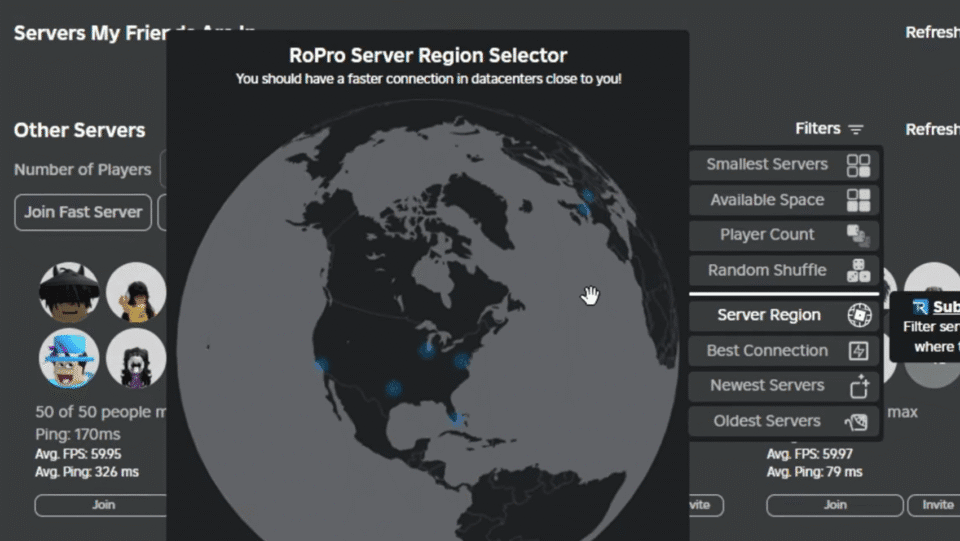
6. Use Roblox Server Selection Tools
Some third-party tools and extensions help players manually select Roblox servers with lower ping. While not officially supported, these can sometimes help you avoid high ping servers.
7. Avoid VPNs and Proxies
Unless you’re using a gaming-optimized VPN to fix routing issues, avoid VPNs when playing Roblox. They often increase ping by routing traffic through distant servers.
8. Contact Your ISP
If you consistently experience high ping despite a stable connection, contact your ISP. They may need to adjust routing paths or resolve congestion issues.
9. Upgrade Your Internet Plan
If your plan has low speeds or bandwidth caps, upgrading to a faster package can reduce latency. Look for providers offering fiber-optic connections, as they generally deliver the lowest ping.
10. Optimize Device Performance
High ping can sometimes feel worse if your PC or device is underperforming. Close unnecessary background tasks, update your network drivers, and ensure your system isn’t overheating or throttling.
Why Does Roblox Sometimes Ignore Closest Servers?
Many players wonder why Roblox doesn’t always connect them to the closest server. This happens because Roblox prioritizes load balancing—spreading out players across servers to avoid overload. If your nearest server is full, Roblox may place you in a different region, even if it results in higher ping.
Additionally, some games are coded to prioritize matchmaking balance or server population instead of latency. This design choice means you may end up on high ping servers simply because the system is filling slots.
Conclusion | Take Control of Your Roblox Ping
High ping servers in Roblox are frustrating, but the issue isn’t always permanent. By understanding why Roblox connects you to distant servers and applying fixes like switching to Ethernet, avoiding bandwidth-heavy apps, and choosing region-appropriate games, you can greatly improve your gaming experience.
While you can’t always control Roblox’s automatic server selection, optimizing your internet connection and system performance ensures you’re prepared for the smoothest possible gameplay. With the right tweaks, you can enjoy Roblox with minimal lag and make the most out of your time in the game.
Frequently Asked Questions
Why does Roblox put me in high ping servers?
Roblox automatically balances players across servers. If your closest server is full or unavailable, you may be connected to one farther away, causing high ping.
How do I check my ping in Roblox?
Press Shift + F5 while in-game to view real-time ping, FPS, and other server stats.
Can a VPN reduce ping in Roblox?
Usually, a VPN increases ping because it adds an extra routing step. However, in rare cases where your ISP has poor routing, a gaming-optimized VPN might help.
Does Wi-Fi cause higher ping in Roblox?
Yes. Wi-Fi is prone to interference and instability. A wired Ethernet connection usually provides lower ping and more consistent performance.
What is considered good ping for Roblox?
Anything below 100 ms is considered good and provides smooth gameplay. Ping above 200 ms often causes noticeable lag and delays.