
Change your inkjet printer cartridge when the printer’s quality drop or the cartridge is empty. Always check the printer’s ink level indicator or monitor printouts for signs of low ink.
To operate your printer efficiently requires timely cartridge replacement. A common confusion that faces both home and office users is recognizing the perfect moment to replace an inkjet printer cartridge. Ignoring the significant signs of a exhausted cartridge can lead to poor printouts, with faded colors and streaky lines that can compromise the professionalism of your documents.
Conversely, replacing the cartridge too early might result in unnecessary expenses. Most modern printers provide helpful ink level warnings designed to alert users before quality is compromised. Recognizing these cues and maintaining an awareness of your printer’s behavior are key to keeping your printouts crisp and vibrant. By understanding your printer’s specific needs and usage patterns, you can ensure that cartridge changes are timely and cost-effective.

Noticing Low Ink Warnings
Knowing when to change an inkjet printer cartridge is crucial for uninterrupted printing. Paying attention to low ink warnings can save both time and money. Let’s learn how to spot these signs.
Printer Notifications
Modern printers make it easy by sending alerts. Look for pop-up messages on your computer or flashing lights on the printer itself.
- Check the printer software: It often shows ink levels.
- Notification sounds may accompany alerts.
Visual Inspection
Physically checking the cartridge can confirm low ink levels. Here’s how:
- Open the printer and locate the cartridge.
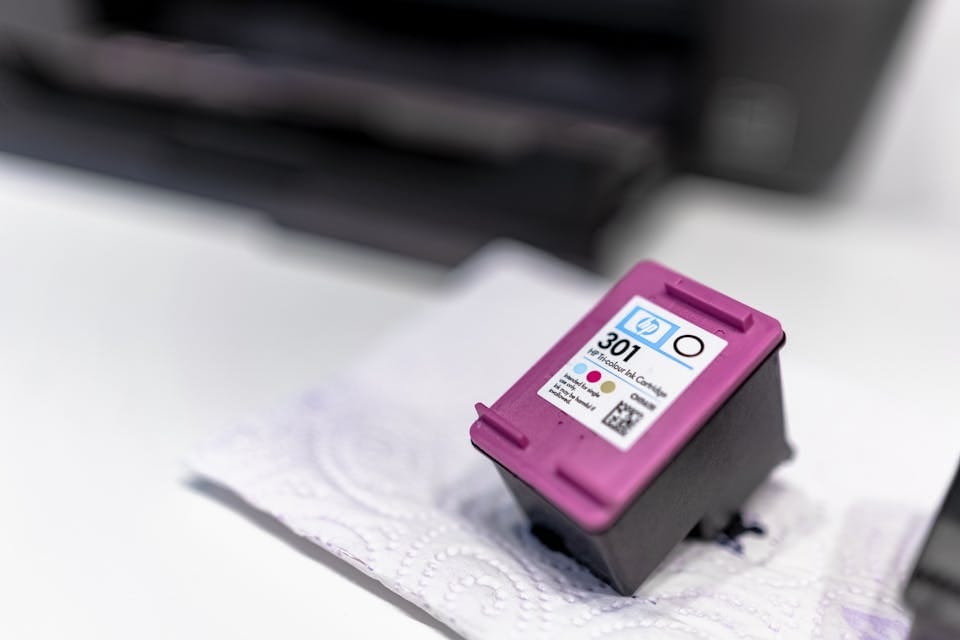
- Remove and inspect for visible ink.
Some cartridges have a window to view ink levels. No ink means time to replace.
Print quality decreases with low ink. Look for faded colors or streaky lines on printouts.

What Happens If You Ignoring cartridge Replacement Timelines?
Ignoring cartridge replacement timelines, whether for inkjet printers, water filters, or other devices that use cartridges, can lead to various issues depending on the type of cartridge and device. Here are the potential consequences:
Compromised Print Quality
Printer cartridges need timely replacement. Prints start to deteriorate when ink levels are low. Here are signs that quality is compromised:
- Faded colors or text
- Lines or streaks on the page
- Inconsistent printing with blank spots
Ignoring these signs leads to unsatisfactory documents and photos. For businesses, this means unprofessional outputs that could harm reputation.
Potential Damage To The Printer
Printers suffer when cartridge changes delay. It’s not just about prints looking bad. It’s also about keeping the printer safe. Here’s what happens:
| Issue | Effect |
|---|---|
| Ink Dry Out | Clogs print nozzles leading to costly repairs. |
| Excessive Wear | Overuse of old cartridges causes extra stress on printer parts. |
Using a cartridge beyond its life spans might end in long-term damage. This eats into your pocket with repair costs or the need for a new printer.
Factors Influencing Cartridge Life
Understanding when to change an inkjet printer cartridge requires more than simply waiting for the ink to run out. Several factors determine cartridge life. Recognizing these can save both time and money. Let’s explore some of the key elements that influence how long your ink cartridge lasts.
Print Frequency And Volume
Regular printer use keeps ink flowing, which can help prevent clogs that might otherwise lead to early cartridge replacement. Irregular use might mean the ink dries out before you can fully deplete the cartridge.
| Daily Print Volume | Expected Cartridge Life Change |
|---|---|
| High | Shorter life span; Change often |
| Moderate | Medium life span; Periodic check |
| Low | Longer life span; Monitor for dry-out |
Cartridge Expiration Dates
Yes, ink cartridges have expiration dates. Check these to avoid unexpected print quality issues. Using a cartridge past its expiry can result in poor performance or damage to your printer.
- Pre-Expired Cartridges – Best performance, optimal quality prints.
- Approaching Expiry – Good for immediate use, risk if stored.
- Post-Expired Cartridges – Poor quality, potential printer harm.
Best Practices For Cartridge Maintenance
Best Practices for Cartridge Maintenance are crucial to ensure your inkjet printer remains in optimal condition. Just as a car needs regular check-ups, your printer cartridges require attention to perform their best. Proper cartridge care extends the life of the cartridges and maintains print quality. While many focus on knowing when to change the ink cartridge, knowing how to maintain them is equally important. This section dives into the maintenance routines that will keep your printing crisp and your cartridges running longer.
Routine Cleaning Procedures
Regular cleaning is essential to prevent ink from drying and clogging the nozzles. Here’s how to keep cartridges in top shape:
- Turn on your printer’s built-in cleaning function monthly.
- Remove the cartridge and gently wipe the print head with a soft, lint-free cloth.
- Use distilled water for stubborn clogs, avoiding harsh chemicals.
- Run a test print to check that all colors are coming through.
Storage Tips For Spares
Storing spare cartridges correctly can save time and money. Follow these tips to protect your investment:
- Keep them sealed in the original packaging until use.
- Store upright as they would be installed in the printer to prevent leaks.
- Avoid extreme temperatures; cool, dry places are best.
- Check the expiration date and use older cartridges first.

Frequently Asked Questions For When Should I Change An Inkjet Printer Cartridge?
How Do I Know When My Printer Cartridges Need To Be Replaced?
Your printer will signal when to change cartridges with low ink warnings or print quality reduction. Regularly check ink levels if printouts start to fade or streak.
When Should I Replace My Printer Ink Cartridge?
Replace your printer ink cartridge if your prints are faded or streaky or when your printer alerts you that ink is low. Regular usage and print quality checks can also indicate when a replacement is due.
How Do I Know If My Printer Cartridge Is Bad?
To determine if your printer cartridge is bad, check for streaks or faded prints. Inspect for leaks, unusual noises when printing, and error messages from your printer. Replace the cartridge if issues persist after cleaning the print head.
How Long Do Inkjet Cartridges Last?
Inkjet cartridges typically last for around 2 years unopened. Once in use, they can print an average of 220 pages before running out.
Conclusion
Determining the optimal time to replace an inkjet printer cartridge requires attention to print quality and cartridge alerts. Keep an eye on fading colors and streaky lines—a clear signal for a change. Remember, timely replacements ensure continuous high-quality prints and protect your printer’s longevity.
Make the switch before print issues arise for the best outcomes.