

Disclosure: This review is based on Moonitor’s current AppSumo listing, its own marketing materials and founder updates, and publicly visible customer ratings as of August 2026 – not hands-on testing. Claims are attributed to their source throughout: official product claims, founder statements, or independent analysis.
It’s a familiar bad feeling: your site’s been down since 3am, nobody noticed until a customer emailed asking why the checkout page won’t load, and now you’re doing damage control on something that could have been fixed hours earlier if you’d just known sooner.
That’s the entire reason uptime monitoring exists as a category – a tool that checks your website, API, or server on a schedule and tells you the moment something’s wrong, instead of you finding out from an angry customer. Moonitor is a newer entrant in that space, positioning itself around a single dashboard that covers websites, APIs, ports, DNS, SSL certificates, domains, and scheduled jobs, with alerts sent to wherever your team already works.
It’s currently available on AppSumo as a lifetime deal across three tiers. This review covers what it actually monitors, how the pricing breaks down, what the founder has said about how the monitoring itself works under the hood, and who it realistically fits.
What Is Moonitor?
Moonitor is an uptime and website monitoring platform built to check whether your websites, APIs, servers, and scheduled jobs are actually running – and alert you the moment one of them isn’t. Per its AppSumo listing, its core pitch is simple: “Catch downtime before your customers do.“
In practice, that means you add the things you want watched, Moonitor checks them automatically on a schedule, and if something goes down, times out, or is about to expire (like an SSL certificate or a domain registration), you get notified through channels like email, Slack, Discord, Telegram, or webhooks.
AppSumo lists it as an alternative to PagerDuty, Statuspage, and UptimeRobot – which gives a reasonable sense of its category (monitoring, alerting, and incident/status communication) without meaning it matches any one of those tools feature-for-feature. It’s a newer, smaller product than any of those three, which is worth keeping in mind throughout this review.
Moonitor at a Glance
| Detail | Current Info |
| Product name | Moonitor: Uptime Monitoring |
| Category | Website and infrastructure uptime monitoring (listed as “Micro-SaaS” on AppSumo) |
| Best for | Developers, product managers, SaaS teams (per AppSumo listing) |
| Website monitoring | Yes – included on every tier |
| Uptime monitoring | Yes – the platform’s core function |
| Response monitoring | Yes – response-time history is included across all tiers |
| Monitoring frequency | 60 seconds on Solo; 30 seconds on Team and Max |
| Alert options | Down and recovery alerts, with failure thresholds to reduce noise from single blips |
| Notification channels | Email, webhooks, Slack, Discord, Telegram; SMS alerts added per a recent founder update (Twilio-powered, per listed integrations) |
| Monitoring locations | 3 as of the most recent founder update (Helsinki, Los Angeles, Johannesburg), with a fourth reportedly being added |
| Status pages | Yes, on every tier – branded, with custom domain and SSL, white-labeling, and maintenance windows per a recent update |
| SSL monitoring | Yes, included from the Solo tier up |
| Domain monitoring | Yes, but only on Team and Max tiers |
| AppSumo pricing | Three lifetime tiers: $54 / $114 / $199 |
| Lifetime access | Yes, per the current listing |
| Refund period | 60 days |
| Current customer rating | 5.0 out of 5 stars, based on a single AppSumo review at the time of writing |
A quick but important clarification: Moonitor’s AppSumo listing carries the “Radar” badge – AppSumo’s label for early-stage, discovery-phase products that the company explicitly states it hasn’t fully vetted. This deal is also not covered by AppSumo’s standard “We Got Your Back” guarantee, since Radar listings are excluded from it. More on what that means in the reliability and safety sections below.
How Does Moonitor Uptime Monitoring Work?
Based on the listing and founder updates, the general workflow looks like this:
- Add the website or service you want to monitor – a URL, API endpoint, port, DNS record, SSL certificate, domain, or scheduled job
- Configure monitoring settings – give it a friendly name, set which status codes count as healthy, and add custom request headers if needed (useful for sites behind Cloudflare or a WAF, per a founder update)
- Choose the monitoring frequency – 60 seconds on the Solo tier, or 30 seconds on Team and Max
- Set notification preferences – choose alert channels and assign contacts per monitor, so noisy background jobs and customer-facing sites can route to different people
- Moonitor checks the service automatically on that schedule, from multiple monitoring locations
- If a check fails, Moonitor re-confirms from other locations and re-checks shortly after before opening an incident, per a recent founder update explaining changes to their alerting logic
- You receive an alert through your chosen channels once an issue is confirmed, and a recovery alert once it’s resolved
- Investigate and resolve the problem, then use the “check now” feature to confirm the fix actually worked
The value of automated monitoring over manually checking a site is fairly obvious once you think about it: nobody is going to reload their site every 30-60 seconds around the clock, but a monitoring tool will, and it won’t get tired or distracted doing it.
Key Moonitor Features
Website Uptime Monitoring
At its core, Moonitor checks whether a website is accessible and responding as expected, on a recurring schedule. This matters across a wide range of situations:
- Business websites – where downtime can mean lost leads or a damaged first impression
- Blogs – where an outage can mean lost readers, broken affiliate links, or missed publishing windows
- E-commerce stores – where even short downtime translates directly into lost sales
- SaaS applications – where an outage directly affects paying customers’ ability to use the product
- Landing pages – especially ones tied to active ad campaigns, where downtime wastes ad spend
- Client websites – for agencies and freelancers responsible for keeping several sites running
Downtime Alerts
When a monitored service goes down, Moonitor sends an alert so you can react before customers start complaining, rather than after. Per the listing, currently supported notification channels include email, webhooks, Slack, Discord, and Telegram, with SMS alerting added according to a recent founder update. Alerts include both a “down” notification when a problem starts and a “recovery” notification once it’s resolved, closing the loop rather than leaving you guessing whether an issue is still ongoing.
Monitoring Frequency
How often a service is checked directly affects how quickly downtime gets detected. On the current plans, Solo checks every 60 seconds, while Team and Max check every 30 seconds. A shorter interval means less time between a service going down and Moonitor noticing – worth factoring in if fast detection matters more for your use case than it does for, say, a low-traffic blog.
Response Monitoring
Beyond simple up-or-down status, Moonitor tracks response-time history across 24-hour, 7-day, and 30-day windows, included on every tier. This is genuinely useful for catching slowdowns before they become full outages – a service that’s gradually getting slower is often a warning sign worth acting on before it actually goes down.
SSL Certificate Monitoring
SSL monitoring is included starting from the Solo tier. This tracks certificate expiration and can warn you before a forgotten renewal turns into an unexpected “not secure” warning for every visitor – a surprisingly common, entirely avoidable failure mode for sites that don’t have automatic certificate renewal set up correctly.
Domain Monitoring
Domain-related monitoring is available on the Team and Max tiers, but not included on Solo. This can help website owners avoid the genuinely painful scenario of a domain expiring unnoticed, or unexpected DNS configuration changes going undetected – per a founder update, Moonitor’s DNS monitoring specifically remembers the last resolved record and alerts when it changes, which can also help catch a hijacked or unexpectedly re-pointed domain.
Status Pages
Branded status pages are included on every tier. Per a founder update, recent improvements include a custom domain with automatic SSL setup, custom logo and color branding, a fully white-labeled option (removing “Powered by Moonitor” branding entirely), the ability for your users to subscribe to updates by email, and maintenance windows so planned work doesn’t trigger unnecessary alerts. A public status page like this is a genuinely useful way to communicate availability to customers directly, rather than fielding the same “is it down for you too?” question repeatedly during an incident.
What Can You Monitor With Moonitor?
Based on the current listing, Moonitor supports eight monitor types in total: websites, APIs, keyword checks, ping, TCP ports, cron/heartbeat jobs, DNS, and SSL/domain expiry. In practical terms, that opens up monitoring for:
- WordPress websites – checking the front end is loading and responding correctly
- Business websites generally
- Online stores – where uptime is directly tied to revenue
- SaaS applications and their critical customer-facing endpoints
- Landing pages, especially for active campaigns
- Client websites, for agencies and freelancers managing several at once
- APIs and endpoints – supported directly as a monitor type
- Web applications more broadly, including background cron jobs and scheduled tasks that don’t have a visible front end at all
It’s worth being clear that some monitor types – specifically Keyword, Port, Cron/Heartbeat, DNS, and Domain monitoring – are only available on the Team and Max tiers, not Solo. The Solo tier covers Website/API, Ping, and SSL monitoring. So the exact monitoring capabilities you get genuinely depend on which tier you choose, not just on the platform’s overall feature list.
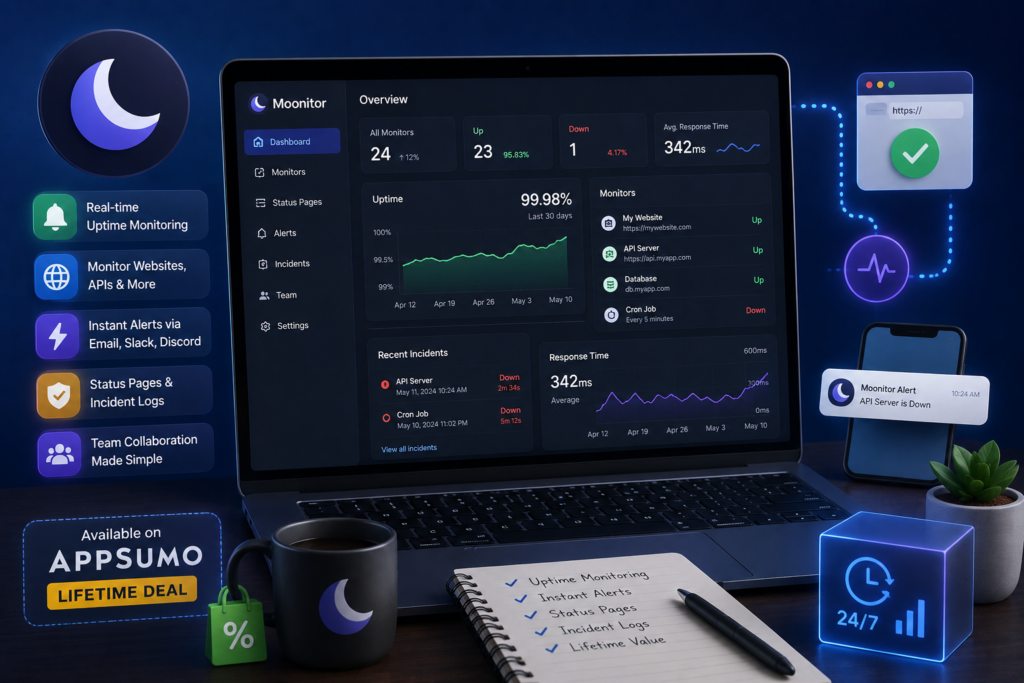
Moonitor AppSumo Lifetime Deal– Pricing & Plans
Based on the current listing (checked August 2026), Moonitor’s AppSumo deal offers three license tiers:
| Feature | Solo ($54) | Team ($114) | Max ($199) |
| List price (before discount) | $168 | $312 | $587.97 |
| Monitors | 20 | 100 | Unlimited |
| Team / users | 1 | Unlimited | Unlimited |
| Check frequency | 60 seconds | 30 seconds | 30 seconds |
| Monitor types | Website/API, Ping & SSL | All types: adds Keyword, Port, Cron/Heartbeat, DNS & Domain | All types: adds Keyword, Port, Cron/Heartbeat, DNS & Domain |
| Alert channels | All available channels | All available channels | All available channels |
| Status pages | Branded status pages included | Branded status pages included | Branded status pages included |
| Response-time history & incidents | Included | Included | Included |
| Real-time alerts | Included | Included | Included |
A few deal-term details worth understanding before buying, per the listing:
- The license includes all future updates to the plan you purchase
- You must activate your license within 60 days of purchase
- You can upgrade or downgrade between the three license tiers
- There’s no code-stacking – you choose one tier
- Lifetime access is included, with a 60-day refund window; the listing explicitly notes this deal is not covered by AppSumo’s “We Got Your Back” guarantee, since it’s a Radar-tier listing
Because pricing and features come from an active, early-stage AppSumo listing, treat these figures as a snapshot rather than guaranteed permanent – it’s worth confirming the live listing before you buy.
Which Moonitor Plan Should You Choose?
Solo ($54)
Solo is a reasonable fit for a single person monitoring a modest number of sites – 20 monitors, one user, Website/API/Ping/SSL monitoring, and 60-second checks. It’s genuinely suitable for a blogger, a solo freelancer with a handful of client sites, or a small business owner watching one or two properties. It won’t cover DNS, domain, port, keyword, or cron/heartbeat monitoring, though, so if any of those matter to you specifically, you’ll need to look at Team or Max instead.
Team ($114)
Team unlocks a meaningfully larger allowance (100 monitors), unlimited team members, faster 30-second checks, and every monitor type Moonitor currently offers, including DNS and domain monitoring. This becomes the practical choice once you need to monitor background jobs or DNS records, need multiple people to have access, or are managing enough sites that Solo’s 20-monitor cap starts to feel tight.
Max ($199)
Max’s core difference is unlimited monitors, at the same check frequency and monitor-type coverage as Team. This tier makes the most sense for agencies or larger operations managing enough websites, APIs, and jobs that even 100 monitors wouldn’t be enough – otherwise, Team already includes essentially the same feature set for less.
The honest recommendation here: don’t jump straight to Max just because it says “unlimited.” If your actual monitor count comfortably fits under 100, Team gets you every feature Max offers for $85 less.
Moonitor vs UptimeRobot vs Better Uptime vs Other Monitoring Tools
| Feature | Moonitor | UptimeRobot | Better Uptime (Better Stack) | Pingdom |
| Uptime monitoring | Yes – core focus | Yes – long-established, widely used | Yes – modern, incident-management focused | Yes – established, enterprise-leaning |
| Monitoring frequency | 30-60 seconds depending on tier | Varies by plan, including a free tier | Varies by plan | Varies by plan |
| Alerts | Email, webhooks, Slack, Discord, Telegram, SMS (per recent update) | Multiple channels, well-established integrations | Multiple channels plus on-call scheduling | Multiple channels, more enterprise-oriented setup |
| SSL monitoring | Yes, from the entry tier | Yes, typically included | Yes, typically included | Available, varies by plan |
| Status pages | Yes, with white-label option on all tiers | Yes | Yes, a core strength | Available, varies by plan |
| API monitoring | Yes | Yes | Yes | Yes, more performance-monitoring oriented |
| Team features | Unlimited users on Team/Max tiers | Varies by plan | Strong team/incident features, a core focus | Enterprise-oriented team features |
| Free option | No free tier; AppSumo lifetime deal instead | Yes, a well-known generous free tier | Limited free tier available | Historically limited to no meaningful free tier |
| Lifetime deal | Yes, via AppSumo | Not typically offered | Not typically offered | Not typically offered |
| Best for | Budget-conscious users wanting a one-time cost | Users wanting an established, free-tier-friendly option | Teams wanting deeper incident management and on-call features | Larger organizations wanting deeper performance monitoring |
This comparison focuses on general, well-established feature categories rather than exact current pricing for the competitors, since their plans and pricing change independently of this review – check each provider’s current site directly if you’re comparing costs precisely. None of these tools is unfairly worse than another; they simply target different priorities. UptimeRobot is well known for a genuinely useful free tier. Better Uptime leans into deeper incident management and on-call workflows. Pingdom leans more enterprise and performance-monitoring-oriented. Moonitor’s specific angle is a one-time lifetime cost via AppSumo, combined with a fairly broad monitor-type list (including cron/heartbeat and DNS monitoring) for a young product.
Moonitor for WordPress Websites
WordPress sites fail in more ways than people expect, and most of those failures happen quietly:
- Plugin conflicts that break the front end without necessarily throwing an obvious server error
- Hosting outages entirely outside your control
- Server failures – resource limits, crashed processes, misconfigurations
- DNS issues, especially after a domain or hosting migration
- SSL problems, usually from a certificate renewal that silently failed
- Unexpected downtime from any combination of the above
Moonitor’s uptime and SSL monitoring can catch these issues faster than waiting for a visitor (or a client) to report them. It’s worth being clear, though, that this is a complement to WordPress security, backup, caching, and performance tools – not a replacement for any of them. Moonitor tells you something’s wrong; it doesn’t fix a broken plugin, restore a backup, or optimize a slow database query.
Moonitor for SaaS Businesses
For SaaS companies, uptime monitoring is a direct line to protecting customer experience – if your app is down and you don’t know it, your customers find out before you do, which is close to the worst possible way to learn about an outage.
- Monitoring production websites and the marketing site alongside the actual application
- Monitoring critical endpoints specifically, like login, checkout, or core API routes, not just the homepage
- Downtime notifications routed to the right team members via per-monitor contact routing
- General incident awareness, with incident history attached to each monitored service for later review
- Customer-facing status communication via a branded status page, so customers have somewhere to check during an incident instead of flooding support
It’s worth being direct about scope here: uptime monitoring is one piece of SaaS observability, not the whole picture. It tells you whether something is reachable and responding – it’s not a substitute for application performance monitoring, log aggregation, error tracking, or deep infrastructure metrics. For a SaaS team’s core “is it up” signal, though, it’s a reasonable and relatively low-cost layer to have in place.
Moonitor for Agencies and Freelancers
Agencies managing multiple client sites have an obvious use case here: centralized monitoring across every site they’re responsible for, instead of manually checking each one or relying on clients to report problems.
- Centralized monitoring – one dashboard covering every client site rather than juggling separate logins or spreadsheets
- Client reporting – uptime and incident history data that can support conversations about SLAs or ongoing maintenance value
- Downtime notifications routed to the right internal person per client site
- Support for multiple websites, scaling from a handful up to unlimited depending on tier
- Reduced need for manual checks, freeing up real time that would otherwise go to just refreshing client sites to make sure they’re still up
On practicality: whether the current plan limits work for an agency depends heavily on how many client sites are involved. A freelancer or small agency with a handful of clients likely fits comfortably on Solo or Team. A larger agency managing dozens of sites would need Max’s unlimited monitor allowance to avoid running into caps.
Pros and Cons of Moonitor
Pros
- Straightforward, purpose-built uptime monitoring across a genuinely broad set of monitor types
- Automated alerts across several common channels (email, Slack, Discord, Telegram, webhooks, and reportedly SMS)
- Setup appears designed to be simple, based on the marketing materials and feature descriptions
- Genuinely useful for a wide range of website owners, not just developers
- Potential strong lifetime-deal value relative to ongoing subscription-based competitors
- Reduces the need for manual, repetitive “is my site still up” checking
- Could be genuinely helpful for agencies managing multiple client websites from one dashboard
- Recent founder updates show active, responsive development – multi-location confirmation checks, Cloudflare/WAF compatibility, and status page improvements were all added within weeks of each other
Cons
- Monitoring limits vary meaningfully depending on plan, particularly around monitor types available on Solo versus Team/Max
- Likely fewer advanced observability features than enterprise-grade platforms – this is a focused uptime tool, not a full observability stack
- Genuinely early-stage product – founded March 2026, with a very small team and just one public review at the time of writing
- Feature differences between tiers mean the “right” plan really depends on which monitor types you specifically need
- Possibly limiting for large infrastructure environments needing deep, granular monitoring beyond uptime and basic response time
It’s worth being direct that with only one public review currently available, there isn’t yet a meaningful body of independent customer feedback to draw on – unlike some other AppSumo listings with dozens of reviews, this one doesn’t yet give a strong read on real-world satisfaction beyond the vendor’s own claims.
Is Moonitor Easy to Use?
Based on the available marketing materials and feature descriptions, Moonitor appears designed with simplicity as a priority – a single dashboard, friendly monitor names, bulk actions, and clear status badges (up, down, paused, pending) all point toward an intentionally approachable interface.
- Dashboard – described as one unified view rolling up monitor health, active incidents, paused checks, and expiring certificates or domains
- Adding monitors – appears to be a straightforward process of entering a target and choosing a monitor type
- Configuring alerts – per-monitor contact routing and failure thresholds suggest a reasonably flexible but still approachable setup process
- Understanding downtime reports – 24h/7d/30d uptime figures and attached incident history are designed to make status easy to read at a glance
- Managing multiple websites – bulk actions (assigning contacts, pausing/resuming checks) are built specifically to reduce the tedium of managing many monitors at once
A realistic expectation: a beginner should be able to set up basic website uptime monitoring without much technical background. More advanced configuration – custom request headers for sites behind a WAF, DNS change detection, cron/heartbeat monitoring for background jobs – leans more technical, though still appears designed to be manageable rather than requiring deep infrastructure expertise.
Is Moonitor Reliable?
This deserves a careful answer rather than a simple yes, because uptime monitoring reliability depends on several layered factors: the monitoring infrastructure itself, how often checks run, how many locations they run from, the logic used to decide something is actually down, and whether alerts actually get delivered when they should.
What’s genuinely useful here is that Moonitor’s founder has been unusually transparent about exactly this topic in recent updates. Per a founder post dated July 26, 2026, the team identified and fixed a real false-positive problem: checking from two locations simultaneously meant that a brief, simultaneous network blip at both locations could look like agreement that a site was down, when it was actually just a shared hiccup. The team’s stated fix, as of that update:
- A fault now needs to be confirmed by a majority of checking locations, not just one
- A failed check is followed by a second check a few seconds later before an incident is opened – if the second check passes, it’s logged but not treated as downtime, and it doesn’t count against your uptime percentage, per the founder’s description
- The same logic applies in reverse, intended to stop a site that briefly flickers back up from being marked recovered and then immediately down again
- A third monitoring location (Johannesburg, alongside existing locations in Helsinki and Los Angeles) was added specifically to break ties, since two-location deadlocks previously meant the system did nothing – the founder states this happened 23 times in a month on one monitor before the fix
- A fourth monitoring location is described as being added, per the same update, though it’s not confirmed live in what’s publicly available
This kind of transparency is a genuinely good sign – it shows active engineering attention to a real, well-known problem in uptime monitoring (false positives from single-location checks), rather than ignoring it. At the same time, it’s worth being clear-eyed: this is a founder’s own description of the system on a very young product, not an independently audited reliability report, and there’s no official uptime percentage, accuracy rate, or alert-delivery guarantee published that this review can point to.
The practical takeaway, which applies to any monitoring tool, is worth repeating here specifically: test your alert delivery after setting up a monitor. Trigger a test failure if the platform supports it, or intentionally take a low-stakes test page offline briefly, and confirm the alert actually reaches you through your chosen channel before you rely on Moonitor for anything business-critical.
Who Should Use Moonitor?
Bloggers
For monitoring an important content website, Moonitor’s Solo tier covers the basics – uptime, SSL, and response time – at a low one-time cost.
Small Businesses
For knowing quickly when a business website goes offline, rather than finding out from a customer, Moonitor’s core uptime and downtime alerting directly addresses the problem.
WordPress Site Owners
For detecting hosting or availability problems – which WordPress sites are genuinely prone to, given the number of moving parts (plugins, themes, hosting, database) – uptime and SSL monitoring adds a useful early-warning layer.
SaaS Founders
For monitoring critical customer-facing services, Moonitor’s API monitoring, response-time tracking, and status pages cover a meaningful chunk of what a small SaaS team needs for basic availability visibility.
Freelancers
For monitoring client websites without manually checking each one, Moonitor’s centralized dashboard and per-monitor contact routing are a practical fit.
Agencies
For managing multiple website monitors from one place, particularly with Team or Max’s higher (or unlimited) monitor allowances and full monitor-type coverage, Moonitor scales reasonably well for this use case.
Who Should Avoid Moonitor?
- Large enterprises – a young, small-team product with a single public review isn’t likely to meet typical enterprise vendor requirements yet
- DevOps teams requiring full observability – Moonitor covers uptime and basic response time, not deep application performance monitoring, distributed tracing, or log aggregation
- Organizations needing advanced infrastructure monitoring – server-level metrics (CPU, memory, disk) aren’t part of what’s described in the current listing
- Teams requiring extensive log aggregation – this isn’t a logging platform, and shouldn’t be evaluated as one
- Businesses needing sophisticated incident-management workflows – Moonitor covers alerting and basic incident history, but doesn’t appear to offer the kind of on-call scheduling, escalation policies, or postmortem tooling found in dedicated incident-management platforms
None of this is a knock on Moonitor specifically – a focused uptime monitoring tool simply isn’t designed to replace a full observability stack, and shouldn’t be judged as if that were its goal.
Conclusion | Is Moonitor Worth It?
On ease of use and core monitoring capability, Moonitor looks like a genuinely solid, purpose-built uptime tool – broad monitor-type coverage, sensible alerting logic (including the recently improved multi-location confirmation approach), useful status pages, and a dashboard clearly designed around reducing manual checking and alert fatigue.
On plan limits and pricing, the three-tier lifetime structure is reasonably flexible, with Solo suiting light, single-user needs and Team/Max opening up the full monitor-type list and higher (or unlimited) monitor counts for growing use cases or agencies.
On reliability and scalability, the honest picture is: promising, actively improving, but genuinely unproven at scale. The founder’s transparency about recent false-positive fixes is a good sign of engineering diligence, but this is a company founded in March 2026 with a single public review – there simply isn’t a long track record yet to point to.
On target audience: Moonitor fits bloggers, small businesses, WordPress site owners, SaaS founders, freelancers, and smaller agencies well. It’s a weaker fit for large enterprises, teams needing full observability, or anyone requiring guaranteed, extensively proven reliability for mission-critical infrastructure.
Compared to established alternatives like UptimeRobot, Better Uptime, or Pingdom, Moonitor’s main draw is the one-time lifetime cost via AppSumo versus an ongoing subscription – a genuinely appealing trade-off if the feature set fits your needs, but not a reason on its own to skip due diligence on a young platform. This isn’t an automatic “must-buy” – it’s a reasonably priced, actively developed tool worth testing against your real monitoring needs before you commit to it for anything critical.
Frequently Asked Questions
What is Moonitor uptime monitoring?
Moonitor is a platform that checks whether your websites, APIs, servers, ports, DNS records, SSL certificates, domains, and scheduled jobs are online and responding, alerting you automatically when something goes down.
How does Moonitor work?
You add the services you want monitored, choose a check frequency, and set up alert channels. Moonitor then checks each service on that schedule from multiple locations, confirming a failure before alerting you, and notifies you through your chosen channels when something goes down or recovers.
Is Moonitor an uptime monitoring tool?
Yes – that’s its core function, alongside broader monitoring for APIs, ports, DNS, SSL certificates, domain expiry, and scheduled/cron jobs.
Does Moonitor offer a lifetime deal?
Yes, per the current AppSumo listing – three license tiers (Solo, Team, Max) each offer lifetime access for a one-time payment, with a 60-day refund window.
How much does Moonitor cost on AppSumo?
As of this writing: Solo is $54, Team is $114, and Max is $199, each granting lifetime access with different monitor counts, check frequencies, and monitor-type coverage. Confirm the live listing for current pricing before purchasing.
How many websites can Moonitor monitor?
It depends on your tier: 20 monitors on Solo, 100 on Team, and unlimited on Max, per the current listing.
How frequently does Moonitor check websites?
Every 60 seconds on the Solo tier, and every 30 seconds on Team and Max, per the current listing.
Does Moonitor send downtime alerts?
Yes – via email, webhooks, Slack, Discord, Telegram, and reportedly SMS, with both down and recovery notifications.
Does Moonitor monitor SSL certificates?
Yes, SSL monitoring is included starting from the Solo tier, helping catch expiring certificates before they cause an unexpected HTTPS warning for visitors.
Does Moonitor offer status pages?
Yes, branded status pages are included on every tier, with custom domain, custom branding, white-labeling, email subscriptions, and maintenance windows per recent founder updates.
Can Moonitor monitor WordPress websites?
Yes – Moonitor monitors any website by URL, which covers WordPress sites the same way it covers any other website, checking uptime, response time, and SSL status.
Can agencies use Moonitor for client websites?
Yes, particularly on the Team or Max tiers, which support unlimited team members and higher (or unlimited) monitor counts suited to managing multiple client sites from one dashboard.
Is Moonitor better than UptimeRobot?
Not universally – UptimeRobot is a well-established platform with a widely used free tier, while Moonitor’s draw is a one-time lifetime cost and a broad monitor-type list on a newer platform. Which is “better” depends on whether you value UptimeRobot’s longer track record or Moonitor’s lifetime pricing and feature set more.
Is Moonitor better than Better Uptime?
Not universally – Better Uptime (Better Stack) leans further into incident management and on-call workflows, while Moonitor is more focused on straightforward uptime and infrastructure monitoring at a one-time cost. Teams needing deeper incident-management tooling may prefer Better Uptime.
Is Moonitor suitable for SaaS monitoring?
For basic availability monitoring of production sites and critical endpoints, yes. For full SaaS observability – performance monitoring, error tracking, log aggregation – Moonitor covers only one piece of that picture, not the whole stack.
Is Moonitor worth buying on AppSumo?
It depends on fit. For users with real, ongoing website or infrastructure monitoring needs who are comfortable with a young, actively developing product, the lifetime price and 60-day refund window make it a reasonably low-risk option to try. For anyone needing a long-proven track record or advanced observability features, it’s worth waiting or choosing a more established alternative.
Check the Current Deal and Test Before You Rely On It
Uptime monitoring is genuinely inexpensive insurance compared to the cost of unnoticed downtime – a missed sale, a frustrated customer, or hours of lost productivity while something quietly stayed broken. Moonitor’s current AppSumo lifetime deal makes that insurance a one-time cost rather than an ongoing subscription, which is a real point in its favor if the feature set matches what you need.
Before buying, look at the current AppSumo listing directly, and choose a tier based on your actual number of websites, required monitor types, check-frequency needs, and team size – not simply which tier sounds like the best deal. And whichever tier you choose, set up your first few monitors and deliberately test the alert workflow – trigger a test failure if possible, or watch how a real one is handled – before trusting Moonitor with anything genuinely critical to your business.
Related posts:
 Secure Your Digital Life Forever with the FileJump 2TB Cloud Storage Lifetime Deal
 SiteGuru Lifetime Deal Review – Simplify Your SEO & Website Audits Forever
 Zipchat AI Review AppSumo 2026: Lifetime Deal, Pricing, Features & Is It Worth It?
 SnowSEO Lifetime Deal Review: Is the AppSumo Lifetime Deal Worth It?