

When it comes to managing finances for nonprofit organizations, having the right accounting software is critical for staying transparent, organized, and compliant. Nonprofit organizations face unique financial challenges, such as tracking donations, managing restricted funds, ensuring compliance with tax regulations, and maintaining transparency with stakeholders. Selecting the right accounting software is critical to streamline these tasks and support the organization’s mission. Both FreshBooks and QuickBooks are well-known cloud accounting platforms, but they serve different types of users and organizational structures.
This comprehensive comparison explores whether FreshBooks or QuickBooks is better for nonprofit organizations, based on ease of use, pricing, nonprofit-specific features-fund tracking, reporting capabilities,, scalability, and support to help you choose the best option for your nonprofit organization.
Understanding Nonprofit Accounting Needs
Nonprofits have unique accounting requirements compared to for-profit businesses. Key needs include:
- Fund accounting to track multiple income sources like grants, donations, and membership fees
- Donor management
- Generating year-end financial reports
- Expense categorization for transparency and audits
An ideal solution must support these operations while remaining easy to use for teams with limited accounting expertise.
FreshBooks Features
FreshBooks is designed for small businesses and freelancers but includes features that nonprofits can leverage:
- Donation and Grant Tracking: Tracks incoming donations and grants for accurate financial management (FreshBooks Nonprofit).
- Financial Reporting: Generates custom reports, including statements of financial position, for transparency and decision-making.
- Fund Accounting: Simplifies tracking finances across various projects and initiatives.
- Expense and Budget Management: Monitors spending and compares it against budgets to ensure effective resource use.
- Automated Invoicing: Streamlines billing for fundraising events, improving cash flow.
- Real-Time Insights: Provides real-time financial reporting, budget tracking, and expense analysis.
- Integrations: Connects with over 100 apps, including fundraising and donation management tools, via platforms like Zapier.
FreshBooks’ features are sufficient for small nonprofits with straightforward needs but may lack the depth required for complex fund accounting or large-scale donor management.
QuickBooks Features
QuickBooks, particularly its Online Plus, Advanced, and Enterprise editions, is specifically tailored for nonprofits:
- Fund Accounting: Categorizes revenue and expenditures by fund or program, with class-based reporting for detailed tracking (QuickBooks Nonprofit).
- Donor Management: Consolidates donor information, tracks donation history, and supports personalized communications.
- Budget Tracking: Tracks budgets by fund or program, comparing projected vs. actual revenue.
- Compliance: Ensures readiness for IRS filings, including Form 990, with specialized reports.
- Mobile Access: Allows donation recording on the go via the QuickBooks mobile app.
- Integrations: Syncs with donation apps like Fundly and DonorPerfect, as well as other tools like Mailchimp and Salesforce.
- Automation: Automatically generates reports like statements of financial position, activities, and budget vs. actual.
- Scalability: Supports up to 40 users with custom permissions, ideal for larger nonprofits.
- Live Bookkeeping: Offers access to QuickBooks-certified bookkeepers for nonprofits.
QuickBooks’ nonprofit-specific features, especially in its Enterprise edition, make it a robust choice for organizations with complex financial structures.
FreshBooks vs QuickBooks for Nonprofits: Feature Comparison Table
| Feature | FreshBooks | QuickBooks Online |
|---|---|---|
| Ease of Use | Very simple and intuitive | Moderate learning curve but manageable |
| Fund Accounting Support | Not Available | Via Class & Location Tracking |
| Donation Management | Manual Only | Custom donation receipts and integration |
| Financial Reporting | Basic reports | Robust nonprofit reporting suite |
| Donor Acknowledgment | Not Built-in | Yes, built-in |
| Audit Compliance | Limited | Detailed reports and logs |
| Custom Budgets | No | Yes |
| Third-party Integrations | Basic (Stripe, PayPal, etc.) | Extensive (Kindful, DonorDock, Fundly, etc.) |
| Best For | Tiny nonprofits, clubs, or informal groups | Registered 501(c)(3)s, churches, and NGOs |
| Starting Price | $8.4/month (Lite Plan) | $1.90/month (Simple Start); nonprofit discounts available |
Pricing
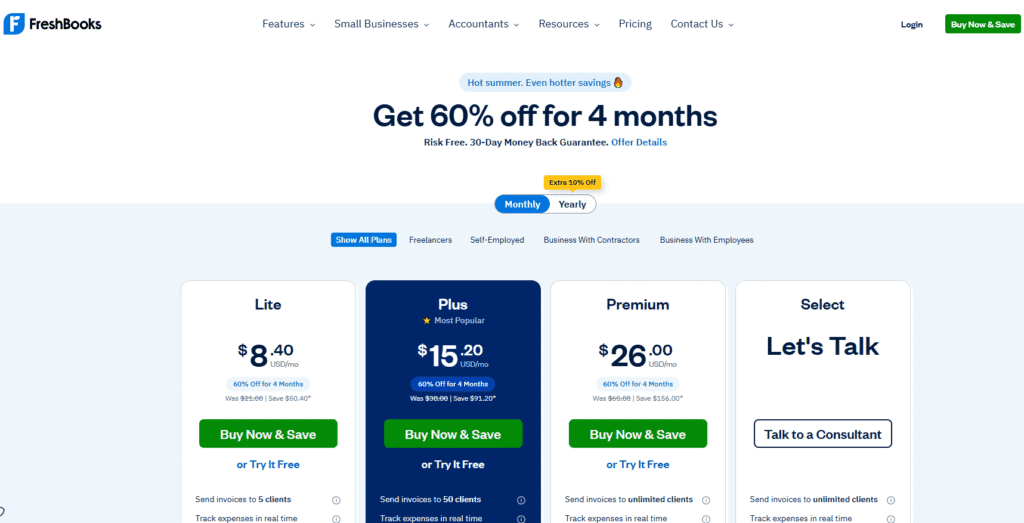
Nonprofits often operate on tight budgets, making cost a critical factor. FreshBooks offers competitive pricing, starting at $8.4/month for the Lite plan, $15.2/month for the Plus plan, and $26/month for the premium plan, with a 10% discount for annual subscriptions. Additional users cost $10/month each, which can add up for larger teams (FreshBooks Pricing). FreshBooks also offers a 30-day free trial, allowing nonprofits to test its features without commitment.
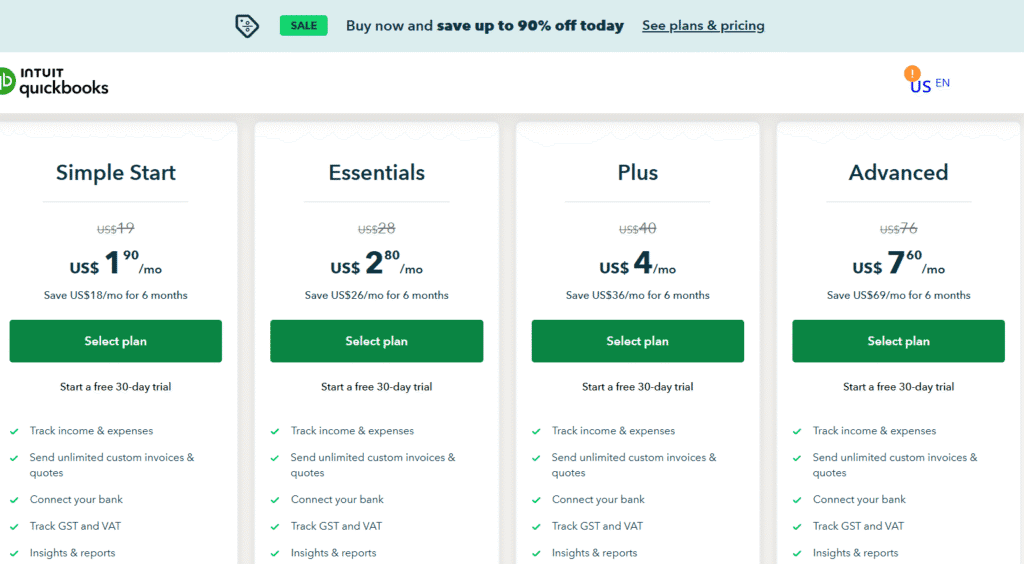
QuickBooks has a higher starting price, with QuickBooks Online Simple Start at $1.90/month, Plus at $4/month, and Advanced at $7.6/month. However, nonprofits can access significant discounts through TechSoup, such as QuickBooks Online Plus for $7.6/year for 5 users or QuickBooks Online Advanced for $91.2/year for 25 users. QuickBooks Enterprise for Nonprofits, a desktop solution, starts at $50/month. These discounts make QuickBooks more cost-effective for larger nonprofits, though smaller organizations may find FreshBooks more affordable.
| Plan | FreshBooks | QuickBooks |
|---|---|---|
| Starting Price | $1.90/month (Lite, 1 user) | $1.9/month (Simple Start) |
| Additional Users | $12.8/month per user | Up to 40 users (Enterprise); varies by plan |
| Nonprofit Discounts | 10% for annual subscriptions | Significant discounts via TechSoup |
| Free Trial | 30 days | 30 days (Plus and Advanced plans) |
Scalability
Scalability is crucial for nonprofits anticipating growth. FreshBooks is well-suited for small to medium-sized nonprofits but may not accommodate larger organizations with multiple users or complex financial needs. Adding users at $10/month can become costly, and its features are less tailored for advanced nonprofit accounting (ControlHub).
QuickBooks excels in scalability, with plans like QuickBooks Online Advanced and Enterprise supporting up to 40 users and handling thousands of donors and vendors. Its ability to integrate with enterprise-level tools and provide customizable reports makes it ideal for growing nonprofits (QuickBooks Nonprofit).
Support and Resources
Nonprofits often need reliable support to navigate financial complexities. FreshBooks offers excellent customer support, with a 4.8/5.0 rating across 120,000+ reviews and a global support team. Its Help Center and live chat are responsive, but resources are less extensive compared to QuickBooks (FreshBooks Nonprofit).
QuickBooks provides robust support, including 24/7 phone support, a large knowledge base, webinars, and live bookkeeping services. Nonprofits can also access specialized training through resources like QuickBooks Made Easy for Nonprofits (QuickBooks Made Easy). This depth of support is particularly valuable for organizations with complex needs or limited in-house expertise.
| Aspect | FreshBooks | QuickBooks |
|---|---|---|
| Support Channels | Live chat, email, Help Center | 24/7 phone, webinars, live bookkeeping |
| Resources | Moderate, focused on simplicity | Extensive, including nonprofit-specific training |
Which Is Better?
- Choose FreshBooks only if your nonprofit is very small, informal, or just getting started and only needs basic invoicing and expense tracking.
- Choose QuickBooks if you’re running a registered nonprofit, need fund tracking, generate year-end financials, or accept donations and grants.
QuickBooks offers the structure, flexibility, and tools that nonprofit organizations require—making it the superior choice for mission-driven organizations aiming for growth, transparency, and compliance.
Conclusion
For small nonprofits with simple accounting needs, FreshBooks is likely the better choice due to its affordability (starting at $15/month), ease of use, and sufficient features for basic donation tracking and financial reporting. Its intuitive interface and responsive support make it ideal for organizations with limited staff or accounting expertise.
For larger or growing nonprofits, QuickBooks is generally the superior option, offering advanced fund accounting, donor management, and IRS-compliant reporting. Its scalability, extensive integrations, and discounted pricing through TechSoup (e.g., $75/year for 5 users) make it cost-effective for organizations with complex financial structures.
Both platforms offer 30-day free trials, allowing nonprofits to test their features and determine the best fit. Consider your organization’s size, budget, and specific financial needs when making your decision.
Frequently Asked Questions
What is the best accounting software for nonprofits?
The best accounting software for nonprofits is often QuickBooks Nonprofit, specifically tailored for managing donations, grants, and fund accounting. It offers features like donor tracking, customizable chart of accounts, and nonprofit-specific reporting (e.g., Statements of Financial Position). Other great options include Aplos, designed exclusively for nonprofits with built-in fund accounting and donation tools, and Wave, a free option suitable for small organizations with basic needs. Xero also supports nonprofits with strong reporting and integration features. The ideal choice depends on your organization’s size, complexity, and need for features like budgeting, audit trails, or multi-program tracking.
Is QuickBooks better than FreshBooks?
QuickBooks is generally better than FreshBooks for businesses needing full-featured accounting, including inventory management, payroll, and advanced reporting. It’s ideal for growing businesses or those with complex financial needs. In contrast, FreshBooks is simpler and more user-friendly, making it a great choice for freelancers, solo entrepreneurs, and service-based businesses that focus on invoicing, time tracking, and expense management. While both offer cloud-based access and integrations, QuickBooks is more robust overall, whereas FreshBooks shines in ease of use and client billing. The better choice depends on your business size and accounting complexity.
Which QuickBooks is best for nonprofit organizations?
QuickBooks Online Nonprofit is the best choice for nonprofit organizations. It offers specialized features like fund accounting, donation tracking, and customized nonprofit financial reports, including Statements of Financial Position and Activities. This version helps nonprofits manage grants, donations, and expenses while maintaining compliance with nonprofit accounting standards. It also supports budgeting and donor management, making it easier to track funds across programs. Its cloud-based platform enables collaboration among team members and accountants, providing an
What is better than QuickBooks?
While QuickBooks is popular, several alternatives may be better depending on your needs.
- Xero offers a modern interface with unlimited users and strong bank integration, ideal for growing small businesses.
- FreshBooks is great for freelancers and service-based businesses focusing on invoicing and time tracking.
- Sage suits companies needing advanced inventory and compliance features. For startups on a budget,
- Wave provides free basic accounting.
- Zoho Books integrates well with other Zoho apps, while NetSuite offers a full ERP solution for larger enterprises. Choosing the best depends on your business size, industry, and specific requirements.
How much does QuickBooks cost for nonprofit organizations?
QuickBooks offers a Nonprofit edition through QuickBooks Online, with pricing typically starting around $80 to $150 per month, depending on the plan and features. Pricing varies based on the number of users and additional services like payroll or advanced reporting. Discounts or special nonprofit pricing may be available through authorized partners. This version includes nonprofit-specific tools such as fund accounting, donation tracking, and tailored financial reports to help organizations manage their finances effectively.