
Web3 is changing the way websites and content are hosted online. With the InterPlanetary File System (IPFS) and Web3 domains, you can now host a blog that’s decentralized, censorship-resistant, and free from traditional server dependencies. This means your content is not just published — it’s truly owned by you.
Let’s explore how to host your blog on IPFS using a Web3 domain step by step.
Understanding IPFS, Web3 Domains, and Traditional Hosting
What is IPFS and Why It Matters?
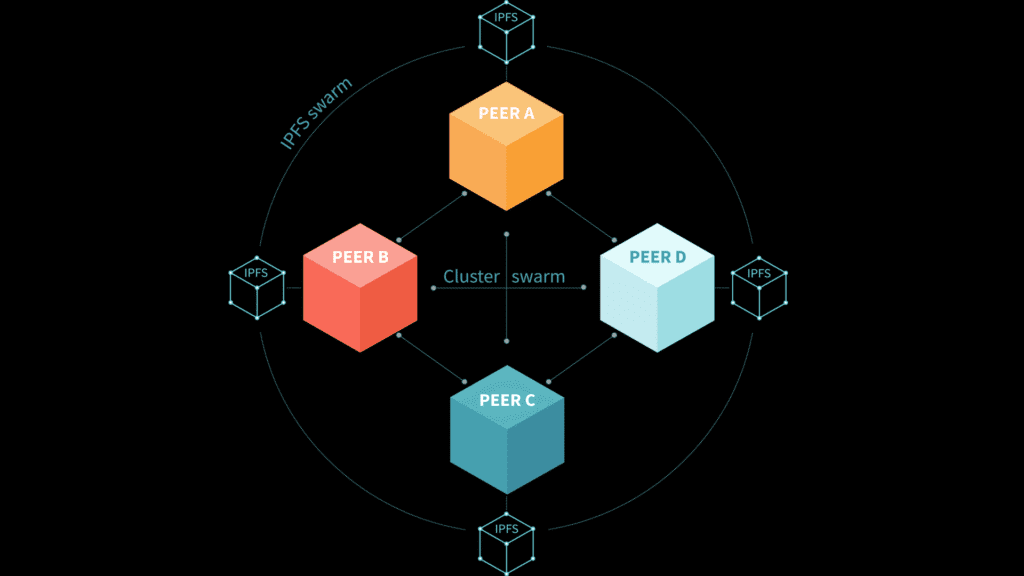
IPFS (InterPlanetary File System) is a peer-to-peer file storage network that allows users to host and access content in a decentralized way. Instead of pulling content from a central server, IPFS retrieves files from multiple nodes on a distributed network. This makes your blog faster, more secure, and censorship-resistant.
Unlike traditional HTTP URLs, IPFS uses Content Identifiers (CIDs) that are hashed, making each file version unique and tamper-proof. In short, once your blog is added to IPFS, it cannot be changed without updating the CID.
What is a Web3 Domain?
Web3 domains are blockchain-based domains that replace traditional domain names like .com or .net with extensions like .eth, .crypto, .zil, or .bnb. These domains are managed through smart contracts and owned by the wallet holder. They allow you to connect blockchain features like crypto wallets, IPFS content, and decentralized identities. Unlike traditional domains, they are owned outright, with no renewal fees, and offer enhanced security. These type of web3 domains provided by ENS or Unstoppable Domains like registrar.
Popular providers include:
- Unstoppable Domains (.crypto, .nft, .wallet)
- ENS (Ethereum Name Service) (.eth)
- Space ID (.bnb, .arb)
- FIO Protocol, Handshake, and more.
Role of Hostinger and CrocWeb in Web3 Hosting
Hostinger and CrocWeb are Web2 hosting providers but can support Web3 hosting in specific ways:
Hostinger: Known for affordable shared hosting ($2.99-$10.49/month), Hostinger supports static site hosting and offers tools like hPanel for easy management. It accepts cryptocurrency payments, signaling Web3 interest, but lacks native IPFS or Web3 domain support. You can host static blog files on Hostinger and link them to IPFS or use Hostinger as a fallback for Web2 accessibility.
CrocWeb: A Canadian provider since 2009, CrocWeb offers cloud hosting ($2.95-$86.95/month) with NVMe storage, LiteSpeed servers, and 99.99% uptime. While not Web3-native, CrocWeb’s one-click CMS installs (e.g., WordPress) and SitePad builder support static site hosting, which can be uploaded to IPFS. Like Hostinger, it requires external tools for full Web3 integration.
Web3 Limitations: Neither provider natively supports IPFS hosting or Web3 domain resolution (e.g., .eth). However, they can host static files or serve as a DNSLink bridge to IPFS content, creating a hybrid Web2-Web3 setup.


Why Host Your Blog on IPFS and Web3 Domains for Blog Hosting?
Traditional Web2 hosting, as offered by providers like Hostinger and CrocWeb, relies on centralized servers, which can face outages (e.g., the 2021 AWS downtime affecting multiple websites) or censorship risks. IPFS distributes your blog’s files across multiple nodes, ensuring availability and resilience. Web3 domains, registered on blockchains like Ethereum, provide permanent ownership without renewal fees, unlike ICANN-managed domains. Key benefits include:
- Censorship Resistance: IPFS-hosted content is nearly impossible to block, as seen in cases like the 2017 Catalan referendum website hosted on IPFS to evade censorship.
- Resilience: Distributed storage ensures uptime, even if individual nodes fail.
- Security: Content Identifiers (CIDs) guarantee data integrity, and Web3 domains reduce domain hijacking risks.
- Cost Efficiency: Free IPFS pinning services like Pinata and budget-friendly plans from Hostinger ($2.99/month) or CrocWeb ($2.95/month) lower costs.
- Permanent Links: IPFS’s content addressing prevents link rot, ensuring long-term accessibility.
For SaaS startups and bloggers, combining IPFS with Hostinger or CrocWeb’s reliable infrastructure and a Web3 domain creates a robust, future-proof blogging solution.
Step-by-Step Guide to Hosting Your Blog on IPFS Using Web3 Domains
1. Create or Export Your Blog
Prepare your blog as a static website. This can be generated using tools like:
- Jekyll
- Hugo
- Gatsby
- Next.js (Static Export)
Your blog folder should contain only static assets: HTML, CSS, JS, and images.
2. Upload Your Blog to IPFS
You can use several platforms or tools to upload your content to IPFS:
- Pinata (https://pinata.cloud) – user-friendly, supports free plans.
- Web3.Storage – backed by Protocol Labs, integrates well with developers.
- Fleek – full deployment with CI/CD for web hosting on IPFS.
- IPFS Desktop – for manual upload if you’re using your own node.
Once uploaded, you’ll get a CID (Content Identifier). This CID is the unique hash that points to your blog on IPFS.
3. Buy or Configure a Web3 Domain
If you don’t already own one, purchase a Web3 domain from:
Link your wallet (MetaMask or similar) and buy a domain. You’ll retain ownership as long as you control the private keys.
4. Point Your Web3 Domain to Your IPFS CID
Each Web3 domain provider allows you to set a “ContentHash” or similar record:
- Go to your domain management dashboard.
- Set the Content Hash to your IPFS CID.
- Save and confirm the transaction on-chain (usually an Ethereum or Polygon gas fee applies).
Your domain (e.g., yourname.crypto) now resolves to the blog content hosted on IPFS.
5. Access Your Blog via Compatible Browsers
Web3 domains are not yet natively supported by all browsers. You can view your blog via:
- Brave, Opera, or Firefox (with plugins).
- Via IPFS Gateway: ]
- Via Handshake or Unstoppable Domain Gateways
You can also embed redirects from traditional domains if needed.
Can Traditional Hosts Like Hostinger or Crocweb Support Web3 Domain Hosting?
As Web3 grows in popularity, many users still wonder whether mainstream web hosting providers like Hostinger or Crocweb support Web3 domains or IPFS hosting. The short answer: partially, and with limitations.
Hostinger and Web3 Domains
Hostinger is a reliable, affordable shared hosting provider, ideal for traditional web hosting. It offers:
- WordPress hosting
- cPanel-based file management
- Free domain and SSL options
However, Hostinger does not natively support IPFS or decentralized content networks. If you own a Web3 domain (like .eth or .crypto) and host your blog on Hostinger, you’ll need a workaround:
- Use your traditional domain (like .com) to redirect users to your Web3 domain.
- Or, use DNS records (CNAME/URL forwarding) from Hostinger to an IPFS gateway or Web3-supported static site.
So, while Hostinger does not offer true Web3-native hosting, you can still integrate Web3 domains by managing redirects or using iframe embedding for IPFS content.
Crocweb and Web3 Domains
Crocweb is a Canadian hosting provider known for cPanel hosting with LiteSpeed servers. Like Hostinger, it’s built for traditional web services.
Currently, Crocweb:
- Does not support IPFS natively
- Offers no Web3 domain resolution
- Doesn’t include blockchain integration features
However, if you want to store your static blog files and use a Web3 gateway or manual IPFS upload, you can use Crocweb as your content origin. Then, pair it with tools like Fleek or IPFS gateways for decentralized deployment.

So, Are These Hosts Compatible With Web3?
| Hosting Provider | Native IPFS Support | Web3 Domain Support | Best Use Case |
|---|---|---|---|
| Hostinger | ❌ | Partial (via redirects) | Hosting + bridging to Web3 |
| Crocweb | ❌ | No native support | Basic file storage only |
| Fleek | ✅ | ✅ (Built for Web3) | Full Web3 hosting |
| Pinata/Web3.Storage | ✅ | ✅ (CID-based routing) | IPFS content pinning |
Recommendation
If you’re committed to Web3-native blogging, go with Fleek, Web3.Storage, or Pinata. Use Hostinger or Crocweb only if you’re transitioning from Web2 to Web3 and need hybrid setups.
Final Thoughts
Hosting your blog on IPFS with a Web3 domain is a powerful step toward digital ownership. Hosting a blog on IPFS with a Web3 domain offers a decentralized, secure, and resilient alternative to traditional hosting.
While neither provider natively supports IPFS or Web3 domains, their static site hosting, high uptime (99.9%-99.99%), and performance features (LiteSpeed, CDN) make them viable for hosting static files or Web2 fallbacks. By combining IPFS tools like Fleek or Pinata with Hostinger’s hPanel or CrocWeb’s SitePad, and linking to a .eth or .crypto domain, you can create a future-proof blog. SaaS startups and bloggers can leverage these platforms to balance Web2 reliability and Web3 innovation, ensuring accessibility and security in the evolving digital landscape.
It puts control back in the hands of the creator — you. As Web3 infrastructure matures, this method will become more accessible, faster, and mainstream. For now, it’s ideal for tech-savvy users and early adopters who value decentralization and innovation.
Frequently Asked Questions
Does Web3 use IPFS?
Yes, Web3 often uses IPFS (InterPlanetary File System) to store and share data in a decentralized way. IPFS allows Web3 applications to store content across a distributed network, ensuring greater security, transparency, and resilience compared to traditional centralized storage systems.
How to host a Web3 domain?
To host a Web3 domain, you need to register it on a decentralized platform like Ethereum or Solana using services such as Unstoppable Domains or the Ethereum Name Service (ENS). After registration, you can link the domain to a decentralized storage system like IPFS to host your website content, making it accessible in a decentralized manner.
Can you host a website on IPFS?
Yes, you can host a website on IPFS (InterPlanetary File System). By uploading your website’s files to IPFS, you create a decentralized, peer-to-peer network where the files are distributed across multiple nodes, ensuring your site is accessible without relying on a central server.
Is IPFS hosting free?
IPFS hosting is free in terms of storing and sharing files, as the network is decentralized. However, you may need to pay for services that ensure better reliability, such as pinning services, which keep your files available on the network long-term.
Is IPFS a blockchain?
IPFS (InterPlanetary File System) is not a blockchain, but it is often used alongside blockchain technology. While blockchain is designed for secure, decentralized transactions, IPFS focuses on decentralized storage and file sharing. Both technologies work together in Web3 to create a more decentralized internet.