


In today’s digital era, protecting crucial data through cloud backup has gained immense popularity. The market is brimming with various PC cloud backup services that offer advanced backup functionalities. If you’re searching for an exceptional option with 1TB free cloud storage or more, read on to discover detailed information.
Why Choose Cloud Backup?
Cloud backup offers numerous advantages, making it an increasingly popular choice for data protection. Compared to traditional local backup methods, cloud backup excels in several aspects that users truly appreciate.
Firstly, it ensures the safety of valuable data by storing it remotely, away from local disasters, equipment failures, system crashes, and virus attacks.
Moreover, your cloud backup space can be expanded at cost-effective price.
Additionally, cloud backup allows convenient access to data anytime and anywhere, while also offering multiple backup versions for effortless and high-speed data recovery.
Furthermore, you can customize the frequency of backup tasks based on your preferences with a cloud backup service.
The Need for 1TB or More Free Cloud Storage
As your data continues to grow on your computer, the question of whether 1TB cloud storage is necessary arises. For many individuals requiring ample storage space for their data, 1TB cloud backup proves to be an ideal solution.
Unfortunately, most cloud services only offer limited free cloud backup space, ranging from 2GB to 15GB, which may not suffice.
However, there is a possibility of obtaining free 1TB cloud storage and even more. To delve deeper into this topic, let’s explore the following section.
Discover the Best Free Cloud Backup Service with 1TB Cloud Storage
CBackup, a professional cloud backup service, offers a remarkable solution to obtain 1TB or more of free cloud storage.
By utilizing CBackup’s Combine Cloud feature, you have the opportunity to obtain 1TB free cloud storage by merging multiple cloud drive accounts into a unified cloud storage. The flexibility is in your hands as you can choose accounts from the same cloud platform or different platforms altogether. This remarkable feature empowers you to consolidate your cloud storage and enjoy an extensive 1TB free cloud storage to meet your storage needs.
Let’s explore other notable advantages of CBackup. It prioritizes data security and provides a range of impressive backup and sync features completely free of charge. Here’s an overview of these features:
- Free Cloud Storage: Each CBackup account includes 10GB of free cloud storage in CBackup Cloud. You can easily back up your data to the CBackup Cloud and upgrade your CBackup account to 1TB or 5TB of storage.
- PC to Public Cloud Backup: CBackup enables effortless backup of computer data to various cloud drives such as Google Drive, OneDrive, Dropbox, and more. It supports a wide range of data types, including documents, pictures, programs, hard drives, and even entire computers.
- PC to Public Cloud Sync: In addition to backup, CBackup allows you to create sync tasks between your PC and popular cloud drives, ensuring your files are up to date across platforms.
- Cloud to Cloud Backup and Sync: CBackup facilitates seamless backup and data transfer between different cloud drive accounts from a single interface.
- Unlimited Backup Versions: Each of your backup version will be saved by CBackup so that you are able to restore your files to any previous version.
- Scheduled Backup and Sync: With CBackup’s Scheduler feature, you can create automated backup or sync tasks according to your preferred scheudle.
CBackup has received positive feedback from users and professional forums, thanks to its user-friendly features and intuitive operation. You can access this free cloud service on its official website or download the desktop app compatible with Windows operating systems, including Windows 11, 10, 8, 7, and XP.
CBackup uses the OAuth Authorization System to protect your login information. Additionally, CBackup employs 256-bit AES Encryption during data transfer, ensuring the security of your data throughout the process.
A Detailed Guide to Obtaining 1TB Free Cloud Storage
Even with limited IT knowledge, you can easily utilize CBackup with this simple guide. Before following these steps, ensure you have downloaded and installed the CBackup desktop application, signed up for a new account, and logged in.
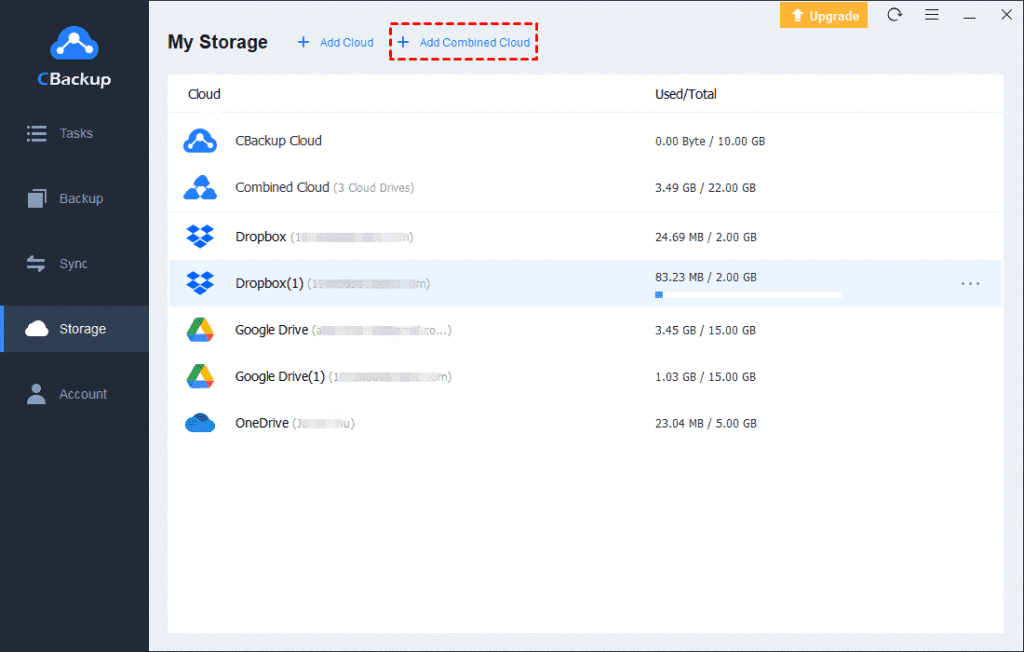
1. Press the Storage tab > choose a cloud drive > tap the “Authorize Now” button to add your cloud drive accounts one by one.

2. On the Storage page, click “+ Add Combined Cloud“.
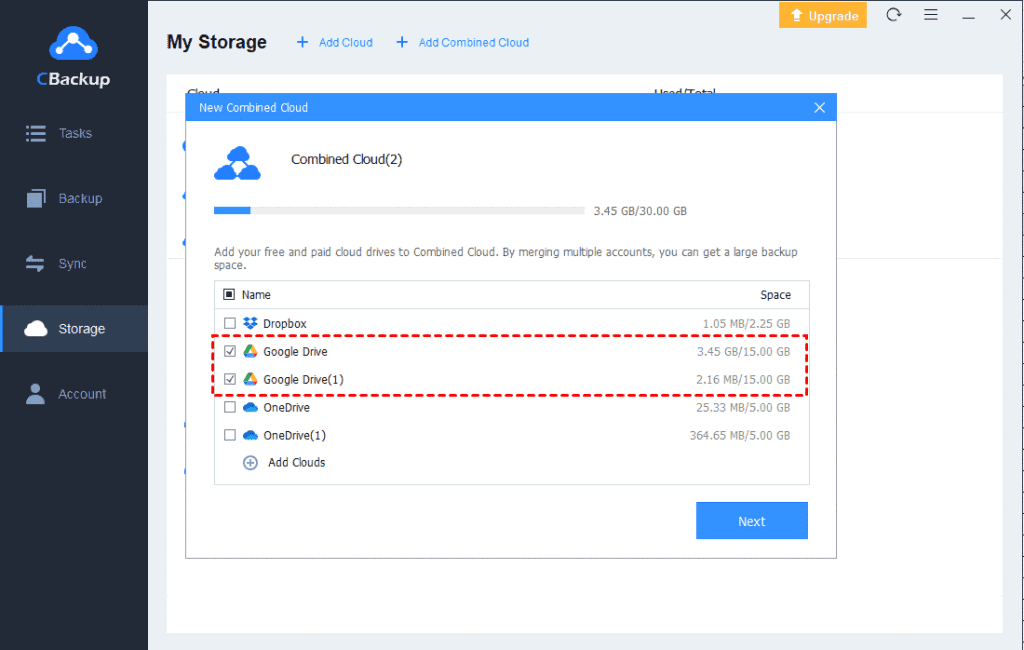
3. You can pick all the cloud storage accounts you want to merge. Choose “Next“. Arrange the selected cloud drives in the desired order, then click “Combine“.
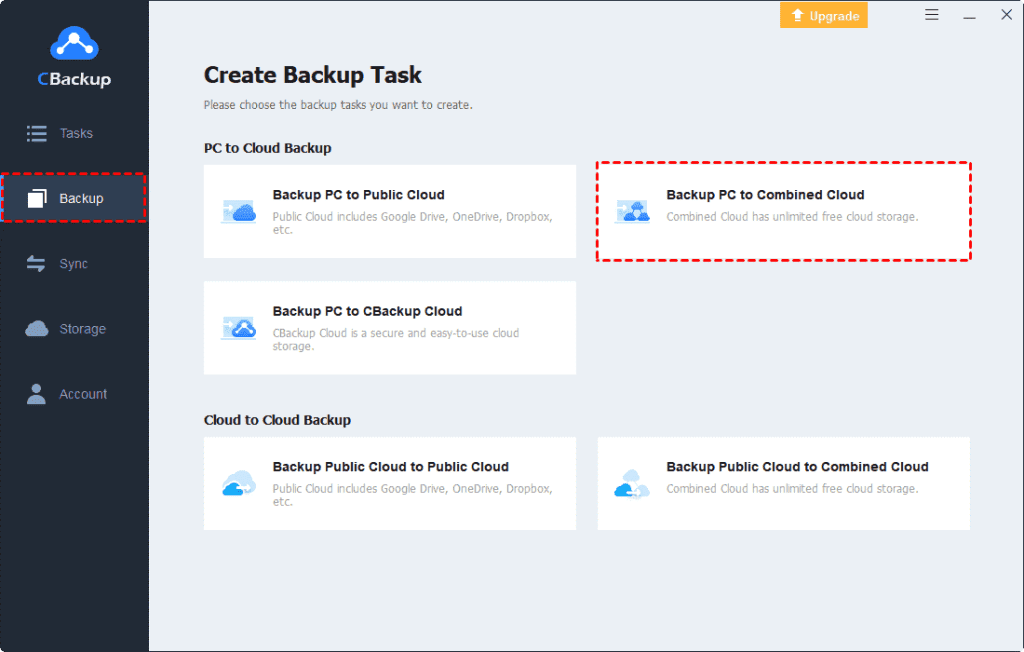
4. After completing these steps, you will find a Combined Cloud option listed in your cloud storage choices. When creating a backup task, simply select “Backup PC to Combined Cloud” under the Backup tab.
Final Words
In conclusion, the aforementioned free cloud backup service with 1TB of free cloud storage offers an excellent solution for your backup needs. By utilizing this free backup softare, you can immediately enjoy 1TB of free cloud storage. Furthermore, CBackup provides a range of effective backup and sync features at no cost.




