
A Bitmain Antminer is quite loud. It can be as noisy as a vacuum cleaner.
Mining cryptocurrency with a Bitmain Antminer is exciting but can be ear-piercing. The constant buzz and whirr can turn your peaceful home into a noisy workshop. This noise can be bothersome, especially if you’re living in an apartment or shared space.
Understanding the noise levels and finding ways to reduce them is crucial for a more pleasant mining experience. In this blog, we will explore how loud a Bitmain Antminer can get and provide practical tips to help you minimize the noise. Stay with us to transform your mining setup into a quieter, more comfortable environment.
How Loud is a Bitmain Antminer?
Bitmain Antminers, especially popular models like the Antminer S19 Pro, S9, or L7, are notorious for their high decibel levels. On average, Antminers produce:
- 70 to 90 decibels (dB) at close range
- Equivalent to a vacuum cleaner or a blender running constantly
- In small rooms or apartments, this level can feel intolerable
For reference:
- 60 dB = Normal conversation
- 70 dB = Busy traffic
- 85+ dB = Hearing damage over long exposure
So yes, Antminers are extremely loud, particularly when used in enclosed spaces without any noise dampening measures.
Noise Levels of Bitmain Antminers
The noise produced by Antminers varies by model and operating conditions, particularly ambient temperature. Below is a detailed breakdown of noise levels for some popular models, based on available data:
| Model | Noise Level (dB) at Factory Settings | Notes |
|---|---|---|
| Antminer S9 | 76 | At full fan speed (6000 rpm front, 4500 rpm rear); lower at 4000 rpm. |
| Antminer L3+ | 70 (up to 95 in warm conditions) | Average noise; exceeds 95 dB when ambient temperature is above 25°C. |
| Antminer L7 | >95 (in warm conditions) | Significant noise increase in temperatures above 25°C. |
| Silent Miner System | 46 | Aftermarket solution compatible with various Antminer models. |
Noise Level Comparisons
To put these figures into perspective:
- 70 dB: Comparable to a vacuum cleaner or dishwasher, noticeable but manageable in some settings.
- 80 dB: Similar to a lawnmower or food processor, disruptive in close proximity.
- 90 dB: Equivalent to a motorcycle at full throttle, highly intrusive.
- 100 dB: Akin to a jackhammer or rock concert, potentially harmful with prolonged exposure.
For example, an Antminer S9 operating at 76 dB is loud enough to be heard clearly in adjacent rooms, while the L3+ or L7 at 95 dB can be audible up to 300 meters away in quiet conditions, as noted in user reports on forums like Reddit.
Why Are Antminers So Loud?
High-Power Cooling Fans:
Most Antminers have dual high-speed fans running at 6,000–7,000 RPM to keep the ASIC chips cool.
24/7 Operation:
These machines are non-stop, mining 24/7 without breaks, so the fans never slow down.
Heat Dissipation Needs:
ASIC chips run hot—often over 70°C (158°F)—which requires constant airflow.

What Are The Common Complaints From Users?
Many Antminer users complain about the constant, high-pitched sound. It can interfere with daily activities and even disturb neighbors.
Some users have reported that the noise makes it difficult to sleep if the miner is running in a nearby room. Others find it impossible to focus on work or enjoy leisure time.
These complaints are common, but there are practical ways to mitigate the noise. Have you faced these issues? What solutions have you tried?
Reducing the noise can make your mining operation more pleasant and sustainable. Let’s look into some effective strategies in the next sections.
Factors Contributing To Noise
Bitmain Antminers can be very loud, producing noise levels similar to a vacuum cleaner. To reduce noise, consider placing the miner in a soundproof box or using noise-dampening materials.
When using a Bitmain Antminer, one of the most common issues is dealing with its loud noise. Understanding the factors contributing to this noise can help you find ways to reduce it. Let’s dive into these factors and see what can be done.
Fan Speed And Operation
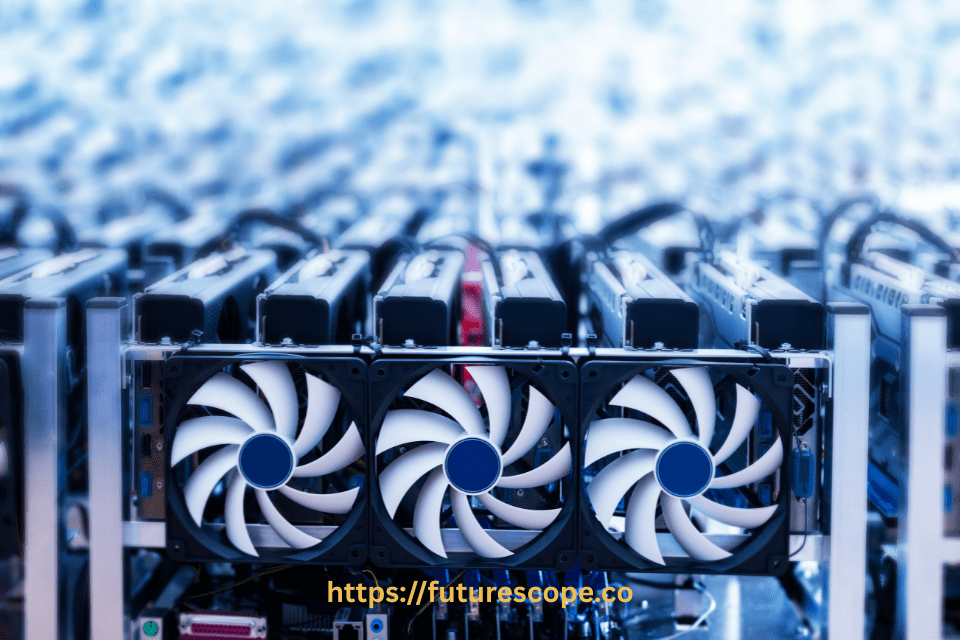
The primary source of noise from your Bitmain Antminer is its fan. These fans operate at high speeds to cool the device as it works hard to mine cryptocurrencies.
Higher fan speeds mean more noise. If you’re mining in a hot environment, the fans will need to run faster to keep the device cool. This significantly increases the noise level.
You can lower the fan speed by placing your Antminer in a cooler environment. A cool basement or air-conditioned room can help.
Mining Environment
The environment where you place your Antminer also plays a crucial role in the noise level. Hard surfaces like concrete or metal can amplify the noise, making it seem louder.
Soft surfaces like carpets or acoustic panels can absorb some of the sound. Consider adding some sound-absorbing materials around your mining setup.
Another tip is to place your Antminer in an enclosed space like a closet or a specially designed mining cabinet. This helps contain the noise and makes it more bearable.
Have you thought about the impact of your mining environment on noise levels? Simple changes can make a big difference.
Reducing noise from your Bitmain Antminer is possible with a few practical steps. Adjusting fan speeds and optimizing your mining environment can lead to a quieter and more pleasant experience.

Impact Of Noise On Surroundings
The Bitmain Antminer is very loud, making it disruptive to its surroundings. To reduce noise, use soundproof enclosures or quieter cooling fans. This helps create a more peaceful environment.
The Bitmain Antminer is a powerful cryptocurrency mining device, but it is notoriously loud. Understanding the impact of this noise on your surroundings is crucial, especially if you’re running the device at home. This section will delve into how the noise affects residential areas and compare industrial versus home settings.
Effects On Residential Areas
The loud hum of an Antminer can quickly become a nuisance in a quiet neighborhood. Imagine trying to relax in your living room, but all you can hear is the relentless buzz from another room. This can disrupt your peace and even lead to complaints from neighbors.
Noise pollution isn’t just annoying; it can impact your health. Continuous exposure to loud sounds can cause stress, disturb sleep, and even lead to hearing loss over time. If you’re living in a shared space or have close neighbors, the noise can strain relationships and create tension.
Are you prepared to handle these challenges? If not, it’s time to consider noise reduction strategies.
Industrial Vs. Home Settings
In an industrial setting, the noise from an Antminer is less of a concern. Factories and warehouses are already noisy environments, so the additional sound is often negligible. Plus, these spaces are usually designed to manage high-decibel activities.
At home, the situation is entirely different. Living rooms, bedrooms, and home offices are meant to be quiet and comfortable. The sudden intrusion of a loud mining rig can be jarring.
Think about where you plan to place your Antminer. A basement or garage can help reduce the noise that permeates into living spaces.
Could you invest in soundproofing materials or enclosures? Simple solutions like foam panels or specialized mining enclosures can make a significant difference. This way, you can continue mining without sacrificing your home’s tranquility.
How to Reduce Bitmain Antminer Noise?
Bitmain Antminers are essential tools for cryptocurrency mining. Yet, they can be very noisy. For many, this noise can be a major issue. Thankfully, there are several ways to reduce this noise. Let’s explore some effective and practical strategies noise reduction techniques.
Optimizing Fan Speed
One way to reduce noise is by optimizing fan speed. The fans in an Antminer are often the main source of noise. Lowering the fan speed can greatly reduce the noise level. Ensure your Antminer is in a cool environment. This helps keep the machine running efficiently at lower fan speeds. A user on Reddit noted that setting fans to 33% speed (below 3000 rpm) made the noise more acceptable.
- Use high-efficiency, low-noise fans (e.g., Noctua Industrial PPC models)
- These reduce RPM and sound without a significant drop in airflow
- Ensure fans are compatible with Antminer’s voltage and pin configuration
Install Fan Speed Controller Firmware
- Use third-party firmware like BraiinOS or Hive OS to control fan speeds
- Reduce fan RPM when ambient temperatures are low
⚠️ Note: Lower fan speed may reduce cooling and impact lifespan if not managed carefully
Use Noise Dampening Materials
Another effective method is using noise dampening materials. These materials can absorb and reduce noise. Place foam panels around your Antminer. This can help block and absorb the sound. There are special noise-dampening enclosures available. These enclosures are designed to minimize noise. They can be a good investment for serious miners. Ensure there is proper ventilation in these enclosures.
By optimizing fan speed and using noise dampening materials, you can significantly reduce the noise from your Bitmain Antminer. These methods are effective and easy to implement. Enjoy a quieter mining experience!
Specially designed mining noise reduction boxes (like the Noctua or DIY soundproof containers) can cut noise levels by 30–40 dB
Be sure to install ventilation and exhaust fans to prevent overheating
Create A Dedicated Mining Space
Bitmain Antminers are notoriously loud, often reaching 75-90 decibels. Use soundproofing materials to reduce noise. Place the miner in a dedicated, insulated space to further lessen the sound.
Mining with a Bitmain Antminer can be noisy. If you’re serious about cryptocurrency mining, creating a dedicated mining space is crucial. This not only helps manage the noise but also keeps your setup organized.
Move the Antminer to basements, garages, or outdoor sheds
Keep it in an area isolated from bedrooms or offices
Ensure proper airflow and dust protection
Build A Soundproof Enclosure
One way to reduce the noise from your Antminer is by building a soundproof enclosure. You can use materials like acoustic foam, mass-loaded vinyl, or even heavy blankets.
Ensure that there is adequate airflow. Your Antminer needs to stay cool. Adding ventilation holes or installing small fans can help maintain the temperature.
I remember setting up my first soundproof box using an old cabinet and some foam panels. It made a noticeable difference. Have you ever thought about how much noise you can cut down with just a few materials?
Line the mining room walls with acoustic panels or foam mats
Helps absorb and diffuse sound waves for overall reduction
Choosing The Right Location
The location of your mining setup plays a significant role in noise management. Choose a spot that’s far from your living areas. A basement or garage can be ideal.
Avoid placing it near bedrooms or common areas. This will help ensure that the noise doesn’t interfere with daily life. Plus, it keeps the heat generated by the miner away from your main living spaces.
I initially set up my miner in a spare bedroom. The noise was unbearable. Moving it to the garage was a game changer. Where have you placed yours?
By creating a dedicated mining space, you can significantly reduce the noise and enjoy a more peaceful environment. Don’t you think it’s worth investing a little time and effort to achieve this?
Advanced Noise Reduction Solutions
Advanced noise reduction solutions can significantly improve your experience with the Bitmain Antminer. The high-pitched sound of the machine can be disruptive. Here, we explore two effective methods. These solutions can help you reduce the noise levels in your mining setup.
Water Cooling Systems
Water cooling systems are an effective way to reduce noise. These systems replace traditional air cooling. They use water to remove heat from the components. This process is much quieter. A water cooling system includes a pump, water blocks, and radiators.
The pump moves water through the system. Water blocks absorb heat from the Antminer. Radiators then dissipate the heat. This method is quieter than using fans. It also increases the efficiency of cooling.
Maintain Low Ambient Temperatures: Keeping the mining environment cool reduces the need for fans to operate at high speeds. Air conditioning units, industrial fans, or heat exchangers can help maintain temperatures below 25°C, which is critical for models like the L3+ and L7 that increase noise in warmer conditions.
External Cooling Systems: Some miners use external cooling solutions to offload heat dissipation from the miner’s internal fans, allowing them to run at lower speeds and produce less noise.
Upgrading Fans And Components
Another method involves upgrading fans and components. Stock fans are often noisy. Replacing them with quieter models can help. Look for fans with lower decibel ratings. These fans operate more quietly.
High-quality fans can reduce noise and improve airflow. Better airflow means more efficient cooling. Upgrading other components can also help. For example, vibration-dampening mounts can reduce noise. These mounts absorb vibrations from the machine. This makes your setup quieter and more stable.
Maintenance Tips For Noise Control
A Bitmain Antminer can be very loud, reaching up to 75 decibels. Reduce noise by placing it in a soundproof box. Regularly clean the fans to ensure smooth operation and less noise.
Maintaining your Bitmain Antminer for noise control is crucial for a quieter mining experience. By keeping up with regular maintenance, you can significantly reduce the noise level and ensure your equipment runs efficiently. Here are some key tips to help you manage the noise from your Antminer effectively.
Regular Cleaning And Upkeep
Dust and debris can quickly build up inside your Antminer, causing the fans to work harder and generate more noise. Regular cleaning can help mitigate this issue.
Make it a habit to clean your Antminer at least once a month. Use a can of compressed air to blow out dust from the fans and other components. Be gentle to avoid damaging any sensitive parts.
Ensure the vents are clear of obstructions. Blocked vents force the fans to spin faster to cool the device, leading to increased noise. Keeping these areas clear can help maintain optimal airflow and reduce noise levels.
Monitoring Equipment Performance
Pay close attention to your Antminer’s performance. Overheating can cause the fans to run at higher speeds, increasing noise. Monitoring the temperature can help you identify any issues early.
Use software tools to keep track of the internal temperatures. If you notice any unusual spikes, it might be time to check the cooling system or replace thermal paste.
Check for any unusual sounds that might indicate a problem. A change in fan noise can signal that a fan is failing or needs lubrication. Addressing these issues promptly can prevent further noise and potential damage.
Ask yourself: Is your Antminer running louder than usual? Regular monitoring and maintenance can help you catch problems early, ensuring a quieter and more efficient operation.
By following these simple maintenance tips, you can enjoy a quieter mining environment and prolong the life of your Bitmain Antminer. Are you ready to start your noise control journey?
Community Insights And Recommendations
Mining cryptocurrencies can be quite a noisy endeavor, especially with powerful equipment like the Bitmain Antminer. This section delves into community insights and recommendations to help you reduce the noise and make your mining setup more manageable.
User Experiences And Feedback
Miners have shared various success stories on platforms like Reddit, demonstrating the effectiveness of these noise reduction methods:
- One user reported that by placing their Antminer S9 in a well-ventilated garage and reducing fan speed to 4000 rpm, the noise became manageable and no longer disturbed household members (Reddit).
- Another miner built a custom enclosure with soundproofing materials, achieving a significant noise reduction while maintaining optimal cooling, as discussed in a Reddit thread.
- A user operating multiple Antminer S7s in a garage noted that using a cabinet to draw in cool outside air and exhaust hot air outside reduced noise significantly, making it tolerable even with 10 units running (Reddit).
These real-world examples highlight the practicality and effectiveness of combining multiple noise reduction strategies.
Popular Products And Tools
Several products and tools have gained popularity in the crypto mining community for their effectiveness in reducing Antminer noise. Soundproofing materials like acoustic panels and foam are widely recommended.
One popular choice is the use of a dedicated mining enclosure. These enclosures are designed to contain the noise and keep your equipment cool. Users have reported significant noise reduction with this method.
Another tool to consider is the use of quieter fans. Replacing the stock fans with high-quality, low-noise alternatives can make a noticeable difference. Check online reviews and user testimonials to find the best options.
Have you tried any of these methods, or do you have your own solutions to share? Your insights could help fellow miners create a more peaceful environment for their operations.
Frequently Asked Questions
How To Reduce Bitcoin Miner Noise?
To reduce Bitcoin miner noise, you can use a combination of soundproofing and cooling strategies. Place the miner in a dedicated enclosure lined with sound-absorbing materials like acoustic foam or insulation panels to muffle the fan and vibration noise. Use quiet, high-efficiency fans or water-cooling systems to reduce the reliance on loud built-in fans. Additionally, placing the miner in a separate room, basement, or even a soundproof mining box can further isolate the noise. Regularly cleaning dust and ensuring proper airflow can also help reduce fan strain and noise levels.
How Loud Is A Bitmain Antminer?
A Bitmain Antminer is quite loud, typically producing noise levels around 75 to 95 decibels (dB), depending on the model and workload. This is comparable to the sound of a vacuum cleaner or a busy street, and it can be disruptive in home or office environments. The noise mainly comes from the high-speed cooling fans needed to keep the powerful ASIC chips from overheating. Because of this, Antminers are best suited for well-ventilated, isolated locations or specialized enclosures that can help reduce noise.
How Loud Is A Bitcoin Miner Decibel?
A typical Bitcoin miner produces noise levels ranging from 70 to 90 decibels (dB) or more, depending on the model and environment. This is similar to the sound of a vacuum cleaner, hairdryer, or lawnmower, making it too loud for most home settings. The high noise is mainly caused by the powerful cooling fans needed to prevent overheating during continuous operation. Some industrial models, like the Bitmain Antminer series, can exceed 90 dB, which may require soundproofing solutions or dedicated mining enclosures to reduce the disturbance.
What Is The Noise Level Of Antminer S19?
A Bitmain Antminer S19 has a noise rating of approximately 75 dB, which is roughly equivalent to the sound of a vacuum cleaner or busy office—loud enough to be disruptive in residential settings .
Reddit users also note this level:
“Antminer S19 operates at a noise level of 75 dB, which can be disruptive in residential areas” medium.com
“I’ve had an S19 up to a high pitched whining 90 dB. That is really loud.” reddit.com+4reddit.com+4reddit.com+4
So while the official spec is 75 dB, actual noise can peak higher depending on load and environment—sometimes hitting 90 dB during intense use.
Conclusion
Bitmain Antminers, such as the S9, L3+, and L7, are powerful tools for cryptocurrency mining, but their noise levels—ranging from 70 dB to over 95 dB—can be a significant challenge for home users. This noise can disrupt households, annoy neighbors, and even violate local regulations. However, by employing strategies like optimal placement, environmental cooling, fan modifications, noise reduction enclosures, specialized systems like the Silent Miner System, and regular maintenance, miners can significantly reduce noise levels. These methods, supported by user experiences and expert recommendations, allow miners to enjoy the benefits of cryptocurrency mining while maintaining a peaceful living environment. By carefully balancing noise reduction with cooling efficiency, miners can create a sustainable and harmonious mining setup.
Keep your environment more comfortable. Happy mining!