The green dot on Facebook indicates that a person is currently active on the platform. It signifies that they are online and visible to their Messenger contacts.
However, it’s important to note that the green dot may not always be accurate in representing someone’s online status, as they may have their chat turned off or may be active on Facebook without actively using it. This feature allows users to see when others are actively using the platform, making it easier for them to connect and communicate in real-time.
Understanding The Green Dot Indicator
The green dot on Facebook indicates that a user is active or recently active on the platform, whether they are browsing the site or using the Messenger app. It is a way for other users to know when someone is online.
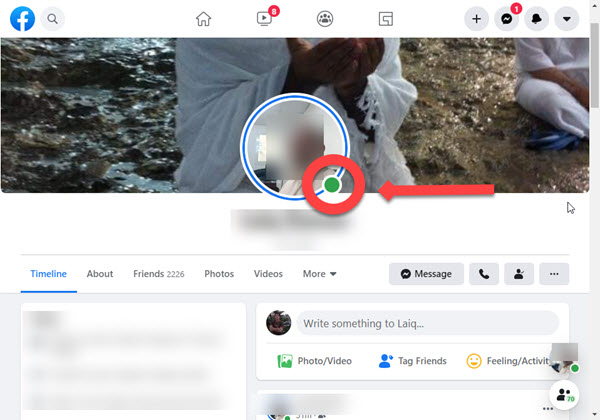
The green dot on someone’s Facebook profile picture indicates that they are active on the Facebook platform, whether on the site or on the Facebook Messenger app. It is a small green dot that appears next to a person’s name or profile picture, indicating their online presence.
Explanation Of The Green Dot’s on Facebook
The green dot on Facebook serves as a real-time indicator of a user’s availability and willingness to engage in conversations. When the green dot is present, it means that the person is actively using Facebook or Messenger and is ready to receive messages or chat. This feature is especially useful for connecting with friends, family, or colleagues and initiating conversations instantly.
Facebook’s green dot offers a quick and convenient way to identify who among your contacts is currently online and available for interaction. It eliminates the need to send messages and wait for a response, as you can directly engage with individuals who have the green dot. Whether you want to catch up with a friend, collaborate on a project with a colleague, or simply have a spontaneous conversation, the green dot enables you to know who is actively using the platform.
Furthermore, the green dot also helps in facilitating timely and efficient communication. Instead of reaching out to someone who might not be actively using Facebook, you can prioritize your conversations with those who have the green dot, knowing that they are more likely to respond promptly. It adds a sense of real-time connection and enhances the overall user experience on the platform.
It’s important to note that the green dot does not indicate the user’s specific activity or the content they are engaged with. It simply lets you know that they are currently active and available for communication. So, if you see the green dot next to someone’s name or profile picture, you can confidently initiate a conversation, knowing that they are online and ready to chat.
Interpreting The Green Dot’s Meaning
The green dot on Facebook indicates that a user is currently active on the platform, whether they are browsing the site or using the Facebook Messenger app. It lets other users know that the person is available for chat or interaction.
Different Interpretations Of The Green Dot
When you see a green dot next to someone’s name on Facebook, it signifies that the person is currently active on the platform. However, the interpretation of this green dot can vary among users. Some may assume that it means the person is actively engaging with content, while others may understand it as an indication that the person is available for direct messaging.
Exploring What The Green Dot Signifies About A User’s Online Status
The green dot on Facebook represents a user’s online status. It indicates that the person is currently active and using the platform. This can be helpful for users who want to engage in real-time conversations or collaborations. However, it’s important to note that the green dot doesn’t necessarily mean that the person is actively scrolling through their feed or viewing specific content.
Understanding The Relationship Between The Green Dot And Facebook Messenger
The green dot on Facebook is closely associated with Facebook Messenger. When a user is actively using Facebook Messenger, the green dot will appear next to their name on both the Messenger app and the Facebook website. This indicates that the person is available for messaging and is actively using the messaging feature on the platform.
It’s worth mentioning that the green dot on Facebook Messenger may not always accurately reflect a person’s availability. There may be instances where a user is actively using Facebook but not currently available to engage in conversations through Messenger. Additionally, the green dot may persist even if a user has left their session open, giving the impression that they are online and active on the platform.
In conclusion, the green dot on Facebook symbolizes a user’s online presence. It suggests that the person is actively using the platform and may be available for direct messaging. However, the interpretation of the green dot can vary among users, with some perceiving it as an indication of active engagement and others viewing it as a sign of availability for messaging. It is closely related to Facebook Messenger and can help facilitate real-time conversations. However, it’s important to keep in mind that the green dot may not always accurately reflect a user’s availability or activity on the platform.
Factors Affecting The Green Dot’s Accuracy
The accuracy of the green dot on Facebook is influenced by several factors. While it typically indicates that someone is online and active on the platform, it may not always be completely reliable. Factors such as chat settings, activity status, and usage patterns can affect the accuracy of the green dot.
Limitations And Inaccuracies Of The Green Dot Indicator
The green dot indicator on Facebook is a helpful feature that allows users to see who is currently active or recently active on the platform. However, it is important to note that the green dot is not always 100% accurate and has certain limitations and inaccuracies.
Exploring Scenarios Where The Green Dot May Not Accurately Reflect A User’s Online Status
There are several scenarios where the green dot may not accurately reflect a user’s online status. It’s important to be aware of these situations to avoid any misunderstandings or misinterpretations:
- Users may forget to log out of their Facebook accounts, leading to the green dot indicating their online status even though they are not actively using the platform.
- Technical issues or glitches can occasionally cause the green dot to display inaccurate information. This could be due to server delays or errors in updating a user’s online status.
- If a user has turned off their chat visibility settings, the green dot may not appear even if they are actively using Facebook.
Reasons Why The Green Dot May Be Misleading Or Misleading For Users
While the green dot is generally reliable, there are certain reasons why it may be misleading or inaccurate for users:
- Users can choose to appear offline even if they are actively using Facebook. This means that the green dot will not appear next to their name, even though they are online.
- The green dot only indicates the activity status on Facebook itself and does not consider other platforms or apps that a user may be using simultaneously. So, a user may appear offline on Facebook but still be active on other messaging apps or platforms.
- In some cases, the green dot may not update in real-time or may lag behind a user’s actual online status. This can lead to confusion or misinterpretation when trying to determine someone’s availability for a conversation.
Managing Privacy Settings Related To The Green Dot
Managing privacy settings related to the Green Dot on Facebook is crucial to control your online visibility. The Green Dot indicates that a person is active on the platform, but it’s essential to understand and manage these settings to maintain your privacy.
website or on Facebook Messenger. This green dot serves as an indicator to let others know that the person is currently online and available for communication. While it may seem like a simple feature, managing privacy settings related to the green dot can ensure that you have control over who can see your online status. In this section, we will explore how you can control the visibility of your own green dot, adjust your Facebook and Messenger settings to manage your online status, understand the implications of different privacy settings on the green dot indicator, and learn best practices for maintaining privacy while using Facebook and Messenger.
Controlling The Visibility Of Your Own Green Dot
- Sign in to your Facebook account.
- Click on the downward arrow in the top-right corner of the screen to open the menu.
- Select “Settings & Privacy” and then choose “Settings”.
- In the left sidebar, click on “Privacy”.
- Scroll down to the “Active Status” section and click on “Edit”.
- A popup window will appear. Here, you can adjust who can see your green dot.
- Select the desired option from the dropdown menu, such as “Everyone”, “Friends”, or “Only me”.
- Click “Save” to apply the changes.
Adjusting Your Facebook And Messenger Settings To Manage Your Online Status
In addition to controlling the visibility of your green dot, you can also manage your online status by adjusting your Facebook and Messenger settings. Here’s how you can do it:
For Facebook:
- Go to your Facebook settings by clicking on the downward arrow in the top-right corner of the screen and selecting “Settings & Privacy” and then “Settings”.
- In the left sidebar, click on “Privacy” and then choose “Timeline and Tagging”.
- Scroll down to the “Who can see your future posts?” section and click on “Edit”.
- Select the desired audience for your posts, such as “Friends”, “Public”, or a custom list.
- Click “Close” to save the changes.
- Open the Messenger app on your device.
- Tap on your profile picture in the top-left corner of the screen.
- Select “Active Status”.
- Toggle the switch to turn on or off your active status.
- You can also choose who can see your active status by selecting “Turn on Active Status” and then selecting the desired audience.
- Tap “Done” to apply the changes.
Understanding The Implications Of Different Privacy Settings On The Green Dot Indicator
It’s important to understand how different privacy settings can impact the visibility of your green dot indicator. Here are the implications of some common privacy settings:
1. Everyone: If you choose this setting, anyone on Facebook can see your green dot when you are online.
2. Friends: With this setting, only your Facebook friends will be able to see your green dot indicator.
3. Friends of Friends: This setting allows your Facebook friends and their friends to see your green dot.
4. Only me: If you select this option, no one else will be able to see your green dot indicator.
By understanding these implications, you can make an informed decision about how to manage your online status and green dot visibility.
Best Practices For Maintaining Privacy While Using Facebook And Messenger
- Regularly review your privacy settings and make necessary adjustments to control who can see your green dot and online status.
- Be mindful of the information you share on your Facebook profile and ensure it aligns with your desired level of privacy.
- Consider using additional privacy features, such as two-factor authentication, to enhance the security of your Facebook account.
- Think twice before accepting friend requests from people you don’t know well, as they will be able to see your online status.
- Be cautious when engaging in private conversations on Messenger and avoid sharing sensitive or personal information with unfamiliar contacts.
Frequently Asked Questions On What Does The Green Dot Mean On Facebook?
Does The Green Dot On Facebook Mean Someone Is Chatting?
The green dot on Facebook means that the person is currently active and available for chatting. However, please note that the green dot may not always be accurate and could indicate that the person has an active Facebook account but is not currently using it.
How Accurate Is The Green Active Dot On Facebook?
The green dot on Facebook indicates that a person is online and available to chat. However, it is not always accurate and can also mean that the person is active on Facebook but not currently using it.
How Can You Tell If Someone Is On Facebook Or Messenger?
The green dot on Facebook or Messenger means that someone is currently online and visible to their Messenger contacts. However, it may not always be accurate as it can also mean that they have an active Facebook account but are not currently using it.
Is Facebook Accurate When It Says Active Now?
Yes, Facebook’s “Active Now” feature is generally accurate in indicating that a person is currently online and visible to their Messenger contacts. However, there may be instances where the feature is not completely accurate, such as when someone has their chat turned off or when they are active on Facebook but not actively using it.
Conclusion
The green dot on Facebook indicates that someone is currently active or online on the platform. It serves as a visual indicator for other users to know when someone is available for communication. However, it’s important to note that the green dot may not always be accurate and can sometimes be misleading.
Overall, the green dot feature helps users determine who is available for real-time interaction on Facebook.