
Have you ever wondered whether investing in a paid tool like SEMrush Site Audit is really worth it compared to using free Google tools for your website’s health check? You’re not alone.
With so many options available for optimizing your site, choosing the right tool can feel overwhelming. But here’s the catch: your website’s performance is crucial to attracting visitors and keeping them engaged. Imagine having a tool that not only identifies issues but also offers solutions tailored to your specific needs.
You want to make informed decisions that will boost your site’s visibility and performance. Wouldn’t it be nice to know whether SEMrush provides that edge over Google’s free offerings? We’ll dive deep into the features of SEMrush Site Audit and compare them with free Google tools. You’ll discover which tool gives you the most bang for your buck and see which one aligns best with your goals. Stick around, because understanding these differences could be the key to unlocking your website’s full potential.
What is SEMrush Site Audit?
SEMrush Site Audit is a premium feature of the SEMrush SEO suite that performs an in-depth crawl of your website to identify issues affecting SEO, user experience, and technical performance. It covers:
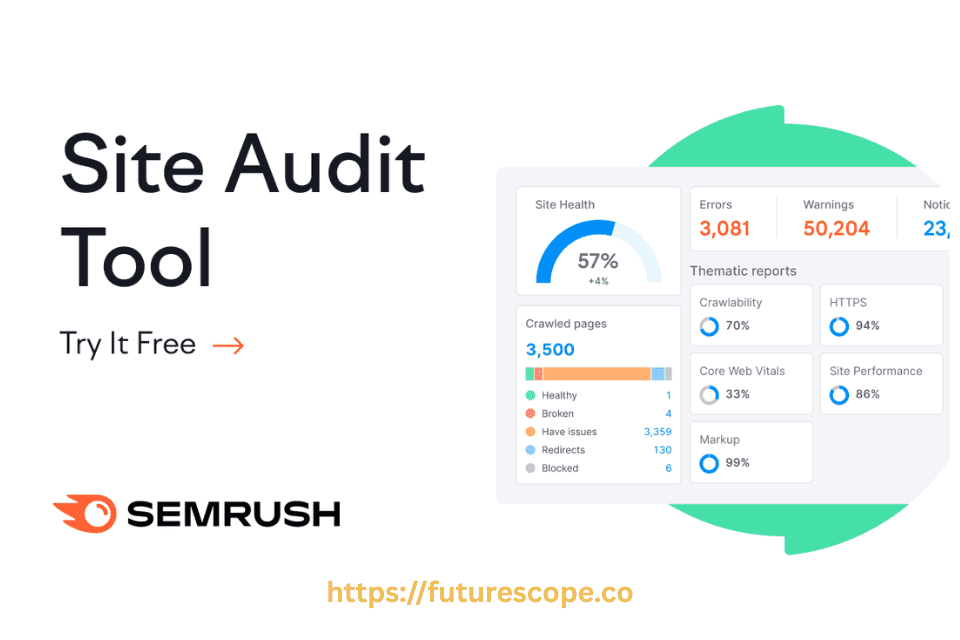
- Over 140+ SEO checks, including crawlability, HTTPS status, meta tags, internal linking, and Core Web Vitals.
- Custom issue categories like errors, warnings, and notices.
- Actionable reports with suggestions and trend tracking.
It is particularly useful for SEOs, digital marketers, and agencies who manage multiple websites or want a full technical audit beyond what free tools provide.
Features And Capabilities
SEMrush Site Audit is packed with features designed to give you a deep dive into your website’s health. It checks for over 140 issues, ranging from crawlability to HTTPS implementation. You can easily identify broken links, missing alt texts, and slow-loading pages. These insights help you prioritize tasks that can significantly impact your SEO.
Unlike Google’s free tools, Semrush provides a holistic view by integrating data from various sources, offering you a more detailed analysis. You can even track your progress over time, ensuring that your optimization efforts are heading in the right direction.
Imagine having a tool that not only identifies issues but also offers actionable solutions. That’s what Semrush Site Audit aims to do. You receive specific recommendations on how to fix these problems, making it easier for you to enhance your website’s performance.
Try SEMrush Site Audit
Still wondering why your competitors outrank you? With SEMrush, you can uncover their exact strategies—from backlinks to content gaps—and use that data to your advantage. Start using insights, not guesswork.
User Interface And Experience
Having a user-friendly interface can dramatically affect your productivity. Semrush Site Audit boasts an intuitive dashboard that organizes information neatly, allowing you to access insights with just a few clicks. Even if you’re not a tech expert, navigating through its features feels seamless.
The layout is designed to minimize clutter and present data in a digestible manner. You can view your website’s overall health score, get detailed reports, and even share these with your team effortlessly.
Have you ever felt overwhelmed by complex tools? Semrush tackles this by simplifying the user experience. Its interface guides you through the auditing process, ensuring you make the most out of its capabilities without getting lost in technical jargon.
So, is Semrush Site Audit better than free Google tools? The answer lies in what you value more: depth and actionable insights or basic functionalities. What do you think? Are you ready to take your website’s SEO to the next level?
What Do Free Google Tools Offer?
Google offers several free tools that are highly effective in specific areas:
- Google Search Console: Tracks performance in search results, indexing issues, and manual penalties.
- PageSpeed Insights: Tests page load speed and Core Web Vitals.
- Lighthouse: Offers detailed performance, accessibility, and SEO scores for individual URLs.
- Mobile-Friendly Test: Checks mobile usability.
These tools are accurate and directly from Google, making them essential for basic diagnostics and monitoring.
Exploring free Google tools can be very insightful for website owners. These tools offer a variety of features to help monitor and improve your site’s performance. Understanding their functionalities can significantly enhance your SEO strategies.
Google Search Console
Google Search Console is a powerful tool for webmasters. It helps track how your site appears in Google search results. You can see which keywords bring traffic to your site. It shows how often your site appears in search queries. You can also check if Google can crawl your site without issues.
Search Console provides reports on security issues. It alerts you about problems like malware. It also lets you submit sitemaps for better indexing.
Google Analytics
Google Analytics gives detailed insights into your website traffic. You can see how many visitors come to your site. It shows where they come from and what pages they visit. You can track user behavior and engagement.
Analytics helps you understand your audience better. You can see which content is popular. It also offers tools to measure conversions and goals. This helps you know what works best for your site.
Key Functionalities
Both tools offer unique functions that enhance your site’s performance. Search Console focuses on search visibility and indexing. Analytics dives into user behavior and traffic analysis. Together, they provide a comprehensive view of your site’s health.
Using these tools can help identify areas for improvement. They provide essential data for decision-making. Understanding these functionalities can greatly benefit your SEO efforts.
SEMrush vs. Google Tools: Key Differences
Start Your Free Trial & Dominate Google Results with SEMrush
| Feature | SEMrush Site Audit | Google Tools |
|---|---|---|
| Depth of Audit | Full-site crawl | URL-level or section-based |
| SEO Issue Detection | 140+ checks | Limited SEO issues |
| Ease of Use | Beginner to expert friendly | Varies, often technical |
| Actionable Suggestions | Yes, detailed | Basic or non-existent |
| Reporting | PDF exports, scheduling | Manual |
| Pricing | Paid (limited free) | Completely free |
SEMrush is ideal for those who need comprehensive automation, reporting, and issue tracking, while Google tools work well for cost-effective, data-driven analysis with direct access to Google’s index and ranking data.
SEO Analysis
Semrush provides detailed SEO analysis. It checks over 130 parameters. This ensures a comprehensive review. Google offers basic analysis through its tools. It checks essential elements only. Semrush covers more technical aspects. This aids in deeper insight.
Error Detection
Semrush excels in error detection. It identifies issues like broken links and missing tags. Google tools detect errors too. But Semrush offers a broader scope. It highlights advanced problems. This ensures thorough issue identification.
Reporting And Visualization
Semrush offers advanced reporting features. It provides visual data representation. This makes understanding reports easier. Google tools have basic reporting. They offer less visual clarity. Semrush’s visualization aids in better comprehension. It helps in making informed decisions.

Ease Of Use
Choosing between Semrush Site Audit and free Google tools can be tricky. Ease of use often plays a big role in this decision. Users want a tool that is simple and efficient. They prefer a setup that doesn’t require much technical knowledge. The design must be intuitive so that users can navigate smoothly. Both Semrush and Google tools offer unique experiences.
Setup Process
The setup process for Semrush Site Audit is straightforward. Users need to create an account and connect their website. The steps are guided and easy to follow. Semrush provides clear instructions at every stage. Free Google tools require linking your site to Google Search Console. This can be slightly more complex for beginners. Google offers help documents to assist users. But the process may seem daunting for some.
User-friendly Design
Semrush boasts a clean and organized interface. It’s designed for easy navigation and quick understanding. Users find the dashboard simple yet informative. This design helps in accessing various features easily. Free Google tools have a more basic layout. They focus on providing essential data without extra flair. Some users might find it less engaging. Yet, it delivers the necessary information effectively.
Price Considerations
When comparing site audit tools, pricing is a significant factor to consider. Different tools have varying costs and offer unique benefits. Understanding these aspects helps in making an informed choice.
Cost Of Semrush
Semrush offers various pricing plans. The basic plan starts at a monthly fee. It provides access to a suite of SEO tools. These tools include site audit features. The higher-tier plans provide more advanced features. They suit larger businesses with more complex needs. The cost may seem high for small businesses. Yet, the comprehensive tools can justify the investment.
Value Of Free Tools
Google offers several free tools. Google Search Console and Google Analytics are examples. These tools provide essential insights. They help in understanding website performance. Free tools are accessible for all business sizes. They are budget-friendly and easy to use. Yet, they have limitations compared to paid services. Understanding these limitations is crucial. It helps in deciding what suits your needs best.

Performance And Accuracy
When assessing the effectiveness of SEO tools, especially between SEMrush Site Audit and free Google tools, two crucial factors stand out: performance and accuracy. Both these elements determine how well you can identify and fix issues on your website. Let’s explore in details.
Data Precision
Precision in data is vital for making informed decisions about your site’s SEO. Semrush Site Audit offers a comprehensive view by scanning your site for over 130 checks. This includes complex issues such as HTTPS implementation, broken links, and even structured data errors. Google tools, like Google Search Console, provide valuable insights but might miss some nuanced aspects of your site’s health.
Have you ever spent hours trying to pinpoint the source of a sudden drop in your rankings? With Semrush, you get detailed reports that help you understand the exact issues causing it. While Google tools are reliable, their scope can be limited, meaning you might need to rely on multiple tools to gather similar data.
Speed Of Analysis
The speed at which you can analyze your site affects how quickly you can implement changes. Semrush is known for its rapid analysis capabilities, allowing you to perform a comprehensive audit within minutes. This can be a game-changer when you’re working against a deadline or trying to stay ahead of competitors.
Google’s tools, while efficient, can sometimes be slower due to the sheer volume of data they process. Imagine waiting for extended periods to get your site’s status when there’s a critical fix you need to make. Semrush helps you save time, letting you focus on optimizing your site rather than waiting for results.
So, is it worth investing in a paid tool like Semrush for your site audits, or can you rely on free tools like Google’s? Consider what matters most to you: precision, speed, or perhaps a balance of both. The choice might just transform your site’s performance.
SEMrush Site Audit vs. Google Search Console
Start Your Free Trial & Dominate Google Results with SEMrush
To determine which tool is better, let’s compare their key features:
| Feature/Aspect | SEMrush Site Audit | Google Search Console |
|---|---|---|
| Best For | Comprehensive audits with detailed recommendations | Google-specific issues and metrics |
| Pricing | Free (100 pages/month), Paid ($139.95–$499.95/month), 14-day free trial | Free |
| Issues Checked | Over 140 technical and on-page SEO issues (e.g., crawlability, broken links, hreflang) | Technical SEO issues, Core Web Vitals, indexing status |
| Customization | Custom audit scope, user agent, URL inclusion/exclusion, scheduled audits | Limited customization |
| Reporting | Detailed reports with fix recommendations | Basic alerts and reports |
| Additional Tools | Keyword research, competitive analysis, rank tracking | None |
| Educational Resources | Free courses (e.g., Site Audit course) | Basic documentation and training |
Choose The Right Tool
Choosing the right tool for site audits can be challenging. Each tool offers unique features and benefits. The decision depends on specific needs and circumstances. Consider key factors like business goals and budget limitations.
Business Needs
Every business has different objectives. Some prioritize detailed insights. Others need quick, actionable results. Semrush provides in-depth analysis. It covers various SEO aspects. Free Google tools offer basic functionalities. They are suitable for small businesses.
Budget Constraints
Budget is a crucial factor in decision-making. SEMrush requires a small subscription fee. It may not fit every budget. Free Google tools are accessible to everyone. They provide essential data without cost. Perfect for startups with limited funds.
Frequently Asked Questions
What Are The Benefits Of Using SEMrush Site Audit?
The SEMrush Site Audit tool offers powerful benefits for improving a website’s overall health and search engine performance. It scans your site for over 140 technical and SEO issues, including crawl errors, broken links, duplicate content, and slow page speeds. One major advantage is its easy-to-understand reports, which provide a clear Health Score and prioritized suggestions to fix problems. It also helps identify mobile usability issues, HTTPS implementation gaps, and internal linking weaknesses. By using SEMrush Site Audit regularly, website owners and SEO professionals can maintain better site structure, improve user experience, and boost search engine rankings with data-driven optimization.
How Does SEMrush Site Audit Differ From Google Tools?
The SEMrush Site Audit tool differs from Google tools like Google Search Console and PageSpeed Insights by offering a more comprehensive, third-party analysis with deeper insights and actionable recommendations. While Google tools focus on your site’s performance from Google’s perspective—highlighting indexing, core web vitals, and search queries—SEMrush goes further by scanning for over 140 technical SEO issues, including crawlability, broken links, JavaScript errors, HTTPS problems, and internal linking structure. It also provides a clear site health score, visual reports, and priority-based fixes, making it ideal for SEO professionals who want a more complete, competitor-aware audit beyond what Google alone provides.
Is SEMrush Site Audit Accurate?
Yes, the SEMrush Site Audit is widely regarded as accurate and reliable for identifying technical SEO issues. It uses a robust crawling engine that mimics search engine bots to detect over 140 on-site problems, including crawl errors, broken links, slow loading pages, and mobile usability issues. While no tool is 100% perfect, SEMrush provides consistent and data-driven insights that are trusted by SEO professionals and agencies worldwide. Its accuracy is enhanced by customizable crawl settings, regular updates, and clear explanations for each issue, making it a dependable resource for improving website health and search performance.
Can Free Google Tools Replace SEMrush Site Audit?
Free Google tools cannot fully replace SEMrush Site Audit, though they are valuable for basic SEO insights. Tools like Google Search Console and PageSpeed Insights provide essential data on indexing, site performance, mobile usability, and core web vitals. However, they lack the comprehensive technical analysis and detailed reporting that SEMrush offers—such as detecting over 140 types of SEO issues, offering internal linking audits, and assigning issue priorities. SEMrush also provides competitor benchmarking and a clearer site health score, making it more suitable for advanced SEO strategies. For casual users, Google tools are helpful, but professionals often use both for a complete picture.
Which Is More User-friendly, SEMrush Or Google Tools?
When it comes to user-friendliness, Google tools like Search Console and PageSpeed Insights are generally more beginner-friendly due to their simple interfaces and focused functionality. They’re designed with clear visuals and easy navigation, making them ideal for casual users or small site owners. In contrast, SEMrush offers a more feature-rich platform tailored for SEO professionals, with a steeper learning curve but greater depth. Its dashboard is more complex but provides comprehensive reports, guided recommendations, and customizable audits. So, for ease of use, Google tools are more straightforward, while SEMrush is better for those seeking detailed control and deeper SEO insights.
What is Semrush Backlink Audit?
SEMrush Backlink Audit is a tool that helps you analyze the quality of your website’s backlink profile. It identifies toxic or harmful links that could hurt your SEO and offers suggestions for removal or disavowal. This improves site authority, protects search rankings, and enhances overall SEO performance.
Conclusion
Choosing between Semrush Site Audit and free Google tools is tricky. Semrush offers detailed insights. Google tools provide basic checks. Semrush helps improve site health faster. Google tools are free and easy to access. Each tool has its strengths. Consider your site’s needs and budget.
Semrush is ideal for deep analysis. Google tools fit small projects well. Your choice impacts your site’s success. Test both and see what works best. Find the balance that suits your goals. Adapt and grow with the right tools. Make informed decisions for optimal site performance.