
Choosing the right accounting software is a critical decision for small service-based businesses that want to simplify invoicing, track expenses, and manage client payments efficiently. Two of the most popular options in the market today are FreshBooks and QuickBooks. FreshBooks and QuickBooks are two leading options, each with distinct strengths tailored to different business needs. This comprehensive comparison explores their ease of use, pricing, features, integrations, and customer support to help small service businesses make an informed decision. While both platforms offer robust tools, they cater to slightly different business needs.
In this article, we will explore whether FreshBooks or QuickBooks is better for small service businesses, focusing on features, pricing, usability, and customer support.
FreshBooks: Tailored for Freelancers & Service Providers
FreshBooks is designed with simplicity and service businesses in mind. Its user-friendly interface, time-tracking features, and customizable invoicing make it ideal for freelancers, consultants, and small agencies.

Key Features:
- Time Tracking: Easily log billable hours and link them directly to invoices.
- Client Portal: Clients can view, approve, and pay invoices online.
- Recurring Invoices & Retainers: Perfect for ongoing service contracts.
- Expense Tracking: Snap and upload receipts on the go.
- Mobile App: Fully functional for freelancers who work remotely or on the move.
Pros:
- Intuitive and beginner-friendly interface
- Strong focus on client interactions and invoice management
- Great customer support with live chat and phone options
- Automatic late payment reminders
Cons:
- Limited accounting reports compared to QuickBooks
- No payroll features
- Slightly more expensive for multiple users
QuickBooks: A Full-Scale Accounting Powerhouse
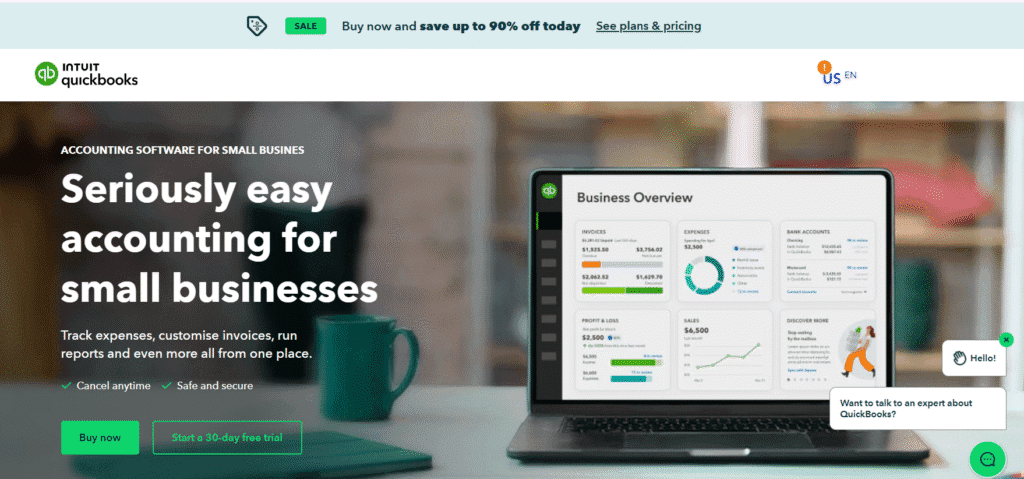
QuickBooks is an all-in-one accounting solution that offers a broader range of features, especially valuable for businesses expecting to scale or those needing comprehensive financial reports.
Key Features:
- Double-entry bookkeeping system
- In-depth financial reporting
- Inventory management
- Payroll integration
- Third-party app integrations (Shopify, PayPal, etc.)
Pros:
- Suitable for both service and product-based businesses
- Advanced reporting tools for financial insights
- Seamless integration with tax prep tools
- Scalable to larger teams and growing businesses
Cons:
- Steeper learning curve for beginners
- Interface can be overwhelming for non-accountants
- Mobile app lacks some functionality of the desktop version
FreshBooks VS QuickBooks: Comparison Table
| Feature | FreshBooks | QuickBooks Online |
|---|---|---|
| Best For | Freelancers, service-based professionals | Small to medium businesses with advanced accounting needs |
| Ease of Use | Very user-friendly, ideal for non-accountants | Moderate learning curve; professional-grade tools |
| Invoicing | Custom invoices, recurring billing, retainers | Custom invoices with automation, less client-centric |
| Time Tracking | Built-in time tracker, link hours to invoices | Requires add-ons or manual entry |
| Expense Management | Simple receipt upload, categorize expenses | Advanced expense categorization & tracking |
| Client Management | Includes client portal and proposal tools | Basic customer details, no portal |
| Inventory | Not available | Fully supported |
| Payroll | Not available | Available (extra cost) |
| Reporting & Analytics | Basic financial reports | Robust financial reports (P&L, Balance Sheet, etc.) |
| Tax Features | Basic tax summaries | Automated tax tracking and filing support |
| Mobile App | Full-featured and intuitive | Functional but some features limited |
| Pricing | Starts at $17/month (Lite), more for extra users | Starts at $30/month (Simple Start) |
| Integrations | 100+ apps (Stripe, G Suite, Trello) | 750+ apps (PayPal, Shopify, TSheets, etc.) |
| Support | Email, chat, and phone support | Chat and phone (no 24/7 support on lower tiers) |
Pricing Comparison
- FreshBooks starts at around $17/month (Lite Plan), with advanced plans available for larger teams and needs.
- QuickBooks Online starts at $30/month, but often offers promotional discounts for the first 3 months.
Note: FreshBooks charges for additional users, while QuickBooks includes some multi-user support in higher-tier plans.
Features for Service Businesses
FreshBooks is specifically designed for service-based businesses, offering features that align with their unique needs. Its time-tracking functionality allows users to log billable hours and seamlessly convert them into invoices, a critical feature for consultants, freelancers, and agencies. FreshBooks also excels in project management, enabling users to track project profitability, manage client communications, and handle retainers and proposals. These tools are available across all plans, making them accessible even on lower tiers.
QuickBooks, while offering time tracking and project management, restricts these features to higher-tier plans. Additionally, QuickBooks includes advanced inventory management tools, which are less relevant for service businesses that don’t deal with physical products. For small service businesses, FreshBooks’ focused feature set is more practical and efficient.
| Feature | FreshBooks | QuickBooks |
|---|---|---|
| Time Tracking | Available on all plans | Higher-tier plans only |
| Project Management | Built-in job scheduling, profitability tracking | Limited to higher plans |
| Invoicing | Streamlined, converts estimates to invoices | Advanced, more sales form options |
| Inventory Tracking | Basic | Robust, ideal for product-based businesses |
Integration and Customization
Both FreshBooks and QuickBooks offer integrations with third-party apps to enhance functionality. FreshBooks integrates with over 100 partner apps and connects with Zapier, allowing connections to thousands of additional tools (FreshBooks Integrations). This flexibility is sufficient for most small service businesses looking to streamline workflows.
QuickBooks, as a more established platform, offers even broader integration options, which may be advantageous for businesses with complex operational needs. However, for small service businesses, FreshBooks’ integrations are typically adequate and easier to manage, avoiding the complexity of QuickBooks’ extensive ecosystem.
Customer Support
Reliable customer support is essential for small business owners who may need quick assistance. FreshBooks is highly praised for its responsive and knowledgeable support team, offering live chat, email support, and a comprehensive Help Center. Higher-tier plans include a dedicated phone support number. A user noted, “I have had some questions over the years, and their customer service is exceptional—quick responses from knowledgeable staff” (G2 Reviews).
QuickBooks also provides robust support, including phone and live chat options, but its support process can be less personalized, often requiring users to submit tickets and wait for a callback (Fit Small Business). For small service businesses, FreshBooks’ accessible and responsive support is a significant advantage.
Best Choice for Small Service Businesses?
If you’re a solo freelancer or operate a service-oriented business (like coaching, design, or consulting), FreshBooks is typically better due to its simplicity, time-tracking, and invoicing capabilities.
However, if your business is scaling quickly, has complex financial needs, or includes inventory management or payroll, QuickBooks offers a more comprehensive feature set that supports long-term growth.
Use Case Scenarios
Choose FreshBooks if:
- You’re a freelancer or solopreneur
- You need simple time tracking and invoicing
- Your client communication is central to your workflow
- You want a quick setup without hiring a bookkeeper
Choose QuickBooks if:
- You run a growing business or team
- You need advanced financial reporting or tax management
- You have an accountant or are familiar with double-entry accounting
- You plan to scale operations or add payroll/inventory
Conclusion
For small service businesses, FreshBooks is generally the better choice due to its ease of use, affordability, and features tailored specifically for service-based operations. Its intuitive interface, robust time tracking, and excellent customer support make it an ideal solution for freelancers, consultants, and small teams. QuickBooks, while powerful, is better suited for businesses with more complex accounting needs or those handling both products and services. Its advanced features, such as inventory management and extensive integrations, may add unnecessary complexity for small service businesses.
Ultimately, the choice depends on your business’s specific needs. If simplicity, affordability, and service-specific tools are priorities, FreshBooks is the recommended option. For businesses anticipating growth or requiring advanced financial reporting, QuickBooks may be the better fit. Both platforms offer free 30-day trials, allowing you to test their features before committing (FreshBooks Trial, QuickBooks Trial).
Frequently Asked Questions
Is FreshBooks good for small businesses?
Yes, FreshBooks is a great option for small businesses, especially for freelancers, service providers, and entrepreneurs. It offers an easy-to-use interface with features like invoicing, expense tracking, time tracking, and financial reporting, all designed to simplify day-to-day accounting. FreshBooks also supports automated billing, online payments, and client management, helping small business owners save time and stay organized. Its cloud-based platform means you can manage your finances from anywhere, and it integrates with popular tools like Stripe, PayPal, and G Suite. Overall, it’s a reliable and user-friendly solution for small business accounting needs.
Do accountants use FreshBooks?
Yes, many accountants do use FreshBooks, particularly those who work with freelancers, startups, and small businesses. While it’s designed to be user-friendly for non-accountants, FreshBooks also offers accountant-specific features such as journal entries, general ledger reports, trial balances, and easy access to client data. Accountants can be invited to client accounts for collaboration, making tax prep and financial reviews more efficient. Though it may lack some advanced features found in enterprise-level software, FreshBooks is widely appreciated for its simplicity, accuracy, and time-saving tools in small business accounting.
Is FreshBooks compatible with QuickBooks?
Yes, FreshBooks is compatible with QuickBooks through third-party integration tools like Zapier, OneSaas, Skyvia, and Make (Integromat). These connectors allow you to sync key data such as invoices, clients, expenses, and payments between the two platforms, either one-way or bidirectionally. This helps reduce manual data entry and ensures accurate bookkeeping across systems. While there’s no direct native integration, these tools make it easy to automate workflows—for example, creating an invoice in QuickBooks when one is added in FreshBooks. This setup is especially useful for businesses transitioning between platforms or managing different aspects of accounting in each tool.
Do professional accountants use QuickBooks?
Yes, professional accountants widely use QuickBooks, especially QuickBooks Online, due to its robust accounting features, ease of collaboration, and widespread adoption by small and medium-sized businesses. It offers tools for invoicing, payroll, tax filing, bank reconciliation, and detailed financial reporting, which meet the needs of both accountants and clients. Accountants can access client data in real time, making it easier to manage books, prepare taxes, and ensure compliance. Its cloud-based platform and accountant-specific dashboard make QuickBooks a top choice for many accounting professionals.
Who uses QuickBooks the most?
Small and medium-sized businesses use QuickBooks the most, particularly those in retail, professional services, construction, and healthcare. It’s especially popular among freelancers, self-employed individuals, and accountants who manage multiple clients. Business owners rely on QuickBooks for its user-friendly tools that handle invoicing, expense tracking, payroll, tax prep, and financial reporting. Additionally, bookkeepers and CPAs use it to streamline client accounting and collaborate in real time. Its flexibility, cloud access, and wide range of integrations make QuickBooks a preferred choice for businesses that need reliable, scalable financial management without complex software.
What software do most accountants use?
Most accountants use software like QuickBooks, Xero, FreshBooks, and Sage for managing finances, bookkeeping, and tax preparation. QuickBooks is the most widely used due to its robust features, real-time collaboration, and scalability for small to medium businesses. Xero is also popular for its cloud-based design and ease of use. FreshBooks appeals to accountants working with freelancers or service-based clients. Larger firms may use Sage Intacct or Oracle NetSuite for more advanced financial management. These tools help accountants streamline tasks such as invoicing, payroll, bank reconciliation, and reporting, making financial workflows faster and more accurate.
What do accountants mostly use?
Accountants mostly use software like QuickBooks, Xero, Sage, and FreshBooks to manage bookkeeping, financial reporting, payroll, and tax preparation. QuickBooks is the most widely used, especially among small and mid-sized businesses, due to its robust features and cloud access. Xero is favored for its clean interface and automation, while Sage is often used by larger firms for more complex financial tasks. FreshBooks is popular among accountants working with freelancers or small service businesses. These tools help accountants streamline daily tasks, maintain accuracy, and collaborate efficiently with clients in real time.