


Are you ready to improve your website’s performance but not sure where to start? The SEMrush Site Audit Tool might just be the solution you need.
Imagine having a virtual guide that helps you identify issues and optimize your site for better search engine ranking. Sounds intriguing, right? This tool is designed to be user-friendly, making it perfect for beginners like you. With easy-to-follow instructions, it allows you to uncover hidden problems that could be holding your site back.
Keep reading to discover how you can harness the power of Semrush to make your website shine. Curious to see what insights await? Let’s dive in and explore how this tool can transform your online presence.
What is the SEMrush Site Audit Tool?
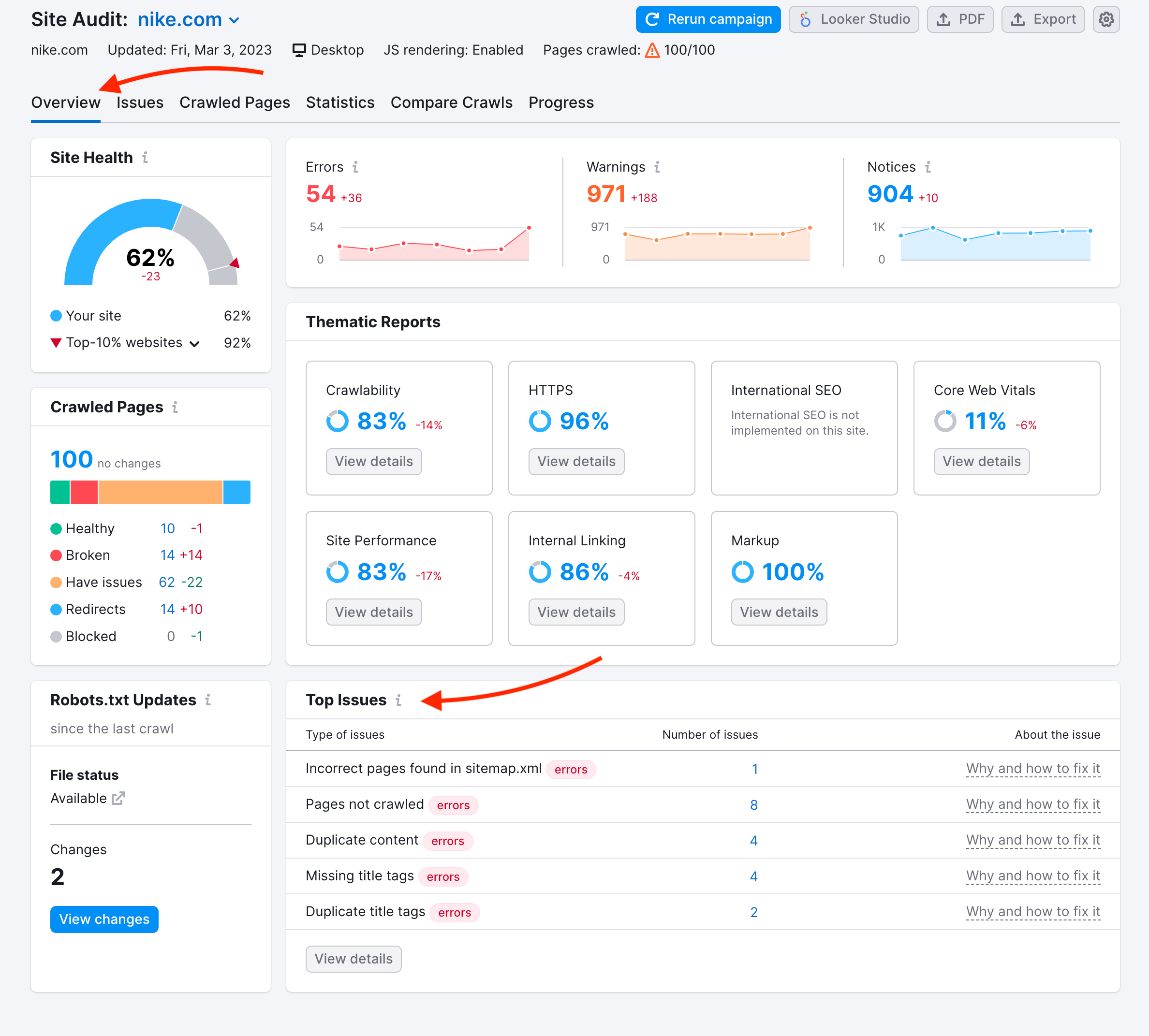
The Site Audit Tool in SEMrush scans your entire website to analyze over 140 technical and on-page SEO issues. It then provides a clear dashboard with scores and actionable tips to optimize your site structure, crawlability, internal linking, mobile responsiveness, and other key SEO factors.
Why Use SEMRUSH Site Audit?
A site audit is a detailed analysis of your website’s technical health and SEO performance. It identifies issues that may prevent search engines like Google from properly crawling and indexing your site, which is essential for appearing in search results. The SEMRUSH Site Audit tool scans for over 140 technical SEO and site health issues, helping you improve critical areas such as website traffic, backlinks, and user experience. Regular audits ensure your site remains optimized, competitive, and aligned with search engine best practices, ultimately boosting your visibility and performance.
Try SEMrush Site Audit Tool
From keyword research to backlink tracking, this complete SEO growth platform puts everything in one dashboard, saving you time while delivering better results.
Credit: www.semrush.com
Getting Started With SEMrush
Starting your journey with Semrush can be a game-changer for your website’s SEO health. As a beginner, you might be wondering how to make the most of this powerful tool. Semrush Site Audit Tool provides comprehensive insights, helping you identify and fix SEO issues. It’s like having a digital health check-up for your site. Let’s dive into the initial steps to get you up and running smoothly.
Creating An Account
The first step is getting your Semrush account set up. Head over to the SEMrush website, and look for the sign-up section. You’ll be greeted with options to choose a plan. If you’re just starting, the free version offers a good glimpse into its capabilities.
Once registered, you’ll receive a confirmation email. Click the link in the email to activate your account. Now, you’re officially part of the Semrush community. Ready to explore?
Navigating The Dashboard
Upon logging in, you’ll land on the Semrush dashboard. It might look overwhelming at first, but don’t worry. The key is to focus on the Site Audit tool, located in the SEO section.
Take a moment to familiarize yourself with the layout. Notice the various tabs that allow you to delve into different aspects of your site’s performance. The dashboard serves as your command center, where you can conduct audits and monitor progress.
Want to ensure your site is in top shape? The dashboard is your starting point. Start a new project and run an audit to see what improvements you can make. Watch as your site’s health score improves with each tweak.
Are you ready to transform your website’s SEO potential? Semrush offers you the tools to do just that, starting from account creation to mastering the dashboard. Dive in and see the difference it makes!
Set Up A SEMRUSH Site Audit Tool
Start Your Free Trial & Dominate Google Results with SEMrush
Discover the basics of using Semrush Site Audit Tool. Identify website issues easily with this beginner-friendly guide. Follow simple steps for a healthier, more optimized site.
Setting up a site audit with Semrush is like setting the foundation for a successful online presence. Whether you’re a small business owner or a budding digital marketer, understanding your website’s health is crucial. The Semrush Site Audit Tool is user-friendly, making it accessible even if you’re just starting out. Let’s dive into how you can set up your site audit effectively.
Choosing A Project
Start by choosing the right project in Semrush. This is akin to selecting the right blueprint before building a house. Your project is essentially a container that holds all the data and settings for a particular website.
To create a project, click on the “Projects” tab in Semrush, then hit “Create Project”. Enter your domain name and project name. Keep it simple and easy to remember. This step is crucial as it sets the stage for all your future audits and analyses.
Configure Audit Settings
Once your project is ready, dive into configuring your audit settings. Think of this as customizing your diagnostic tool to suit your website’s unique needs. Semrush offers a variety of options to tailor your audit, ensuring you get the most relevant insights.
Crawl Scope: Decide how deep you want the audit to go. You can specify the number of pages to be crawled and select subdomains or specific folders.
Audit Frequency: Choose how often you want the audit to run—daily, weekly, or monthly. Regular audits help in spotting issues early.
User-Agent Settings: Opt for a desktop or mobile crawler based on your primary audience. This helps you understand how different users experience your site.
As a beginner, you might feel overwhelmed by these settings. But remember, each choice you make here fine-tunes your audit, just like adjusting the settings on a camera before capturing the perfect shot.
Have you ever set up a site audit before? What settings did you choose, and why? Sharing experiences can help others navigate these choices with confidence.
Understanding Audit Reports
Start Your Free Trial & Dominate Google Results with SEMrush
Navigating the Semrush Site Audit Tool is simple for beginners. Discover site issues with straightforward reports. Improve your site’s performance using easy-to-understand recommendations.
Understanding how to read audit reports can transform your website’s performance. The Semrush Site Audit Tool offers detailed insights that are easy to miss without proper guidance. As a beginner, you might feel overwhelmed, but breaking down the reports into digestible parts makes it manageable. This guide will walk you through the crucial components of the audit report, ensuring you make informed decisions to enhance your website’s health.
Interpreting Key Metrics
The first step in understanding your audit report is interpreting the key metrics. Metrics like Health Score, Errors, Warnings, and Notices are pivotal. The Health Score gives you a snapshot of your site’s overall condition. For example, a high score indicates fewer issues, while a lower score means there’s more work to do.
Errors are critical issues that need immediate attention, such as broken links or missing meta tags. Address these first to prevent harming your site’s user experience and SEO rankings. Warnings might not be as severe, but they still impact your site’s performance. Lastly, notices are minor issues that you can prioritize based on your time and resources.
Identifying Common Issues
Recognizing common issues in your audit report can streamline your optimization efforts. Broken links, duplicate content, and missing alt attributes are frequent culprits. Imagine visiting a website only to find that clicking on a link leads nowhere. It’s frustrating, right? That’s why fixing broken links should be a priority.
Duplicate content can confuse search engines, potentially harming your ranking. Use the audit report to identify and consolidate similar content to ensure clarity for both users and search engines. Alt attributes enhance accessibility and provide search engines with context about your images. Ensuring each image has a descriptive alt attribute can improve your SEO performance.
Do you often wonder why your site isn’t ranking as expected? The answer might be hidden within these audit reports. By understanding and acting on the insights provided, you can significantly improve your site’s visibility and user experience.
Fixing SEO Issues
Fixing SEO issues is crucial if you want your website to perform well in search engines. The Semrush Site Audit Tool is designed to help you identify and resolve these issues with ease. Whether you’re battling broken links or optimizing your site’s speed, understanding how to fix these problems can significantly enhance your site’s visibility and performance. Here’s a guide to get you started on prioritizing recommendations and implementing changes effectively.
Prioritizing Recommendations
Once you’ve run a site audit with Semrush, you’ll be greeted with a list of issues, ranging from critical to less important. Prioritizing these recommendations is essential to maximize your efforts. Start by addressing critical issues that affect your site’s functionality and user experience, like broken links or server errors.
Next, focus on issues that impact SEO directly, such as missing meta tags or duplicate content. If your site is slow, consider optimizing images and minifying code. Ask yourself: which changes will make the most impact? This helps you allocate your time efficiently.
Implementing Changes
After prioritizing, it’s time to act. Begin with the top priority issues, using the insights from Semrush to guide you. If you’re fixing broken links, update them or redirect them to relevant pages. Use Semrush’s detailed descriptions to understand each issue and its solution.
For SEO-specific changes, ensure your meta tags are filled with relevant keywords. Revise duplicate content to enhance uniqueness. Implement changes one step at a time to avoid overwhelming yourself. It’s like building a puzzle; each piece matters.
Keep track of progress by regularly running audits. Celebrate small victories, like improved load times or increased traffic. How do these changes affect your site’s performance? Monitoring results keeps you motivated and informed.
Fixing SEO issues might seem daunting at first, but with Semrush’s guidance, you can systematically improve your website. Are you ready to take your site to the next level?

Monitoring Progress
Begin with creating an account on Semrush. Navigate to the Site Audit Tool. Enter your website’s URL. Start the audit to identify technical issues. Explore the results and prioritize fixing errors for better performance. Use the tool regularly to keep your site healthy.
Monitoring your website’s progress is crucial to ensure you’re moving in the right direction. The Semrush Site Audit Tool makes this task manageable and efficient. It helps you identify issues, track improvements, and maintain your site’s health over time.
Scheduling Regular Audits
Regular audits are essential to keep your site in top shape. With Semrush, you can schedule these audits to run automatically. This ensures you never miss a beat in spotting potential issues.
Setting up automatic audits is simple. You can choose daily, weekly, or monthly audits based on your site’s needs. This consistent check-up helps you stay proactive and not reactive.
Think of it like a regular doctor’s appointment for your website. You catch issues before they become serious problems. This keeps your SEO strategy robust and effective.
Tracking Improvements
Tracking improvements is just as important as finding issues. Semrush provides detailed reports showing what’s been fixed and what still needs attention. This feature allows you to see tangible results from your SEO efforts.
Imagine fixing a broken link today and seeing your site’s performance improve tomorrow. This motivates you to continue refining your strategy. Plus, it provides evidence of your hard work paying off.
These reports are easy to understand, even for beginners. They use clear visuals and straightforward language. You can quickly grasp where your site stands and what steps to take next.
Regularly reviewing these improvements can spark new ideas. It can lead to better strategies and innovative solutions. So, how do you plan to use these insights to boost your site’s performance?
Advanced Features of SEMrush’s Site Audit Tool
SEMrush’s Site Audit Tool offers powerful features for website analysis. Advanced features enhance your ability to optimize your site efficiently. Let’s explore some of these advanced functionalities.
Customizing Audit Parameters
Customizing audit parameters allows you to tailor your site checks. You can choose specific areas of focus. This helps in pinpointing issues that matter most to your website’s health.
Set the depth of the crawl to control how thoroughly your site is examined. Adjust the limit on checked pages for large websites. You can also exclude certain pages from the audit to refine your results.
Integrating With Other Tools
Integrating Semrush with other tools enhances data analysis. You can link it with Google Analytics for deeper insights. This integration helps you understand user behavior on audited pages.
Connect Semrush with Google Search Console to access performance data. This provides a clearer view of how your site ranks. Use these connections to improve your SEO strategy.
Tips For Beginners
Start Your Free Trial & Dominate Google Results with SEMrush
Starting with Semrush’s Site Audit Tool can seem daunting. But, with the right guidance, beginners can easily navigate through. This section aims to provide practical tips. These will help you avoid pitfalls and make the most of Semrush’s features.
The SEMRUSH Site Audit tool can feel overwhelming at first, but these tips will help you navigate it effectively:
- Schedule Regular Audits: Set up weekly or monthly audits to monitor progress, especially for sites that frequently add new content, like e-commerce platforms.
- Don’t Get Overwhelmed: Focus on fixing errors first. You can address warnings and notices as you gain more experience.
- Leverage Other SEMRUSH Tools: Use the SEO Writing Assistant for content optimization or Backlink Analytics to monitor and improve your backlink profile.
- Implement Lazy Loading: Improve Core Web Vitals by enabling lazy loading for images and videos to reduce page load times.
- Audit Backlinks: Use the Backlinks report to identify and remove toxic links, or use Google’s Disavow Tool as a last resort.
- Learn from Resources: Explore tutorials and courses at SEMRUSH Academy to deepen your understanding of the tool.
Utilize SEMRUSH Resources
Semrush offers a rich library of resources. These resources help beginners understand the platform better. Start with the Semrush Academy. It provides free courses tailored for beginners. These courses cover fundamental concepts clearly. They also include step-by-step guides.
Check out the Semrush blog for insightful articles. These articles offer tips and tricks. They also cover common challenges users face. The Semrush community forum is another helpful resource. Engage with other users. Share experiences and solutions. This interaction enhances learning.
Common Mistakes to Avoid
As a beginner, it’s easy to make mistakes when using the Site Audit tool. Here are pitfalls to watch out for:
- Ignoring Errors: Always prioritize errors over warnings or notices, as they have the most significant impact on SEO.
- Neglecting Mobile Optimization: With many users accessing sites via mobile devices, ensure your site is responsive and mobile-friendly.
- Not Updating Your Sitemap: Keep your sitemap current to help search engines crawl your site effectively.
- Overlooking HTTPS: A secure site is essential for both SEO and user trust, so ensure all pages use HTTPS.
Frequently Asked Questions
What Is Semrush Site Audit Tool?
Semrush Site Audit Tool analyzes your website for SEO issues. It identifies errors, warnings, and optimization opportunities.
How Do I Start A Site Audit On Semrush?
Log in to Semrush. Navigate to the ‘Projects’ section. Click ‘Create Project’ and follow the steps.
How Often Should I Run A Site Audit?
Run a site audit monthly. Regular audits help maintain website health and improve SEO performance.
What Common Issues Does Semrush Site Audit Find?
It finds broken links, duplicate content, slow loading pages, and missing meta tags. Important for SEO health.
Can Beginners Easily Use Semrush Site Audit?
Yes, beginners can use it easily. Semrush provides a user-friendly interface and detailed reports. Perfect for novices.
Conclusion | SEMrush Site Audit Tool review
The SEMRUSH Site Audit tool is an invaluable resource for beginners looking to improve their website’s SEO and overall health. By following this guide, you can confidently set up and run your first audit, interpret the results, and take actionable steps to fix issues. Regular audits, combined with other SEMRUSH tools and best practices, will help you maintain a healthy, optimized website that ranks higher in search results and provides a better user experience. Start your journey today and watch your site’s performance soar!
Remember, improving your site is a continuous journey. Stay consistent. Happy auditing!




