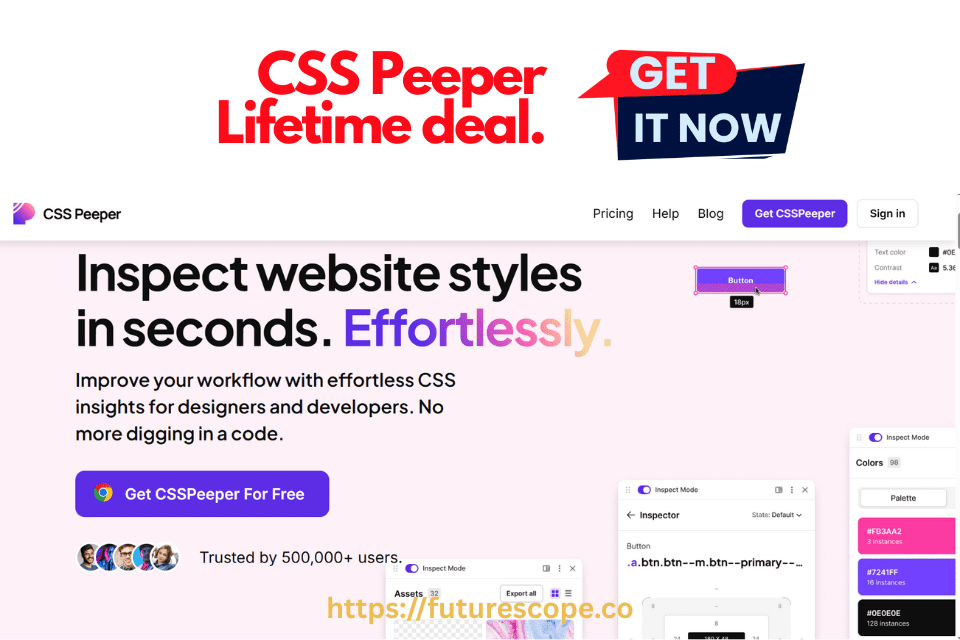

In the world of web design and front-end development, inspecting styles and assets from live websites is a daily necessity. Whether you’re analyzing typography, color palettes, spacing, or layout density, traditional developer tools can be overwhelming and time-consuming—especially for designers who aren’t fluent in code. That’s where CSS Peeper comes in.
CSS Peeper is a Chrome extension that simplifies the process of inspecting and extracting design elements from any website. With its intuitive interface and powerful features, it’s become a favorite among designers, developers, and creative teams. And now, thanks to its lifetime deal on AppSumo, you can get permanent access to this tool for a one-time price.
This review explores CSS Peeper’s features, benefits, pricing, and whether the lifetime deal is truly worth it for professionals looking to streamline their design workflow.
What Is CSS Peeper?
CSS Peeper is a Chrome extension built specifically for designers and frontend developers who want to inspect websites without diving deep into the browser’s DevTools. Unlike standard Inspect Element features that bombard users with lines of code, CSS Peeper presents a clean, organized, and designer-friendly interface to reveal CSS properties, color palettes, typography, and spacing in seconds.
The tool is not only fast but also visually intuitive, making it a favorite for creative professionals working with modern web interfaces. It allows users to:
- Instantly inspect any website element
- Explore color palettes and semantic groups
- Access typography details and hierarchy
- Download assets like images, SVGs, and icons
- Preview layout spacing, padding, and borders
- Switch between light and dark modes
Created by Dawid Młynarz in 2016, CSS Peeper was born out of frustration with the clunky nature of browser dev tools. Today, it boasts a user base of over 500,000 designers worldwide.
CSS Peeper Lifetime Deal: What You Get!
No Monthly Bills. Pay Once. Use Forever-Lifetime Access
Available exclusively on AppSumo, the CSS Peeper lifetime deal offers full access to the Ultra plan for a one-time payment of $29. Here’s what’s included:
| Feature | Included |
|---|---|
| Lifetime access | Yes |
| All future Ultra plan updates | Yes |
| Export color palettes | Yes |
| Smart inspections & contrast checker | Yes |
| Download images, SVGs, icons | Yes |
| Personalized typography units | Yes |
| Dark mode & layout switcher | Yes |
| AI-powered inspections | Yes |
| Email support & knowledge base | Yes |
This deal is covered by AppSumo’s 60-day money-back guarantee, making it a risk-free investment for designers and developers.
Key Features of CSS Peeper
Visual CSS Inspector
CSS Peeper allows you to inspect any element on a webpage simply by clicking on it. Instead of opening Developer Tools and scrolling through nested styles, the extension shows clean CSS summaries that are easy to read and understand.
You can view:
- Fonts and font sizes
- Colors and background gradients
- Spacing, padding, and margins
- Border radius and shadows
- Positioning and layout details
All this in an organized, minimalist UI — perfect for non-coders or hybrid designer-developers.
Color Palette Extraction
One of CSS Peeper’s most loved features is the automatic extraction of a site’s color palette. With just a click, it scans the entire page and generates all the colors used — primary, secondary, backgrounds, buttons, and more.
You can copy HEX or RGB values or export the full color palette for use in your design tools like Figma or Adobe XD.
Asset Download
Need a logo, image, or icon from a website? CSS Peeper lets you quickly download all images and assets from a page — including SVGs and high-resolution images. This is a major time-saver for UI/UX designers doing competitive analysis or redesigns.
The best part? You don’t need to inspect the source or manually find the image URLs.
Typography Analysis
CSS Peeper displays all the typography styles in one place, including:
- Font families
- Sizes
- Weights
- Line heights
- Text colors
This is extremely helpful for designers seeking typographic consistency or aiming to replicate existing web design patterns.
Layout Preview
Get a visual breakdown of layout elements like margin, padding, box sizes, and containers. This helps designers and developers understand spacing and alignment strategies used in real-world websites.
How CSS Peeper Works: Step-by-Step?
Using CSS Peeper is incredibly simple:
- Install the Chrome Extension Visit the Chrome Web Store and add CSS Peeper to your browser.
- Visit Any Website Navigate to the site you want to inspect. Click the CSS Peeper icon in your toolbar.
- Inspect Elements Visually Hover over elements to view design properties. Use the sidebar to explore colors, fonts, spacing, and assets.
- Export and Download Export color palettes, download images, and copy typography specs for use in your design tools.
- Use Smart Tools Run contrast checks, switch layout views, and personalize units for better accessibility and design accuracy.
Why the CSS Peeper Lifetime Deal is a Steal?
Unlike many modern SaaS tools that demand recurring subscriptions, CSS Peeper offers a lifetime license — meaning you pay once and use it forever. This is a rare find, especially for a tool this polished and professional.
One-Time Payment, Unlimited Use
Whether you’re working on one website or a hundred, CSS Peeper costs the same — a small, one-time fee (often less than the cost of one monthly design software subscription).
Speed Up Your Workflow
Designers using tools like Figma, Sketch, or Adobe XD can benefit greatly from analyzing live websites in seconds and translating styles to design systems — without jumping into raw code.
CSS Peeper vs. DevTools & Other Alternatives
| Feature | CSS Peeper | Chrome DevTools | VisBug (Chrome) | Figma Plugins |
|---|---|---|---|---|
| Visual CSS interface | Yes | No | Yes | Yes |
| Color palette extraction | Yes | No | Yes | Yes |
| Asset download | Yes | Manual | No | No |
| One-time payment | Yes | Free | Free | No (some paid) |
| Learning curve | Very Low | High | Medium | Medium |
| Works on live websites | Yes | Yes | Yes | No (design files only) |
CSS Peeper clearly wins when it comes to speed, simplicity, and usability for designers who want to work smarter, not harder.
TL;DR Summary
- CSS Peeper is a Chrome extension for visual CSS inspection and asset extraction.
- It helps designers and developers analyze styles without touching code.
- Features include color palette export, typography hierarchy, layout switcher, and smart inspections.
- The AppSumo lifetime deal costs $29 — includes all future updates.
- Ideal for designers, developers, agencies, and educators.
- Highly recommended for streamlining design reviews and improving workflow.
CSS Peeper Review | Is the Lifetime Deal Worth It?
Absolutely. For just $29, CSS Peeper offers a powerful toolkit for visual inspection, design analysis, and asset extraction. It’s ideal for anyone who works with websites—whether you’re designing, developing, teaching, or reviewing.
The lifetime deal provides long-term value with no recurring fees, future updates, and a clean, intuitive interface. If you’re tired of digging through code or juggling multiple tools to inspect styles, CSS Peeper is a smart investment.
Frequently Asked Questions (FAQ)
What is CSS Peeper?
CSS Peeper is a Chrome extension designed for designers and front-end developers to inspect CSS styles, extract color palettes, download assets, and view typography — all in a clean, user-friendly interface.
How does CSS Peeper differ from Chrome DevTools?
Unlike Chrome DevTools, which shows raw code and requires technical know-how, CSS Peeper provides a visual overview of styles, colors, fonts, and spacing in an organized format — perfect for designers who prefer a simplified experience.
What is included in the CSS Peeper Lifetime Deal?
The Lifetime Deal typically includes full access to all features: CSS inspection, color extraction, typography analysis, and asset downloads — for a one-time payment, with no recurring fees
Can I download images and assets from websites using CSS Peeper?
Yes. CSS Peeper lets you quickly download all images, icons, and SVGs from a webpage, saving time on manual asset collection.
Does CSS Peeper work on all websites?
CSS Peeper works on most modern websites built with HTML and CSS. However, it may not work as expected on highly dynamic, JavaScript-heavy sites with obfuscated styles.
Is CSS Peeper available for browsers other than Chrome?
Currently, CSS Peeper is only available as a Chrome extension. There is no official support for Firefox, Safari, or Edge.
Is this tool useful for non-coders or design students?
Absolutely! CSS Peeper is perfect for beginners, students, and non-technical users who want to understand and replicate web design without diving into complex code.
Where can I buy the CSS Peeper Lifetime Deal?
The deal is occasionally available on software deal platforms like AppSumo or directly through the CSS Peeper website. Availability may vary, so it’s best to check current offers.
Related posts:
 Keyword Revealer Lifetime Deal: The Ultimate SEO Tool for Marketers and Businesses
 Sensfrx Lifetime Deal Review – Smart Data Tracking & Automation for Modern Businesses
 WbizTool Lifetime Deal Review – All‑in‑One Business Management Platform
 WebStarts Lifetime Deal Review – Build, Host & Grow Your Website Without Monthly Costs