In the digital age, visuals are everything—whether you’re updating your LinkedIn profile, enhancing your social media or running an e-commerce store, managing social media, or designing websites, high-quality images can make or break your content. However, traditional photoshoots are often expensive, time-consuming, and inconvenient.. That’s where PhotoGPT AI steps in: a smart, AI-powered photo editing tool that transforms images with professional quality results—without needing advanced design skills.
Now available through a limited-time PhotoGPT AI Lifetime Deal, this tool gives users lifetime access to its premium features with just a one-time payment, making it one of the most cost-effective image editing tools powered by artificial intelligence.
This article explores the key features, benefits, and details of the PhotoGPT AI lifetime deal, making it a must-have for anyone looking to elevate their visual identity.
What is PhotoGPT AI?
PhotoGPT AI is a cutting-edge AI photo editor that leverages generative AI and machine learning algorithms to enhance, retouch, and transform images instantly. Whether you need background removal, upscaling, object replacement, or even style transfer, PhotoGPT AI does the heavy lifting for you—within seconds.
Whether you’re a freelancer needing a polished LinkedIn headshot, a content creator crafting themed social media posts, or a marketer producing high-quality visuals, PhotoGPT AI delivers studio-quality results without the need for expensive photoshoots or design skills. The platform allows users to upload selfies and transform them into professional headshots or use text prompts to generate unique images tailored to specific needs. Its intuitive interface and robust feature set make it accessible to beginners and professionals alike, revolutionizing how we approach digital photography.
The platform combines the power of artificial intelligence with an intuitive UI, making it accessible to non-designers, marketers, eCommerce sellers, and content creators alike. You no longer need expensive software or hours of editing—PhotoGPT AI handles it all with just a few clicks.
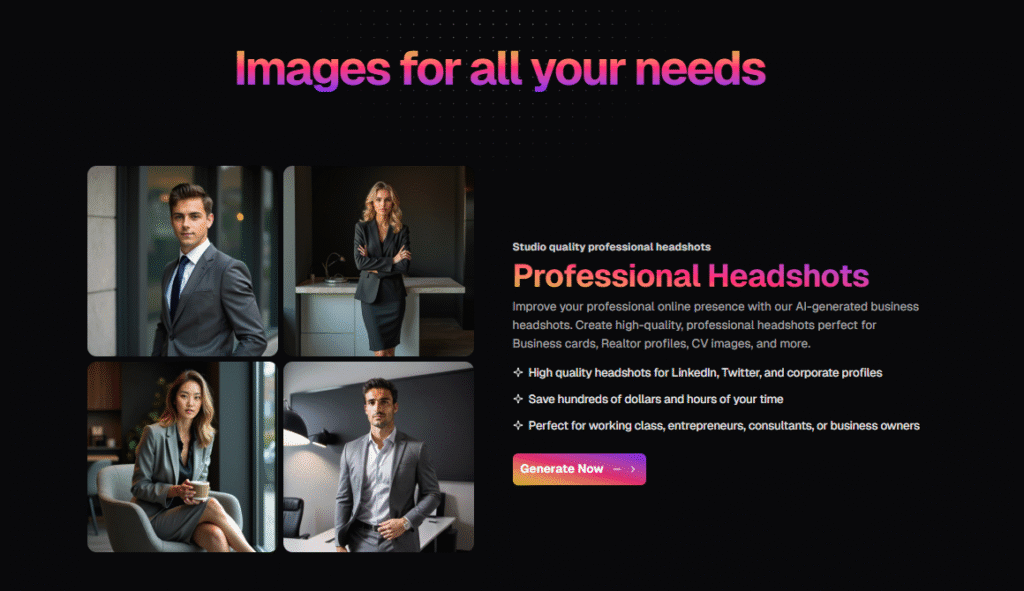
Key Features of PhotoGPT AI
PhotoGPT AI offers a comprehensive suite of features designed to meet a wide range of visual needs. Below is a detailed overview of its core functionalities:
| Feature | Description |
|---|---|
| Studio-Quality Headshots | Transform casual selfies into professional headshots with perfect lighting and crisp details, ideal for LinkedIn, Instagram, or corporate profiles. |
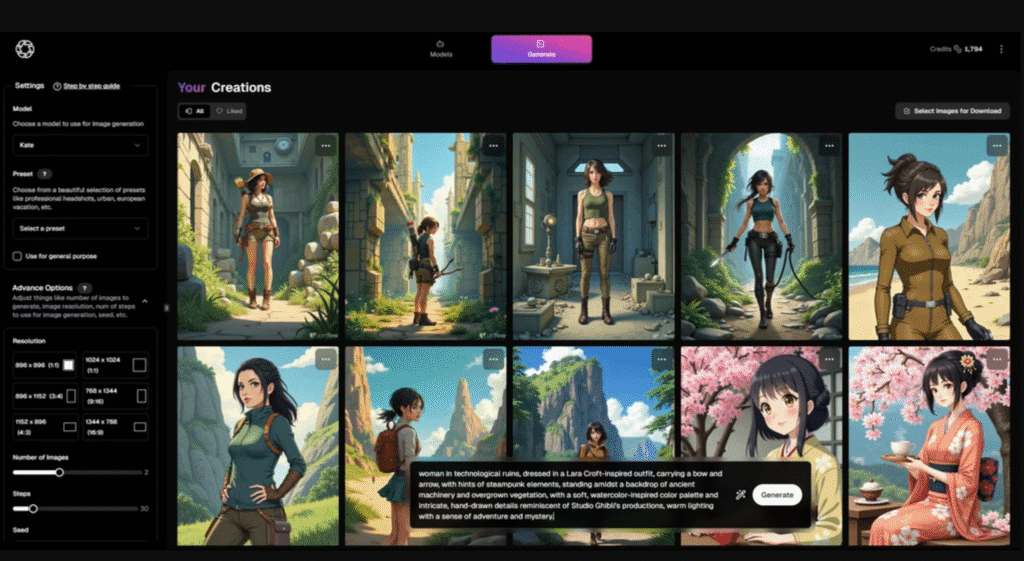
| Text-to-Image Generation | Create unique, high-resolution images by describing them in text, with an AI-powered prompt assistant to guide you. |
| 100+ Curated Themes | Choose from themes like fitness, fashion, holidays, and more to create visuals for any occasion. |
| AI Human Model Library | Access a diverse library of AI-generated models with varied races, genders, and ages for versatile image creation. |
| Personalized Headshots | Train the AI with a few selfies to generate highly personalized headshots that reflect your unique style. |
| High-Resolution Upscaling | Enhance images for print or digital use with advanced upscaling technology for clarity and detail. |
| GDPR Compliance | Ensures secure data handling, meeting strict privacy standards for user trust. |
| API Integration | Automate workflows by integrating PhotoGPT AI with other tools via its API. |
| Optimized Aspect Ratios | Generate images tailored for social media platforms like Instagram, Twitter, and LinkedIn. |
| White-Label Ready | Agencies can brand the platform for client-facing projects, enhancing professional offerings. |
These features make PhotoGPT AI a versatile and powerful tool for creating professional visuals quickly and affordably, catering to a wide range of users and industries.
PhotoGPT AI Lifetime Deal: What’s Included?
No Monthly Bills. Pay Once. Use Forever-Lifetime Access
The PhotoGPT AI Appsumo lifetime deal offers perpetual access to the platform’s features with a one-time payment, providing significant savings compared to the regular subscription price. Available through AppSumo, the deal is structured in three tiers to accommodate different needs:
| Tier | Price | Key Features |
|---|---|---|
| Tier 1 | $69 (Originally | 2,000 credits/month, 1 human AI model/month, 25 expert-curated presets, high-resolution upscaling, AI-generated personal headshots, AI-assisted text-to-image, optimized aspect ratios, and more. |
| Tier 2 | $199 (Originally | Includes all Tier 1 features + 6,000 credits/month, 4 human AI models/month. |
| Tier 3 | $349 (Originally | Includes all Tier 2 features + 12,000 credits/month, 8 human AI models/month, 100+ curated presets. |
Get access to PhotoGPT AI Lifetime Deal today!
Deal Highlights
- Lifetime Access: Pay once and use PhotoGPT AI for the product’s lifespan, with all future updates included.
- 60-Day Money-Back Guarantee: Try the platform risk-free and get a refund if it doesn’t meet your needs.
- Flexible Tiers: Upgrade or downgrade between tiers within 60 days of purchase to match your requirements.
- Cost Savings: Avoid recurring subscription fees, making it a budget-friendly alternative to traditional photography.
This deal is a rare opportunity to invest in a future-proof tool that keeps your visual content fresh and professional without ongoing costs.
Benefits of PhotoGPT AI
PhotoGPT AI offers a range of benefits that make it an essential tool for anyone looking to enhance their visual presence:
| Benefit | Impact |
|---|---|
| Cost-Effective | Eliminates the need for expensive photoshoots or hiring designers, saving significant costs. |
| Time-Saving | Generates professional images in seconds, bypassing the scheduling and logistics of traditional photography. |
| Versatile Applications | Ideal for personal branding, social media, marketing materials, and client projects. |
| User-Friendly | Intuitive interface requires no technical or design skills, making it accessible to all. |
| Customizable | Tailor images with curated themes, AI models, or personalized headshots to match your style. |
| Scalable | Tiers cater to individual users, small teams, or agencies with multiple projects. |
| Secure | GDPR-compliant data handling ensures user privacy and trust. |
These benefits make PhotoGPT AI a game-changer for creating high-quality visuals efficiently and affordably.
Who Can Benefit from PhotoGPT AI?
PhotoGPT AI is designed for a diverse audience, offering tailored solutions for various use cases:
- Freelancers and Entrepreneurs: Elevate your professional image on LinkedIn, Upwork, or other networking platforms with polished headshots.
- Content Creators and Influencers: Generate themed images for social media posts, saving time and ensuring consistency.
- Social Media Managers: Create high-quality visuals for client campaigns, optimized for various platforms.
- Agencies: Use the white-label feature to offer branded image generation services to clients.
- Marketers: Produce custom visuals for advertisements, email campaigns, or website content without relying on external designers.
Its versatility and ease of use make it a valuable tool for anyone looking to enhance their digital presence.
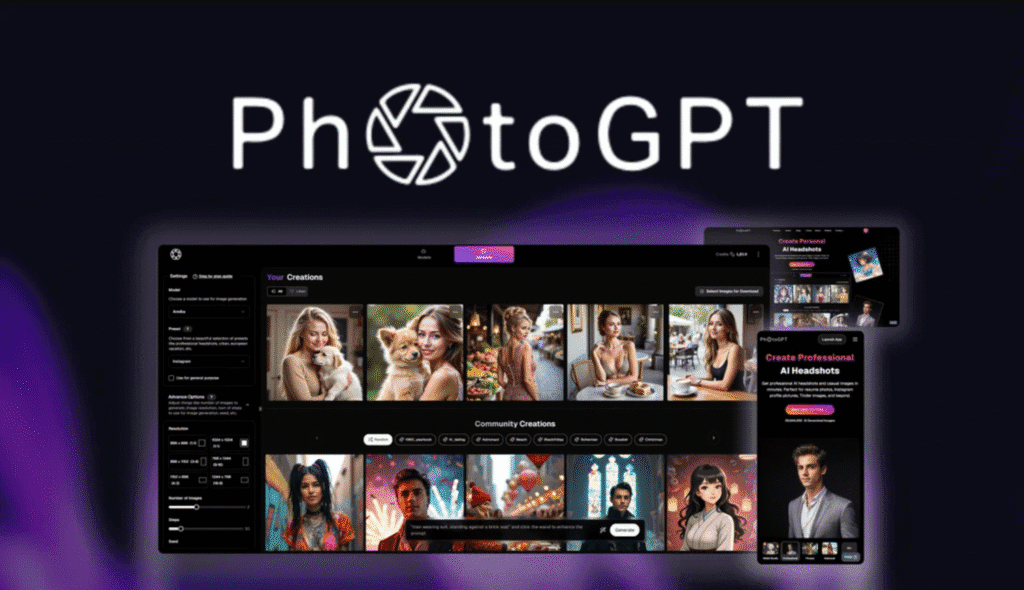
Ideal Users And Scenarios For PhotoGPT AI
PhotoGPT AI has garnered positive feedback from users who appreciate its speed, quality, and affordability. Here are some highlights:
“I needed a new profile pic—this delivered in seconds.” – Satisfied User
“Mind-blowing. The AI nailed my look better than a real photographer.” – Content Creator
“The lifetime deal is a steal for anyone serious about their online branding.” – Entrepreneur
These testimonials highlight the platform’s ability to deliver professional results quickly, making it a trusted choice for users across industries.
Why the PhotoGPT AI Lifetime Deal of Appsumo Is a Smart Investment?
Most AI editing tools operate on monthly subscriptions, with popular platforms like Canva Pro, Luminar AI, or Photoshop requiring ongoing payments. PhotoGPT AI breaks this mold by offering a lifetime deal—no subscriptions, no recurring charges. Just a one-time purchase, and you’re set for life.
Here’s why it’s a no-brainer:
- No ongoing costs
- Regular updates included
- Use on unlimited projects
- All premium features unlocked
- Automation saves hours of manual editing
Whether you’re running a solo business, managing clients, or just love creative visuals, PhotoGPT AI’s lifetime access delivers serious ROI.
How to Get the PhotoGPT AI Lifetime Deal?
Securing the PhotoGPT AI lifetime deal is simple:
- Visit AppSumo (https://appsumo.com/products/photogpt-ai/)
- Choose the tier that best suits your needs (Tier 1, 2, or 3).
- Complete the purchase with a one-time payment.
- Start creating professional headshots and custom images in minutes.
With a 60-day money-back guarantee, you can try PhotoGPT AI risk-free. As lifetime deals are often time-sensitive, it’s recommended to check availability and act promptly to secure this offer.
How Does PhotoGPT AI Compare with Canva Pro, Adobe Photoshop, Remove.bg & Shutterstock?
PhotoGPT AI has emerged as an innovative tool that lets users generate, enhance, and edit images with natural language prompts. From realistic image generation to background replacement and face refinement, PhotoGPT AI is an all-in-one visual AI assistant for creators, marketers, and eCommerce professionals.
But how does it stand against industry giants like Canva Pro, Adobe Photoshop, Remove.bg, and Shutterstock?
We explore the top PhotoGPT AI alternatives, providing a feature-rich comparison to help you decide which image tool fits your creative or business workflow best.
PhotoGPT AI vs Canva Pro
Canva Pro is a drag-and-drop design tool best known for its user-friendly interface, massive template library, and branding tools. While Canva has recently added some AI features (like Magic Edit), it still relies heavily on manual design elements and stock content.
Verdict: Choose Canva Pro if you’re designing branded assets or marketing materials. Pick PhotoGPT AI if you want to generate images from descriptions or perform deep AI edits quickly.
PhotoGPT AI vs Adobe Photoshop
Adobe Photoshop is the gold standard in professional photo editing, offering pixel-level control, layer manipulation, and high-end design tools. With Adobe Firefly integration, Photoshop now includes some AI-powered features—but it still demands design skills and a steep learning curve.
Verdict: Go with Adobe Photoshop for complex, high-detail graphic editing. Choose PhotoGPT AI if you need fast, AI-powered visuals with little to no editing experience.
PhotoGPT AI vs Remove.bg
Remove.bg is a specialized tool that removes image backgrounds with a single click. It’s widely used in eCommerce and ID photo processing. While incredibly accurate at what it does, it offers very limited editing or creative features.
Verdict: Choose Remove.bg for fast, reliable background removal in bulk. Opt for PhotoGPT AI if you want to replace, customize, or generate entirely new image backgrounds.
PhotoGPT AI vs Shutterstock
Shutterstock is a massive stock photo library with millions of royalty-free images, videos, and music tracks. Recently, Shutterstock introduced AI-generated image tools. However, the core of its value lies in ready-made content, not user-created visuals.
Verdict: If you need stock imagery quickly, go with Shutterstock. If you want to generate unique images tailored to your needs, PhotoGPT AI is more flexible and future-forward.
| Feature/Tool | PhotoGPT AI | Canva Pro | Adobe Photoshop | Remove.bg | Shutterstock |
|---|---|---|---|---|---|
| AI Image Generation | Yes | Basic (Magic Edit) | Limited (Firefly) | No | Limited |
| Background Removal | Yes | Yes | Yes | Excellent | Yes |
| Image Editing Tools | AI-driven | Template-based | Advanced | No | No |
| Ease of Use | Beginner-Friendly | Very Easy | Steep Learning Curve | One-click | Simple |
| Stock Assets | No | Huge Library | No | No | Millions |
| Ownership/Rights | Full Rights | Limited | Full (if created) | Limited | Licensed Use |
| Best For | AI image creation | Social media & branding | Pro graphic design | Product shots | Stock visuals |
Which PhotoGPT AI Alternative Is Right for You?
If you’re looking for a smart AI tool that creates original, high-quality images with zero design skills, PhotoGPT AI is one of the most compelling options available—especially if you secure a lifetime deal.
However, depending on your use case:
- Choose Canva Pro for templates, team branding, and visual marketing.
- Use Adobe Photoshop for pro-level image manipulation and layer control.
- Pick Remove.bg for simple, accurate background removal.
- Opt for Shutterstock when you need a quick stock photo without customization.
Want full control, AI creativity, and a fast workflow? Try PhotoGPT AI today and unlock limitless visual creation with the power of prompts.
PhotoGPT AI review | Should You Buy the PhotoGPT AI Lifetime Deal?
If you’re tired of paying monthly fees for design tools, or if you’re simply looking to elevate your photo content without learning complex software, PhotoGPT AI is a smart, affordable, and powerful solution.
With its intuitive design, powerful AI editing features, and zero subscription fees, the PhotoGPT AI Lifetime Deal is ideal for content creators, solopreneurs, and businesses that rely on high-quality images to stand out.
Act now before this deal disappears—PhotoGPT AI could be the last photo editor you ever need.
Frequently Asked Questions
Is PhotoGPT AI Suitable For Beginners?
Yes — PhotoGPT AI is quite suitable for beginners. It lets you transform casual selfies into professional headshots easily, with minimal skills required. You just upload some photos, pick a preset or theme, and the AI handles the rest. Beginners will appreciate its user-friendly interface, built-in templates, and helping tools, like prompt assistants. It does require good input photos and some experimentation, but it’s a solid starting point for anyone wanting high-quality images without steep learning curves.
How Does PhotoGPT AI Improve Photo Editing?
PhotoGPT AI improves photo editing by using advanced AI to enhance images automatically, saving time and effort. It can adjust lighting, remove imperfections, sharpen details, and even generate professional-quality headshots or styled portraits from simple uploads. With pre-built presets and customizable options, it offers both quick fixes and creative transformations. This makes photo editing more accessible, efficient, and consistent, whether for personal use, business branding, or professional-quality social media content.
Can PhotoGPT AI Be Used For Professional Projects?
Yes, PhotoGPT AI can be used for professional projects, as it delivers high-quality, polished images suitable for business, branding, and marketing. It transforms ordinary photos into professional headshots, product images, or styled visuals with minimal effort. Its AI-driven enhancements ensure consistency and save time compared to manual editing. While it may not replace advanced tools for complex edits, it’s a powerful solution for professionals needing fast, reliable, and visually appealing results.
Can I use my AI-generated headshots for both personal and professional purposes?
Yes, you can use AI-generated headshots for both personal and professional purposes. They are ideal for LinkedIn profiles, resumes, company websites, portfolios, or social media accounts, as well as casual use on personal platforms. AI tools create polished, high-quality images that enhance credibility and presentation. However, ensure the generated images align with your industry’s standards and platform guidelines to maintain authenticity and professionalism in different personal or career-related contexts.
What if I’m not satisfied with my AI-generated headshots?
If you’re not satisfied with your AI-generated headshots, most platforms let you refine results by uploading clearer photos, adjusting styles, or trying different presets. Some services also allow multiple revisions or provide credits to re-generate images. If the issue persists, you can contact support for assistance or request a refund, depending on the provider’s policy. Experimenting with various inputs often helps achieve a more accurate and professional outcome that suits your needs.
Is my personal information and uploaded photos kept confidential?
Yes, most AI headshot platforms prioritize confidentiality by securing your personal information and uploaded photos with encryption and strict privacy policies. Images are typically processed on secure servers and deleted after a set period, ensuring they aren’t misused or shared without permission. Always review the platform’s privacy policy to confirm how your data is stored, used, and deleted. Choosing a trusted service ensures your photos and information remain safe and confidential.
Is There A Lifetime Deal For PhotoGPT Ai?
Yes, PhotoGPT AI is currently available through a lifetime deal on AppSumo. For a one-time payment of $69, you gain lifetime access to the Starter (Tier 1 and 2) and Hobby (Tier 3) plans, including all future updates. This offer is ideal for individuals and businesses seeking to generate professional-quality headshots and images without recurring fees (AppSumo).
Related posts:
 Keyword Revealer Lifetime Deal: The Ultimate SEO Tool for Marketers and Businesses
 WorkZappy Lifetime Deal: Simplify, Automate, and Scale Your Workflow Forever
 WebStarts Lifetime Deal Review – Build, Host & Grow Your Website Without Monthly Costs
 Best AI Lifetime Deals for 2025: Your Guide to the Best One-Time Purchases