
PDFs are a universal standard for sharing information — from invoices to proposals, brochures, contracts, and downloadable resources. But for WordPress users, creating and managing PDFs directly from their site has often been a hassle. You might rely on clunky plugins, pay for third‑party tools, or manually export content into PDFs — wasting time and losing branding control.
That’s where The PDF Maker steps in. This powerful WordPress plugin helps you convert any post, page, WooCommerce product, or custom content into professional PDFs — instantly. And with The PDF Maker Lifetime Deal, you get this tool forever for a one‑time payment, making it one of the smartest investments for website owners, marketers, and agencies.
The PDF Maker, a powerful cloud-based platform, addresses these pain points by offering a seamless solution for automating PDF creation. Available through a time-sensitive Lifetime Deal on AppSumo, The PDF Maker provides lifetime access to its premium features for a one-time payment, eliminating recurring subscription costs.
What is The PDF Maker?
The PDF Maker is a premium WordPress plugin that allows you to generate high‑quality, fully branded PDFs from your website content. Instead of using manual export tools or online converters, The PDF Maker gives you total control over the PDF creation process — all inside your WordPress dashboard.
Whether you want to offer downloadable blog posts, course materials, invoices, product sheets, or eBooks, The PDF Maker makes it seamless. It’s not just a PDF converter; it’s a branding tool, a marketing asset, and a productivity booster.
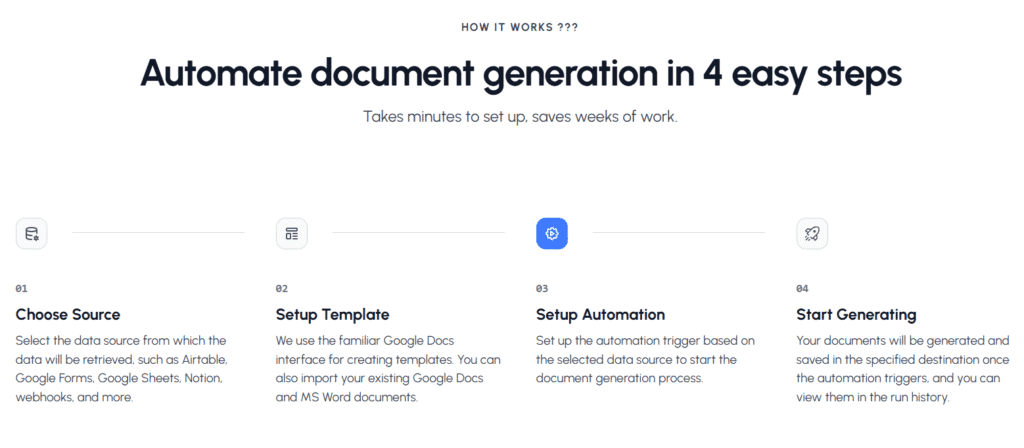
By leveraging a no-code API, it integrates with popular tools like CRMs, Notion, Google Sheets, and Airtable to pull real-time data and generate documents such as invoices, receipts, purchase orders, contracts, payslips, and certificates. This automation eliminates the need for manual data entry, reducing errors and saving valuable time. Unlike traditional PDF editors that focus on manual editing, The PDF Maker emphasizes scalability and integration, making it ideal for businesses that produce high volumes of transactional documents. Its user-friendly interface ensures that both technical and non-technical users can streamline their workflows effortlessly.
The PDF Maker Lifetime Deal | Pricing & Plan
No Monthly Bills. Pay Once. Use Forever-Lifetime Access
| Tier | Price (One‑Time) | Features Included |
|---|---|---|
| Tier 1 | $69 | 1 WordPress site license Unlimited PDF generation Core features & updates |
| Tier 2 | $139 | 5 WordPress site licenses WooCommerce integration Custom templates & branding |
| Tier 3 | $249 | Unlimited WordPress sites Full white‑label branding Bulk PDF generation Priority support |
- One‑time payment – no monthly fees.
- Lifetime updates & future enhancements included.
- 60‑day money‑back guarantee!
Key Features of The PDF Maker
The PDF Maker offers a robust set of features that cater to diverse document creation needs. Below is a detailed overview of its capabilities:
| Feature | Description |
|---|---|
| Automated Document Creation | Uses a robust API to automate document generation by pulling data from existing tools and systems. |
| No-Code API Integration | Generate API keys with one click and customize them without coding knowledge, ensuring accessibility for all users. |
| Real-Time Data Pulling | Seamlessly integrates with CRMs and other data sources to ensure documents are accurate and up-to-date. |
| Custom Templates | Create templates in Google Docs or Microsoft Word with dynamic placeholders that auto-fill with data. |
| Built-in Integrations | Connects with tools like Notion, Google Sheets, Airtable, and more, with support for importing existing templates. |
| Bulk PDF Generation | Generate single or bulk PDFs at scale, ideal for businesses with high document output. |
| Payment API Integration | Integrates with Stripe and other payment platforms to create invoices and receipts automatically. |
| Pre-built Templates | Offers four built-in Stripe invoice templates for quick setup and professional results. |
| Versatile Document Types | Supports a wide range of documents, including payslips, contracts, certificates, and reports, using real-time data. |
Who Should Use The PDF Maker?
The PDF Maker is designed for businesses and individuals who regularly produce transactional or client-facing documents. Below are some key use cases:
- E-commerce Businesses: Automate the creation of invoices and receipts, ensuring customers receive professional documents promptly.
- Service-Based Companies: Streamline the generation of contracts, agreements, and proposals, reducing administrative overhead.
- HR Departments: Simplify the creation of employee-related documents like payslips, certificates, and onboarding forms.
- Freelancers and Consultants: Save time by automating proposals, invoices, and client reports, enhancing professionalism.
- Large Enterprises: Manage high volumes of documents efficiently with bulk generation and CRM integrations.
Its no-code interface makes it accessible to non-technical users, while its robust API and customization options cater to developers and larger organizations. Essentially, any business looking to save time, reduce errors.
Benefits of The PDF Maker Lifetime Deal
The Lifetime Deal for The PDF Maker offers significant advantages for businesses seeking a long-term document automation solution. Below is a table summarizing the key benefits:
| Benefit | Details |
|---|---|
| Cost Savings | One-time payment eliminates recurring subscription fees, potentially saving thousands over time. |
| Perpetual Access | Lifetime access includes all future updates, ensuring the tool remains current without additional costs. |
| Scalability | Handles increased document generation needs as your business grows, without requiring upgrades. |
| Time Efficiency | Automates repetitive tasks, freeing up time for strategic activities. |
| Error Reduction | Minimizes manual errors by automating data entry, ensuring professional and accurate documents. |
| Risk-Free Trial | AppSumo’s 60-day money-back guarantee allows you to test the tool without financial risk. |
How to Get the PDF Maker Appsumo Lifetime Deal?
To secure the The PDF Maker Lifetime Deal, visit the AppSumo website and navigate to the product page for The PDF Maker at https://appsumo.com/products/pdf-maker/. There, you’ll find detailed information about the deal, including current pricing and terms. AppSumo deals are typically time-sensitive, so it’s advisable to act quickly to lock in lifetime access. The deal includes a 60-day money-back guarantee, allowing you to test the tool risk-free.
User Feedback and Considerations
While specific user reviews for The PDF Maker are limited, early feedback on AppSumo suggests high satisfaction with its automation capabilities and ease of use. Users appreciate the seamless integrations and time savings, though some note that initial setup may require familiarity with APIs for advanced customization. Compared to other PDF tools with lifetime deals, such as UPDF (4.8/5 on AppSumo) or PDF Reader Pro, The PDF Maker’s focus on automation sets it apart, but broader user feedback is needed to confirm its long-term reliability. The 60-day refund period provides a safety net for testing the tool.
The PDF Maker vs Other Alternatives PDF Tools
How does The PDF Maker compare to popular solutions?
| Feature | The PDF Maker | PDF Embedder | WooCommerce PDF Invoices | Canva/Online Tools |
|---|---|---|---|---|
| Lifetime Deal | Yes | No | No | No |
| Branded PDF Templates | Yes | Basic | Limited | But manual |
| WooCommerce Integration | Yes | No | Yes | No |
| Bulk PDF Generation | Yes | No | No | No |
| Multi‑Language Support | Yes | Limited | Limited | Manual |
| Price | $59–$177 LTD | $99+/year | $129/year | Subscription only |
With The PDF Maker, you own the plugin for life and get all future updates without extra costs.
Why The PDF Maker Lifetime Deal is Worth It
PDF tools can be expensive — and most aren’t built for WordPress. The PDF Maker solves this by offering a native WordPress experience, unlimited usage, and branding freedom for a single lifetime price.
This means:
- No recurring bills
- Control over your PDFs (no third‑party servers)
- Professional, branded downloads for your clients and audience
Whether you’re a blogger, agency, coach, or WooCommerce store owner, The PDF Maker will save you time, money, and hassle.
Conclusion | The PDF Maker Lifetime Deal Review
If you need an easy, professional way to create branded PDFs from your WordPress site, The PDF Maker is a no‑brainer.
- Unlimited PDFs for life
- One‑time payment – no monthly stress
- Branded, customizable, and secure
It’s one of those “buy it once, use it forever” plugins that keeps delivering value long after the purchase.
Get The PDF Maker Lifetime Deal today and start creating professional, branded PDFs directly from your WordPress site.
Turn your WordPress site into a PDF powerhouse — and never pay monthly for a PDF tool again.
Frequently Asked Questions
What types of documents can I create with The PDF Maker?
With The PDF Maker, you can create various documents such as resumes, invoices, reports, brochures, contracts, and forms. It supports both personal and professional document creation with customizable templates to suit different needs and formats.
Do I need coding skills to use The PDF Maker?
No coding skills are needed to use The PDF Maker. It offers a user-friendly interface with easy drag-and-drop features and templates, allowing anyone to create professional PDFs quickly and effortlessly without technical knowledge.
Can I connect The PDF Maker to my existing CRM or data sources?
Yes, The PDF Maker can connect to various CRMs and data sources. It offers direct integrations with platforms like HubSpot CRM and Pipedrive CRM, allowing you to automate PDF generation within your CRM workflows. Additionally, you can use tools like Zapier or Make to integrate with other CRMs, including Zoho CRM and Jobber, without coding skills.
How does payment integration work with The PDF Maker?
The PDF Maker facilitates payment integration through platforms like Stripe and PayPal. By utilizing automation tools such as Zapier, Make, or n8n, you can link these payment gateways to generate invoices automatically upon payment events. This streamlines financial documentation without manual intervention.
Is PDF Maker Compatible With All Devices?
Yes, The PDF Maker is compatible with various devices. It is a web-based application accessible through modern browsers on Windows, macOS, and Linux. Additionally, mobile apps for iOS and Android are available, supporting devices like iPhones, iPads, and Android smartphones, offering flexibility across platforms.
Can I Edit Pdfs With PDF Maker?
Yes, The PDF Maker allows you to edit PDFs by adding text, images, annotations, and form fields. You can also customize templates, merge documents, and automate workflows. While it offers basic editing features, for advanced text manipulation or OCR capabilities, consider using dedicated PDF editors like Adobe Acrobat Pro or PDFelement.
Related posts:
 Keyword Revealer Lifetime Deal: The Ultimate SEO Tool for Marketers and Businesses
 Sensfrx Lifetime Deal Review – Smart Data Tracking & Automation for Modern Businesses
 WbizTool Lifetime Deal Review – All‑in‑One Business Management Platform
 WebStarts Lifetime Deal Review – Build, Host & Grow Your Website Without Monthly Costs